
 @AbelKeithsun
dsh-question-nav
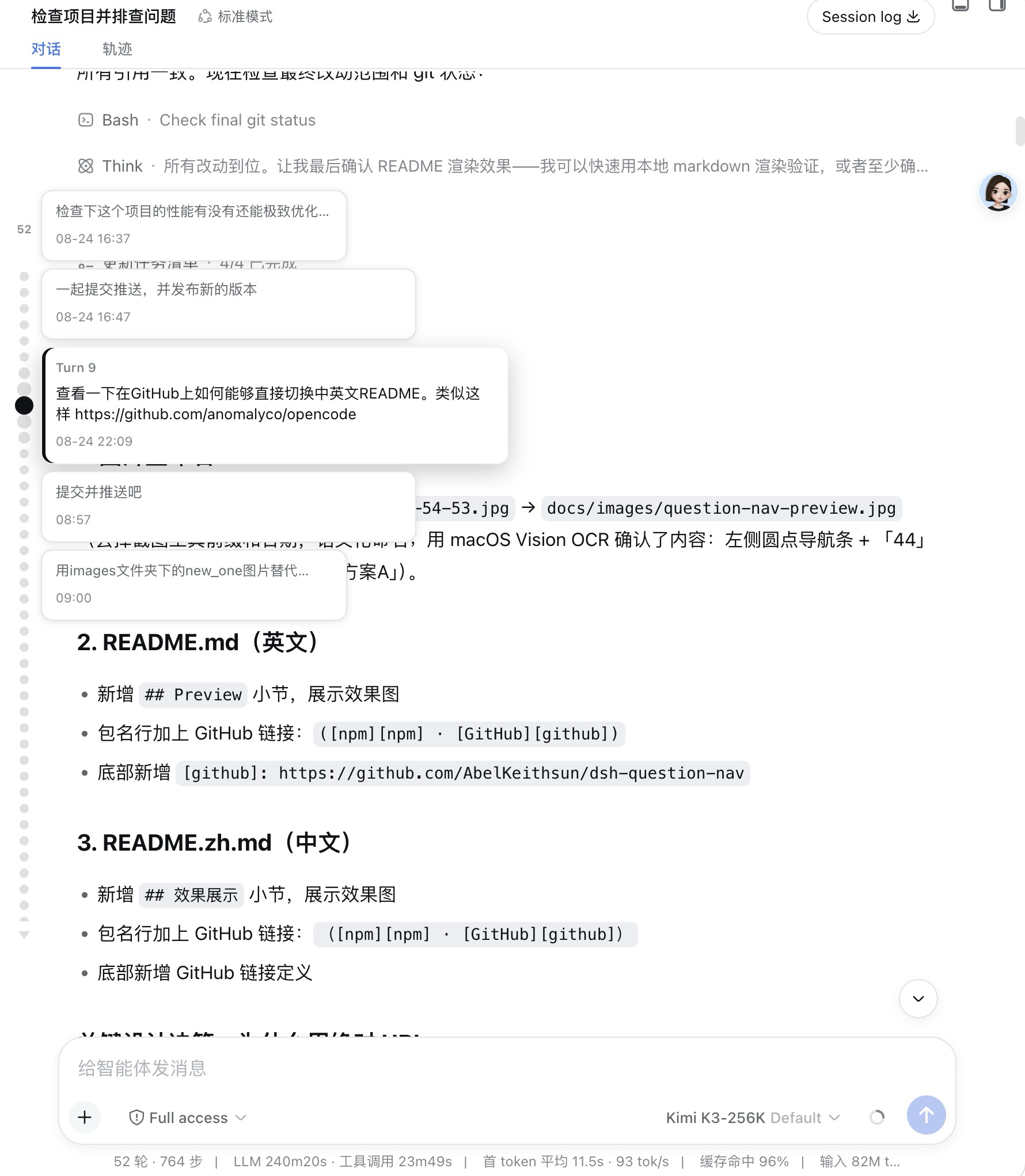
In-session question minimap for the DeepSeek Harness Web GUI: a vertical column of round dots overlaid on the left edge of the conversation column, one dot per user question — hover enlarges and shows full text, click jumps to that message.
- Stars
- 6
- Language
- TypeScript
- Created
- Aug 21, 2026
- Updated
- Sep 6, 2026
Introduction
dsh-question-nav
In-session question navigator for the DeepSeek Harness (DSH) Web GUI: a vertical column of small round dots overlaid on the left edge of the conversation column — one dot per user question. Hover a dot to magnify it (together with its two neighbors on each side) and reveal a vertical cascade of crisp question cards with each question's full text and sent time (clicking any card jumps to it); click a dot to scroll the chat to that question.
It is an external plugin bundle with zero runtime dependencies — the browser
half (lib/client.js) externalizes everything to the DSH shell, so it adds
only a small bundle to the GUI at load time.
Package: @luziyang2026/dsh-question-nav (npm · GitHub).
Preview
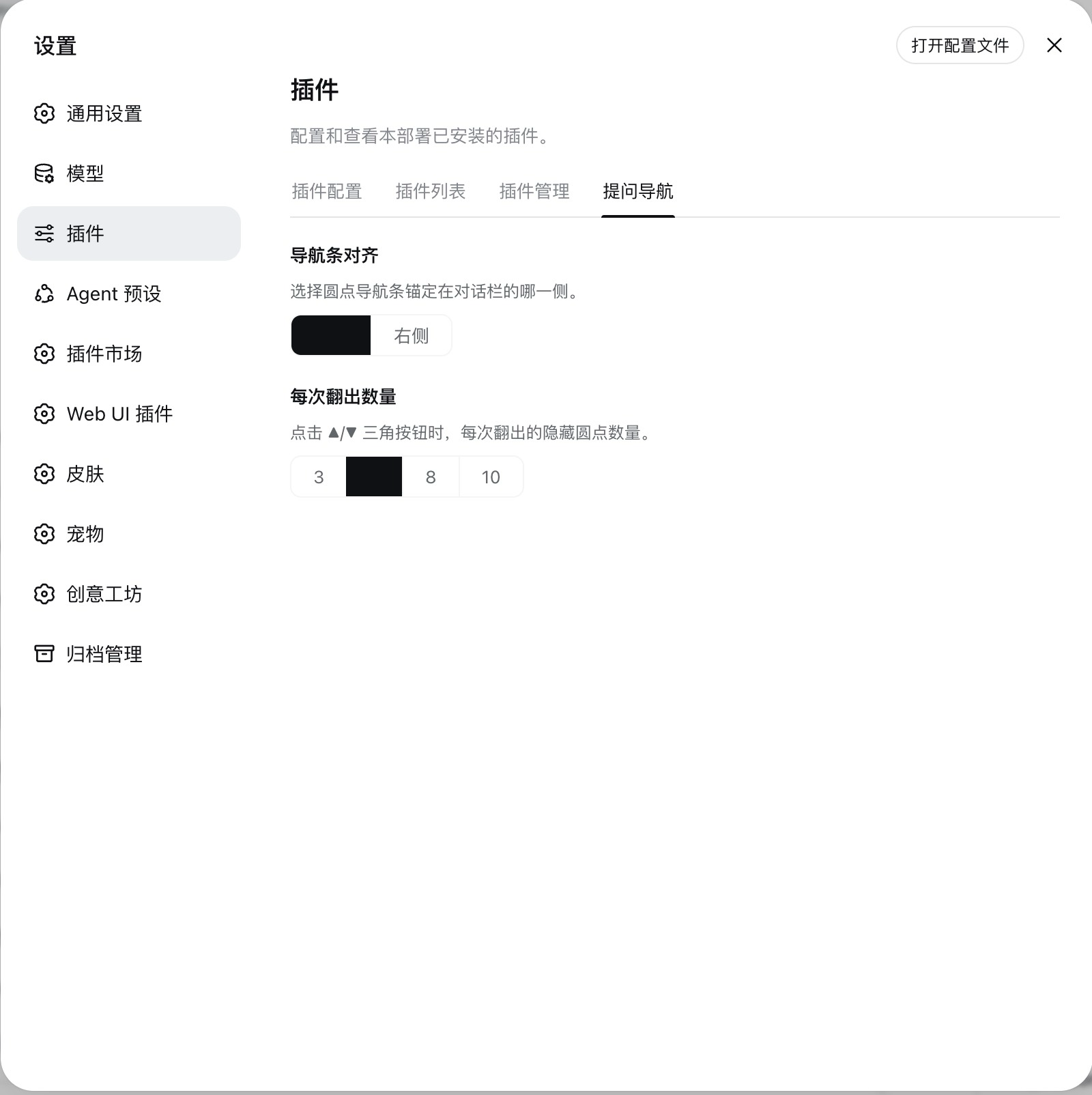
Plugin settings (rail alignment + dots per page):
What it does
- Left-edge dot minimap (embedded, not reserving any width). The rail's anchor edge is configurable — Settings → Plugins → Question Nav → Rail alignment switches it between the left and right edge of the conversation column.
- Height-capped and scrollable: the dot column is vertically centered and uses at most 60% of the conversation height; longer sessions scroll inside that band (wheel over the dots or the gaps between them).
- One dot = one turn that asked a question (strictly aligned with the Trajectory view's turn numbering), with a small count above the dot column.
- Full history, persisted, no render-window expansion: the plugin's host
half registers a
questionIndexsession projection — the projection registry folds the whole event log (read-only, the chat's paged window is never touched), the official projection cache persists it across restarts, and push frames deliver new questions live. - Hover (focus): the dot and its two neighbors on each side magnify
progressively (selected largest), the rail scrolls the selection into view
only when clipped by the band's edges, and a
vertical cascade of five crisp question cards (portal-rendered, no
native-title delay) appears beside the rail — one card per window dot,
stacked top-to-bottom without overlap and centered on the selected dot. Each
card shows the turn's full question text (all of them, when one turn
batched several) and the question's sent time (
HH:MMon the same day,MM-DD HH:MMacross days,YYYY-MM-DD HH:MMacross years). The hierarchy is two-tier: the center card is the focus — full-contrast text, a brand accent bar and a raised shadow — while the four neighbors are clean context cards (same surface, narrower, fewer lines) that light up on hover to show they are clickable too. Clicking any card jumps to that question exactly like clicking its dot. - Click: jumps to that question. Only then does the jump loop page the
window (
loadOlder()) to bring that specific page into view — never the whole history up front. - Paged overflow: when many dots don't fit the 60% band, the native scrollbar is hidden and two small triangle buttons in the dot style appear — ▲ above the dot queue and ▼ below it — each click revealing the next page of hidden dots, which pop in with a short staggered animation as click feedback. The page size is configurable — Settings → Plugins → Question Nav → Dots per page (3 / 5 / 8 / 10, default 5). The triangles themselves are the overflow cue — each appears only while its direction has more dots to reveal (wheel and trackpad still scroll too); hovering never scrolls the band, so the dots stay put while you browse.
- Empty/left areas of the rail pass pointer events through to the conversation (it never blocks the chat).
Requirements
- DeepSeek Harness Web GUI (a runnable DSH profile; the
dshCLI). - Node.js
>= 20(matches the DSH SDK peer range).
Which version to install
The package publishes two lines under the same name, so pick the one that matches the DSH build your GUI runs on:
| npm dist-tag | Version | Targets the DSH | Status |
|---|---|---|---|
latest | 0.7.x | 0.1.1-rc.1 SDK line | Stable — recommended for everyday use |
alpha | 0.8.0-alpha.x | 0.1.2-alpha.2 SDK line | Alpha — for the Alpha GUI build |
- Most users install the
latest(stable) line — it tracks the stable DSH release and is safe for daily use. - Running the DSH Alpha GUI (
0.1.2-alpha.2)? Install thealphadist-tag instead. The stable build reads a chat snapshot API (session.getSnapshot().chat) that was removed in the Alpha SDK; thealphabuild reads the live chat through the new conversation service instead. Installing the stable line on an Alpha GUI would leave the strip degraded (projection-only dots). - Not sure which DSH build you have? Check the version in your GUI / with
dsh --version; if it reports0.1.1-rc.x, uselatest; if it reports0.1.2-alpha.x, usealpha.
Install
Install the prebuilt package from npm and add it to a profile. Use the dist-tag that matches your DSH build (see above):
Stable line (DSH 0.1.1-rc.1, most users):
dsh plugin --profile web add @luziyang2026/dsh-question-nav # latest → 0.7.x
Alpha line (DSH 0.1.2-alpha.2 GUI):
dsh plugin --profile web add @luziyang2026/dsh-question-nav@alpha # alpha → 0.8.0-alpha.x
If you prefer a specific version, pin it explicitly:
dsh plugin --profile web add @luziyang2026/dsh-question-nav@0.7.7        # stable pin
dsh plugin --profile web add @luziyang2026/dsh-question-nav@0.8.0-alpha.0 # alpha pin
Then restart the DSH Web GUI to load the new bundle.
Build from source / develop locally
This repository is a standalone plugin project — build it, then add the checkout to a profile as an installable bundle:
pnpm install       # install devDependencies (DSH SDK peers, tsdown, vitest)
pnpm build         # tsc declarations + tsdown client bundle -> lib/
dsh plugin --profile web add ./dsh-question-nav
Development
pnpm typecheck     # tsc --noEmit
pnpm test          # vitest run
pnpm build         # build host lib/index.js + client lib/client.js
How it is built
The client half uses the shared DSH client-bundle preset
(tsdown.client.ts, vendored into this repo), which emits
a window.__ModuleLoader__.load({ id, factory }) closure-factory
artifact with CSS Modules inlined and externals resolved through the loader
module table.
License
MIT.