
 @BHX-WL
dsh-approval-reminder
No description
- Stars
- 0
- Language
- JavaScript
- Created
- Sep 4, 2026
- Updated
- Sep 6, 2026
Introduction
dsh-approval-reminder
Persistent approval / question reminder for the DeepSeek Harness Web GUI.
Whenever any session lands a permission request (approval) or a question that needs you to click, a persistent bottom-right system bubble appears (click it to jump to that conversation), plus an in-page reminder card. The bubble does not steal focus and stays until resolved — you will never silently wait on a stalled waterfall again.
中文版见 README.zh.md。
Screenshots
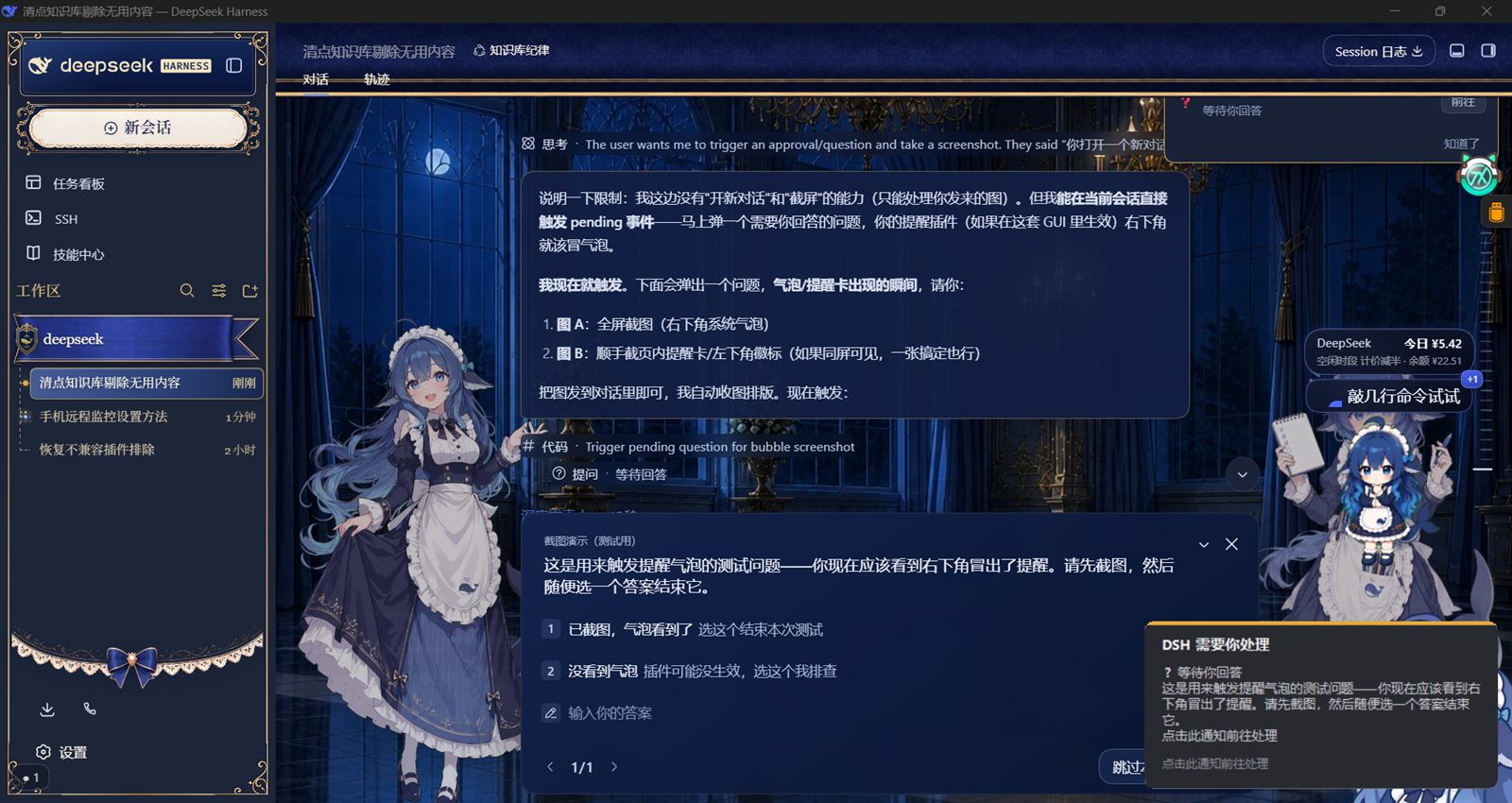
How it works
Dual-face plugin mounted on every dsh web start via a profile bundle layer:
- Host half (
lib/index.js) — two loopback-only routes under/api/dsh-approval-reminder/*; renders the toast with a hidden PowerShell/WinForms process (borderless, rounded, topmost, click-to-close, never activates). - Browser half (
lib/client.js) — subscribes to the authoritative per-sessionuseSessionPendingInteractionhook (uiSession.pendingInteractionsregistry); on a NEW pending key it POSTs/notify, when everything is resolved it POSTs/notify { clear: true }; bubble clicks are drained through/poll-openand the page navigates to the conversation that needs attention. A small self-test badge (bottom-left) mirrors the pending registry for liveness.
CJK is lossless: bubble text travels through environment variables, no base64/EncodedCommand.
Install
DSH loads this plugin as a profile bundle (see cordis.patch.yml). Easiest:
- Put this repo under your DSH
plugin-src/local/(or any path your host loads plugins from). - Ensure the profile bundle row is applied:
- insert: - id: dsh-approval-reminder name: '@dsh-external/dsh-approval-reminder' - Restart
dsh web. The reminder is persistent across sessions — no per-sessioncordis_defineneeded.
Requirements
- Windows (bubble uses PowerShell + WinForms)
- DeepSeek Harness host + Web GUI
Support
If this plugin saves you from silently waiting on approvals again, you can say thanks:
- 爱发电 (ifdian) — 微信/支付宝 (recommended for CN)
- GitHub Sponsor button (if enabled)
Custom development / commissioning
I build DSH-ecosystem tooling on a commissioned basis (paid). Typical asks:
- DSH Web GUI plugins — host/client dual-face plugins, skins & themes, reminder/board/notification widgets
- Electron desktop client customization — built on the official DeepSeek Harness client
- Windows automation — PowerShell/WinForms system toasts, tray/overlay UX, local OCR & vision pipelines (Ollama + qwen2.5vl, multi-frame video recognition)
- TypeScript / Node tooling & plugins
Start a Discussion or open an Issue describing what you need — quotes are free. Larger jobs can go through an escrow/escrow-style platform (e.g. 程序员客栈/Upwork) if both sides prefer.
License
MIT