Back to home@ClickPM

dsh-acp-interactive

Editor-facing ACP server for Zed and other ACP clients, composed from published DeepSeek Harness plugins. Community-maintained; not affiliated with DeepSeek.

Stars
0
Language
TypeScript
Created
Sep 2, 2026
Updated
Sep 9, 2026

Introduction

dsh-acp-interactive

npm CI Registry auth check License: MIT

English | 中文

Editor-facing Agent Client Protocol server over JSON-RPC stdio. It creates dsh agents on demand and projects their live session events into ACP message, thought, tool, permission, plan, title, usage, and command updates. Zed is the first compatibility target.

This package publishes both the UI transport plugin and the dsh-acp-interactive executable. The transport contains no domain logic; the executable loads the complete Cordis composition shipped with the package, so ordinary users do not need a DeepSeek Harness source checkout. This UI bridge is separate from the upstream automation-only ACP transport.

dsh-acp-interactive is an independent, community-maintained project. It is not affiliated with or endorsed by DeepSeek or Zed Industries; it composes the published @deepseek-ai/dsh-* packages behind a reviewed editor profile and does not claim to be the official DeepSeek ACP agent.

Quick start

npm install --global deepseekharness-acp-interactive
dsh-acp-interactive --setup

--setup stores DEEPSEEK_API_KEY through the Harness credential store without echoing it. Then register the installed command in Zed's settings.json; on Windows use the absolute path printed by where.exe dsh-acp-interactive:

{
  "agent_servers": {
    "DeepSeek Harness": {
      "type": "custom",
      "command": "C:/Users/you/AppData/Roaming/npm/dsh-acp-interactive.cmd",
      "args": []
    }
  }
}

Every ACP client sees a Configure DeepSeek API key authentication method: clients with terminal authentication, including Zed, open the same --setup flow from it, and other clients get its instructions as an agent-type method. See Running with Zed for details.

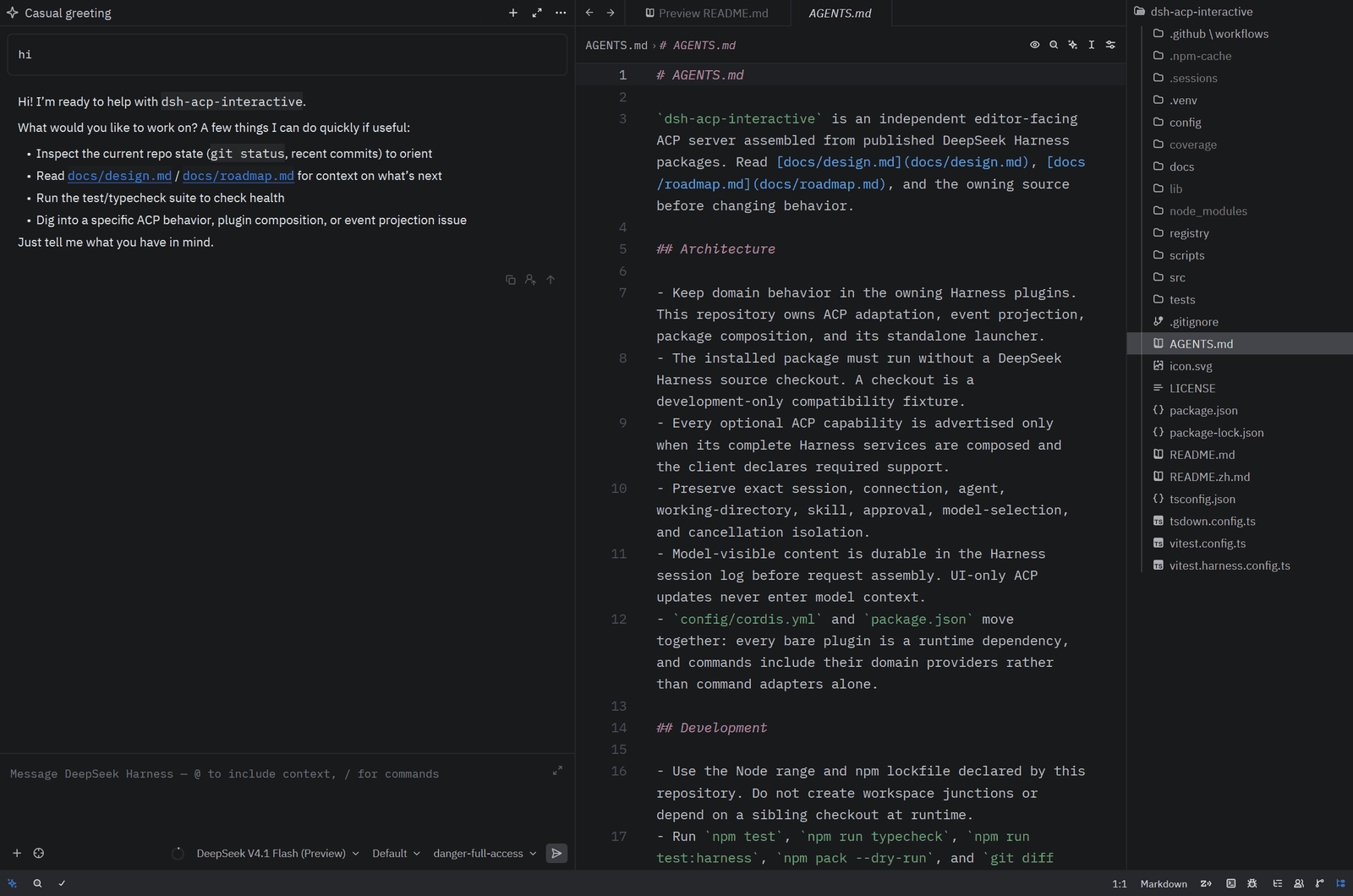
In Zed

Zed agent panel running DeepSeek Harness Interactive next to the editor, with the model, reasoning-effort, and permission selectors in the composer

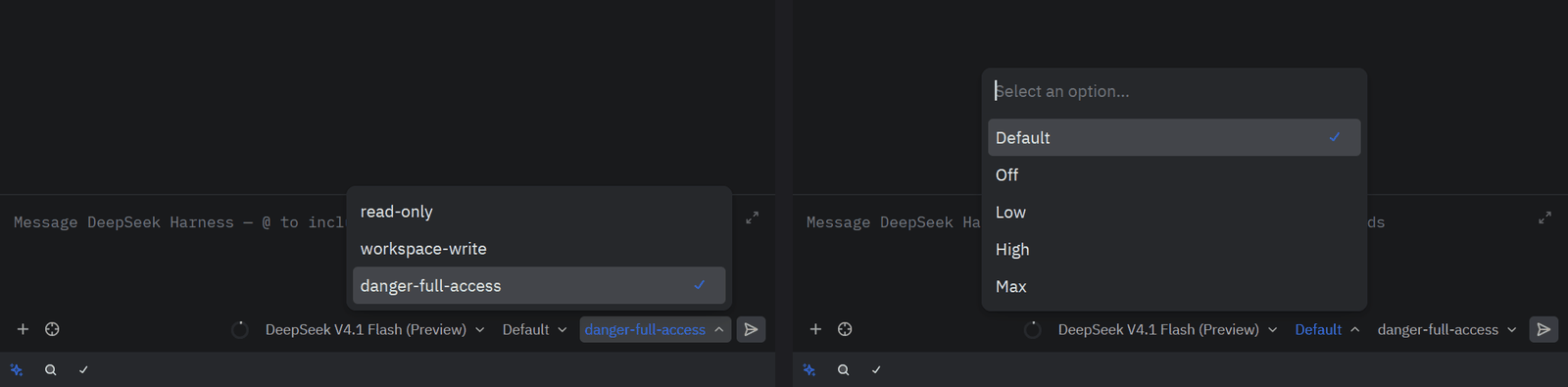
The / palette lists the human commands discovered from the composed Harness plugins; the permission and reasoning-effort selectors are ACP session configuration options backed by Harness permission presets and the selected model's advertised efforts.
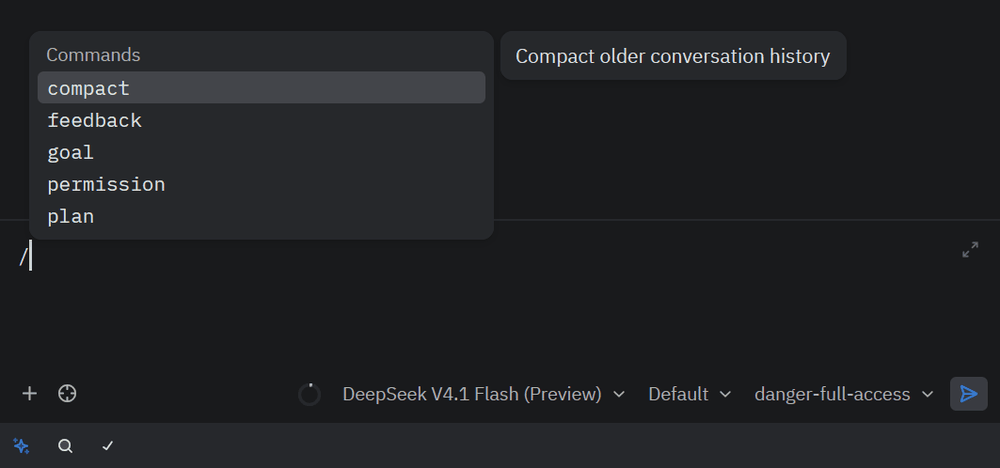
Slash command palette showing compact, feedback, goal, permission, and plan

Permission preset selector (read-only, workspace-write, danger-full-access) and reasoning-effort selector (Default, Off, Low, High, Max)

Authentication

Opening a thread without a stored key answers session/new with auth_required, so Zed shows the Configure DeepSeek API key action with the agent's own instructions. Clicking it runs --setup in a Zed terminal task; when that terminal exits, Zed retries session/new with the stored key.
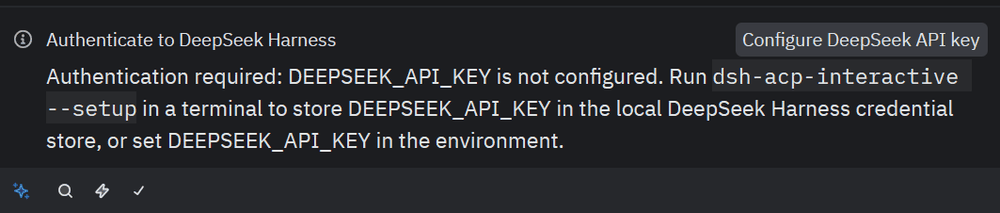
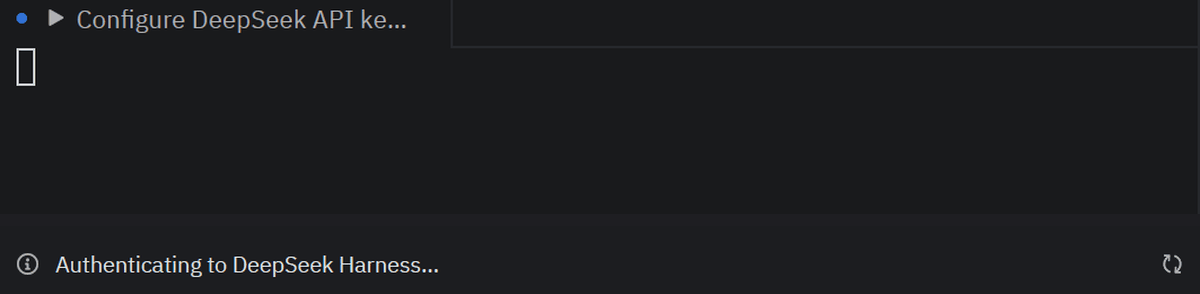
Zed's authentication panel: "Authenticate to DeepSeek Harness", a Configure DeepSeek API key button, and the message that DEEPSEEK_API_KEY is not configured

After clicking: the thread shows "Authenticating to DeepSeek Harness…" while Zed runs the Configure DeepSeek API key terminal task

Permissions

Tool calls run inside the Harness sandbox. Under the read-only preset a write is denied with the sandbox's escalation hint; the retried call arrives in Zed as an ACP permission request with Allow once / Reject, and the approved write and its read-back render as tool cards.
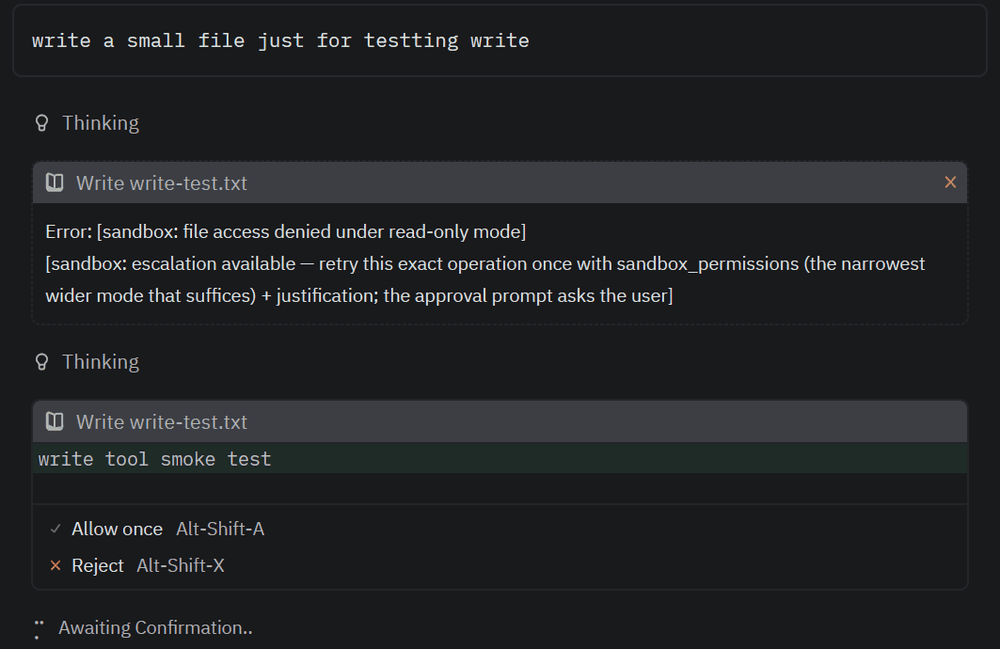
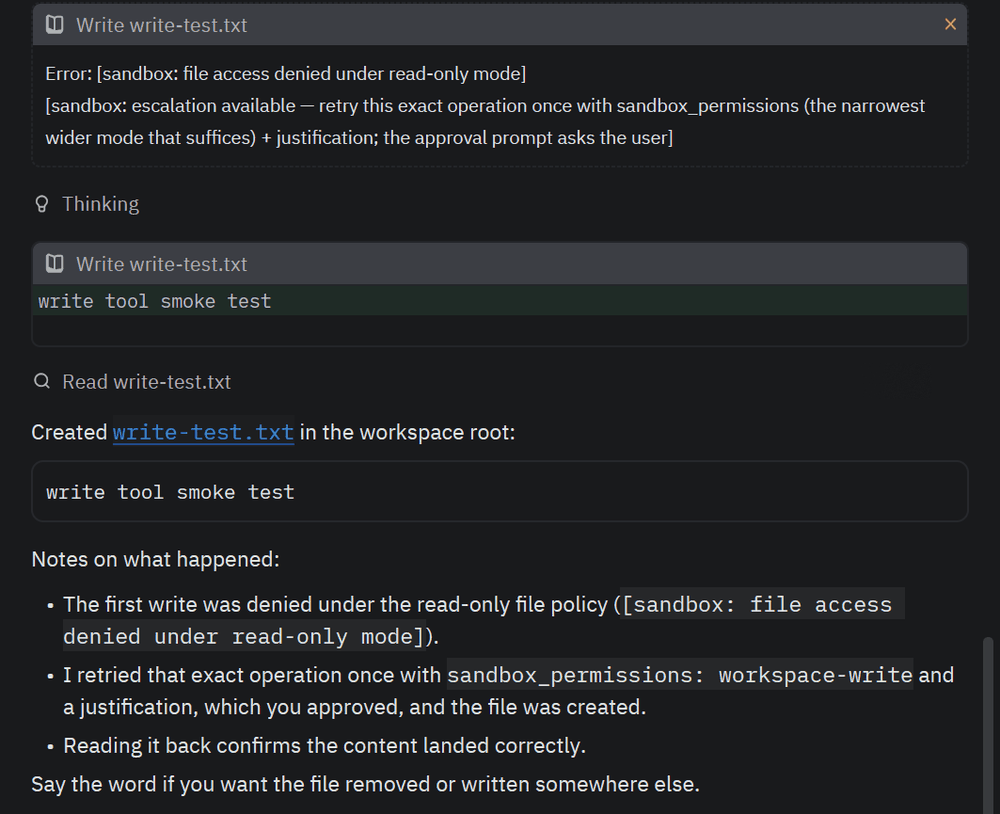
A write denied under read-only, then the escalated write awaiting Allow once or Reject

The approved write card with its content, the read-back, and the created file

1.0.9

Version 1.0.9 answers a session/prompt on the official DeepSeek route with auth_required while DEEPSEEK_API_KEY is not configured, regardless of other providers in the model directory. 1.0.7 deliberately stopped gating session/new for multi-provider deployments so those users could open a session and switch routes, but a prompt on the DeepSeek route then failed as an internal model-call error; clients such as Zed show the authentication action for auth_required from session/prompt too. Direct slash commands never reach the model and are not gated.

1.0.8

Version 1.0.8 makes the Configure DeepSeek API key action actually launch --setup in Zed. Zed's stable releases run terminal authentication only through the legacy _meta["terminal-auth"] object on the method (its handling of the stable type: "terminal" method sits behind a beta flag), and that object must name an executable itself; the method now carries it, pointing at the Node executable running the server and this package's own bin.js --setup, which holds for a global install, a Registry npx install, and a checkout alike, with DSH_HOME forwarded when the server was started with one. session/new also keeps re-reading an unconfigured key for one second before answering auth_required, so the retry Zed issues the instant the setup terminal exits sees the key the credential provider's watcher loads about 100 ms after the write. The launcher now also exits on its own when the client closes its stdin; previously the composition's file watchers kept the process alive until a signal arrived.

1.0.7

Version 1.0.7 narrows the auth_required gate to deployments whose model directory offers only the official DeepSeek provider. A user whose settings.yaml adds llm-pi-ai routes is no longer blocked from opening a session and switching to those routes when no DeepSeek key is stored; a missing DeepSeek key then fails only when the DeepSeek route is actually used. Fresh installations still see the Configure DeepSeek API key action before the first prompt.

1.0.6

Version 1.0.6 makes session/new return the ACP auth_required error while the composition's default route is the official DeepSeek provider and DEEPSEEK_API_KEY is not configured. Clients render authMethods only on that error, so 1.0.5's always-advertised method was still invisible in Zed until the first prompt failed; now the Configure DeepSeek API key action appears when a new thread is opened without a key, and the key stored by --setup is picked up by the next session/new. The check uses the credential store's describe() (configured state only, never the value) and applies only to the DeepSeek default route. See the Auth Method Fallback and Registry Id Agent Note.

1.0.5

Version 1.0.5 always advertises the deepseek-api-key authentication method: as a terminal method when the client declares terminal authentication, and otherwise as an agent-type method whose description points at --setup and DEEPSEEK_API_KEY, so clients that do not declare the capability (for example JetBrains IDEs, whose initialize carries no terminal-auth flag) still see how to configure the key instead of an empty list. agentInfo now reports the package version from package.json instead of a hardcoded string, and agentInfo.name matches the ACP Registry id dsh-acp-interactive, which the Registry entry now uses together with a description that states the community-maintained, unofficial status. See the Auth Method Fallback and Registry Id Agent Note.

1.0.4

Version 1.0.4 makes this English README the default document on GitHub and npm (the Chinese counterpart is README.zh.md), adds public cross-platform CI, a tag-driven release workflow with npm trusted publishing, and keeps the ACP Registry entry (registry/agent.json and icon.svg) in this repository, where the Registry's own validator scripts re-check it daily. See Verification and ACP Registry. The test suite and the packed-install verifier now pass on Linux and macOS as well as Windows; the fixes were confined to test fixtures and the verifier script. Runtime behavior is unchanged from 1.0.3, which recognizes both the stable ACP v1 terminal-auth capability and the ACP Registry validator's legacy _meta["terminal-auth"] compatibility flag; supporting clients configure an official DeepSeek API key through an isolated --setup process, and the ordinary ACP transport never handles or prints the secret.

Installation

Install globally from npm:

npm install --global deepseekharness-acp-interactive

Every published version corresponds to a vX.Y.Z tag and a GitHub Release whose assets include the tarball and its SHA-256 checksum, so an installation can be audited against the tagged source.

The published tarball already contains the built lib/; no build step runs at install time. Installation adds the dsh-acp-interactive command, which loads the reviewed editor profile bundled in config/cordis.yml, which composes DeepSeek and user providers, the agent spine, model-generated session titles, file and local filesystem-search capabilities, shell, permissions, persistence, human commands, and the ACP transport. At startup, Windows registers the native pwsh tool, while Linux and macOS register bash; the model never receives both tool dialects. Stdout carries JSON-RPC frames only.

Before using the official DeepSeek API for the first time, run:

dsh-acp-interactive --setup

The prompt does not echo the API key. It delegates an atomic DEEPSEEK_API_KEY write in $DSH_HOME/.credentials.yaml to the Harness credentials service, whose provider owns locking, concurrent updates, and the POSIX 0700 directory / 0600 file permissions. Leaving the prompt blank keeps an existing file credential. When the launching environment already supplies DEEPSEEK_API_KEY, that value wins by Harness precedence and setup does not write a shadowed file credential. Setup only stores the credential; it makes no network request, so the first model request still validates the key.

initialize always advertises one deepseek-api-key authentication method. Clients that declare ACP terminal authentication (stable clientCapabilities.auth.terminal or the legacy _meta["terminal-auth"] flag) receive it as a terminal method that opens the same interactive --setup flow; for Zed, whose stable releases act only on the legacy _meta["terminal-auth"] object, the method also carries that object, naming the Node executable running the server and this package's bin.js. Clients without that capability receive it as a plain agent-type method whose description points at dsh-acp-interactive --setup and DEEPSEEK_API_KEY; authenticate then succeeds immediately, because credentials are resolved by the Harness credential store at the first model request rather than by the transport. The terminal setup runs as a separate process and does not start the ACP transport; normal server mode continues to reserve stdout for JSON-RPC frames.

session/new returns the ACP auth_required error while the composition's default route is the official DeepSeek provider and DEEPSEEK_API_KEY is not configured, so clients such as Zed show the method before the first prompt instead of failing at the first model request. The check reads only the credential's configured state, never its value, and a key stored by --setup is seen by the next session/new without a restart. Deployments that select another default provider are not gated, and neither is a model directory that offers other providers (for example llm-pi-ai routes from settings.yaml): such a user may hold credentials for those routes and switch to them. A session/prompt whose current route is the official DeepSeek provider is checked the same way regardless, so a missing DeepSeek key surfaces as auth_required — and the client's authentication action — rather than as a model-call error; direct slash commands are not gated.

Custom deployments may instead consume only the transport export and mount it in a dedicated ACP stdio composition:

- id: settings
  name: '@deepseek-ai/dsh-settings-file'

- id: credentials
  name: '@deepseek-ai/dsh-credentials-local'

- id: llm-pi-ai
  name: '@deepseek-ai/dsh-llm-pi-ai'

- id: acp-interactive
  name: 'dsh-acp-interactive'
  config:
    provider: deepseek-official
    model: deepseek-v4-pro

The bundled composition explicitly mounts these three provider dependencies. settings-file reads $DSH_HOME/settings.yaml by default, credentials-local resolves managed credentials from the same dsh home, and the dormant llm-pi-ai mount dynamically registers every route under llm-pi-ai.providers. With no DSH_HOME override, the current user's default .dsh directory is used. Pi Agent Desktop and Zed ACP can therefore share provider profiles, model catalogs, and credential references without copying API keys into Zed or cordis.yml. A profile's apiKeyEnv must match a key under .credentials.yaml refs. The desktop app and ACP server remain separate processes with isolated sessions.

provider and model select only the initial route for a new session; they do not restrict the model selector. When the surrounding composition also retains the DeepSeek adapter, Zed groups DeepSeek together with the user's OpenAI-compatible, Anthropic, and custom gateway routes. Changes to settings.yaml refresh the provider directory through the existing settings and LLM-registry update path.

Plugin

apply(ctx, config) requires agents, commands, llm, skills, tools, sessions, sessionPersistence, and sessionQuery. It answers approval requests only for agents it created and delegates every foreign request. One connection may own several isolated sessions; every event, selection, skill lookup, and approval is checked against the exact agent object before it reaches the wire. A composed permissionPresets service adds the permission selector; its absence leaves model selection available and omits permission configuration.

ConfigMeaning
providerOptional provider route for newly created agents.
modelOptional model id for newly created agents.

stream is a runtime-only test override. Production reserves stdout for ACP frames and reads frames from stdin.

Protocol

The plugin implements initialize, session/new, session/prompt, session/cancel, session/list, session/load, session/resume, and session/close. Text and reasoning deltas stream immediately. Tool calls use each tool's presentCall, presentResult, and durable presentationMeta; generic, diff, and terminal intents map to ACP cards without switching on tool names. The editor profile's new glob and grep tools execute in the published Harness filesystem-search plugin with its packaged ripgrep binary and use the same generic projection. todo/write, session/title, request capacity, provider usage, and command-registry changes update the matching client session.

After a new session receives its first eligible text prompt, Harness publishes its immediate deterministic fallback title and then asynchronously summarizes that prompt with the exact provider/model route recorded for the main request. The accepted model result is persisted as a newer session/title event and replaces the client title through session_info_update. Failure, timeout, or framed input beyond 4096 bytes keeps the fallback without delaying the main agent response. Later prompts do not repeatedly retitle the session.

session/list reads the live-preferred query corpus in deterministic newest-created order, omits sessions without a recorded absolute cwd, supports exact cwd filtering, and includes log-backed titles when available. The current response is one complete page; a non-null cursor fails explicitly.

session/load restores the persisted dsh agent and replays assembled human and assistant messages, reasoning, images, tool cards, the latest plan and title, final usage, and the command catalog before returning. It never replays raw assistant chunks, so assembled messages appear once. session/resume restores the same context without emitting history. session/close cancels prompt admission, skill discovery, model, or command work, waits for output and continuable descendants to settle, crosses the standard ctx.sessions.flush() durability barrier, and only then disposes the exact owned agent. After a successful response, another process sharing the JSONL source can discover and restore the history immediately. A checkpoint failure still releases live resources and fails explicitly; close never deletes durable history.

MCP configuration is live, complete, and session-scoped. Stdio commands are passed directly as executable plus argv without shell interpolation; explicit env values and HTTP headers are never persisted in the session log or added to model context. Stable ACP v1 stdio and HTTP transports are supported, while SSE, ACP-proxied MCP, and unknown variants fail explicitly. Initial connection or tool-discovery failure fails the whole create/restore transaction and rolls back every server already started. Load and resume use only the current request's complete configuration, so an omitted, removed, changed, or failed server never inherits an older connection. Deterministic mcp__<server>__<tool> names remain stable across restoration, while private per-session Cordis roots permit two sessions to use the same server name without sharing tools.

A personal control plane may live on the client side, but it is not a runtime dependency of this package. For example, Zed context_servers may configure each service as agent-config-mcp serve <service-id> and pass it here through standard ACP mcpServers; this package still consumes only protocol records and never reads a personal directory or recognizes that command. A standalone Harness WebUI may use its own agent-config consumer only when it creates separate connections in a private Cordis root for every agent, and that consumer must not be added to this package's config/cordis.yml. Zed ACP and the npx dsh WebUI can therefore share static definitions and credential references without sharing an MCP Client, transport, tool registry, session ID, cancellation signal, child process, or reconnect task. See the Agent Note for the full boundary.

The ACP command catalog merges the exact agent's ctx.commands view with the userInvocable skills discovered for its cwd and scope. A real command wins a same-name collision. commands/change and skills/change trigger full per-session replacement updates; incomplete or failed skill observations retain the last complete skill entries, and a complete empty result removes them. A leading /<skill-name> that still resolves to a user-invocable definition enters the ordinary user-message path, where @deepseek-ai/dsh-tool-skill performs the standard logged agent/pre-step injection. Unknown slash names remain unknown commands, and model-only skills are neither advertised nor accepted as explicit ACP skill invocations.

The catalog does not declare domain commands itself. The bundled editor profile composes /permission, /plan, /compact, /goal, and /feedback with their corresponding domains/providers, while discovery still comes only from actual ctx.commands.register() calls. This bridge executes registered commands and does not treat model tools as slash commands.

Text, resource-link, and inline raster-image prompts are supported. Resource links become explicit bracketed references in the durable user message. When an attachment store is composed, initialization advertises image input; each image is validated against the selected model route and stored before the message is queued, so the session log contains only durable references. Images replay as verified inline ACP content. Audio, embedded resources, and additional directories are rejected explicitly; the independent dsh-additional-directories DSH plugin project owns the Additional directories domain capability. Direct slash commands remain text-only.

When ctx.planMode is composed, new, loaded, and resumed sessions advertise default and plan modes. session/set_mode delegates to that service, and committed plan/mode events publish current_mode_update; the transport keeps no separate mode state.

When ctx.userQuestions is composed, the plugin registers a provider for its exact owned root agents. Clients advertising stable ACP form elicitation receive structured questions, choices, multi-select fields, optional free text, and plan-review detail. Decline or dismissal returns ASK_CANCELLED, turn or request cancellation returns ASK_ABORTED, unknown future actions fail closed, and clients without form elicitation fail explicitly.

Session configuration

session/new, session/load, and session/resume return the complete ACP configOptions list. The model selector groups each adapter's advisory catalog by provider and encodes the complete provider/model route in each value. The selected route applies at the next prompt-assembly boundary; a step already assembling or running keeps its captured route. Restored sessions use the latest logged request header, and an unadvertised restored route remains a current-only row instead of being replaced by the composition default. Client values not present in the current directory are rejected.

Configuration projection accepts ACP 1.x's model_config category and gates boolean options on the client's session.configOptions.boolean capability. The current composition has no real boolean domain option, so it does not invent or advertise a toggle; unknown boolean configuration and malformed value types are rejected explicitly.

When the selected model advertises reasoning efforts, a thought_level selector exposes Default plus every adapter-owned effort. The selected value applies at the next prompt-assembly boundary. Switching models resets the explicit effort to the new route's default; restored sessions recover the effort from the latest request header, including a current-only historical value when its catalog row or all reasoning metadata is unavailable.

When ctx.permissionPresets is composed, a permission selector exposes its configured presets. A switch executes the existing /permission write path, so the preset, sandbox mode, approval policy, live approval state, and durable events stay aligned. A running session also accepts permission changes: the switch commits durable events immediately and takes effect on subsequent confined calls and approval requests. Configuration requests are serialized per session, and a prompt cannot pass an unsettled switch. Adapter topology changes, selector switches, and direct /permission commands publish a full config_option_update.

Tool execution and permissions

ACP never executes a dsh tool. A tool call stays inside the harness and uses its normal cwd, sandbox, subprocess, timeout, and lifecycle policies. A bridge-owned approval/request becomes an ACP permission request with allow_once and reject_once; cancellation stays cancellation and an unknown option never grants access.

The Zed terminal extension is capability-gated. When the client advertises _meta.terminal_output, a terminal render intent produces terminal metadata and captured output. Other clients receive a fenced console fallback. File paths in locations and diffs stay unchanged so editor follow-along opens the operated file.

Running with Zed

After installation, register the installed command directly in Zed. On Windows, where.exe dsh-acp-interactive prints its absolute path:

{
  "agent_servers": {
    "DeepSeek Harness": {
      "type": "custom",
      "command": "C:/Users/you/AppData/Roaming/npm/dsh-acp-interactive.cmd",
      "args": []
    }
  }
}

Zed starts the server with the workspace as cwd. JSONL sessions live under that workspace's .sessions, while every server process owns a separate in-memory SQLite session-query index. Multiple editor processes can share the JSONL source of truth without contending for the derived index. No DeepSeek Harness checkout or DeepSeek-specific Zed code is required.

See the Zed compatibility matrix for supported versions and verification status. This release uses the stable ACP v1 schema from SDK 1.4.0 as its baseline.

An explicitly configured image-capable model must declare its input modalities. For example:

- id: deepseek-v4-flash-vision-exp
  inputModalities: [text, image]

Without this metadata, the DeepSeek adapter treats that explicit catalog entry as text-only and the bridge rejects image admission before queuing the prompt.

Model Experience

Prompts and commands

What the model sees

An ordinary ACP text prompt becomes one human user/message and enters the standard dsh request. A slash-leading prompt resolves a real ctx.commands entry first; otherwise an exact user-invocable skill remains a user message and receives the standard logged skill injection. Command discovery and direct output stay outside model history, while a command-owned domain mutation may affect later requests.

Token effect

Ordinary prompt text has the same retained token cost as any dsh human message. Direct command discovery, input, and output add no model tokens; a user-explicit skill adds its rendered instructions through the standard skill consumer, and a command-owned domain decides the cost of any later model-visible projection.

KV Cache effect

Ordinary prompt text appends after the reusable request prefix. Direct command traffic does not affect the cache; a skill injection changes that request's appended context, and a command-owned model-visible change follows that domain's cache behavior.

UI projections

What the model sees

Message, thought, tool-card, permission, plan, title, usage, and command updates are client-only. They add no tokens and do not change KV-cache reuse. Tool results and human permission decisions affect the model only through the ordinary dsh tool-result path.

Token effect

The ACP updates add no model tokens. Tool results retain their ordinary dsh model-facing cost.

Model-generated titles use a separate auxiliary request. It reads only the first eligible human message, emits at most 32 tokens, and incurs the selected route's ordinary usage; neither the generated title nor its framing enters the main agent history.

KV Cache effect

The UI projection does not affect reuse. A tool result appends through the standard session surface and has that path's ordinary cache effect.

Model, reasoning, mode, and permission controls

What the model sees

Selector and mode metadata are client-only. Model and reasoning selections change the route fields logged by the next assembled request. Plan mode changes the standard plan guidance and exit tool behavior through ctx.planMode. A permission selection changes later tool execution and any standard permission narration owned by the sandbox and approval plugins.

Token effect

The controls add no model tokens themselves. A selected route and effort have that model's ordinary token behavior; plan mode adds its configured guidance; a permission preset has only the token effect of its existing policy projection.

KV Cache effect

Changing provider or model starts using that route's cache identity on the next request. Changing reasoning effort or plan guidance changes the request and therefore its reusable prefix. Permission selection follows the existing sandbox/approval projection behavior and does not add ACP traffic to the prompt.

Known Limitations and Deferred Work

  • session/delete is not advertised. The persistence Service Definition has no backend-independent deletion method; direct JSONL or SQLite manipulation in this transport would bypass persistence ownership and reconciliation.
  • session/list returns one complete page and omits updatedAt; a stable metadata cursor and cheap last-activity observation belong in the session-query capability.
  • Audio and embedded-resource prompt blocks fail instead of degrading silently. Tool-result image cards remain text-only even though prompt and message-history images are supported.
  • Session cost is sent only after a Harness backend supplies a reliable cumulative amount and currency; the bridge does not estimate cost from token prices.
  • MCP supports stable-v1 stdio and Streamable HTTP configuration only; legacy SSE and ACP-proxied transports are rejected. Additional directories remains outside this repository and belongs to the independent dsh-additional-directories DSH plugin project.
  • Terminal output is delivered at tool completion rather than incrementally.

Verification and ACP Registry

  • CI runs on every push and pull request on Ubuntu, macOS, and Windows with Node 22.19 and 24: npm ci, typecheck, build and tests, a pack dry run, and verify:packed, which installs the packed tarball outside the repository, runs --setup, and drives the real launcher through initialize, session/new with a session-scoped MCP server, and session/close.
  • Registry auth check stages registry/agent.json and icon.svg into a fresh clone of agentclientprotocol/registry and runs that repository's own build_registry.py --dry-run and verify_agents.py --auth-check against the published npm package: daily, on demand (gh workflow run registry-auth.yml -f version=<x.y.z>), and dispatched by the release workflow after it publishes a version.
  • Release runs on v*.*.* tags, re-verifies the tagged tree, publishes through npm trusted publishing (ordinary CI holds no publishing token), and attaches the tarball and SHA256SUMS.txt to the GitHub Release.
  • Registry submission: agentclientprotocol/registry#585. npm run check:registry validates the entry and icon against package.json locally.

Development

npm install
npm test
npm run typecheck
npm run build
npm run check:profile
npm run check:registry
npm run verify:packed

The standalone repository has no runtime dependency on a DeepSeek Harness checkout. For development compatibility, set DSH_HARNESS_ROOT to a read-only official checkout or place one at the sibling ../deepseek-harness path, then run npm run test:harness. The command copies the current official packages/acp/acp-interactive/tests into an ignored temporary directory and runs those assertions against this repository's src. check:profile reconciles official candidate packages, human commands, required providers, and critical consumers, reporting review-required drift without rewriting the release composition. verify:packed installs the tarball outside the repository and starts the real ACP launcher. npm run test:all chains repository tests, official compatibility tests, and profile reconciliation.

See the design document for the implemented scope and the development roadmap for the recommended sequence and acceptance criteria.

License

MIT