
 @EugeneVl
dsh_session_folders
Session folders for the DSH web sidebar: one-level named folders per workspace, drag-and-drop or context menu to group sessions, server-side persistence. No harness changes.
- Stars
- 8
- Language
- JavaScript
- Created
- Aug 19, 2026
- Updated
- Sep 15, 2026
Introduction
dsh-session-folders
中文版 README · Русская версия README
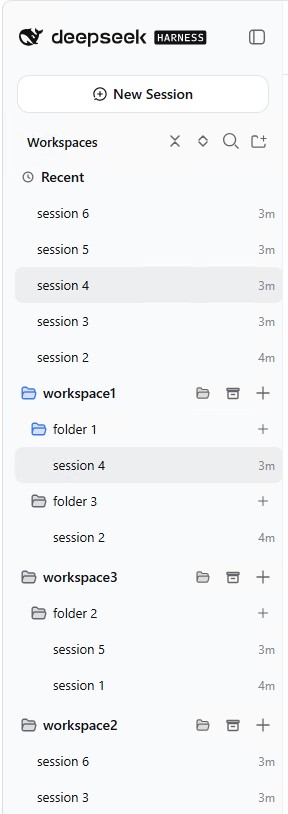
A session-folders plugin for the DeepSeek Harness web UI: the sidebar workspace browser is replaced with a browser that adds session folders — one level of named folders per workspace. Sessions can be dragged into folders or moved via the context menu; folder data is persisted server-side and survives page reloads. Status badges mirror the built-in session browser. No harness changes.
Screenshots
 |  |  |
Features
Organization
- Session folders: one level of named folders per workspace; sessions outside folders live in the "inbox" (loose) bucket
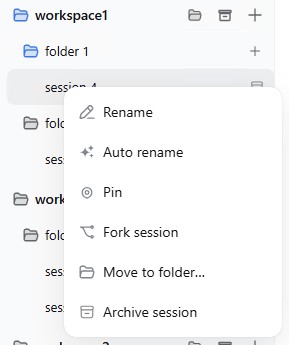
- Move sessions: drag-and-drop a session onto a folder, or use the row context menu — "Move to folder…", with a "New folder…" entry that creates a folder and moves the session into it on the spot; the submenu's "Workspace" entry returns a session from a folder to the loose bucket
- Folder management: create, rename, delete (with confirmation); names are unique per workspace (case-insensitive)
- Inline rename: double-click a session title to rename it in place — Enter commits, Esc cancels
- Auto rename: the session context menu offers "Auto rename" — the session's own model reads its first user message and derives a short title of at most 3 words (a description of the process, feature, or task, in the message's language); the result is pinned like a manual rename
- Reorder by drag-and-drop: drag a workspace row to reorder workspaces; drag a folder row to reorder folders inside its workspace (folders stay above the loose sessions, session sorting by time is unchanged); the order is persisted server-side
- Show more / Show less in every folder and the Archive block: at most five sessions are shown until the overflow row is clicked; the expanded state is per folder and local to the browser session
Session actions
- Context menus: every session / folder / workspace row opens its actions menu on right-click (the per-row "…" buttons are removed); each action carries an icon
- Pin / Unpin sessions: a pinned session always sits first in its folder or in the loose bucket; the pin is persisted server-side and follows the session when it is moved; a pinned session with no status badge shows a small pin icon in its status slot
- Quick archive on hover: hovering a session row swaps the timestamp for a small archive icon — one click archives the session (same as the context-menu action); the swap happens in place, so the layout never shifts
- Session ID badge: right next to the quick-archive icon, hovering a session row also reveals a small
IDbadge — one click copiessession-<id>of that row to the clipboard - New session buttons: a plus icon on a workspace row starts a new session in that workspace; a smaller plus on a folder row starts a session directly inside that folder (the created blank session is moved into the folder and opened)
- Status badges Running / Completed — mirroring the built-in session browser
Archive & restore
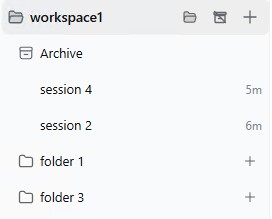
- Archive block: an archive icon on a workspace row shows/hides a virtual Archive folder with every archived session of the workspace; while shown, the icon renders struck through. Showing the folder also opens it expanded; it lists the newest archived sessions first (the first five, with a "Show N more / Show less" row), and drops: dropping a session onto it archives it (same as the context-menu action); dropping an archived session onto a folder or the loose area restores it there
- Restore from the Archive: a right-click on an archived session offers "Restore to original folder" (the session returns to the folder it was in when archived, or to the loose area); a left-click restores the session into the workspace's Restored folder (created on demand) and opens it in chat. Restored sessions are kept apart from the regular ones: the Restored folder always sits first (right below the Archive block) and hides itself whenever it holds no visible sessions
Navigation
- Recent section: above the workspace list, the five most recent workspace sessions (from folders or the loose area), newest first; clicking one opens it in chat, expands collapsed workspace/folder levels so it is visible, and it stays highlighted both in Recent and in its workspace/folder. The header collapses/expands the section (state persists)
- Recent origin card: hovering a Recent session pops a small card to the right of the row showing the workspace and folder it lives in
- Folder tree guides: dashed guide lines drop from each folder icon to its sessions; the whole tree of the folder holding the open session paints blue. Toggle in the browser header (on by default)
- Session search with match highlighting — by title and content
- Open workspace folder: the first button on a workspace row (folder icon) opens the workspace root directory with the operating system's default file manager, via the host's native
openPathAPI - Collapse / expand all: the chevron button pair in the browser header folds and unfolds every workspace group, folder, the Recent section and the Archive blocks in one click
- Workspace focus: the crosshair toggle on a workspace row (also in its context menu) hides everything else — other workspaces, Recent, Ungrouped — until toggled off; focus resets on restart
Persistence & UI
- Server-side persistence: folders live in a DSH storage domain and survive page reloads; view state (collapsed folders, etc.) lives in browser localStorage
- The server is the source of truth: every action is validated server-side (workspace existence, session membership, name conflicts); the client only mirrors the rules
- Bilingual UI: adapts to the page language (zh / en)
- Collapsed sidebar: in the narrow rail only the search and new-workspace buttons render, mirroring the built-in browser
Installation
From npm
dsh plugin --profile web add dsh-session-folders
A prebuilt install from the registry — skips the allowBuilds build-approval step.
From GitHub
dsh plugin --profile web add 'github:EugeneVl/dsh_session_folders#v0.4.3'
Restart dsh web after installing (the host plugin and the client bundle are loaded at startup).
Usage
Getting started
- Open the sidebar: in each workspace, folders are shown above the loose sessions
Folders
- Create a folder — right-click the workspace row → "New folder"; the name must be unique within the workspace
- Rename / delete a folder — right-click the folder row → "Rename"; deletion asks for confirmation and the folder's sessions become loose
- Reorder — drag a workspace row to a new position; drag a folder row within its workspace (drop on the upper/lower half of a row to place it before/after)
Sessions
- Move a session — drag the session row onto a folder (only into a folder of the same workspace), or right-click the session → "Move to folder…" → pick a folder, or "New folder…" to create one and move right away
- Move back to the loose area — right-click the session → "Move to folder…" → "Workspace" (the first entry)
- Pin a session — right-click it → "Pin": the session jumps to the top of its folder (or of the loose bucket) and stays there while other sessions come and go; "Unpin" restores the newest-first order; a pinned session with no status badge is marked with a small pin icon in its status slot
- New session — the plus button on a workspace row starts a session in that workspace; the smaller plus on a folder row starts a session directly inside that folder
- Rename a session — double-click its title (Enter commits, Esc cancels), or right-click → "Rename"
- Auto rename — right-click the session → "Auto rename": the session's model derives a title of at most 3 words from the first user message. Generates nothing while the menu is idle; failures surface in the notice bar
- Quick archive — hover a session row: the timestamp is replaced by an archive icon; click it to archive the session
Archive & restore
- Archive — the archive icon on a workspace row shows/hides the virtual Archive folder (every archived session of the workspace, newest first, five at a time). Drop a session onto it to archive it; drag an archived session onto a folder or the loose area to restore it there
- Restore — right-click an archived session → "Restore to original folder" (back where it was); click it to restore into the Restored folder, which expands automatically if it was collapsed, and opens the session. The Restored folder is always first and hides itself while empty
Find & navigate
- Search — the field at the top of the browser; matches are highlighted and clickable
- Recent — the section above the workspace list shows the five most recent sessions (folders + loose area). Click one to open it; the row in Recent and the workspace/folder icons mark the current session. The header collapses the section
- Open the workspace folder — the folder button (first on the workspace row) opens the workspace root directory in the system file manager
View
- Collapse / expand everything — the chevron button pair at the top of the browser:
- collapse: folds all workspace groups and folders
- expand: unfolds them again
How it works
| Layer | Implementation |
|---|---|
| Host | lib/index.js — a cordis plug-in: 10 POST routes /dsh-session-folders/{list,create,rename,delete,move,reorder-folders,reorder-workspaces,pin,unarchive}; its own storage domain dsh_session_folders (one global record holding the folder list); mutations are serialized through a promise tail so two browsers cannot overwrite each other; workspace and session membership are validated via ctx.workspaceRegistry |
| Client | lib/client.js — a bundle loaded via window.__ModuleLoader__.load, registered in the sidebar.workspaces slot (priority -1); services slots / locale / sessions / workspaces; view state in localStorage (dsh.session-folders.view.v1) |
- Folders do not touch session accounting: the workspace owns sessions, folders are only grouping. A session listed in no folder is loose by definition
- Deleting a workspace does not delete folder records: they stop being served (filtered by live workspace ids) and stay harmlessly in storage
- DSH domains guarantee durability-first writes; the storage file is
~/.dsh/storages/dsh_session_folders.json - No system-prompt changes, no new model tools — zero token impact
Limitations
- One folder level only: nested folders are not supported
- A session can only be moved into a folder of the workspace that owns it; a session outside every workspace (unaccounted) cannot enter a folder
- Folder names are capped at 80 characters; duplicate names are rejected (case-insensitive)
- Reordering works with the server as the source of truth: the client submits the full ordered id list and the server validates it (workspaces cannot be dropped outside the live set, folders cannot leave their workspace)
Compatibility
Current version targets DSH 0.1.0-rc.6 (the sidebar.workspaces slot, webServer / storageDomain / workspaceRegistry services, @deepseek-ai/dsh-storage-domain, @deepseek-ai/dsh-workspace, zod). A DSH upgrade that changes slot/service APIs may require adaptation.
Development
There is no build step: lib/ is the committed bundle (host + client). Edit the files directly and syntax-check:
node --check lib/index.js
node --check lib/client.js
Client-side changes (menu items, buttons, rendering) usually only need a browser refresh — the bundle is served on demand; host-side changes (routes, validation) need a dsh web restart.
Release checklist
- Bump
versioninpackage.jsonand add aCHANGELOG.mdentry - Commit, tag
vN.N.N, push master and the tag - Point the profile at the new release:
dsh plugin --profile web add 'github:EugeneVl/dsh_session_folders#vN.N.N', then restartdsh web