
 @GrapeCityXA
dsh-plugin-spreadjs-editor
DeepSeek Harness Web UI plugin: view and edit Excel/SpreadJS workbooks from the ui-all file tree.
- Stars
- 0
- Language
- TypeScript
- Created
- Aug 31, 2026
- Updated
- Oct 15, 2026
Introduction
SpreadJS Editor for DeepSeek Harness
GitHub · npm: @grapecity-software/dsh-spreadjs-editor
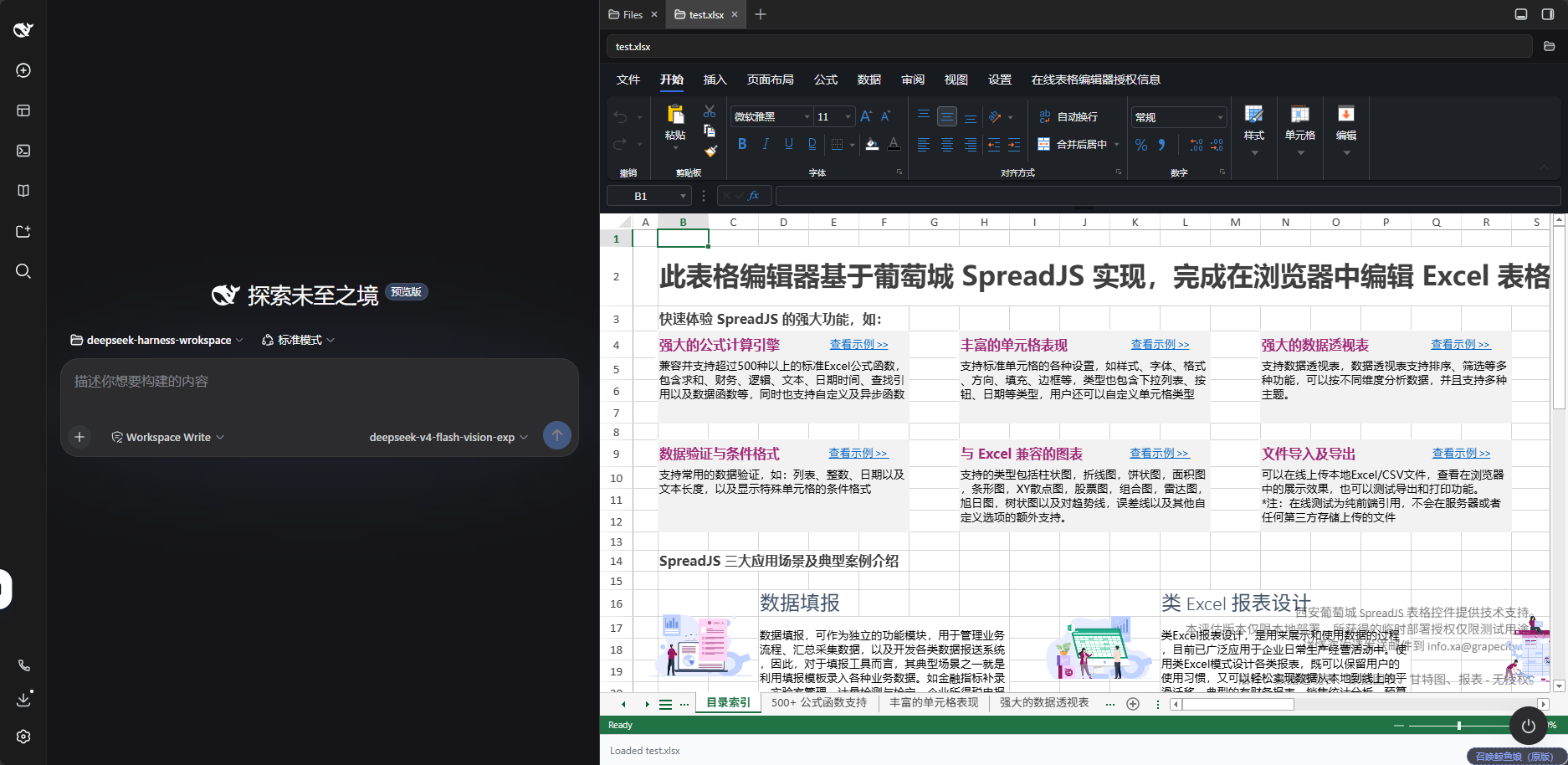
在 DeepSeek Harness Web UI 里,直接在右侧文件树中打开、查看和编辑 Excel / SpreadJS 文件。
A DeepSeek Harness Web UI plugin that opens, views, and edits Excel / SpreadJS files directly from the right-side file tree.
中文说明
功能
- 支持
.xlsx、.xlsm、.csv、.sjs、.ssjson文件。 - 从文件树打开工作簿,使用 SpreadJS Designer 编辑表格。
- 编辑后可直接保存回原文件:原子写入、限制在会话工作区内、带冲突检测。保存按钮在 DSH 文档头部自己的工具栏上,未保存时带一个标记点;它与「另存为…」的尺寸、字号、颜色都按 DSH 头部自身控件的规格绘制,而且只在表格文件上出现。
- 「另存为」可以把当前工作簿(含新建的空白工作簿)写进工作区的另一个路径,成功后就地切换到那个文件;同名文件不会被覆盖。
- 编辑器跟随 DSH 的浅色/深色主题,工具栏与工作表区域一起变;DSH 偏好设为「跟随系统」时自然跟着系统走。
- 「设置」标签里有「关于」按钮:内置版本、授权状态与版权信息在弹窗里。
配合 SpreadJS Driver 使用
本插件单独使用就是完整的:打开、编辑、保存工作簿都不需要别的插件。但配上 driver,它会多出一件单独做不到的事——让 AI 直接改你屏幕上这份表。
本编辑器通过公开的SpreadJS 桥接契约支持其他 driver:driver 登记到 spreadjsBridgeRegistry,由用户选择后获取真实 Workbook 引用,无需依赖本 editor 的 npm 包。配套 @grapecity-software/dsh-spreadjs-driver 是其中一种实现,也能接入其他符合该契约的 SpreadJS editor。使用同一引擎之外,还需遵守实例身份、独占锁、取消和保存协议,并核对 SpreadJS 版本及模块支持。
本包不依赖任何 driver。SpreadJS、Designer 及扩展作为开发/构建依赖内联进浏览器产物,实例和授权始终由 editor 管理;DSH 与 React peers 由宿主提供。配套 Driver 不再包含 SpreadJS、Designer 或无头浏览器引擎。第三方 driver 使用自己的唯一 id;如需从服务端读取本 editor 的选择,设置文档命名空间为 spreadjs-editor,字段为 bridge。
安装
两个插件都装在同一个 web profile 下——driver 的活工作簿能力只存在于 Web UI 里:
dsh plugin --profile web add @grapecity-software/dsh-spreadjs-editor
dsh plugin --profile web add @grapecity-software/dsh-spreadjs-driver
dsh --profile web
装完重启 DSH,打开任意一个表格文件,然后在 设置 → 电子表格编辑器 里选中 SpreadJS Driver。(没装任何 driver 时这一页只有「不使用」一项,编辑器行为与本功能不存在时完全一样。)
「装了」不等于「激活」:两个包都必须出现在 profile 的
dsh.profile.bundles里。光pnpm add或dsh plugin add不一定替你写进去,装完请开一个真实会话确认工具确实在场。
两边是怎么配合的
编辑器持有你打开的那份工作簿,每个 driver 登记为候选人;名册里可以有多个(比如我们的测试夹具),但只有一个会拿到工作簿——就是你在设置里选中的那一个。
- 递出去的是活引用,不是副本。 工作簿从不离开页面、也从不被序列化,所以通过它写的样式、公式、格式,当场就出现在表格里。
- 默认不落盘。 AI 的改动先活在工作簿里,你看着满意了它才会要求保存。保存走的还是文档头部那颗「保存」,因此冲突检测、工作区围栏、原子写入一条都不少。
- 名册只认被选中的那个。 设置里改选别人、或选「不使用」,driver 的全部工具与 skill 都会让位。这个设置命名的是「谁来管这里的电子表格」,而不只是「谁暂时拿着这份活文档」。
- 编辑器始终是守门人。 名册是候选人列表,不是广播。没有被递到工作簿的插件,没有任何办法去够到它。
选中 driver 后,AI 获得 sjs_live_open、sjs_live_execute 和 sjs_live_status。没有打开工作簿时,driver 可以请求 editor 打开文件并等待初始化;新文件可由 driver 从准备好的空白模板复制,Workbook 仍由 editor 创建和持有。
driver 执行期间 editor 会显示操作中提示,禁用 Designer 的鼠标/键盘编辑及冲突的保存、另存为、新建、导出入口。若用户关闭或切换 editor,销毁 Workbook 前会保存当前快照到现有恢复缓存,driver 返回中断;重新打开文件后检查已恢复的部分,再继续任务。该缓存只在当前页面生命周期内有效,不跨页面刷新,也不恢复 JavaScript 的执行位置。快照失败会明确写入控制台日志。
driver 的状态和执行按调用聊天隔离,并绑定当前文件的加载实例;重新加载即更新实例身份。恢复缓存使用完整聊天资源地址,不同聊天的同名文件不会互相恢复或清理。取消或超时后阻止后续自动保存;异步导出结束、写回之前再次检查任务权限。忽略取消信号的脚本仍持有编辑锁,直到结束或实例被销毁。已发送的写入可能完成,因此取消不能保证回滚。两侧插件需同时更新以支持实例身份协议。
要求
- 请同步升级 editor 与 driver,以使用完整的实例身份、独占锁和恢复协议。
- 两侧统一支持 DSH
0.2.0-rc.2:桥选择页使用settings.section,选择结果保存在 editor 的设置文档中。开发依赖与宿主 peer 声明均以该 RC 为基线;旧版本和 alpha 不在支持范围内。 - driver 前提:Node ≥22.19、同一 web profile 中的 editor 和可用的前端连接。服务端无需安装 Chrome/Edge。
内置版本与文件兼容性
| 组件 | 内置版本 |
|---|---|
| SpreadJS | 19.2.1 |
| SpreadJS Designer | 19.2.1 |
内置版本、授权状态与版权信息在 Designer「设置」标签的「关于」弹窗里。低版本 SpreadJS 可能无法打开本版本保存的 .sjs 或 .ssjson 文件;与旧版系统交换文件时,建议保留原文件并确认兼容性。
安装
支持 DSH 0.2.0-rc.2,需要 Node.js ≥22.19。插件使用 DSH 自带的右侧栏,不需要安装任何第三方侧边栏插件。升级 DSH 时请同步升级插件;新的 RC 需重新验证后再调整支持声明。
| DSH 版本 | 状态 | 说明 |
|---|---|---|
0.2.0-rc.2 | 支持与验证基线 | 类型检查、215 项单测、构建、两个 smoke 与 verify:package 通过;运行中的 DSH 仍需重启后执行 probe:live 和界面验收 |
该 RC 提供工作簿所需的二进制后缀声明、内置只读预览、文档头部动作槽 sidebar.right.tab.document.actions 和设置分区 settings.section。本版不再声明兼容旧版 DSH。
插件内置 SpreadJS 和 Designer,无需编译。使用已安装的 DSH CLI 安装并启动:
dsh plugin --profile web add @grapecity-software/dsh-spreadjs-editor
dsh --profile web
启动后,在 Web UI 右侧文件树中打开 .xlsx、.xlsm、.csv、.sjs 或 .ssjson 文件即可。
也可以通过 npx 安装并启动:
npx --yes @deepseek-ai/dsh@0.2.0-rc.2 plugin --profile web add @grapecity-software/dsh-spreadjs-editor
npx --yes @deepseek-ai/dsh@0.2.0-rc.2 --profile web
旧版本用户请参阅升级说明。
保存
保存的正式入口是 DSH 文档头部自己的工具栏(打开工作簿后,文件名旁边那颗「保存」)。它注册在 DSH 的官方动作槽 sidebar.right.tab.document.actions 里,与其它查看器的控件排在一起;有未保存改动时,「保存」前会多一个标记点,像 Excel 标题栏的 *。改动写回你打开的那个文件,不会再问你"要不要保存",因为按下保存本身就是你的意图。
同一份写回也挂在 Ctrl+S 和 Designer 工具栏上的保存按钮上:插件把 Designer 的 Save 命令重定向到写回,所以这两处按下都不会再弹出下载框。(Designer 自带的「文件」标签页已从 Ribbon 上隐藏,见本节末尾。)
这两颗头部按钮并不引用 DSH 的按钮组件——第三方客户端插件不能假定内部的 @deepseek-ai/* 包在运行时一定可解析,解析失败会连编辑器一起挂掉——而是照抄了邻居的规格:28px 高、padding: 0 6px、12px 字号、常态 --dsw-alias-label-secondary,悬停转 --dsw-alias-label-primary 并给 --dsw-alias-interactive-bg-hover 底色,禁用转 --dsw-alias-label-tertiary 且不再响应。也就是头部「查看器名称」与图标按钮的那一套;有一条单测钉住这些数值,避免以后悄悄漂移。
它们只在本插件负责的文件上画出来。这个动作槽对每个预览文件都会渲染,所以按钮要在插件自己的编辑器占据屏幕时才出现——否则工作区里每个 Markdown、图片、日志旁边都会多两颗按不动的按钮。产品自己的「用本地应用打开」也是这个形状:没有可打开的应用时就什么都不画。
顺序上它们排在「用本地应用打开」之前。槽位是 list,条目按公开的 order 排序(先 priority,再 order,最后才轮到注册顺序),插件注册在 -10 —— 而这正是 DSH 自己给「头部动作里排第一」用的值(dsh-client-ui-agent-preset 注册会话头部标签时就是 order: -10)。这样「先保存、再考虑外部打开」是确定的阅读顺序,也不再受插件加载顺序影响;未保存的标记点也因此落在这一组的第一项上,一眼就能看到。
Designer 自带的「文件」标签页已经从 Ribbon 上隐藏:插件不再改写它的私有菜单模板(那段改写已删掉),也不让它留在那里——因为「文件」页里的保存是下载副本,与上面那颗写回的保存只隔一次点击,两颗都在就是误存副本的来源。现在这个编辑器里只有一处保存:文档头部的「保存 / 另存为…」,加上 Ctrl+S。
代价是「文件」页里的其它分类(新建、打开、导入、导出、打印、信息)也一并看不到了——这是隐藏整页的必然结果,如果你需要其中某一项,告诉我,我们把它单独接回 Ribbon。隐藏方式是按产品公开的命令名(CommandNames.FileMenuButton)加它模板画出的元素类名做一条 CSS,作用域限定在本插件的面板内;这条规则有单测钉住,创建编辑器时控制台也会回报命中的元素数与它实际算出的 display,所以将来产品改名、规则失效会被看见,而不是悄悄多出一颗下载按钮。
- 工作簿还没载入完时不让保存。 载入中的工作簿是空的,此时保存会用空表覆盖原文件;载入完成前保存命令会拒绝并说明。
- 不会冲掉别人的修改。 打开文件时插件记下其内容哈希;保存前重新比对,若磁盘上的文件在此期间被改过(Agent 改过、你在别处存过),保存会被拒绝并说明原因,而不是覆盖掉那些改动。
- 不会写出半个文件。 同目录临时文件写完后 rename 覆盖,其他程序任何时候读到的都是完整文件。
- 写不出工作区。 目标必须在当前会话的工作区内,越界(含
..逃逸)直接拒绝。 - 只有循环回环地址可用。 保存接口与 DSH 其它接口一样只服务本机来源;通过局域网地址访问时,需要把该地址加进
trustedHosts。
另存为
头部工具栏上的「另存为…」把当前工作簿写到工作区的另一个路径——包括在 Designer 里重新置空的空白工作簿。它不碰原来那个文件。
- 默认目标:同目录、同后缀,文件名后面加「副本」(
报表.xlsx→报表-副本.xlsx)。 - 成功后就地切换:这个标签页会直接开到刚写下的文件上继续编辑,不会另开一个标签页。
- 同名不覆盖:目标已存在时宿主会拒绝写入(写回要求带版本基线,另存为没有),对话框直接说「目标文件已存在,请换一个名字」,而不是默默覆盖。
- 只接受 5 种后缀:
.xlsx、.xlsm、.csv、.sjs、.ssjson。写出格式由后缀决定,其它后缀会写出打不开的文件,所以在提交前就拦下。 - 越界同样被拒:路径解析与围栏由宿主按写回那一套规则判定,工作区之外一律拒绝。
- 写不进去的另一种可能:正在载入或另一次保存尚未结束时,对话框会说「编辑器还没准备好」,不会假装成功。
未保存的改动
DSH 在标签页被切走时会卸载文档主体,平台也没有可供拦下的关闭钩子(关闭是同步的,文档定义里既无生命周期也没有否决点),所以这里不做「确认离开」的拦截,而是保证不丢:
- 切走再切回不丢。 有未保存改动的工作簿会在主体卸载前留成一份快照,切回同一个标签页时原样恢复,不需要重新读盘。
- 关掉标签页也不丢。 快照同时按文件路径保留;重新打开同一个文件时,只要磁盘上的文件仍是快照写下的那一版,就自动恢复,并在面板右下角的胶囊里说明来源。
- 文件被外部改过时不默默套用。 若磁盘上的文件已经变了(Agent 改过、你在别处存过),面板右下角会浮出一个胶囊提示「存在未保存的改动缓存,但文件已在磁盘上被修改」,由你选择恢复(用缓存继续,之后保存即写入磁盘)或丢弃(重新读盘)。
- 看得见,而且有两处。 头部工具栏的「保存」在有未保存改动时带一个标记点(像 Excel 标题栏的
*);面板右下角另有一个浮动胶囊,显示「未保存的改动」与「丢弃」操作。胶囊悬浮在表格上方,不占布局高度,保存成功后消失。 - 整页关闭会提示。 刷新或关闭页面时,只要还有未保存的改动(含已留存的缓存),浏览器会弹出一次自己的离开确认。
- 保存即清空。 保存成功后,该文件的快照全部清除。
配置
如已获得许可证,在 web profile 的 cordis.patch.yml 中添加以下配置:
| Key | 默认值 | 说明 |
|---|---|---|
licenseKey | '' | SpreadJS 部署许可证。留空以带水印的试用模式运行。 |
designerLicenseKey | '' | 独立的 SpreadJS Designer 部署许可证。留空保持 Designer 试用状态。 |
maxSaveBytes | 67108864 | 单次保存允许的最大字节数;超出直接拒绝,不做截断。 |
trustedHosts | [] | 除本机回环地址外,额外允许调用保存接口的地址(局域网部署时使用)。 |
- id: spreadjs-editor
  config:
    licenseKey: 'YOUR_SPREADJS_KEY'
    designerLicenseKey: 'YOUR_DESIGNER_KEY'
修改后重启 DSH 并刷新网页。
还有一项不写在这里:bridge 是「电子表格编辑器」设置页在 Web UI 里写的,代表用户选了哪一个桥。它同样属于本插件的配置,但不该手写进 patch——设置页会把写入结果如实报出来(写入被拒或失败时页面会说明),而手写的值不会经过这条检查。既没选过、又在 patch 里留空,含义相同:bridge: '' 等于「不使用」。本插件自身的设置页取代了 DSH 从这个 schema 自动生成的那一页,所以不会出现两个入口。
验证
| 命令 | 验证内容 |
|---|---|
npm run typecheck、npm test | 类型契约,以及 215 个单元测试(保存路由的每条守卫、文件地址解析与地址构造、另存为的目标校验、默认名与失败文案、保存命令重定向的每条分支、编辑器主题桥的每条分支、查看器名称与二进制后缀声明的边界、未保存改动的缓存规则与脏状态跟踪的边界、打开时「用文件还是用缓存」的每个分支、面板状态胶囊的状态与操作矩阵、文档头部动作的发布/订阅/命令路由、按钮的尺寸字号颜色规格、「只在表格文件上出现」的判定与注册顺序,隐藏 Designer「文件」Tab 那条规则的两处身份与作用域,以及桥选择的方向与「写入被拒也要报出来」、桥字段是否真的声明为 volatile、名册自身的契约(重复 id 拒绝、disposer 语义、只在真的变化时通知)、名册与设置页在有无 settings 服务时的接线,以及设置页每一行确实是照 DSH 自己设置页的行规格画的) |
node scripts/smoke-client.mjs | 构建后的浏览器半结构:loader 包装、内联的 SpreadJS 与样式、外部依赖只有 react |
node scripts/smoke-node.mjs | 构建后的宿主半:路由注册、许可证配置,以及保存路径的真实写盘、冲突与越界拒绝 |
npm run probe:live | 对着正在运行的 DSH 跑一遍真实保存:真实 ctx.fs 的解析、落盘、冲突守卫、工作区越界;并核对进程里装的是不是本构建(插件版本与内置 SpreadJS 版本) |
npm run probe:live 要求 DSH 已重启到本版本。宿主半会在 /spreadjs/api/health 回报插件版本与内置 SpreadJS 版本,探针据此判断「正在跑的进程是不是这一版」——回报的版本与本构建不一致会直接判失败;如果进程里是很早的宿主半(连版本字段都没有),探针会说明需要重启,如果连保存路由都报 404,则说明那更是旧版。可选参数:--url(默认 http://127.0.0.1:3080)、--session <id>、--home <DSH_HOME>。探针会在会话工作区内建一个临时文件,结束时删除。
许可
插件代码免费提供,采用 MIT 许可证。内置的 SpreadJS 和 Designer 是葡萄城商业产品,未配置许可证时可按其试用条款体验;插件免费不包含这两个产品的商业授权。
如用于正式部署或 SaaS 服务,请根据使用场景获取适用的 SpreadJS 和 Designer 授权。
English
Features
- Opens
.xlsx,.xlsm,.csv,.sjs, and.ssjsonfiles. - Open workbooks from the file tree and edit them with SpreadJS Designer.
- Save edits straight back to the file: atomic, confined to the session workspace, with conflict detection. Save lives in the harness's own document header, with a mark while anything is unsaved.
- Save As writes the workbook — including a new blank one — to another path in the workspace and moves the tab onto it; an existing name is never overwritten. Both header buttons follow the spec of the header's own controls (see Saving below) and appear on this plugin's own files only.
- Follows the harness's light or dark theme, toolbars and worksheet alike; a harness preference of
systemstill tracks the OS. - An About button in the settings tab reports the bundled versions, the licence state and the copyright.
Using it with the SpreadJS Driver
This plugin is complete on its own: opening, editing and saving workbooks needs nothing else. Paired with the driver, though, it gains the one thing it cannot do alone — letting the AI edit the very sheet you have on screen.
This editor supports other drivers through the public SpreadJS bridge contract. A driver registers into spreadjsBridgeRegistry and receives the real Workbook only after explicit user selection, without an npm dependency on this editor. The companion @grapecity-software/dsh-spreadjs-driver is one implementation and can consume other compatible SpreadJS editors. Compatibility also requires document identity, leases, cancellation and save semantics, plus supported SpreadJS versions/modules.
This package depends on no driver. SpreadJS, Designer and extensions are build/dev dependencies inlined into the browser bundle; the editor owns the instance and licensing. DSH and React peers are supplied by the host. The companion Driver bundles no SpreadJS, Designer or headless engine. Third-party drivers use their own unique ids; the host-side selection document for this editor is namespace spreadjs-editor, field bridge.
Install
Both plugins go into the same web profile — the driver's live-workbook capability exists only in the Web UI:
dsh plugin --profile web add @grapecity-software/dsh-spreadjs-editor
dsh plugin --profile web add @grapecity-software/dsh-spreadjs-driver
dsh --profile web
Restart DSH, open any spreadsheet file, then pick SpreadJS Driver under Settings → Spreadsheet Editor. (With no driver installed that page offers only "None", and the editor behaves exactly as it does without the feature.)
Installed is not the same as active: both packages have to appear in the profile's
dsh.profile.bundles.pnpm addordsh plugin adddoes not always write that for you, so after installing, open a real session and confirm the tools are actually there.
How the two fit together
The editor owns the workbook you open; each driver registers as a candidate. The roster may hold several — our test fixture, for one — but exactly one is handed the workbook: the one you selected in Settings.
- What is handed over is a live reference, not a copy. The workbook never leaves the page and is never serialized, so a style, formula or format written through it appears in the sheet at once.
- Nothing reaches disk by default. An AI edit lives in the workbook until you are happy with it and the agent asks for a save. That save is the document header's own Save, so conflict detection, the workspace fence and the atomic write are all still in force.
- The roster answers to the selection alone. Choose another bridge — or "None" — and every tool and skill the driver registers steps aside. The setting names the plugin that owns spreadsheets here, not merely the one holding the live document for the moment.
- The editor stays the gatekeeper. The roster is a list of candidates, not a broadcast. A plugin that was not handed the workbook has no way to reach it.
Selecting the driver enables sjs_live_open, sjs_live_execute and sjs_live_status. The driver can copy a template and ask this editor to open and initialize it. Import/export and Workbook ownership remain editor features.
Driver status and execution are confined to the calling chat and bound to the current loaded-document identity, renewed on every reload. Recovery snapshots use the full session resource address, so same-named files in different chats cannot restore or clear each other's buffers. Cancellation/timeout prevent subsequent automatic saves; the editor rechecks permission after export and before write-back. Scripts ignoring cancellation retain their edit lock until they settle or the instance is destroyed. A write already sent may complete; cancellation cannot guarantee rollback. Update both plugins for the identity protocol.
Requirements
- Update the editor and driver together for the complete instance identity, lease and recovery protocol.
- Both plugins support DSH
0.2.0-rc.2: the bridge picker usessettings.sectionand stores the choice in the editor settings document. Development dependencies and host peers target this RC; older releases and alpha builds are outside the supported baseline. - Driver requirements: Node ≥22.19, the editor in the same web profile, and a working browser connection. No Chrome/Edge installation on the server is required.
Bundled Versions and File Compatibility
| Component | Bundled version |
|---|---|
| SpreadJS | 19.2.1 |
| SpreadJS Designer | 19.2.1 |
The About button in the Designer's settings tab shows the bundled versions, the licence state and the copyright. Older SpreadJS versions may not open .sjs or .ssjson files saved by this version. When exchanging files with older systems, keep the original files and check compatibility.
Installation
Supports DSH 0.2.0-rc.2 and requires Node.js ≥22.19. The plugin uses the harness's own right Sidebar and needs no third-party sidebar plugin. Update the plugins alongside DSH; a newer RC needs verification before changing the supported baseline.
| DSH version | Status | Notes |
|---|---|---|
0.2.0-rc.2 | Supported and verified baseline | Typecheck, 215 unit tests, build, both smokes and verify:package pass; restart the running DSH before a separate probe:live and UI acceptance check |
This RC supplies the binary-suffix declaration, built-in read-only preview, document-header actions slot sidebar.right.tab.document.actions, and settings section settings.section. This version no longer declares support for older DSH releases.
The plugin includes SpreadJS and Designer, with no build step required. With the DSH CLI installed:
dsh plugin --profile web add @grapecity-software/dsh-spreadjs-editor
dsh --profile web
After startup, open .xlsx, .xlsm, .csv, .sjs, or .ssjson from the right-side file tree.
Alternatively, install and start through npx:
npx --yes @deepseek-ai/dsh@0.2.0-rc.2 plugin --profile web add @grapecity-software/dsh-spreadjs-editor
npx --yes @deepseek-ai/dsh@0.2.0-rc.2 --profile web
For upgrades, see the release notes.
Saving
Save's official entry point is the harness's own document header — the Save button beside the file name once a workbook is open. It is registered in the actions slot sidebar.right.tab.document.actions published by DSH, next to the other viewers' own controls, and it carries a mark while anything is unsaved, like the * in Excel's title bar. It writes your changes back to the file you opened, and there is no second prompt, because pressing Save is the intent.
The same write-back is also on Ctrl+S and the Save button on the Designer's own toolbar: the plugin redirects the Designer's Save command, so neither of those reaches a download dialog any more. (The Designer's own File tab is hidden from the ribbon — see the end of this section.)
These two header buttons do not import the harness's button component — a third-party client plugin cannot assume an internal @deepseek-ai/* package resolves at runtime, and a failure there would take the whole editor down — so they copy the values from the controls beside them instead: 28px tall, padding: 0 6px, 12px text, --dsw-alias-label-secondary at rest, --dsw-alias-label-primary with the --dsw-alias-interactive-bg-hover background on hover, and --dsw-alias-label-tertiary with no response when disabled. That is exactly what the header's own viewer-name button and icon buttons do, and a unit test pins those values so they cannot drift unnoticed.
They are drawn only on the files this plugin handles. The slot renders for every previewed file, so the buttons appear only while this plugin's own editor is the body on screen — otherwise every markdown file, image and log in the workspace would carry two buttons that cannot do anything. The product's own open-in-app control works the same way: it draws nothing when there is no application to offer.
They are ordered before open-in-app. The slot is a list, and its entries sort by the documented order (priority first, then order, then registration sequence), where this plugin registers at -10 — the very value the harness itself uses for "first in a header actions list" (dsh-client-ui-agent-preset registers its session-header label at order: -10). That makes "save first, think about opening elsewhere second" a decided reading order rather than a side effect of plugin load order, and it puts the unsaved mark on the first item of the group, where the eye lands.
The Designer's own File tab is hidden from the ribbon. The plugin no longer rewrites its private menu template (that rewrite is gone), and it does not leave the tab in place either: the File tab's Save downloads a copy, one click away from the Save that writes the file back, and having both is how the wrong one gets pressed. This editor now has exactly one place to save — the document header's Save / Save As…, plus Ctrl+S.
The price is that the File tab's other categories (new, open, import, export, print, info) are not reachable from the UI any more; that is what hiding the page means. Say the word if you want one of them back on the ribbon and we will wire that one in. The hiding is one CSS rule keyed on the product's public command name (CommandNames.FileMenuButton) and the class its template draws, scoped to this plugin's panel; a unit test pins the rule, and creating the editor logs how many elements it matched and what display they compute to, so a rename in a future build shows up as a dead rule rather than as a quietly reappearing download button.
- A workbook that is still loading cannot be saved. It has no content yet, so saving would overwrite the file with an empty book; the save command refuses, with an explanation, until the load finishes.
- It will not clobber someone else's edit. The plugin records the file's content hash when it opens it and re-checks before writing; if the file changed in the meantime (an agent edited it, you saved it elsewhere), the save is refused with an explanation instead of overwriting those changes.
- It never leaves half a file. A same-directory temporary file is renamed over the target, so any other reader always sees a complete workbook.
- It cannot write outside the workspace. The target must sit inside the current session's workspace; anything else — including
..escapes — is refused. - Loopback only. The save endpoint serves the local machine like the rest of DSH. If you reach DSH through a LAN address, add that address to
trustedHosts.
Save As
另存为… in the same document header writes the workbook to a different path in the workspace — including a workbook that was reset to blank inside the Designer. The file it came from is left untouched.
- Suggested target: same directory, same suffix, with the localized word for a copy appended (
report.xlsx→report-copy.xlsx). - It switches this tab. On success the tab navigates to the file just written and keeps editing there; no second tab is opened.
- An existing name is never overwritten. The host refuses the write (a write-back needs a version baseline, and a Save As has none) and the dialog says so — "that file already exists; choose another name" — instead of replacing what is there.
- Only five suffixes are accepted:
.xlsx,.xlsm,.csv,.sjs,.ssjson. The written format follows the suffix, so anything else would produce a file this editor cannot reopen; it is refused before the write. - Containment is judged by the host, on the same rule as a write-back: a path outside the session workspace is refused.
- A busy editor says so. While a load or another save is running the dialog reports that the editor is not ready rather than pretending to have written.
Unsaved work
The harness unmounts a document body when its tab is hidden, and the platform offers no close hook to intercept (a close is synchronous, and a document definition has neither a lifecycle nor a veto point). So leaving is never blocked — and nothing is dropped either:
- Switching away and back keeps the edits. A dirty workbook is kept as a snapshot just before its body unmounts, and restored as-is when the same tab returns, without re-reading the file.
- Closing the tab keeps them too. The snapshot is also kept under the file's path, so reopening that file restores it — and says so in the pill at the panel's bottom-right — as long as the file on disk is still the version the snapshot was written from.
- A file changed elsewhere is never silently replaced. If the file on disk changed since the snapshot (an agent, another editor), the panel offers it instead in that same pill: Restore carries on from the buffer (a later save writes it to disk), Discard re-reads the file.
- It is visible, in two places. Save in the document header carries a mark while edits are pending, like Excel's title-bar
*. A floating pill at the bottom-right showsUnsaved changesand a Discard action. It costs no layout height and disappears after saving. - Closing the page warns. A reload or close raises the browser's own prompt once, as long as anything is unsaved or still cached.
- Saving clears it. A successful save drops every snapshot for that file, so reopening starts from disk.
Configuration
If you have licenses, add the following to the web profile's cordis.patch.yml:
| Key | Default | Description |
|---|---|---|
licenseKey | '' | SpreadJS deployment key. Empty runs in evaluation mode with a watermark. |
designerLicenseKey | '' | Separate SpreadJS Designer deployment key. Empty keeps Designer in evaluation mode. |
maxSaveBytes | 67108864 | Largest payload one save may carry; a bigger one is refused, never truncated. |
trustedHosts | [] | Extra authorities allowed to call the save endpoint, beyond loopback (for LAN deployments). |
- id: spreadjs-editor
  config:
    licenseKey: 'YOUR_SPREADJS_KEY'
    designerLicenseKey: 'YOUR_DESIGNER_KEY'
Restart DSH and refresh the browser after changing the configuration.
One more field is deliberately not in that table: bridge is written by the Spreadsheet Editor page in the Web UI and records which bridge the user chose. It is this plugin's configuration all the same, but it should not be written into the patch by hand — the page reports honestly whether a write was accepted, and a hand-written value never goes through that check. Not having chosen yet and leaving it empty in the patch mean the same thing: bridge: '' is "None". This plugin's own page replaces the one DSH would otherwise synthesise from the schema, so there is only ever one entry point.
Verification
| Command | What it proves |
|---|---|
npm run typecheck, npm test | The type contract, and 215 unit tests: every save guard, file-address parsing and address building, the Save As target rules, suggested name and failure wording, every branch of the Save-command redirect, every branch of the editor theme bridge, the viewer-name and binary-suffix edge cases, the unsaved-buffer and dirty-tracking rules, every branch of the file-versus-buffer decision at open, the panel state pill's state/action matrix, the document header actions' publication, subscription, command routing, button spec, "spreadsheets only" rule and registration order, both identities plus the scope of the rule that hides the Designer's File tab, the direction of the bridge choice and that a refused write is reported, that the bridge field really is declared volatile, and the registry's own contract (a duplicate id refused, disposer semantics, notifying only on a real change), the wiring of the roster and the settings page with and without a settings service, and that every row of that page is drawn to the harness's own settings-row spec |
node scripts/smoke-client.mjs | The built browser half's structure: loader wrapper, inlined SpreadJS and styles, react as the only runtime external |
node scripts/smoke-node.mjs | The built host half: route registration, license config, and the save path writing real bytes plus refusing conflicts and escapes |
npm run probe:live | A real save against a running DSH: the actual ctx.fs resolving, writing, refusing a stale base hash, and refusing a workspace escape — plus a check that the process carries this build (plugin and bundled SpreadJS versions) |
npm run probe:live needs DSH restarted onto this version. The host half reports the plugin and bundled SpreadJS versions on /spreadjs/api/health, so the probe can tell whether the running process is this build: a version that disagrees with this build fails outright, a host half old enough to omit the field is reported as needing a restart, and a 404 means the host half predates the save route. Options: --url (default http://127.0.0.1:3080), --session <id>, --home <DSH_HOME>. The probe creates one temporary file inside the session workspace and deletes it.
License
The plugin code is free under the MIT license. Bundled SpreadJS and Designer are GrapeCity commercial products available for evaluation under their trial terms without license keys. The free plugin does not include commercial licenses for these products.
For production or SaaS deployments, obtain SpreadJS and Designer licenses appropriate to your use.