
 @GreenLv
dsh-session-insights
Local-first, evidence-backed workflow retrospectives for DeepSeek Harness
- Stars
- 1
- Language
- Python
- Created
- Aug 21, 2026
- Updated
- Sep 19, 2026
Introduction
dsh-session-insights
简体中文 | Introduction | Changelog


Run /session-insights to turn DeepSeek Harness session history into a local workflow review. The Bundle reads sessions through DSH's sessionQuery service and writes a self-contained HTML dashboard plus companion JSON.
It helps answer questions such as:
- What kinds of work am I doing with DSH?
- Which projects and workflows take the most effort?
- Where do tool failures, retries, or unfinished work appear?
- Which practices are working, and what should I try next?
This is behavioral review, not telemetry. It is not a live monitor, a billing calculator, or a claim that it can judge the quality of your work.

What you get
The dashboard brings several views of the same evidence together:
| View | What it helps you understand |
|---|---|
| Overview and time comparison | Sessions, task families, token usage, and changes between two periods |
| Work and workflow breakdown | Projects, roles, representative workflows, and completion evidence |
| Usage patterns | Daily active-time trends, session types, top tools, skill and plugin/MCP usage, file types, and local active hours |
| Wins and friction | Evidence-backed strengths plus failures, retries, and other signals worth investigating |
| Recommendations | DSH workflow suggestions tied to measured evidence, with prompts you can copy |
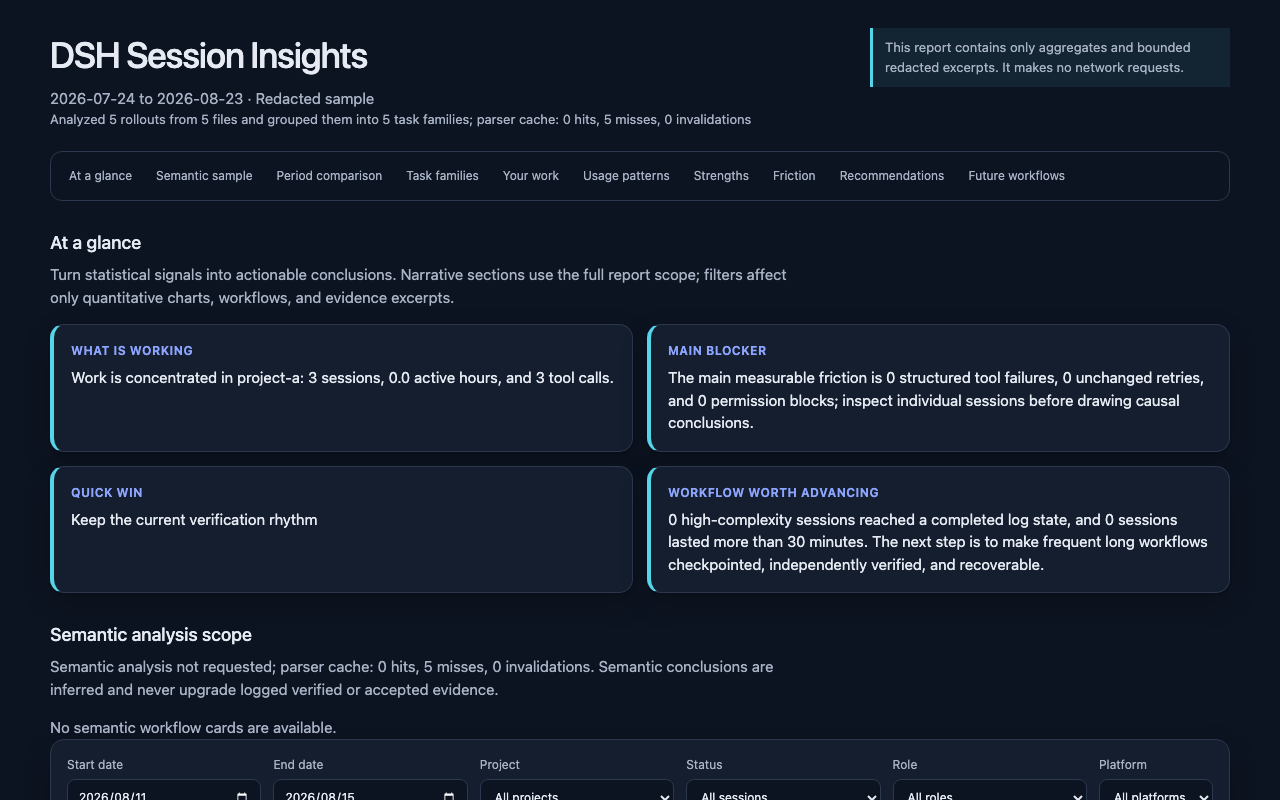
The HTML file contains its own styles and data, so you can keep it locally and open it without a server. A machine-readable JSON report is written beside it.
Install the Bundle
Requirements: DeepSeek Harness and Python 3.11 or newer.
DSH compatibility: The current verified support baseline is 0.1.5-rc.2 (macOS native workflows). See DSH compatibility for other-platform scope.
Install the published Bundle into a DSH profile, then start that profile:
dsh plugin --profile web add dsh-session-insights
dsh web
To install from a reviewed source checkout instead:
git clone https://github.com/GreenLv/dsh-session-insights.git
cd dsh-session-insights
dsh plugin --profile web add .
dsh web
Then run this in the DSH composer:
/session-insights --days 30 --locale en
The command prepares bounded semantic batches, queues the current DSH agent to analyze them serially, and writes the final HTML/JSON under $DSH_HOME/insights/runs/<run-id>. Add --deterministic to skip the model-assisted stage. The command name intentionally differs from /insights, so this Bundle can coexist with dsh-insights.
The npm package has no install or build lifecycle script. The registry command installs the published Bundle; dsh plugin ... add . installs the current local checkout.
Availability
- Install the published Bundle from npm.
- Download versioned artifacts from GitHub Releases.
- Find the public directory entry on dsh.pub.
- Other verified community listings are recorded in the distribution ledger.
Privacy modes
Deterministic reports run offline. In native plugin mode, complete raw snapshots are streamed from sessionQuery to Python over stdin and are not copied into the run directory. Choose how much session content the report and optional model stage may retain:
| Mode | Report content | Semantic analysis |
|---|---|---|
redacted (default) | Keeps bounded excerpts after anonymizing identity and paths and filtering secrets | Uses bounded, redacted evidence only when you explicitly run the semantic workflow |
metrics | Omits excerpts and keeps aggregate measurements | Disabled; no semantic batches are created |
local | Keeps bounded local paths and text after secret filtering | Explicit opt-in for a trusted local destination and configured model provider |
The tool itself does not add an upload channel. If you use the optional semantic workflow, bounded evidence cleaned according to --analysis-privacy is analyzed by the model provider currently configured in DSH.
Reports are refused inside $DSH_HOME/sessions, so generated files cannot be mixed into the source log tree.
Native command
/session-insights [--days N] [--project PATH] [--privacy MODE]
  [--analysis-privacy MODE] [--analysis-depth LEVEL]
  [--locale zh-CN|en] [--deterministic] [--resume] [--no-open]
Project filters use the host operating system's path syntax. On Windows, pass a native path such as /session-insights --project C:/path/to/project; a POSIX-rooted path such as /path/to/project is rejected instead of silently matching no sessions.
The semantic workflow is the default. Invalid model output gets one repair opportunity and can then fall back explicitly to the deterministic report. The current session is counted for coverage but excluded from recommendations as meta-analysis.
Compatible CLI and Skill workflow
The v0.1 file-log CLI and Skill remain available for automation and environments that do not mount the Bundle:
DSH_HOME="${DSH_HOME:-$HOME/.dsh}"
python3 scripts/bootstrap.py install --dsh-home "$DSH_HOME"
CLI="$DSH_HOME/tools/dsh-session-insights/venv/bin/dsh-session-insights"

# Review the last 30 days and open an English dashboard
"$CLI" report --dsh-home "$DSH_HOME" --days 30 --locale en \
  --format html --output ./dsh-insights.html --open

# Limit the report to one project on macOS or Linux
"$CLI" report --dsh-home "$DSH_HOME" \
  --project /path/to/project --format html --output ./project-insights.html

# Produce aggregate metrics without excerpts or semantic batches
"$CLI" report --dsh-home "$DSH_HOME" --privacy metrics \
  --format json --output ./dsh-metrics.json

# Check the installation
"$CLI" doctor --dsh-home "$DSH_HOME"
The Windows PowerShell equivalent uses the managed Windows launcher and a Windows-native project path:
$Cli = Join-Path $env:DSH_HOME 'tools\dsh-session-insights\venv\Scripts\dsh-session-insights.exe'
& $Cli report --dsh-home $env:DSH_HOME --project 'C:\path\to\project' --format html --output .\project-insights.html
To remove only this project's managed directories:
python3 scripts/bootstrap.py uninstall --dsh-home "$DSH_HOME"
The installer manages only:
$DSH_HOME/skills/dsh-session-insights$DSH_HOME/tools/dsh-session-insights
It refuses symbolic-link targets, overlapping roots, and existing unmarked directories. It does not overwrite another Skill.
Manual semantic review
The native command orchestrates semantic review by default. The CLI exposes each phase for debugging or automation:
dsh-session-insights semantic prepare --dsh-home "$DSH_HOME" --days 30 --workdir /safe/workdir
dsh-session-insights semantic validate-batch --workdir /safe/workdir --batch batch-001
dsh-session-insights semantic prepare-aggregate --workdir /safe/workdir
dsh-session-insights semantic validate-aggregate --workdir /safe/workdir
dsh-session-insights semantic finalize --workdir /safe/workdir --output report.html
Each model-produced JSON file is validated before it can enter the final report. Unknown evidence IDs, prohibited completion claims, malformed enums, and privacy leakage fail closed. If the semantic stage cannot finish, finalize --fallback records the degradation and preserves the deterministic report.
Current scope and limitations
- Native input is the trusted DSH
sessionQueryservice; CLI compatibility input is the current session-log generation under$DSH_HOME/sessions—session.jsonl.zstdfor generation 0,session.vN.jsonl.zstdfor generation N, and the plaintext.jsonlforms when a home is configured without compression. - Output follows
dsh-session-insights/1. - Token counts are deduplicated per
(turn, step)and are usage measurements, not billing or quota figures. - The Dashboard and semantic prompt contract support
zh-CNandenfrom the same report schema. - Reports infer patterns from available evidence; they do not prove intent, quality, task acceptance, or security.
Exact package, CI, native macOS, and focused native Windows evidence is kept in the v0.2.0 release acceptance record. Deterministic slash dispatch and rendered English DOM remain unverified natively on Windows. The historical v0.1 CLI/Skill evidence remains in the v0.1.0 acceptance record. Current compatibility evidence and its platform limits are recorded in the 0.1.5-rc.2 acceptance record.
DSH compatibility
We support only the explicitly verified minimum baseline or the latest DSH version after verification. We do not maintain historical DSH releases, promise compatibility across intervening versions, or treat a new release as supported before validation. Users on older hosts should upgrade to the verified baseline.
The package declares 0.1.5-rc.2 as its current DSH requirement. This exact range is also what DSH plugin markets display and enforce during installation.
| Scope | DSH version | Status |
|---|---|---|
| Current support baseline | 0.1.5-rc.2 | Verified within the scopes below |
| Source and automated-test review | 0.1.5-rc.2 | Reviewed and adapted against the installed packages; passing locally |
| Native host acceptance | 0.1.5-rc.2 | macOS isolated host: deterministic, full semantic, metrics skip, fallback, and Skill discovery passed |
0.3.2 retains the generation 0–3 session-log support introduced in 0.3.1. The metadata-only update does not alter platform-specific launchers or host interfaces, so the full Windows/Linux native model workflows are not repeated. The existing three-platform CI checks shared code and paths; it does not establish native acceptance on those platforms. These results apply to the named DSH version and verification scope. Historical acceptance records remain release evidence, not continuing support commitments.
Session log generations
One logical session can hold several immutable log generations. The reader selects exactly one, using the canonical filename rather than file timestamps.
| Situation | Behavior |
|---|---|
| Several canonical generations in one session directory | The highest version wins; the session is counted once, and a migrated session is never summed twice |
Generation 0 only (session.jsonl[.zstd]) | Read the retained log format; this does not imply support for an older DSH host |
Noncanonical names (temporary, uppercase, leading-zero, .v0, session.lock) | Never selected; an in-flight write cannot be mistaken for a committed generation |
| Newer than the supported generation | Reported and skipped, with a warning; the session is not silently reported from an older generation |
| Corrupt or undecompressable current generation | Reported as unreadable; the reader does not fall back to an older generation |
| Both compression encodings in one directory | Reported as ambiguous; the session is not read |
| Several project directories claim one session id | Each session directory is counted independently |
Tool and usage counts retain historical events, while semantic evidence excludes replaced messages. DSH derives an ordered model-visible conversation (the surface) from its event log. Replacement endpoints refer to positions in that conversation, not a numeric range of event sequence numbers.
| Event | Behavior |
|---|---|
system/message | Counted as system content; never user work, never excerpted, never leaked into titles or semantic evidence |
user/message with source.kind == "user" | A direct human prompt: counts as user work and may seed the title |
user/message with any other source.kind | Synthetic injected context (plugin, goal, skill catalog, subagent report, …): counted separately, excluded from user work and semantic evidence |
assistant/attempt | Counted as an attempt that committed no visible reply; never materialized as an assistant message, and its token usage is reported unavailable rather than estimated |
assistant/message | Carries its step usage; usage is deduplicated per (turn, step) so a stream field cannot double-count |
surfaceOp: "append" | Normal surface growth |
surfaceOp: {op: "replace", startSeq, endSeq} | Compacted conversation leaves the semantic summary; historical tool and token event statistics are retained |
session/end-seed with data.inherited: true | Records the fork cut; untagged markers establish nothing |
| Unknown event type | Counted in coverage.unknown_record_types and reported, never silently ignored |
npm download history
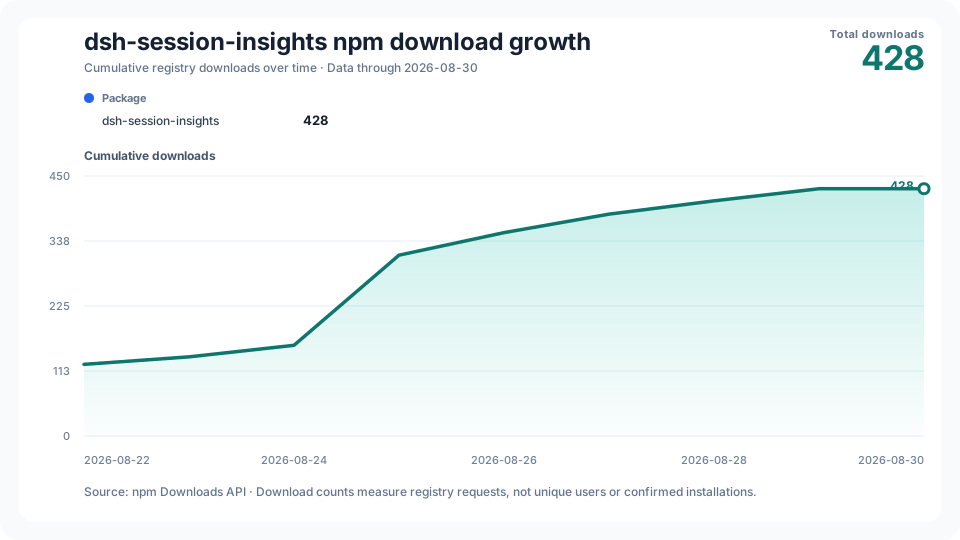
The cumulative chart is generated daily from the npm Downloads API. npm download counts measure registry requests; they are not counts of unique users or confirmed installations. The workflow can also be run manually if GitHub delays or disables a scheduled run.
Development and project docs
python3 -m pip install -e '.[dev]'
python3 -m unittest discover -s tests -v
python3 scripts/build_fixture.py --check
python3 scripts/audit_public_tree.py --root .
The test fixture is fully synthetic and reproducibly compressed.