
 @JRJRJPRO
dsh-chat-tree
把 对话分支 画成 可点击的树
- Stars
- 14
- Language
- JavaScript
- Created
- Sep 19, 2026
- Updated
- Oct 4, 2026
Introduction

dsh-chat-tree
Every branch of a conversation, drawn as a tree down the right edge of
DeepSeek Harness.
Click a dot to jump to that turn. Click + to continue from it.
English · 中文
Install
Desktop app (DeepSeek Harness 0.2): open Settings → Plugins → Install and enter
dsh-chat-tree. Its settings live under Settings → Conversation tree.
Web / CLI (dsh 0.1.5):
dsh plugin --profile web add github:JRJRJPRO/dsh-chat-tree
Refresh your browser and it's live — no dsh restart, no other plugins needed.
To remove it: dsh plugin --profile web remove dsh-chat-tree. It also shows up under
Installed in the plugin market, where the toggle turns it on and off in about a second.
The tree draws itself
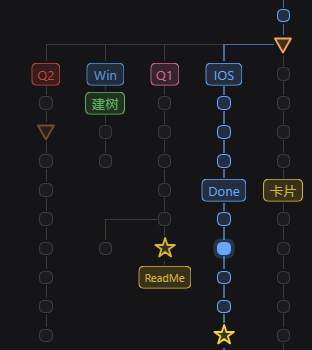
Refresh the page and it's already there, next to your chat.
Every dot is one turn. Click one to jump to it — the turn you're looking at is filled in solid as you scroll.
Branches sit side by side, so you can see at a glance where a conversation split and which path you're on. Named nodes carry their label right on the tree.
The sidebar folds too
In the session list on the left, a tree takes up one row: branches tuck under the root, and a chevron at the front of the row unfolds them. While folded, the row shows how many conversations the tree holds; a blue dot on the chevron means a branch inside is still running, a green one means it finished while you weren't looking. Prefer the flat list? Turn off Fold sidebar by conversation in settings.
Every node has a card
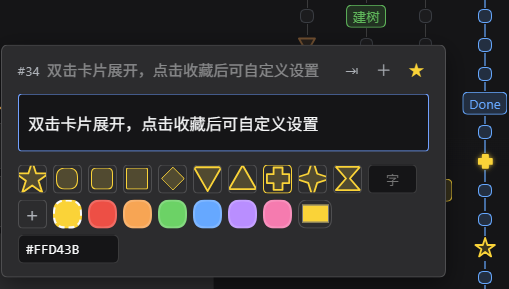
Hover a dot for a preview. Double-click the card to expand it — rename the node, pick a shape, pick a color, or upload an image.
The red ✕ at the far right of the expanded card deletes a branch: the node's session plus every branch hanging under it on the tree is archived into the host's archive list — a second click confirms, and anything archived can be restored. Only the first turn of a branch can be deleted: a log can't lose its middle, so to drop a few turns use rewind on the message row.
An expanded card closes as soon as you click anywhere in the chat.
There is an invisible divider on the left edge of the tree: drag it to give the tree more or less room (the chat column re-centres in what is left). The same value is the "tree band width" setting; 0 turns it off.
On touch devices, a tap does what hovering does.
| + | Continue from this turn as a new branch. On the empty root node, starts a fresh conversation in the same tree |
| ☆ | Favorite. The dot becomes a gold star, and you can give it its own icon and color |
| ⇥ / ⇤ | Split a branch off into its own tree, or put it back |
| ⊕ / ⊖ | Merge another conversation from this folder into the tree, or pull it back out |
A greyed-out button means you can't do it right now — hover it and it will say why.
The colors mean something
| Blue outline | This node is part of your current conversation |
| Solid blue | The turn you're looking at |
| Orange triangle | This turn was compacted |
| Green | Another branch finished while you weren't looking. Open it and the node goes back to normal |
| Faded branch | Turns you rewound — no longer pretending to be part of the conversation |
Make it yours
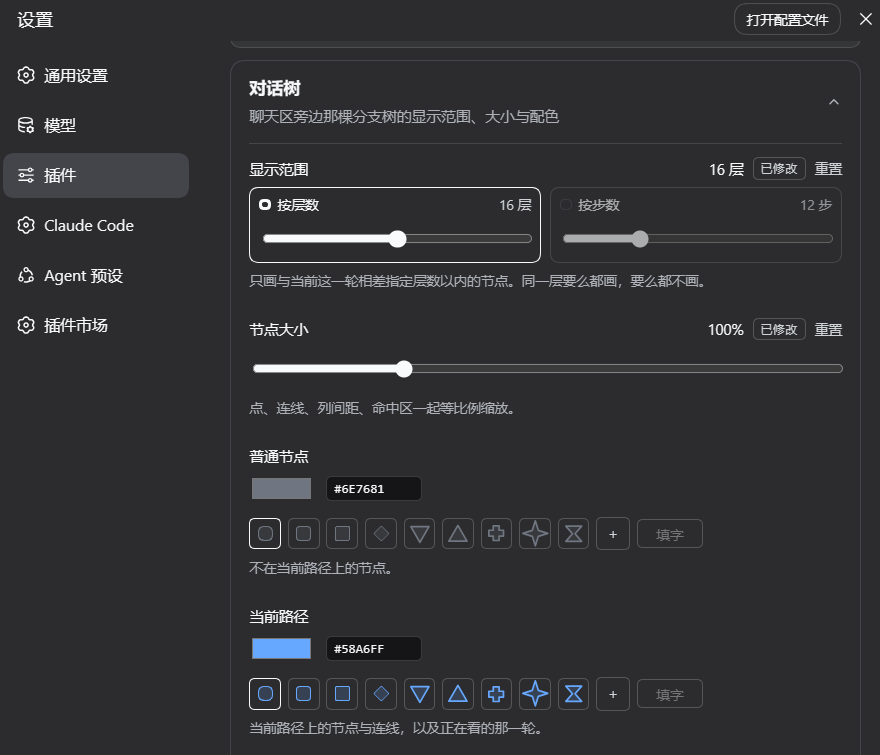
Settings → Plugins → Conversation tree.
Visible range keeps big trees readable by drawing only what's near your current turn — by depth or by distance, whichever you prefer. Either one has an "off" setting. Nodes at the edge shrink and fade rather than vanishing, and come back the moment you hover them.
Node size scales dots, lines and spacing together, 50%–250%.
Fold sidebar by conversation switches the session list back to the host's flat layout, one row per branch, when turned off.
Colors are one row per kind of node, color on the left and shape on the
right. Pick with the color wheel, or type a hex value like #FFD43B straight
in. What you set is exactly what gets drawn — the same in light and dark.
Reset hands a row back to the default.
Favorite icons
Once a node is starred, its card offers two more rows:
- 12 shapes — circle, rounded square, square, diamond, triangle, inverted triangle, arrow, pentagon, hexagon, cross, four-point star, hourglass
- A character — any letter or emoji, drawn inside a rounded outline
- An image — png / jpg / webp / svg, any size, scaled for you
Names, favorites, icons and colors are all stored on the dsh side, so they follow you to another browser or your phone.
- A color — 6 presets, a reset swatch, a color picker, or a typed hex value
Using Claude Code through dsh-claude? Read the note in AGENTS.md first.
Want to hack on it? AGENTS.md
MIT