
 @KeS1Ke
dsh-exit
A focused DeepSeek Harness web plugin that adds a safe, confirmed host-exit control.
- Stars
- 0
- Language
- JavaScript
- Created
- Aug 24, 2026
- Updated
- Aug 25, 2026
Introduction





✨ What it does
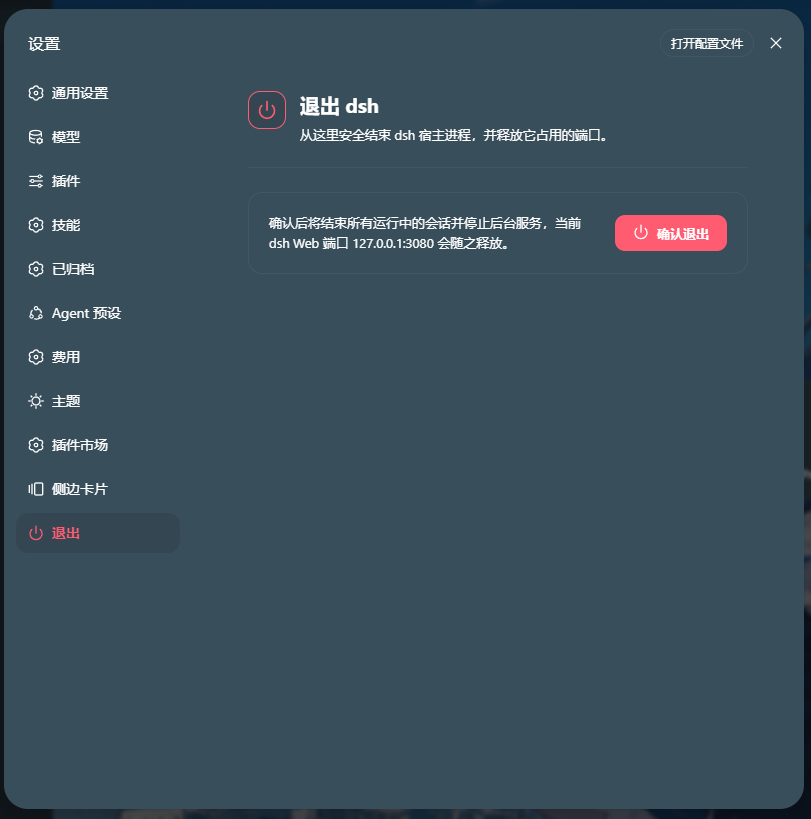
dsh-exit adds a dedicated Exit section to the dsh settings panel. It uses the highest settings order so newly installed settings plugins appear above it.

- Opens a confirmation modal before doing anything destructive.
- Keeps the Exit section at the bottom of the settings navigation.
- Calls the typed
dshExit/exitRemote method only after confirmation. - Gives the gateway a short acknowledgement window, then ends the host process.
- Releases every port held by that process; the settings page displays the current dsh Web host and port.
- Keeps the terminal window and browser tab available for the next action.
- Uses the existing dsh design tokens and the Lucide
powericon.
🎬 GitHub showcase
Follow the exit flow below, then see the plugin in a running dsh settings panel.
📸 Real dsh UI
The capture below is a current dsh settings view with dsh-exit installed. The red Exit entry is the plugin's real navigation item at the bottom of the settings list.
🧱 npm package contents
| Layer | File | Responsibility |
|---|---|---|
| Host | lib/index.js | Registers the dshExit Cordis service and the typed exit() Remote method. |
| Client | lib/client.js | Self-contained browser bundle: settings section, exit button, CSS, modal, keyboard handling, and Remote mounting. |
| Bundle patch | cordis.patch.yml | Inserts the plugin row into the dsh profile. |
| Package metadata | package.json | Declares the host entry, web client, and bundle patch. |
The package stays focused on the runtime files and package metadata. Additional screenshots and source materials are provided below:
| Showcase asset | Location |
|---|---|
| Animated WebP | docs/dsh-exit-landscape.webp |
| MP4 / WebM video | docs/dsh-exit-landscape.mp4 · docs/dsh-exit-landscape.webm |
| Archify source | docs/exit-flow-landscape.html · docs/exit-flow-landscape.workflow.json |
| Real UI capture | docs/dsh-exit-real.png |
🚀 Install from npm
Install the published package directly into the dsh Web profile:
dsh plugin --profile web add @kesike/dsh-exit
Restart the profile after installation. The dsh host loader resolves the bare runtime imports, so this package intentionally declares no runtime dependencies. To update or remove it:
dsh plugin --profile web update @kesike/dsh-exit
dsh plugin --profile web remove @kesike/dsh-exit
🖥️ UI behavior
| Interaction | Result |
|---|---|
| Click the red Exit item at the bottom of Settings navigation | Opens the exit section and confirmation action. |
| Click Cancel, press Esc, or click outside | Closes the modal without changing the host. |
| Click Confirm exit | Disables duplicate actions and invokes the host Remote method. |
| Remote call fails | Restores the controls and shows an inline error message. |
| Remote call succeeds | Closes the modal; the host exits shortly afterward. |
🔌 Remote contract
The host advertises a strict, parameterless Remote method:
namespace: dshExit
method:    exit
result:    true
gateway:   /api/dshExit/exit
The client-side dsh gateway returns the standard envelope { ok: true, value: true } on success. The service guards repeated calls with an exiting flag and schedules process.exit(0) after the response has a chance to settle.
🧪 Development checks
Run the lightweight syntax checks from the project root:
node --check lib/index.js
node --check lib/client.js
🗺️ Quick reference
- Target: DeepSeek Harness web profile
- Install mode: npm package
- Surface: final section in the Settings navigation
- Action: terminate the dsh host process
- Runtime port: read from the current dsh Web address in the settings page
- Repository topics:
dsh·deepseek-harness·dsh-plugin·plugin·javascript·web
The power icon comes from Lucide and is used under its ISC license.
Small surface, explicit confirmation, predictable exit behavior.