
 @KeS1Ke
dsh-start-and-exit
dsh-start&exit: safe start, exit, and restart controls for the DeepSeek Harness Web profile, plus a loopback-only Windows foreground launcher.
- Stars
- 0
- Language
- JavaScript
- Created
- Aug 24, 2026
- Updated
- Aug 27, 2026
Introduction
dsh-start&exit
Focused start, exit, and restart controls for the DeepSeek Harness web interface.





✨ What it does
dsh-start&exit adds a dedicated Start / Exit / Restart section to the dsh settings panel. It uses the highest settings order so newly installed settings plugins appear above it.
- Opens a confirmation modal before doing anything destructive.
- Keeps the Start / Exit / Restart section at the bottom of the settings navigation.
- Starts the dsh Web profile through a visible Windows Terminal/PowerShell launcher when requested.
- Provides a standalone Windows foreground launcher that minimizes the terminal only after the local WebUI is ready.
- Calls the typed
dshExit/exitRemote method only after confirmation. - Gives the gateway a short acknowledgement window, then ends the host process.
- Releases every port held by that process; the settings page displays the current dsh Web host and port.
- Keeps the terminal window and browser tab available for the next action.
- Uses the existing dsh design tokens and the Lucide
powericon.
🎬 GitHub showcase

Follow the exit flow below, then see the plugin in a running dsh settings panel.
📸 Real dsh UI
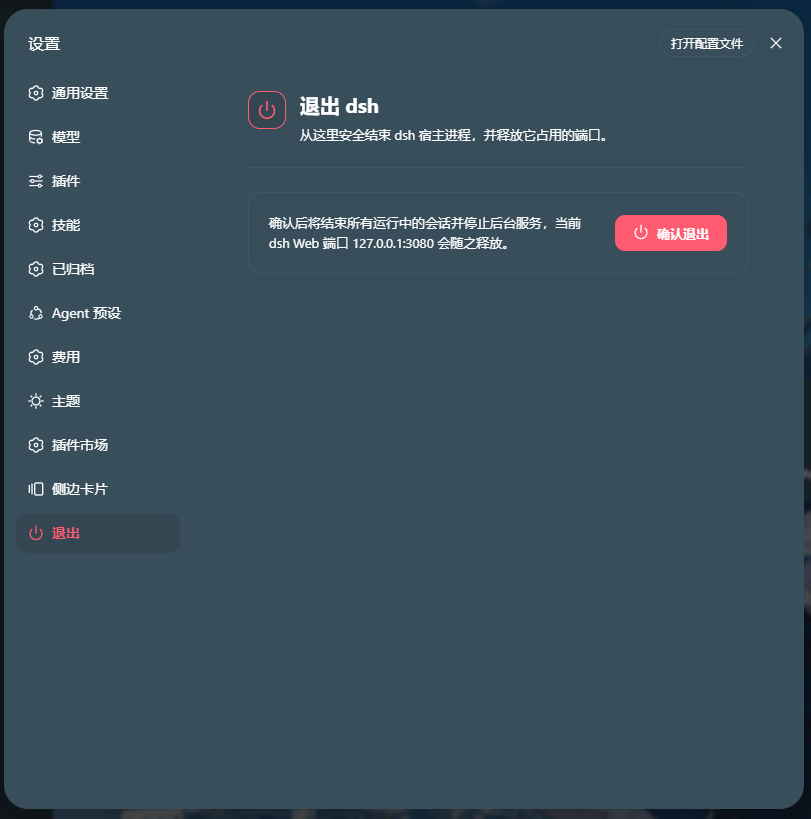
The capture below is a current dsh settings view with dsh-start&exit installed. The red Exit entry is the plugin's real navigation item at the bottom of the settings list.
🧱 Repository layout
| Layer | File | Responsibility |
|---|---|---|
| Host | lib/index.js | Registers the dshStartExit Cordis service and typed start, exit, and restart Remote methods. |
| Client | lib/client.js | Self-contained browser bundle: settings section, start/exit/restart controls, CSS, modal, keyboard handling, and Remote mounting. |
| Bundle patch | cordis.patch.yml | Inserts the plugin row into the dsh profile. |
| Windows launcher | scripts/launch-dsh-foreground.ps1 | Starts the Web profile in a visible foreground PowerShell terminal and minimizes it after the local WebUI is ready. |
| Launcher icon | assets/dsh-launcher-hq.ico | Multi-size DeepSeek launcher icon for a Windows desktop shortcut. |
| Package metadata | package.json | Declares the host entry, web client, and bundle patch. |
The npm package stays focused on runtime files and package metadata. The Windows launcher and icon are repository utilities; additional screenshots and source materials are provided below:
| Showcase asset | Location |
|---|---|
| Animated WebP | docs/dsh-exit-landscape.webp |
| MP4 / WebM video | docs/dsh-exit-landscape.mp4 · docs/dsh-exit-landscape.webm |
| Archify source | docs/exit-flow-landscape.html · docs/exit-flow-landscape.workflow.json |
| Real UI capture | docs/dsh-exit-real.png |
🚀 Install from npm
Install the published package directly into the dsh Web profile:
dsh plugin --profile web add @kesike/dsh-start-and-exit
Restart the profile after installation. The dsh host loader resolves the bare runtime imports, so this package intentionally declares no runtime dependencies. To update or remove it:
dsh plugin --profile web update @kesike/dsh-start-and-exit
dsh plugin --profile web remove @kesike/dsh-start-and-exit
Package rename: existing
@kesike/dsh-exitand@kesike/dsh-start-exitinstallations should be removed and replaced with@kesike/dsh-start-and-exit.
🖥️ Windows foreground launcher
The repository includes an optional desktop launcher for Windows:
PowerShell 7 → scripts/launch-dsh-foreground.ps1 → dsh --profile web
The launcher keeps the dsh process in a visible foreground terminal while it starts. After http://127.0.0.1:3080/ returns a successful response, it calls Windows SW_MINIMIZE on that same terminal. The terminal is minimized, not hidden or detached, and remains restorable from the taskbar.
It refuses to start or keep dsh running when the selected port has a non-loopback listener. Do not commit personal .lnk files, profile directories, logs, npm caches, or generated archives; create the shortcut locally and point its icon to assets/dsh-launcher-hq.ico.
🖥️ UI behavior
| Interaction | Result |
|---|---|
| Click Start | Starts the dsh Web profile through the host launcher. |
| Click the red Exit item at the bottom of Settings navigation | Opens the exit section and confirmation action. |
| Click Restart | Schedules a new foreground dsh terminal after the current host closes. |
| Click Cancel, press Esc, or click outside | Closes the modal without changing the host. |
| Click Confirm exit | Disables duplicate actions and invokes the host Remote method. |
| Remote call fails | Restores the controls and shows an inline error message. |
| Remote call succeeds | Closes the modal; the host exits shortly afterward. |
🔌 Remote contract
The host advertises a strict, parameterless Remote method:
namespace: dshStartExit
methods:   start · exit · restart
result:     true
gateways:   /api/dshStartExit/start · /api/dshStartExit/exit · /api/dshStartExit/restart
The client-side dsh gateway returns the standard envelope { ok: true, value: true } on success. Exit and restart guard repeated calls, return the response before shutdown, and keep the host bound to the loopback-only Web surface.
🧪 Development checks
Run the lightweight syntax checks from the project root:
node --check lib/index.js
node --check lib/client.js
npm test
🗺️ Quick reference
- Target: DeepSeek Harness web profile
- Install mode: npm package
- Surface: final section in the Settings navigation plus an optional Windows launcher
- Actions: start · exit · restart
- Runtime binding: loopback-only (
127.0.0.1) - Repository topics:
dsh·deepseek-harness·dsh-plugin·dsh-start-and-exit·plugin·javascript·web·windows·powershell
The power icon comes from Lucide and is used under its ISC license.
One small surface for starting, exiting, and restarting dsh safely.