
 @Kevin-McIsaac
dsh-workspace-git-badge
No description
- Stars
- 0
- Language
- JavaScript
- Created
- Aug 30, 2026
- Updated
- Oct 21, 2026
Introduction
dsh-git-badge
Git status badges for DeepSeek Harness

Why
Most agent workflow failures happen quietly: branches drift, uncommitted files are left behind, and approved PRs or failed builds sit unnoticed. This plugin brings repository awareness directly into your workflow:
- At-a-glance session status: branch, file counts and PR/CI state on the input box. When the session is working in a linked
git worktree, the badge follows that tree rather than the main checkout.
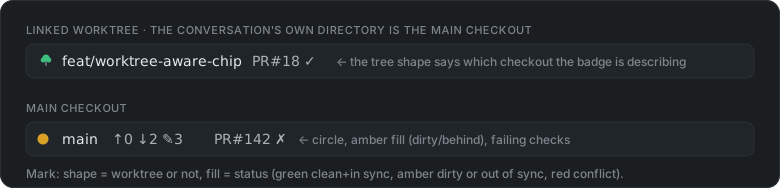
- Actionable session overview: pinpoints the session requiring attention. The session row status icon is extended to show what git actions are needed, e.g., push, merge. The row's hover card lists this icon, the action and the reason (
↑ push — no upstream configured). The chip leads with the same icon, and a checkout with nothing to do shows anin syncdisc — green when nothing is outstanding, amber when commits are not yet merged — so a session is never iconless.
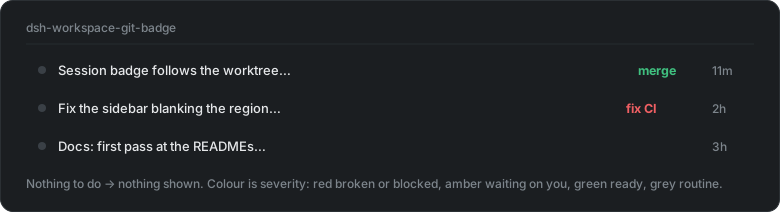
Both are updated within seconds of any commit, checkout, stage or file edit — including inside a linked worktree for safe isolation of parallel dhs working session.
Install
Use the plugin market place or install manually:
dsh plugin --profile web add dsh-git-badge # marketplace Install does this step
Then restart the web process and refresh the browser. That is the whole install: every surface rides an upstream slot, so there is nothing to patch and no second step.
Sidebar technical details
The status icon renders using the upstream
sidebar.session.row.leading seat — a 16px cell in the row's leading cluster,
rendered only while the session is idle. The hover-card provenance line rides
upstream's own sidebar.session.row.hover seat as well.
Testing
See TESTING.md — clean-profile boot (customer simulation) and the
gotchas list. cd dsh-git-badge && npm test
runs the whole suite (parser, real temp repositories, resolution, SSE, the
watcher, every gh degradation path and the rendered surfaces) with no DSH, no
network and no restart.
Worktrees
A worktree isolates each session to ensure it does not step on another sessions work, e.g., change or delete the branch, modify the same file.
The challenge
A DSH session remembers the directory it was created in and that value can't be changed. After moving a session to a worktree there is no native method for the status badge to identify which worktree the session maps to. This means the status badge reports the wrong branch, the wrong counts, the wrong pull request.
The solution
When we switch to a worktree, we create an entry in the register, that is stored on disk. To ensure this is done properly we use the included worktree skill
Requirements
- Node.js ≥ 20,
giton PATH - DSH with the
webprofile (any install) ghon PATH, authenticated, for the PR/CI token and the row'smerge/reviewactions — otherwise those are silently absent and everything else still works