
 @KumarZX
dsh-memory-wrap
DSH plugins: idle memory wrap-up sidebar plus vault search, distill, and rules.
- Stars
- 0
- Language
- JavaScript
- Created
- Sep 4, 2026
- Updated
- Sep 8, 2026
Introduction
dsh-memory-wrap


English
After a DSH chat goes quiet, this plugin asks the model to save anything worth keeping into a Markdown vault, and shows the queue in the workbench.
Two packages ship together:
- kumar-memory — agent-preset plugin. It writes a daily interaction log, searches the vault, helps distill notes, appends short rules, and injects a wrap-up reminder after idle time.
- kumar-wrap — host UI. A workbench tab for status, idle / defer / cooldown, vault path, “wrap now”, and recent wrap-up records.
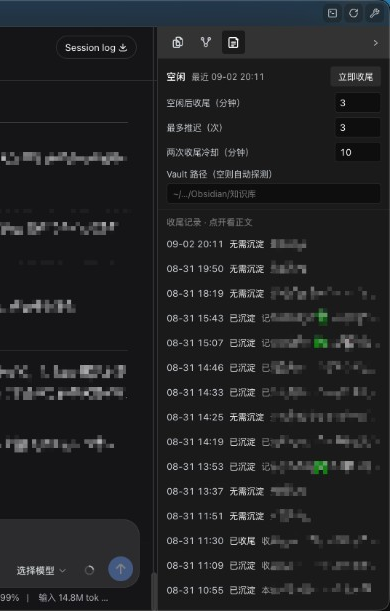
Vault path
Set it in any of these places. The first non-empty value that points to a real folder wins:
- The sidebar field Vault path (
~/.dsh/run/wrap-config.json→vaultPath) - Environment
KUMAR_MEMORY_VAULTorDSH_VAULT - Preset
config.vaultPath(see examples/preset-row.yml) - Common folders under the home directory: iCloud Obsidian
知识库,Documents/Obsidian/知识库,Obsidian/知识库
~ is expanded. Leave the sidebar empty to use the later steps.
Optional preset config.wrapReminder replaces the default wrap-up prompt.
Timing (sidebar)
| Field | Default | Meaning |
|---|---|---|
| Idle minutes | 3 | Wait this long after the last work turn, then inject wrap-up |
| Max deferrals | 3 | If new chat keeps interrupting the countdown, wrap at end of turn |
| Cooldown minutes | 10 | Minimum gap between two wrap-up injections |
Subagent sessions and plan mode skip wrap-up. Plugin-injected reminders are marked source.kind: plugin.
Install
- Copy (do not symlink)
kumar-memory/to$DSH_HOME/profiles/node_modules/kumar-memory/(DSH_HOMEdefaults to~/.dsh). A symlink into this repo makes Node resolve@deepseek-ai/*from the checkout and the preset fails to mount. - Add the row in examples/preset-row.yml to the agent preset you use (
agent.cordis.yml).namemust be a plain string path to that copy — not!!js(preset health check rejects it and DSH Desktop cannot start a new session). Setconfig.vaultPathor rely on auto-detect. - Copy
kumar-wrap/next to your profile packages (orpnpm addafile:/link:dependency). Merge examples/cordis.patch.yml into that profile’scordis.patch.yml, and addkumar-wraptodsh.profile.bundlesas in examples/profile-package.json.link:is fine for kumar-wrap only. - Restart DSH Desktop.
Folder layout this plugin writes to: 30_Daily/, 20_Knowledge/, 10_Projects/<name>/runbook.md, 50_System/RULES.md. Pair it with a vault that already uses that layout (for example Agent Vault).
License
MIT
中文
DSH 对话安静下来之后,本插件让模型把值得留下的内容写入 Markdown 仓库,并在工作台侧栏显示排队状态。
仓库里是两个配套包:
- kumar-memory:挂在 agent 预设上。写每日交互流水、检索 vault、蒸馏笔记、追加短规则,并在空闲后注入收尾提醒。
- kumar-wrap:宿主界面。工作台第三个 tab:状态、空闲/推迟/冷却、vault 路径、「立即收尾」、最近收尾记录。
Vault 路径
下面谁先配到一个真实目录,就用谁:
- 侧栏 Vault 路径(写入
~/.dsh/run/wrap-config.json的vaultPath) - 环境变量
KUMAR_MEMORY_VAULT或DSH_VAULT - 预设
config.vaultPath(见 examples/preset-row.yml) - 主目录下常见路径:iCloud Obsidian「知识库」、
Documents/Obsidian/知识库、Obsidian/知识库
支持 ~。侧栏留空就走后面几步。
预设里可选 config.wrapReminder 覆盖默认收尾提示。
时间(侧栏)
| 字段 | 默认 | 含义 |
|---|---|---|
| 空闲后收尾(分钟) | 3 | 工作回合结束后等这么久再注入收尾 |
| 最多推迟(次) | 3 | 倒计时被新对话打断达到次数后,回合结束直接收尾 |
| 两次收尾冷却(分钟) | 10 | 两次注入之间的最短间隔 |
子代理会话和 plan mode 不收尾。插件注入的提醒带 source.kind: plugin。
安装
- 拷贝(不要软链)
kumar-memory/到$DSH_HOME/profiles/node_modules/kumar-memory/(DSH_HOME默认~/.dsh)。软链回本仓时 Node 会从源码目录解析@deepseek-ai/*,预设挂载失败。 - 把 examples/preset-row.yml 加进你在用的 agent 预设
agent.cordis.yml。name必须是指向该拷贝的普通字符串路径,不要写!!js(健康检查不求值,会报 names no plugin,Desktop 无法开新会话)。可写config.vaultPath,也可留空自动探测。 - 把
kumar-wrap/装进对应 profile(file:/link:均可;只有 wrap 适合 link)。将 examples/cordis.patch.yml 合并进该 profile 的cordis.patch.yml,并按 examples/profile-package.json 把kumar-wrap写入dsh.profile.bundles。 - 重启 DSH Desktop。
插件写入的目录约定:30_Daily/、20_Knowledge/、10_Projects/<项目>/runbook.md、50_System/RULES.md。仓库布局可配合 Agent Vault。
许可证
MIT