
 @Leafmy
dsh-font-manager
DeepSeek Harness (DSH) plugin: pick UI/code/terminal fonts visually - enumerate installed fonts, edit fallback stacks, import custom fonts, live preview, one-click reset. Applies through the official ctx.theme service; never touches app.asar.
- Stars
- 0
- Language
- JavaScript
- Created
- Oct 17, 2026
- Updated
- Oct 17, 2026
Introduction
dsh-font-manager
DeepSeek Harness(DSH)的字体管理插件:在「设置 → 字体管理」里可视化地选择界面、代码与终端字体, 枚举本机已装字体、编辑回退栈、导入自定义字体、实时预览、一键恢复默认。
它不修改 app.asar,更新 DSH 不会丢。 字体通过 DSH 官方的 ctx.theme 服务写入,
与官方「设置 → 通用 → 字体」共用同一份设置。
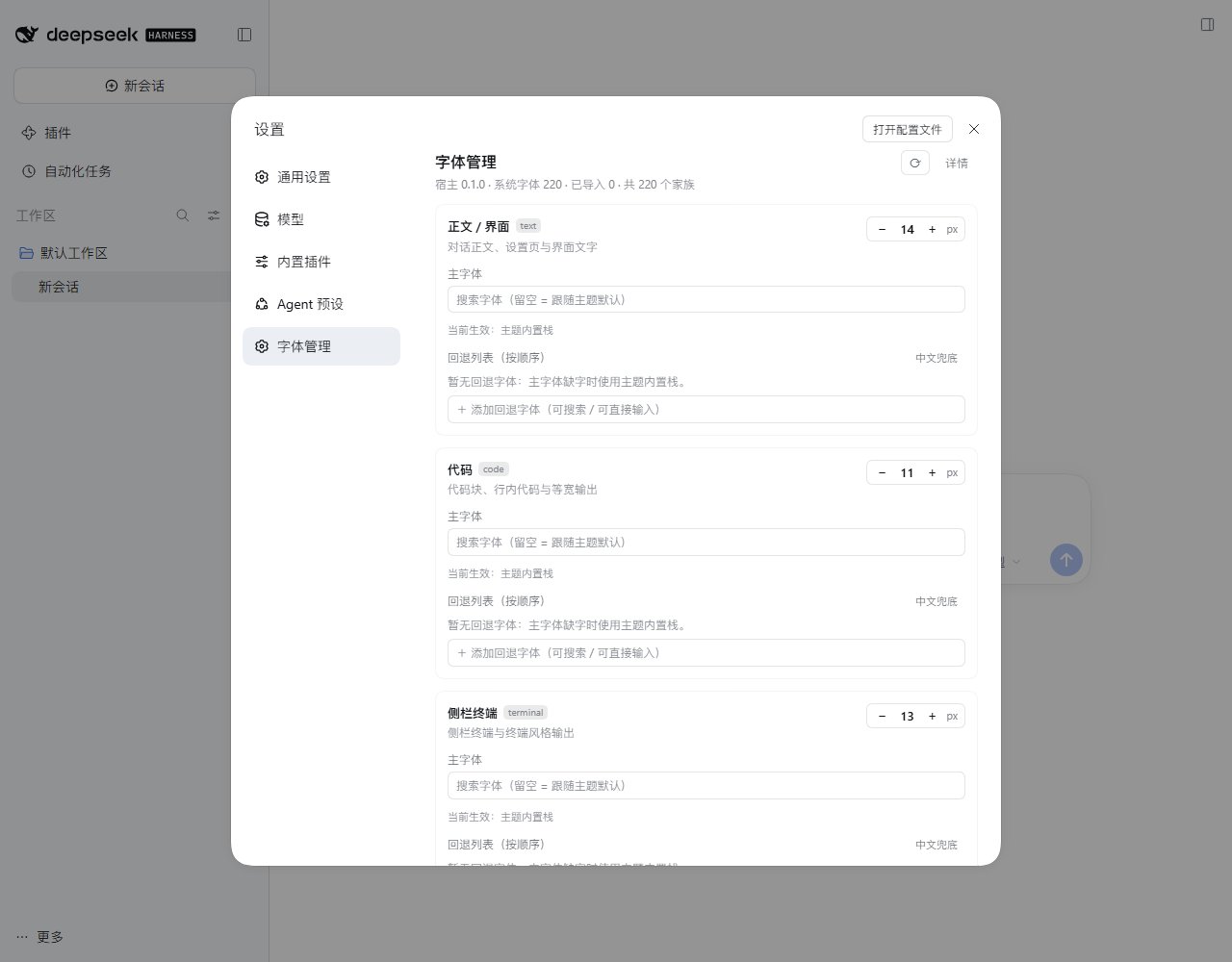
安装
需要 DSH Desktop ≥ 0.2.0-rc.1(包内声明
dsh.engines.dsh)。DSH 的插件管理器会据此拦住不满足的版本, 但下面方式一的dsh plugin ... add只是把参数透传给 pnpm、不做这个校验,低版本上装上去不会报错, 请自行确认版本(实测版本见 docs/VERIFICATION.md)。装完完全退出并重开 DeepSeek Harness Desktop,再进「设置 → 字体管理」。
方式一:从 GitHub 安装(推荐)
# tag 源码包(稳定,推荐)
dsh plugin --profile <你的 profile 名> add https://codeload.github.com/Leafmy/dsh-font-manager/tar.gz/refs/tags/v0.1.0

# 或跟随 main 最新代码
dsh plugin --profile <你的 profile 名> add https://codeload.github.com/Leafmy/dsh-font-manager/tar.gz/refs/heads/main
dsh plugin把参数透传给 profile 目录里的 pnpm;pnpm 由 DSH 自带,不需要自己装。- 安装成功后会自动把这个包追加进
~/.dsh/profiles/<profile>/package.json的dsh.profile.bundles(因为本包声明了dsh.bundle.patch),不需要手动改 bundles。 dsh不在 PATH 上时(Windows 便携版),用安装目录里自带的启动器:<DSH 安装目录>\resources\runtime\cli\bin\dsh.cmd。- 升级:换掉 URL 里的 tag 重新
add(先remove再add更干净)。 - 卸载:
dsh plugin --profile <你的 profile 名> remove dsh-font-manager,然后重启。
方式二:本地源码 / 手动安装
dsh plugin --profile desktop add file:/绝对路径/dsh-font-manager
仓库自带安装/卸载脚本(默认 dry-run,只打印将要做的每一步、不写任何文件;真正执行要显式 --apply):
node tools/install.mjs            # dry-run:打印备份 / junction / package.json 三步
node tools/install.mjs --apply    # 备份 package.json、建目录 junction、写 link: 依赖、追加 bundles
node tools/uninstall.mjs --apply  # 回滚:删 junction,从备份逐字节还原 package.json
不使用脚本时,最少做这三件事(install.mjs 还会额外写入
dependencies["dsh-font-manager"] = "link:<绝对路径>" 以固定包来源,手改非必需):
-
把本仓库放进 profile 的
node_modules/(复制或目录 junction 都行):New-Item -ItemType Junction ` -Path "$env:USERPROFILE\.dsh\profiles\desktop\node_modules\dsh-font-manager" ` -Target "C:\path\to\dsh-font-manager" -
在
~/.dsh/profiles/<profile>/package.json的dsh.profile.bundles末尾加一行"dsh-font-manager"。 -
重启 DSH Desktop。
本包自带的
cordis.patch.yml已经insert了id: dsh-font-manager,不要在 profile 层再重复insert同一个 id(重复 id 会让加载器起不来)。字体与字号本身由插件在运行时写进 profile 的cordis.patch.yml同 id 覆盖行,不用手动编辑。
许可证
MIT。字体文件不属于本项目;示例截图中的字体(HarmonyOS Sans SC、Montserrat)各自遵循其上游许可。