
 @Nirvana-Jie
dsh-lark-agent
Reach your DeepSeek Harness assistant from Feishu / Lark · 离开电脑,也能在飞书里找到你的 DeepSeek Harness 助手
- Stars
- 2
- Language
- TypeScript
- Created
- Oct 23, 2026
- Updated
- Oct 26, 2026
Introduction

dsh-lark-agent

Reach your DeepSeek Harness assistant from Feishu / Lark when you're away from your computer.
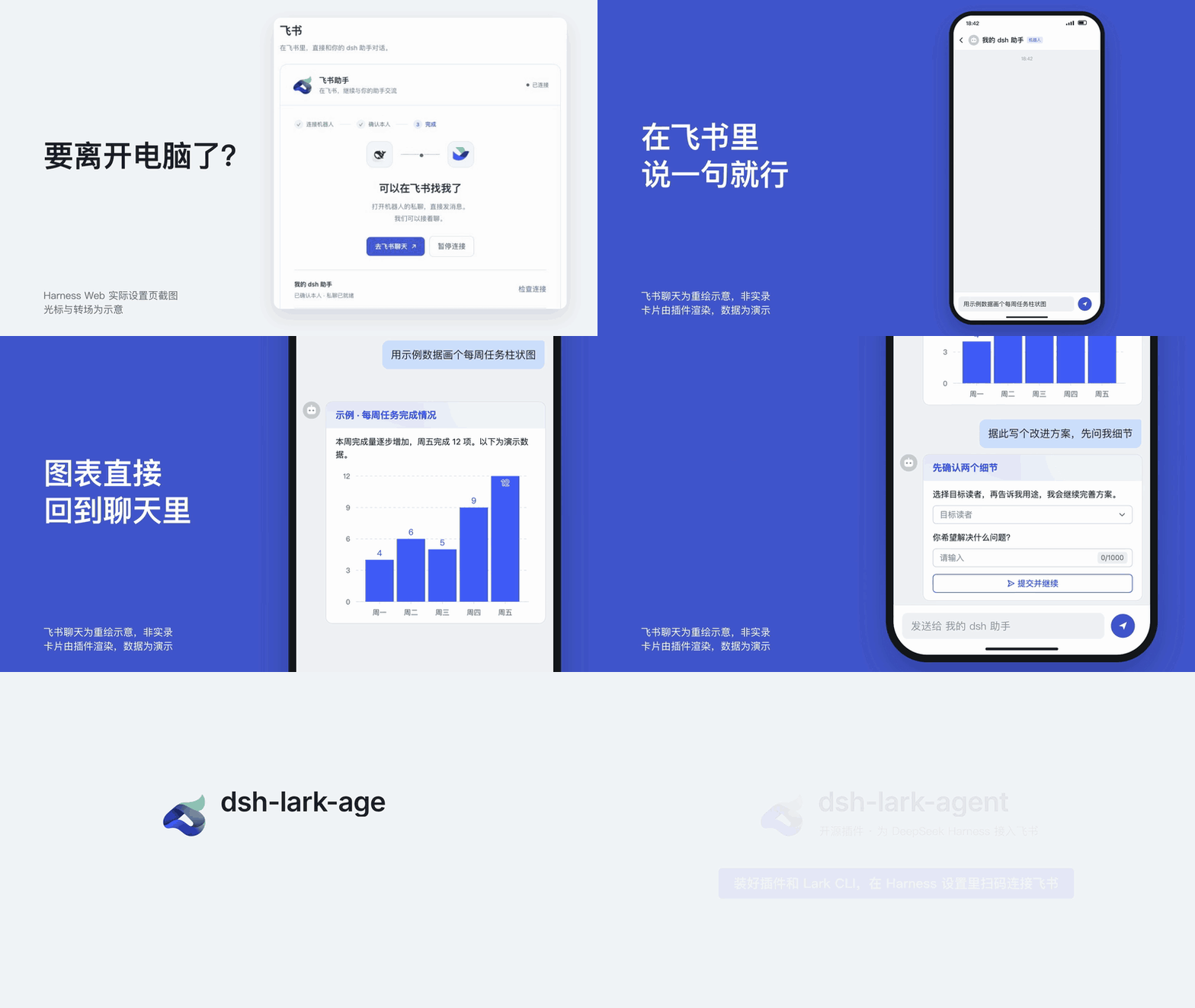
dsh-lark-agent adds a Feishu / Lark private chat to a running DeepSeek Harness: hand off tasks, talk through plans, and pick up earlier topics from your phone. Feishu gets its own sessions and never takes over chats already open in the desktop app or on the web.
Install / Update
Before you start:
-
DeepSeek Harness is running, can chat, and has a default model selected: PC App
0.2.1-rc.3(0.2.1-rc.2also works), or Web /dshCLI0.1.1-rc.2. -
The official Lark CLI is installed on the same machine before you enable the plugin (needs Node.js / npm):
npm install -g @larksuite/cli@1.0.98
lark-cli --version
Don't run
lark-cli config initorlark-cli auth login: the plugin creates its own dedicated CLI profile when you scan, andconfig initcan overwrite existing profiles.
Install on the DeepSeek Harness desktop app
In the sidebar, open 插件 → 添加插件 (Plugins → Add plugin), enter dsh-lark-agent, click 安装 (Install), then 立即启用 (Enable now). Restart if the app asks.
Install with the dsh CLI
dsh plugin runs pnpm, so pnpm must be on your PATH:
dsh plugin --profile web add dsh-lark-agent@0.5.0 --allow-build=protobufjs
Then restart dsh web.
[!NOTE]
--allow-build=protobufjslets a dependency of the Lark SDK run its install script. Without it, pnpm 11 stops withERR_PNPM_IGNORED_BUILDSand dsh does not enable the plugin. If that already happened, run:dsh plugin --profile web approve-builds '!protobufjs'The
!skips that optional script (it only prints a version hint) and lets dsh finish enabling the plugin. Then restartdsh web.
Update
When a new version has been out for a day, the Feishu settings page shows a notice with these steps (in the desktop app it also opens the plugin list for you). Until then, installs without an exact version, including @latest, still select the previous version because pnpm 11 skips releases less than 24 hours old. Use the exact version in the installation example above to install this release immediately after publication. If an install picks an older version that your DeepSeek Harness rejects as incompatible, see Troubleshooting.
- On the Feishu settings page, click 暂停连接 (pause) and back up as described in Upgrade.
- Desktop app: the Add plugin dialog says third-party plugins must be uninstalled before a new version is installed, so uninstall
dsh-lark-agenton the Plugins page and add it again (this in-app upgrade hasn't been tested end to end yet; an earlier source build is listed asdsh-larkbot). CLI: rundsh plugin --profile web update dsh-lark-agent@latest, then restartdsh web. - Click 恢复连接 (resume) and check that the bot replies.
Connect Feishu
Button labels are quoted in Chinese, as they appear, with an English gloss.
- Open 设置 → 飞书 agent (Settings → Feishu agent) in the desktop app, or 设置 → 插件 → 飞书 agent on the web. Choose a robot and click 扫码创建并连接 (scan to create and connect). Use 添加机器人 (add robot) for another Agent; each robot has its own preset and workspace settings.
- Scan the QR code with your own Feishu account and approve. If your organization requires admin approval, click 重新检查 (check again) once it is approved.
- Click 打开飞书私聊 (open private chat) and, from the account that scanned, send the pairing word (
DSH-…, valid for 10 minutes) as a plain-text message on its own, exactly as shown. If asked, confirm with 这是我,完成连接 (this is me). - When the page shows 已连接 (connected), send the bot a message.
The connection's model check does not create a “飞书连接测试” conversation in Harness. The Feishu entry works only while the host is online: not when the app is closed, the web host is stopped, or the computer sleeps.
What it can do
| In Feishu, you… | The assistant… |
|---|---|
| Send a request | Works on it with Harness's own tools (web search, reading pages, workspace files and more), streaming the reply live into one card; its thinking and tool steps are folded inside, step by step as in the app, and the card ends with the model, thinking depth and permission mode it used |
| Use several assistants | Manages up to 10 Feishu robots from one page, each with its own Agent preset, workspace, connection and history; pause a robot to edit its settings. Preset selection is available when the host provides it |
| Send images in your private Harness chat | Reads PNG, JPEG, WebP or GIF through the host's durable attachments, when the selected model supports images; up to 4 images, 10 MB each |
| Send a voice message | Use 开通语音权限 (authorize voice) for that robot, then pause, enable and save voice input. Transcribes up to 60 seconds of Chinese / English speech and replies in text; requires FFmpeg and a tenant plan that supports ASR |
| Ask for something that needs your OK | Sends a confirmation card: tap 允许一次 (allow once) or 拒绝 (deny); no answer within 5 minutes means it won't run |
| Get asked to choose by Harness | Sends a choice card: tap an option, or fill it in and submit |
Use /permission, or 设置 → 权限模式 (Settings → Permission mode) in the bottom menu | Switches between read-only, workspace edits and full access, like the app's permission selector; full access stops asking. The card you tap updates in place and turns green when done |
| Ask for the result file | Sends files from its workspace straight to the chat |
| Say "lead with the conclusion from now on" | Remembers the preference |
Continue inside a topic, or use /sessions, /new | Keeps each conversation in its own native Feishu topic; reply beneath a new topic's entry card, or use the searchable, paged dropdown to reopen an earlier topic |
| Ask for a bar chart of some numbers | Replies with a native Feishu chart card |
| Ask it to let you pick between options first | Sends a form card and continues once you submit |
| Ask for an architecture diagram or a report | Creates a Feishu doc (with a whiteboard for diagrams) shared read-only with you alone; in App 0.2.1-rc.2 / rc.3, opening that Feishu session in the app also shows a local preview |
Use /model, /thinking | Switches between the host's configured models and thinking depth, in sync with Harness on your computer (App 0.2.1-rc.2 / rc.3) |
By default it answers only your own private chat. In that chat the assistant is your Harness itself: the tools it can use and the actions that need your confirmation follow the permission settings on your computer. Sessions and memory stay on the computer running Harness; messages pass through Feishu and your model provider.
A new request in the main chat opens a topic; continue inside that topic to keep its context. Authorized group chats work the same way and still require an @mention on each message. /new opens another topic and keeps the earlier ones available.
Good to know
- More docs: commands, privacy, upgrades, the chat bottom menu, team deployment and troubleshooting are in DEVELOPMENT.md (Chinese).
- Compatibility: fully verified with PC App
0.2.1-rc.2anddshCLI / Web0.1.1-rc.2. PC App0.2.1-rc.3passes the real-host contract tests, and the plugin loads and connects on it (first-time QR setup on rc.3 is not tested yet). Other versions, platforms and tenants are not yet verified. - Language: the settings page, the bot's built-in messages (
/help, status text, card buttons, bottom menu) and the intro video are in Chinese.
License
MIT. DeepSeek and Feishu / Lark brand assets belong to their owners and are not covered by the MIT license; this is an independent open-source plugin, not an official product.