
 @SuperJJ007
papermachine
The AI analyst that shows its work. Runs Python and R on your own machine, and traces every chart back to the code behind it.
- Stars
- 66
- Language
- TypeScript
- Created
- Aug 24, 2026
- Updated
- Sep 12, 2026
Introduction
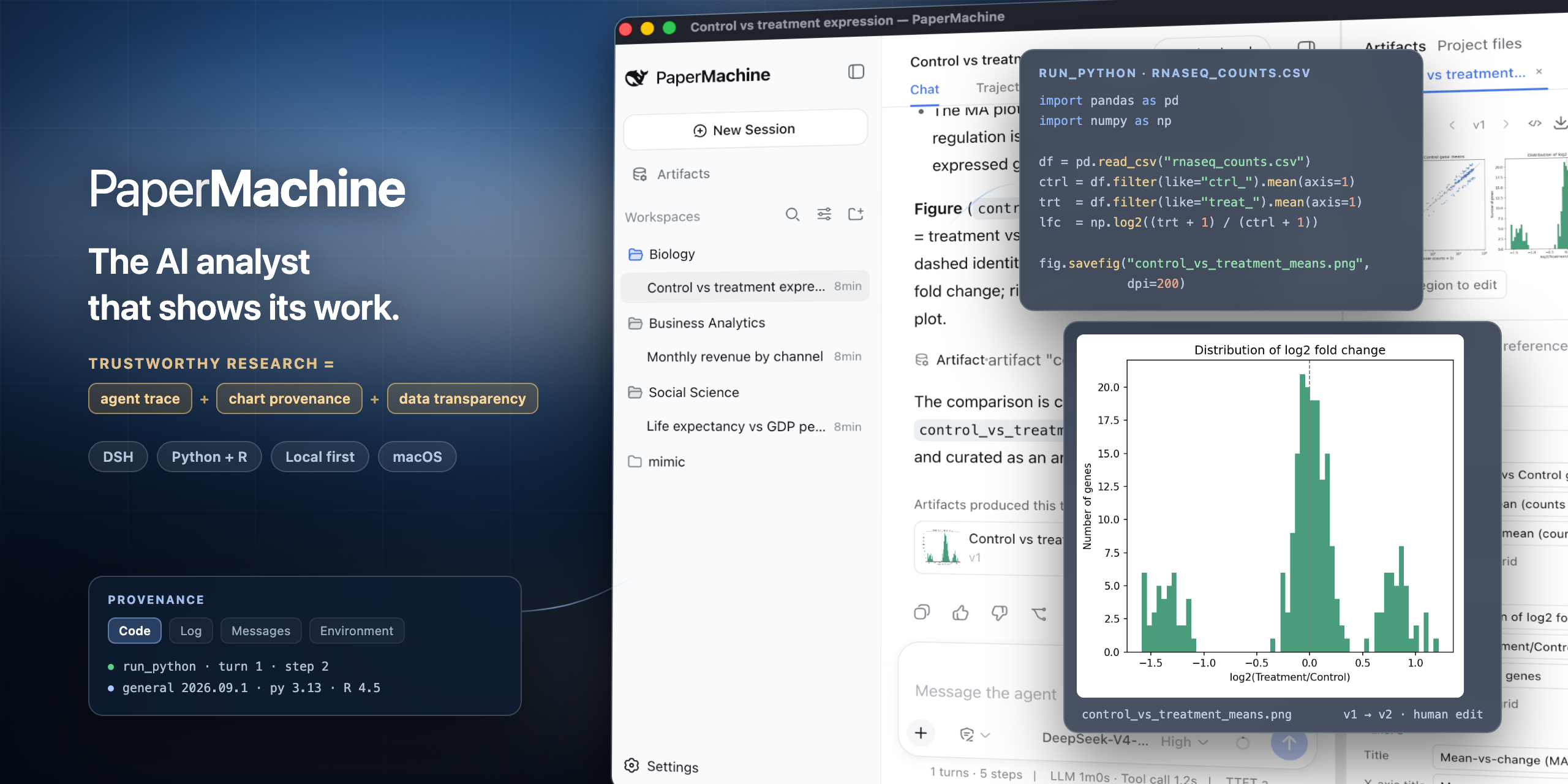
PaperMachine · 造纸机器
English | 中文
Trustworthy research, done with AI.






PaperMachine is a desktop app for everyone whose work runs on data — researchers, business analysts, data analysts. You say what you want in one sentence and it runs Python and R on your own machine. The difference is that the result is not handed to you out of a black box: agent trace shows the code it ran and the output it got at every step; result provenance takes any figure or table back to the code, the log, and the environment that produced it; data transparency keeps every dataset it read and every variable it changed open to inspection. You supervise the AI, and the whole process stays under your control.
Trace: every step it took is right there
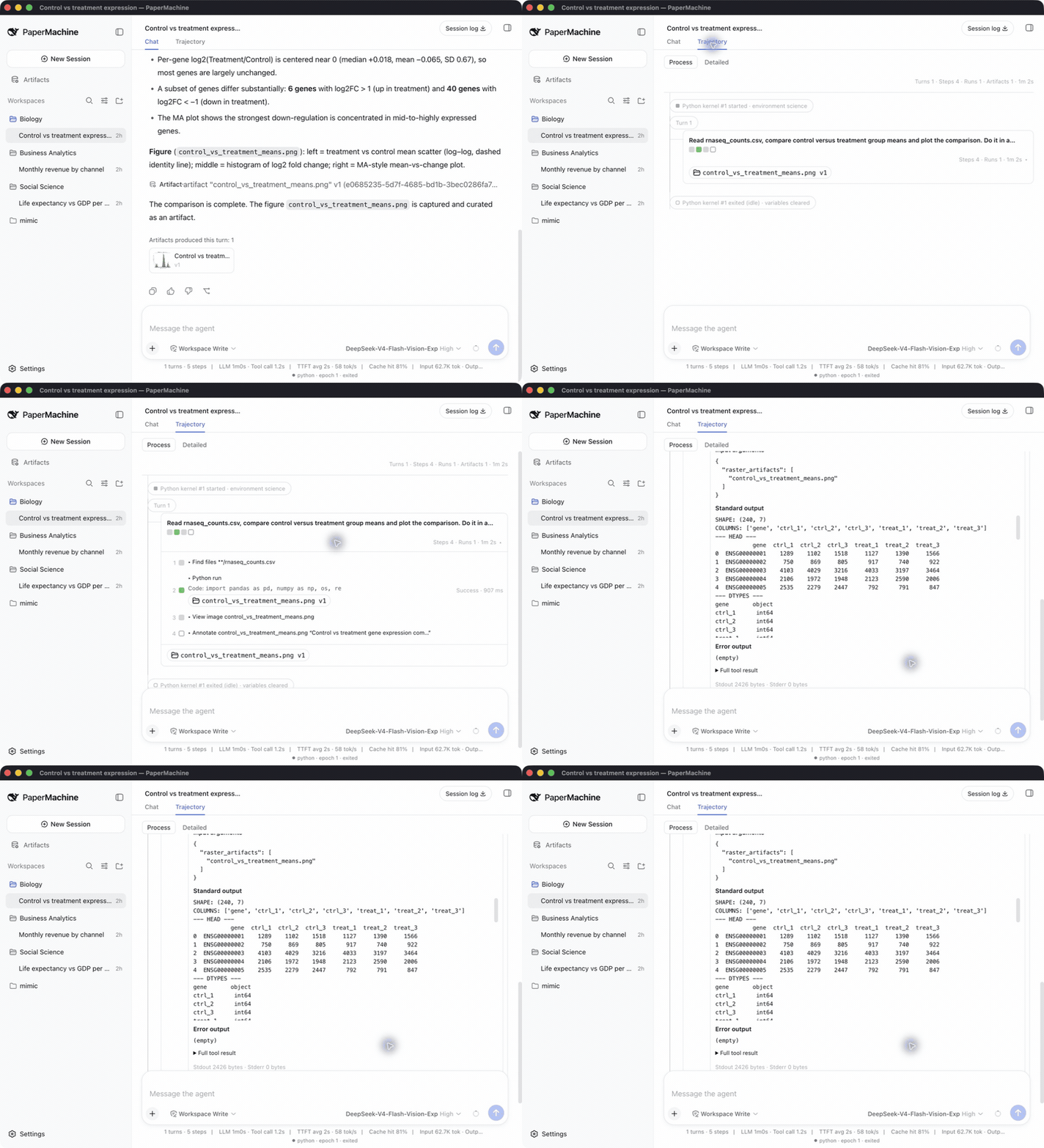
Every turn becomes a strip of steps: read the data, clean it, fit the model, draw the chart. Each step shows only a one-line title and a result badge until you open it; inside is the exact code it ran, its output, and the kernel state. Kernel restarts are marked inline, so you always know when variables were cleared. The Python and R kernels persist across turns, so what you built last turn is still there.
When a reviewer asks how those 600 rows were dropped, the answer is on the screen, not in your memory.
Artifacts: every chart leads back to where it came from
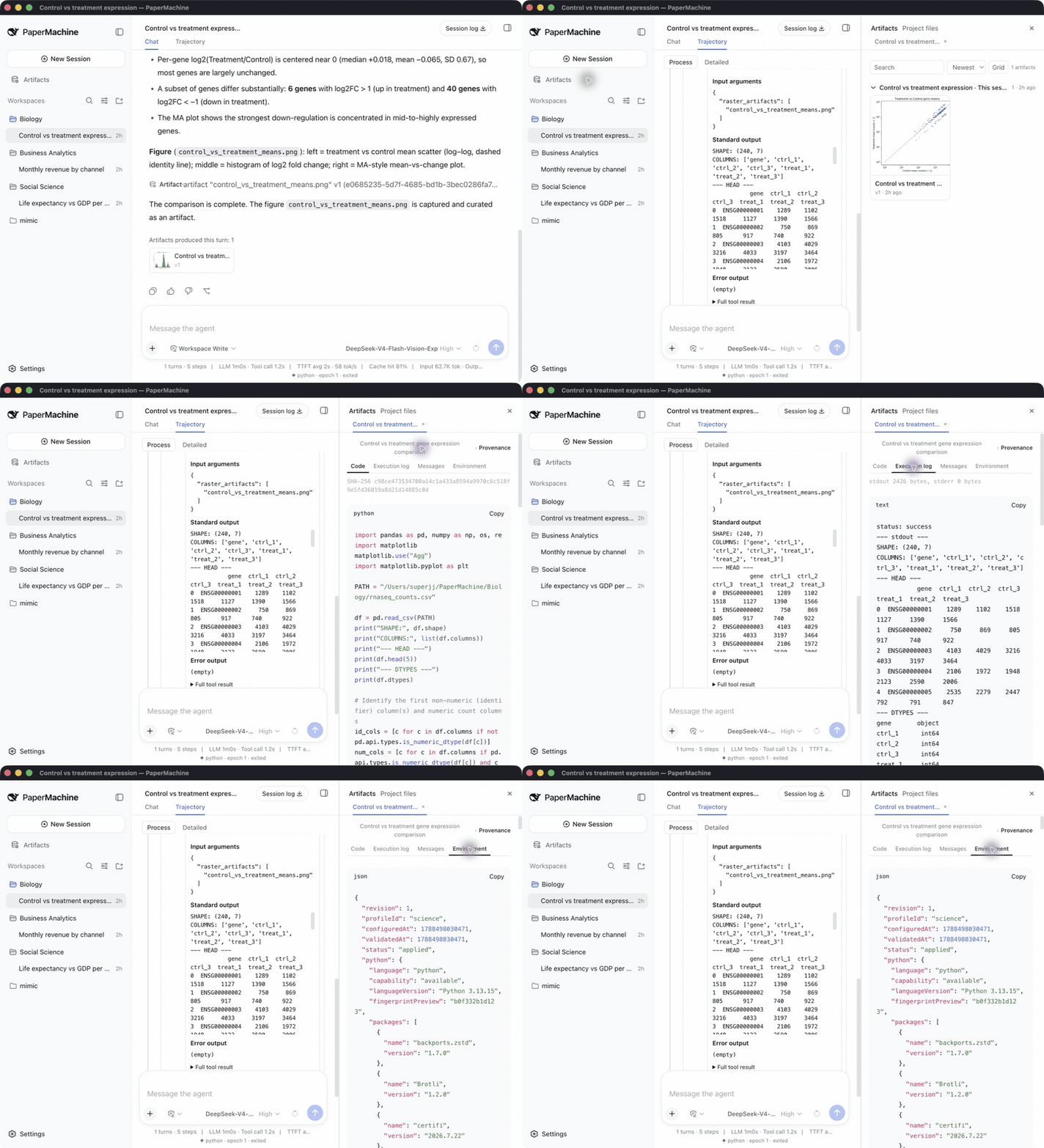
Every figure, table, and file the model produces lands in the artifact panel on the right, with a version number. One click on any artifact opens its provenance in four tabs: the code that produced it, the log of that execution, the question and result it answered, and the environment it ran in — package versions, kernel, timestamp. Artifacts produced in other sessions are traced too.
What you hand over is not just a chart, but everything behind it.
Chart editing: edit it, keep both versions
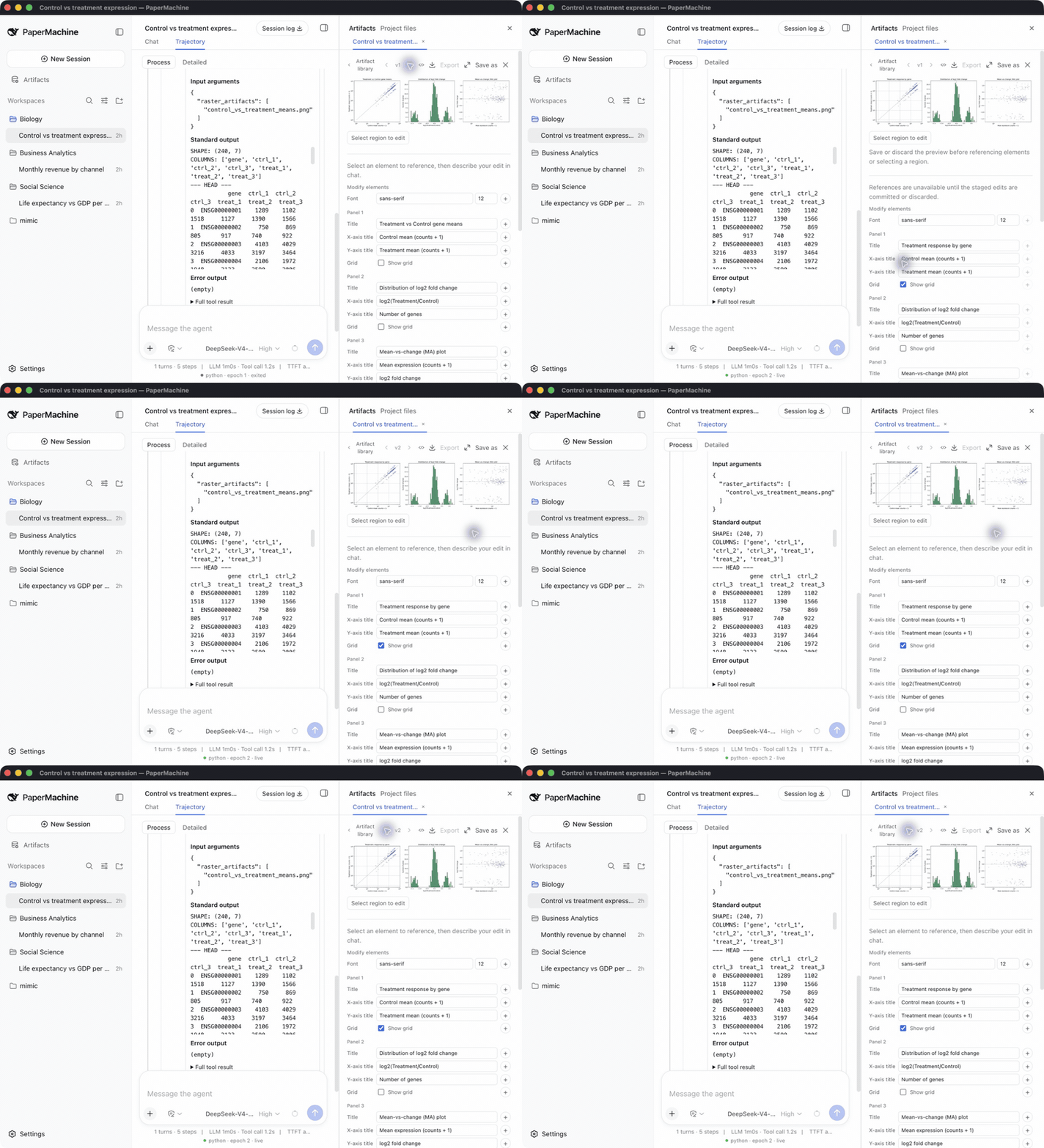
You do not have to go back to the code to fix a figure. Change a matplotlib or ggplot2 chart's title, axis labels, legend position, grid, or font directly in a panel — or select a region on the chart and have the model change only that. Saving writes v2 and marks it as a human edit; v1 stays untouched, and you can compare the two at any time.
Quick start
- Download your installer from Releases:
PaperMachine-<version>-arm64.dmgfor Apple silicon,PaperMachine-<version>-x64.dmgfor an Intel Mac,PaperMachine-<version>-x64.exefor Windows (experimental/beta — see the note below step 4). - Open the app and install the environment as described under First run below.
- Open Settings → Models and enter your DeepSeek API key. The app ships without one; it calls
deepseek-v4-flashby default. - Drop a CSV, Excel, SPSS, or Stata file into a project and ask your first question, for example: Plot life expectancy against GDP per capita for 2007, colored by continent.
First run
The first time you open PaperMachine it installs its own Python and R environment before opening a workspace. This happens once: afterwards the environment works offline, and later launches go straight to the workspace.
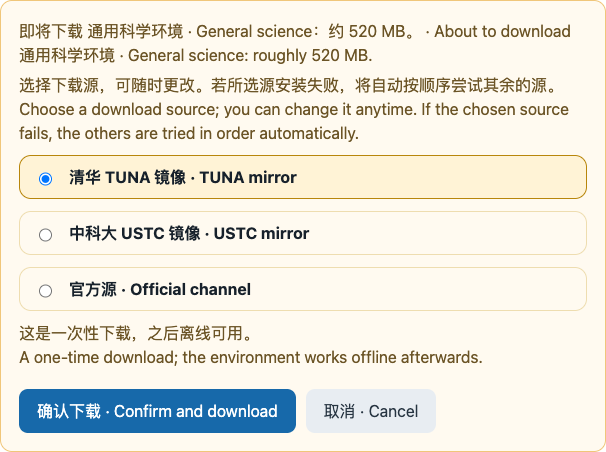
PaperMachine does not use the conda environments already on your machine. It ships its own micromamba and installs into ~/.papermachine, so what it runs and which packages are present stay exactly known, and your own environments are left alone.
The choices on this screen:
| Option | When to use it |
|---|---|
| Download and install | The default path. Installs the 22-package general science environment: about 850 MB to download, 6 GB of free disk needed. |
| Package source | Where packages are pulled from. USTC is preselected when your system language or timezone looks like mainland China, otherwise the official conda-forge channel; you can switch to either of the others, though on Windows TUNA fails every time from a path-length limit, which is why it is listed after USTC. Picking the wrong one is not fatal — if the chosen source fails, the remaining sources are tried in order automatically. |
| View the full package list | Read exactly which 22 packages are about to be installed. |
| Advanced: edit the package list | Add or remove conda packages in the prefilled list, one per line, name=version supported. Removing python or r-base fails the post-install check. |
| Keep current environment | Only appears once an environment is already installed. Reinstalling downloads the 850 MB again, so keep it unless you want a different package list. |
The workspace opens when the install finishes, but you cannot ask anything yet — the model key is yours to enter, as in step 3 above.
Neither installer carries a paid Apple/Microsoft signing identity, so macOS and Windows each show their own warning; the fix is different for each.
On macOS, since 0.1.1 the app is ad-hoc signed at build time, so Gatekeeper should give a plain "unidentified developer" rejection rather than reporting the app damaged. Depending on which prompt you see, three fixes apply:
- macOS 15 (Sequoia) and later: open System Settings → Privacy & Security, scroll to the bottom, and click Open Anyway.
- Older macOS: right-click the app and choose Open.
- If macOS instead reports the app "is damaged and can't be opened", neither of the above fixes that prompt — run the following once instead (
-rbecause the app is a directory):
xattr -dr com.apple.quarantine /Applications/PaperMachine.app
On Windows, SmartScreen warns about an unrecognized publisher: choose More info, then Run anyway. The installer is per-user and asks for no administrator rights. It does not require a Visual C++ Runtime already installed on the machine. The Windows installer is experimental/beta: its sandbox only partially enforces (not the full isolation macOS gets), R has known edge cases under non-ASCII install paths or usernames, Windows 10 64-bit or later is required, and an issue report should attach %USERPROFILE%\.papermachine\logs.
What is inside
The general science environment (22 packages)
| Python 3.13 | R 4.5 |
|---|---|
| NumPy, SciPy, pandas | tidyverse (including ggplot2), data.table |
| Matplotlib, seaborn | broom, modelr, lme4 |
| statsmodels, scikit-learn | survey, srvyr |
| PyArrow, openpyxl, pyreadstat, Pillow | haven, jsonlite |
Skills and tools
Three bundled skills, invoked by typing / in the composer: scientific-visualization, statistical-analysis, and scientific-writing. Your own skills in ~/.papermachine/skills shadow bundled ones of the same name.
Five science tools the model can call: run_python, run_r, get_science_state, annotate_artifact, and install_science_packages. The model has read-only access to your workspace and no shell.
How it works
The window talks to a local host process on your own machine. The host owns one Python kernel and one R kernel per session, a bundled micromamba, and a project-level artifact store. Only model requests leave the machine, to the DeepSeek API with your key.
Everything else stays in ~/.papermachine: sessions, artifacts, the installed environment, skills, and logs. Deleting that folder removes all of it.
PaperMachine sends three anonymous telemetry events (app.launch, environment.installed, environment.install-failed) carrying an app version, platform, and architecture, and no hostnames, paths, package lists, or error text. Set DSH_TELEMETRY_DISABLED=1 to turn it off.
Status and limitations
PaperMachine 0.1 is an early release. Known limitations:
- Analysis runs on macOS (Apple silicon and Intel) and Windows x64. Both platforms' sandbox enforcement is file-write confinement only — neither claims file-read, network, syscall, or scientific-validity isolation. Windows reports the weaker
partiallevel, not macOS'sfull, because its restricted-token backend cannot close two gaps a full-enforcement backend does: an externally Everyone-writable object stays writable through it, and an NTFS hard link aliases a granted workspace file onto an external path (seedsh-sandbox-windows-acl, "Verified boundaries"). Cancelling or timing out a run on Windows always restarts its kernel and loses every variable that kernel held, where macOS usually survives an interrupt. Windows kernel execution's real-hardware evidence is one manual verification, not a repeatable CI gate. The Windows desktop first-launch flow (onboarding, environment download and install) has not yet been verified on Windows hardware; kernel execution has. - A DeepSeek API key is required; the app ships no key.
- Neither installer carries a paid signing identity; the macOS package is ad-hoc signed since 0.1.1. See the notes above.
- Updates are manual: download the next installer.
- There is no variables panel yet; the kernel status bar shows each language's kernel state.
Roadmap
- Cooperative interrupt on Windows: cancelling or timing out a run without losing its kernel's state.
- A repeatable Windows CI gate against real hardware, replacing today's manual verification.
- Discipline environments, starting with the social sciences.
- A variable history view: shape changes of each dataset across cleaning steps.
Feedback
Bug reports and analysis questions are welcome in GitHub Issues.
Built on DeepSeek Harness
PaperMachine is assembled from DeepSeek Harness plugins. Developers start with the development guide and architecture documentation; agents follow AGENTS.md. The desktop carrier is documented in apps/desktop.
Run
The harness Web UI that PaperMachine wraps starts from a repository checkout; the command prints its URL:
git clone https://github.com/SuperJJ007/papermachine.git
cd papermachine
pnpm install
pnpm run build
pnpm dsh web
Run from source
The desktop app runs from the same checkout after pnpm run build; fetch the pinned micromamba for your architecture first (darwin-x64 on an Intel Mac, win32-x64 on Windows):
pnpm --filter @deepseek-ai/dsh-desktop fetch:micromamba darwin-arm64
pnpm --filter @deepseek-ai/dsh-desktop dev
Acknowledgements
- Bundled skills are vendored from K-Dense-AI/scientific-agent-skills (MIT).
- Screenshots use the Gapminder dataset (CC BY 4.0).
License
Third-party dependencies and their licenses are disclosed in THIRD_PARTY_NOTICES.md.