
 @TIREEDMAN
dsh-mulanci
木兰辞 · MulanCi — 多 Agent 编排与逐 Agent 认证管理;DeepSeek Harness 第三方源码预览 / multi-agent orchestration source preview
- Stars
- 1
- Language
- TypeScript
- Created
- Sep 8, 2026
- Updated
- Sep 9, 2026
Introduction
木兰辞 · MulanCi
English | 中文
A multi-agent orchestration plugin suite for DeepSeek Harness, currently distributed as a third-party source preview with its matching modified Harness—not a standalone dsh plugin add bundle. Configure a team in the WebUI, then ask for multi-agent work in the normal chat. The coordinator model selected in Harness calls agent_orchestra; each external agent uses its own configured model and authentication.
Repository · Source preview v0.1.0-preview.3 · Report an issue
See the interface
Set up the team and each agent's authentication in the sidebar; submit work in the main chat. The conversation board tracks stage progress, handoffs, results, and diagnostics.
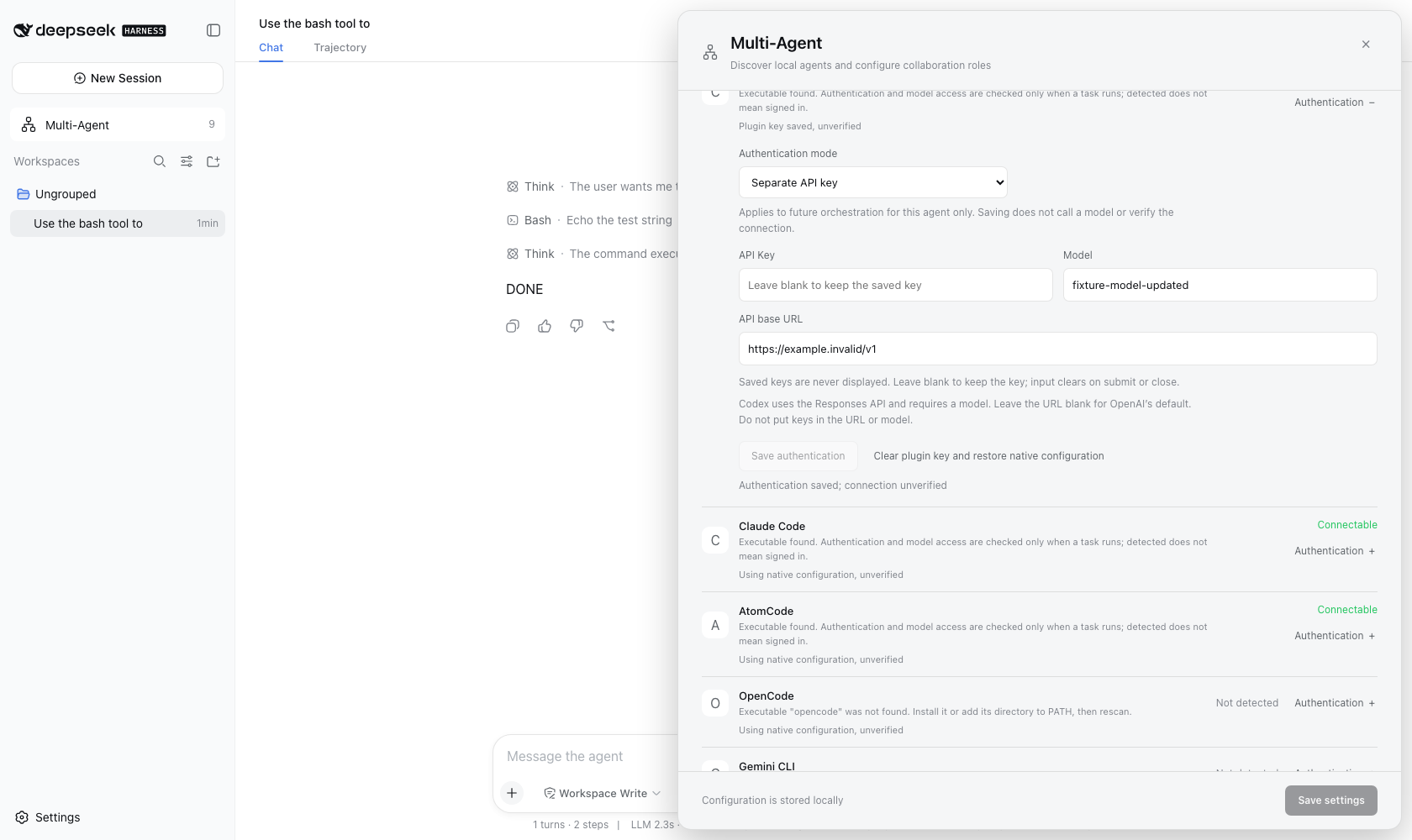
Controlled browser-test scene: per-agent authentication settings. The API-key field is empty; endpoint and model values are test placeholders. Saving settings does not establish account or model connectivity. This image is not evidence of a live multi-model run; see the verification record for the tested scope.
Why MulanCi?
The name comes from the ancient Chinese Ballad of Mulan, also known as Mulan Ci:
东市买骏马,西市买鞍鞯。
Our literal English rendering is: “In the eastern market, buy a fine horse; in the western market, buy a saddle and saddlecloth.”
Mulan gathers different equipment for one journey. MulanCi takes that idea into multi-agent work: choose agents with complementary strengths, assign planning, implementation, review, or other roles, and combine their results for one task. No agent brand owns a fixed role. Codex, Claude Code, and AtomCode are supported choices, not the definition of the framework; additional agents join through Harness providers or explicitly configured ACP adapters.
What this release is
Version 0.1.0-preview.3 is a third-party modified Harness source distribution, not an official DeepSeek release. It includes the three plugin packages and the matching host integration. MulanCi is the community project name; internal agent-orchestra identifiers remain unchanged. Existing @deepseek-ai/* names are retained for internal imports and attribution, not claimed as community-owned npm names. This distribution does not publish those packages to npm.
This is not a standalone dsh plugin add bundle. The current implementation depends on the host's remote bridge, sidebar slot, provider helpers, preset wiring, and persistent session event catalog. Installing only the three packages into an arbitrary Harness version is unsupported, including versions with the same 0.1.0-rc.5 package label. The release manifest identifies the exact included files by SHA-256; the source checkout had no verifiable Git commit, so no upstream commit is claimed.
Start an isolated copy
Use Node.js ^22.19.0 or >=24.0.0 and pnpm 11.7.0, matching the included manifests. Node 24 is the tested local runtime. Obtain the source preview from the release page above, verify it with the accompanying SHA-256 file, and extract it into a new directory; do not overwrite an existing Harness installation. The public repository and release archive both contain the source under harness. From that parent directory:
cd harness
CI=true pnpm install --frozen-lockfile
pnpm run build
DSH_HOME="$PWD/.community-home" pnpm dsh web --port 3081
On Windows PowerShell, use these install, build, and start commands instead:
Set-Location harness
$env:CI = 'true'
pnpm install --frozen-lockfile
pnpm run build
$env:DSH_HOME = Join-Path (Get-Location) '.community-home'
pnpm dsh web --port 3081
Open http://127.0.0.1:3081. In Settings, configure your own coordinator provider, API key, and model. Add/select a workspace. No credentials or existing conversations are shipped. Dependencies require downloading; this is not an offline binary distribution. Child agents use native login/configuration by default: an isolated Harness home does not isolate their own credential stores or permissions.
In Multi-Agent, expand an agent's authentication configuration to set its own API key, endpoint and model. Codex requires a Responses-compatible API and a model; Claude requires a Messages-compatible API. Claude API mode excludes native settings files, including file-based permissions and hooks; native mode retains them. ACP agents require their documented environment variable names. Saving only confirms configuration, not account access. A blank password retains the saved key; reset removes the plugin key and restores native configuration. These overrides apply only to Harness-launched children and do not rewrite native login files. The local credential file is owner-only plaintext, not encrypted; never upload it or paste secrets into ordinary settings. See the authentication reference.
CI=true skips the repository's Git-hook installation. The first install may warn that workspace CLI binaries do not yet exist; the following build produces them. Do not bypass a failed build.
Use the team
- Open Multi-Agent in the sidebar. Startup discovery and Rescan inspect executable files without invoking agents or spending model tokens.
- Choose providers and roles, timeouts, and concurrency, then save. Codex, Claude Code, and AtomCode have adapters; additional Harness providers and explicitly configured ACP agents can participate. A detected program is not proof of login, credit, model access, or ACP support.
- Send an explicit request in the main chat, for example: “Use multiple agents: have Codex inspect the structure, Claude Code review tests, and AtomCode summarize both findings. Do not modify files.” Progress, dependencies, results, and diagnostics appear in the conversation board.
- First try a read-only task in a disposable workspace. Only then authorize implementation work through each agent's native permission configuration. Do not enable unrestricted access merely to hide an execution failure.
Saved roles form a sequential team. The orchestration tool also accepts explicit dependency graphs; independent read-only stages can run in parallel. File-changing stages are exclusive within one run, not across conversations. Stage results are passed as bounded text handoffs, not shared agent memory.
Your first read-only run
For a self-contained exercise, use the reading-list tutorial (English / 中文): it includes a synthetic JSON sample, complete role instructions, and an answer key, not a recorded live-model result. Use the general exercise below when you have your own disposable sample project.
Use a disposable copy of a small project without secrets. Complete coordinator and agent authentication, then assign at least two available agents to planning and review roles in Multi-Agent. A synthesis role is optional; you do not need every supported brand. Each selected agent must have working account access.
Edit each role's instructions, not just its name: planning should only read the README and package manifests; review should only read test documentation and configuration; optional synthesis should only combine their findings. Explicitly prohibit file edits, dependency installation, and project-script execution in each role. Remove unused default implementation and verification stages, then save. Saved teams run sequentially; these instructions do not enable a sandbox or the explicit graph's readOnly scheduling flag. Paste this request into the main chat:
Use agent_orchestra with my saved team for a read-only project review. The planning role should read the README and package manifests and describe the project structure. The review role should read the documented test instructions and test configuration, without executing tests, and identify missing or unclear verification steps. If a synthesis role is configured, have it combine those findings. Otherwise, summarize the team results in the main conversation. Do not edit files, install dependencies, or run project scripts. The configured model calls are allowed; do not use tools or project scripts to contact additional external services. Cite file paths for findings, and clearly separate observed facts from things that still need verification.
Check the result rather than expecting identical wording:
- The conversation shows an orchestration run and a status for each selected stage; a plain chat answer alone is not evidence of an external agent call.
- Completed stages return findings with file references. If a stage fails, inspect its diagnostic and any skipped dependent stages before retrying.
- The final summary distinguishes observed facts from unverified assumptions. No project files should have changed.
This is a suggested first-use exercise, not an additional live-chain verification claim. Models may need an explicit follow-up to select the tool. “Read-only” in a prompt is not a security sandbox: also restrict each external agent's native permissions. Model calls may consume your account balance.
Tell us which setup worked—or where it stopped—using the first-use feedback form. Redact diagnostics before submitting. If the project is useful to you, a voluntary Star helps other developers discover it; feedback is welcome either way.
Security and limits
- Native programs run with the permissions of the account and their own agent configuration. Custom ACP entries execute an executable plus an argv array, not a shell expression. Only add programs you trust.
- ACP permission requests default to rejection. Allowing them is an explicit instance-wide setting; it is not per workspace. On Windows, ACP batch launchers are not supported: use a native executable or
node.exewith the documented script arguments. - Prompts, handoffs, results, and diagnostics are stored in the parent conversation. Do not put secrets in tasks. Common credential patterns in transport failures are redacted and bounded, but this is not a general guarantee that arbitrary agent output contains no sensitive data.
- External sessions are one-shot. The board shows stage progress, not token-by-token streams. Reload/restoration recovers recorded history; it does not resume a killed external process. Retrying creates a new run.
- No automatic credential migration, universal CLI protocol inference, cross-run filesystem isolation, or guaranteed live-model tool selection is claimed. Authentication updates do not provide crash-atomic or multi-process transactions. macOS has local runtime evidence; Windows behavior has targeted tests, not Windows-machine certification.
Troubleshooting and removal
If an agent is detected but cannot run, check the displayed diagnostic, native login, model entitlement, balance, executable path, and workspace permissions. A working coordinator API key does not authenticate the external agents. If only some branches fail, their dependent stages are skipped while unrelated work can continue.
Stop this copy with Ctrl+C. Its Harness state is in harness/.community-home; archive that directory if you want to keep conversations, then remove this extracted copy when no longer needed. Do not delete native agent configuration directories. No global Harness installation is replaced by the commands above.
Contents and sharing
The orchestration service owns discovery and settings; the orchestration tool owns execution; the WebUI plugin owns management and the board. Their paired READMEs document the behavior and configuration. The release-root RELEASE-MANIFEST.json records source hashes; verification evidence states the tested scope. Community announcements are available in English and Chinese. The adjacent .sha256 file checks the archive, not publisher identity.
The included MIT license and third-party notices retain upstream attribution. MulanCi is independently maintained and is not endorsed by DeepSeek. The public repository uses the dsh-plugin topic for discovery; DeepSeek Harness Discussions is the upstream community entry point. Report reproducible problems through the project issue link above, with environment details and redacted diagnostics; never upload keys, credential files, or private conversation logs.
To reproduce the source archive, run node scripts/community/release.ts inside harness after validation. Output goes to .artifacts/community; existing release entries are never overwritten. Supply a new output-directory argument for a separate build. The archive excludes dependencies and compiled files, so users always rebuild the matching host and plugins together.