
 @UllrAI
dsh-mqtt
MQTT protocol driver and agent worker gateway for DSH
- Stars
- 2
- Language
- TypeScript
- Created
- Aug 17, 2026
- Updated
- Aug 22, 2026
Introduction
dsh-mqtt
English | 中文
MQTT protocol driver and agent worker gateway for DeepSeek Harness (DSH).
dsh-mqtt turns a DSH process into an MQTT-addressable agent worker. A client can submit work, observe normalized execution events, steer or inject context into a running turn, cancel it, and receive a correlated final result. The DSH host only makes an outbound broker connection, so the worker can stay behind NAT or a firewall without exposing an HTTP server.
[!IMPORTANT] Version
0.1.6closes a DNS-rebinding hole in the unauthenticated management API, keeps a live stream instead of polling when a management token is set, and stops a chatty controller from fsyncing the state file once per message. It currently targets DSH0.1.0-rc.8. DSH itself is a developer preview and may introduce breaking changes.
What it provides
- MQTT 3.1.1 and 5 connections over TCP, TLS, WebSocket, or secure WebSocket;
- broker authentication with direct or environment-backed username/password credentials, custom CAs, and optional mutual TLS;
- persistent MQTT sessions, reconnect, retained presence, and Last Will;
- node-scoped
submit,steer,inject, andcancelcommands; - DSH agent creation and controlled Session continuation;
- normalized
session/event, agent status, and agent error output; - QoS 1 request and control deduplication across reconnects and restarts;
- durable terminal results and interrupted-request recovery;
- workspace aliases instead of caller-supplied filesystem paths;
- active-request and payload limits;
- safe event exposure by default, with explicit full-event opt-in;
- an ACL-friendly, versioned topic layout.
This is a long-running host plugin, not an mqtt_publish or mqtt_subscribe model tool. The MQTT subscription lives with the DSH process and wakes or controls Agents when messages arrive.
When to use it
Good fits include:
- invoking a workstation or private server from CI or a cloud service;
- running small fleets of DSH workers with local repositories, credentials, browsers, or GPUs;
- asynchronous automation where the producer and worker should not maintain a direct connection;
- simple software-to-Agent or Agent-to-Agent event integration.
It is not intended to replace a synchronous HTTP API, a general MQTT client tool, or a workflow/job system with visibility timeouts, priority queues, dependency graphs, dead-letter processing, or exactly-once execution.
How it works
client / CI / SaaS
        │ request.submit (MQTT)
        ▼
   MQTT broker
        │
        ▼
 dsh-mqtt gateway ── create/resume ──► DSH Agent
        ▲                                  │
        └──── events / terminal result ────┘
The implementation uses DSH's public Agent and event surfaces:
ctx.agents.create()andctx.agents.resume();ctx.agentDefaultModel.currentSelection()and Agent-scoped model selection;agent.followup(),agent.steer(),agent.inject(), andagent.cancel();session/event,agent/status, andagent/error.
The management UI is built on the one extension point DSH offers third-party client code, ctx.slots. It registers a settings.section entry alongside the shipped ones and never replaces them. Because DSH gives plugin UI no data channel of its own, the panel reads the plugin's own management API over HTTP.
Quick start
Prerequisites
- Node.js
^22.19.0or>=24; pnpmonPATH(DSH forwards plugin management to pnpm);- a DSH provider credential, for example
DEEPSEEK_API_KEY; - an MQTT broker and a client such as Mosquitto.
For a loopback-only development broker:
mosquitto -p 1883 -v
Mosquitto 2 binds locally when started without a listener configuration. Do not expose an anonymous development broker to another network.
Cloud MQTT brokers
A hosted broker is convenient when the DSH worker and its callers are on different networks. The following services expose standard MQTT endpoints and are examples rather than endorsements:
| Service | Notes |
|---|---|
| MQTT.pro | Serverless managed MQTT broker with TLS/SSL, username/password authentication, and ACLs. |
| RunMQTT | Managed isolated brokers with device identities, reusable topic policies, MQTT over TLS, and secure WebSocket access. |
| EMQX Cloud | Fully managed MQTT with retained messages, shared subscriptions, rules, and data integrations. |
| HiveMQ Cloud | Managed MQTT 3.1.1/5 with TLS, WebSockets, credentials, and topic permissions. |
Copy the endpoint, port, username, and password generated by the provider into the connection examples below. Check the provider's current protocol-version, region, authentication, ACL, persistence, and quota documentation before production use. A listing here does not imply that every plan supports every feature.
Install the plugin
DSH installs plugins into a profile. The web profile is convenient for a first run because the normal DSH UI remains available. A dedicated profile such as mqtt-worker can be used for unattended deployments.
From npm:
npx @deepseek-ai/dsh plugin --profile web add dsh-mqtt@0.1.6
From a local checkout:
git clone https://github.com/UllrAI/dsh-mqtt.git
cd dsh-mqtt
npx @deepseek-ai/dsh plugin --profile web add .
Directly from GitHub:
npx @deepseek-ai/dsh plugin --profile web add github:UllrAI/dsh-mqtt
Git dependencies build through the package prepare script. pnpm 10 and later may reject the first installation and print an allowBuilds key. Add the exact key from that message under allowBuilds in ~/.dsh/profiles/web/pnpm-workspace.yaml (or $DSH_HOME/profiles/web/pnpm-workspace.yaml), then run the command again. A local checkout or built tarball does not need this allowance.
pnpm may also report missing DSH peer dependencies while installing an out-of-tree bundle. The DSH launcher supplies its own matching core packages through the profile fallback at boot; --dump-config and the startup check below are the authoritative validation.
Configure the profile
Edit ~/.dsh/profiles/web/cordis.patch.yml, or the equivalent path below $DSH_HOME. The bundle already inserts a row named mqtt-gateway; the profile patch replaces that row's complete configuration.
- id: mqtt-gateway
  config:
    url: mqtt://127.0.0.1:1883
    namespace: ullrai
    nodeId: mac-mini
    displayName: Mac mini · development

    # The management API and standalone page listen on loopback by default.
    # The DSH settings panel reads this API too, so leave the port on.
    managementHost: 127.0.0.1
    managementPort: 3210
    requireControllerAuth: true

    workspaces:
      repo-foo: /absolute/path/to/repo-foo
    defaultWorkspace: repo-foo

    # Use an absolute path so state does not depend on the launch directory.
    stateFile: /absolute/path/to/dsh-mqtt-state.json

    capabilities: [coding]
Path fields are resolved by Node.js. ~ and environment variables are not expanded inside these values; use absolute paths. Relative paths are resolved from the directory where DSH is launched.
Inspect the composed profile without booting it:
npx @deepseek-ai/dsh --profile web --dump-config
Then start DSH from the desired workspace:
export DEEPSEEK_API_KEY='...'
npx @deepseek-ai/dsh --profile web
Open the Worker UI
The Worker UI comes in two forms. Both render the same panel against the same API, so use whichever fits the deployment.
In DSH. Open DSH settings and select MQTT Worker. This is the usual way in: no second tab, and the panel follows the shell's language and theme. It reads the management API on managementPort, which loopback origins may call without extra configuration. If the plugin's management server runs somewhere other than http://127.0.0.1:3210, set DSH_MQTT_MANAGEMENT_URL on the shell window to its /api root.
Standalone. For headless or remote Workers with no DSH web shell in front of the operator, the plugin also serves a page of its own on the Worker machine:
http://127.0.0.1:3210/
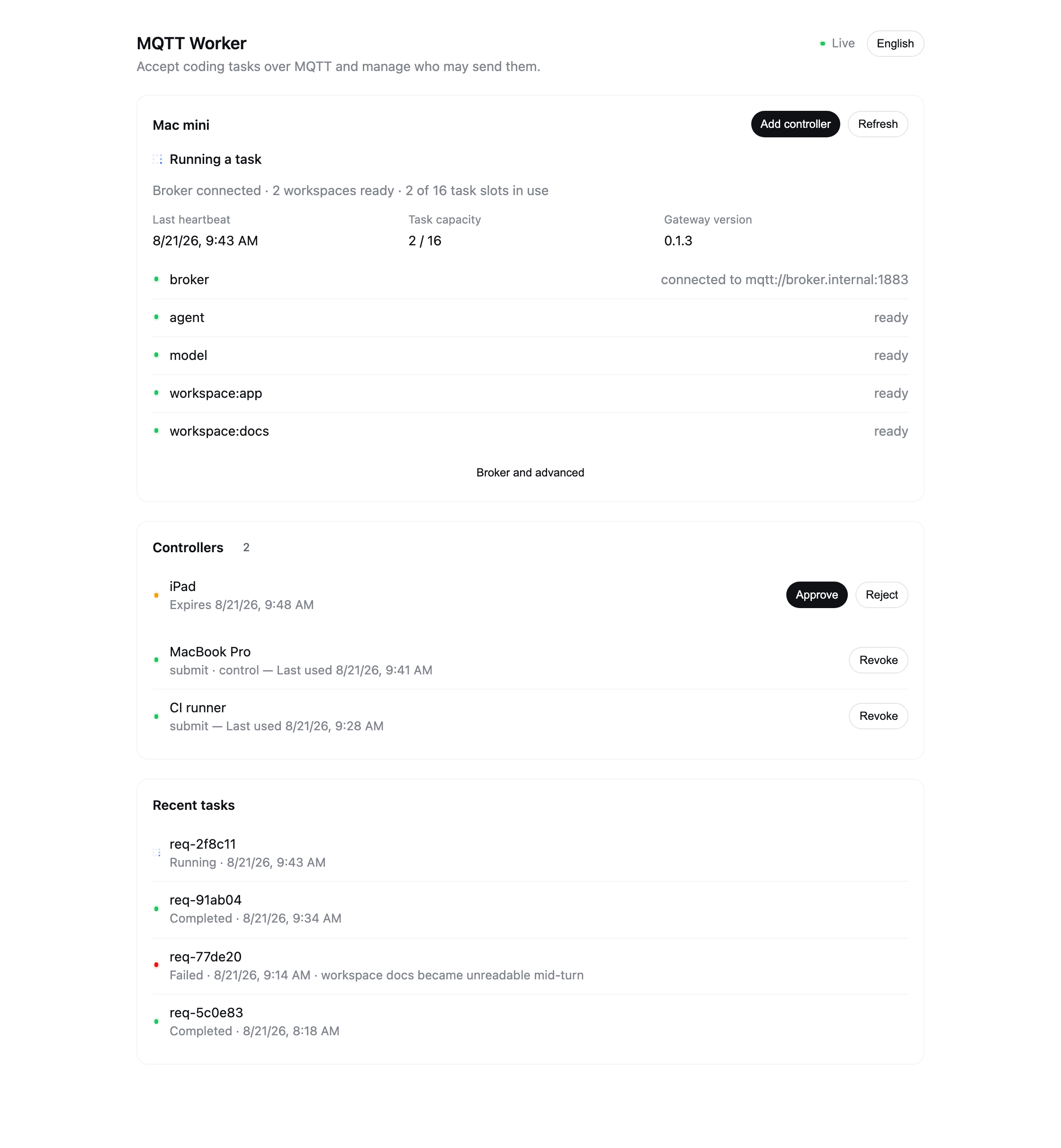
Broker, Agent, model, workspace, and capacity data come from live Gateway checks. Both forms create controller invitations, approve access, list recent tasks, report last use, and revoke controllers. Updates arrive over Server-Sent Events and fall back to polling when the stream cannot be held open. Set managementPort: 0 to turn off the API and the standalone page — which also leaves the DSH panel with nothing to read.
The panel speaks English and Chinese. Inside DSH it follows the shell's language; the standalone page picks one up from the browser and offers a switch in its header.
The management server binds to loopback by default. A non-loopback managementHost requires managementToken or managementTokenEnv; the UI asks for that token and keeps it in sessionStorage for the current tab only, while API clients send Authorization: Bearer <token>. Cross-origin requests are accepted from loopback origins, which is what the DSH panel needs; set managementCorsOrigin to name a single exact origin instead. Without a token, then, any page you open on this machine can drive the API — including a page that resolves its own hostname to loopback, which is why requests arriving under a non-loopback Host are refused with 421. Set a management token on a machine where that matters, and never expose an unauthenticated management endpoint to a network.
Add a controller
- Select Add controller in the Worker UI and generate a ten-minute invitation.
- Copy the invitation to the controller. It contains the Broker URL, namespace, node ID, controller ID, and application token, but no Worker Broker password or model credential.
- Configure separate Broker credentials on the controller with node-scoped ACLs.
- Approve the controller — either in the invitation dialog you just used, or later from the pending list. With
requireControllerAuth: true, pending, expired, or revoked tokens cannot submit or control work.
Programmatic controllers can use the exported MqttControllerClient. It adds controller_id and token to commands, subscribes to status/events/results, and provides waitForResult().
The retained status message should appear at:
mosquitto_sub -h 127.0.0.1 -q 1 -v \
  -t 'dsh/v1/ullrai/nodes/mac-mini/status'
Submit a request
Subscribe before publishing because events and results are deliberately not retained:
export BASE='dsh/v1/ullrai/nodes/mac-mini'
export REQUEST_ID="request-$(date +%s)"

mosquitto_sub -h 127.0.0.1 -q 1 -v \
  -t "$BASE/requests/$REQUEST_ID/events" \
  -t "$BASE/requests/$REQUEST_ID/result"
In another terminal, using the same BASE and REQUEST_ID:
export NOW="$(date -u +%Y-%m-%dT%H:%M:%SZ)"

mosquitto_pub -h 127.0.0.1 -q 1 \
  -t "$BASE/requests" \
  -m "{\"version\":1,\"id\":\"$REQUEST_ID\",\"type\":\"request.submit\",\"timestamp\":\"$NOW\",\"input\":\"Run the tests and summarize the failures.\",\"workspace\":\"repo-foo\"}"
The gateway publishes request.accepted, request.session, Agent/session events, and one final request.result:
{
  "version": 1,
  "id": "request-1755417600",
  "type": "request.result",
  "timestamp": "2026-08-17T12:04:00.000Z",
  "status": "completed",
  "session_id": "mqtt-6a0fe184-bb2a-45d4-941b-e079923b93db",
  "summary": "All tests passed.",
  "error": null
}
Topic layout
Every topic is scoped by protocol version, namespace, and node:
dsh/v1/{namespace}/nodes/{nodeId}/requests
dsh/v1/{namespace}/nodes/{nodeId}/requests/{requestId}/control
dsh/v1/{namespace}/nodes/{nodeId}/requests/{requestId}/events
dsh/v1/{namespace}/nodes/{nodeId}/requests/{requestId}/result
dsh/v1/{namespace}/nodes/{nodeId}/status
Current delivery settings are:
| Topic | Direction | QoS | Retained |
|---|---|---|---|
requests | client → gateway | subscribe at 1; publish at 1 recommended | rejected if retained |
requests/{id}/control | client → gateway | subscribe at 1; publish at 1 recommended | rejected if retained |
requests/{id}/events | gateway → client | 1 | no |
requests/{id}/result | gateway → client | 1 | no |
status | gateway → client | 1 | yes |
The gateway never executes a retained command. Retain is reserved for node presence.
namespace, nodeId, workspace aliases, request IDs, command IDs, and Session IDs are topic-safe identifiers. Request, command, and Session IDs match:
[A-Za-z0-9][A-Za-z0-9._:-]{0,127}
Protocol
Messages are UTF-8 JSON. Request-scoped input contains:
{
  "version": 1,
  "id": "request-01",
  "type": "request.submit",
  "timestamp": "2026-08-17T12:00:00Z"
}
timestamp must be a syntactically and calendrically valid RFC 3339 date-time. Version 1 validates its form but does not currently enforce clock skew or a freshness window. Use unguessable, never-reused IDs and broker authentication to prevent replay.
Unknown fields are ignored within protocol version 1. Unknown types and invalid values are rejected without execution.
Submit
{
  "version": 1,
  "id": "request-01",
  "type": "request.submit",
  "timestamp": "2026-08-17T12:00:00Z",
  "input": "Upgrade the dependency and run the tests.",
  "workspace": "repo-foo",
  "metadata": {
    "source": "ci",
    "pull_request": 42
  }
}
| Field | Required | Meaning |
|---|---|---|
version | yes | Must be 1. |
id | yes | Request correlation and deduplication key. |
type | yes | Must be request.submit. |
timestamp | yes | RFC 3339 date-time. |
input | yes | Non-empty instruction sent through agent.followup(). |
workspace | for a new Session unless defaultWorkspace is set | Configured alias, never an arbitrary path. |
session_id | no | Continue a permitted DSH Session. Cannot be combined with workspace: a resumed Session keeps the directory it was created with. |
metadata | no | Opaque JSON object; size-limited and echoed in request.accepted. Do not place secrets in it. |
Control
Controls are accepted only while the correlated request is active. Every control needs a unique command_id for QoS 1 deduplication.
Steer the current turn:
{
  "version": 1,
  "id": "request-01",
  "command_id": "command-01",
  "type": "request.steer",
  "timestamp": "2026-08-17T12:01:00Z",
  "input": "Fix the integration tests first."
}
Inject additional input:
{
  "version": 1,
  "id": "request-01",
  "command_id": "command-02",
  "type": "request.inject",
  "timestamp": "2026-08-17T12:01:10Z",
  "input": "The staging service is unavailable."
}
Cancel:
{
  "version": 1,
  "id": "request-01",
  "command_id": "command-03",
  "type": "request.cancel",
  "timestamp": "2026-08-17T12:02:00Z",
  "reason": "user_cancelled"
}
Publish controls to requests/{id}/control. A failed control is not a terminal request result. It produces request.control.failed or request.control.rejected; retry it with a new command_id after addressing the cause.
Events
All events use this envelope:
{
  "version": 1,
  "id": "request-01",
  "type": "agent.output.delta",
  "timestamp": "2026-08-17T12:00:05.000Z",
  "sequence": 7,
  "data": { "text": "I found three failing tests..." }
}
Gateway lifecycle events do not have a sequence. Normalized DSH Session events preserve the DSH sequence when one is available. Clients must tolerate missing sequence values, duplicates, and gaps.
With the default eventExposure: safe:
- visible assistant text is emitted as
agent.output.deltaandsession.assistant/message; - tool calls expose identifiers and tool names, not arguments;
- tool results expose identifiers and failure state, not result content;
- reasoning deltas are omitted;
- unknown Session event payloads are replaced by
{ "redacted": true }; - visible text, usage, and operational error fields are still application data and may be sensitive.
eventExposure: full publishes cloned raw DSH event data with a session. type prefix. Use it only with trusted subscribers; it can contain prompts, reasoning, tool arguments, tool output, paths, and secrets.
Results and errors
Every accepted request eventually has a stored status of completed, failed, or cancelled. A result contains error: null or:
{
  "code": "CAPACITY_EXCEEDED",
  "message": "gateway has reached its active request limit",
  "retryable": true
}
Common error codes include RETAINED_COMMAND, REQUEST_ID_CONFLICT, CAPACITY_EXCEEDED, SESSION_NOT_OWNED, SESSION_BUSY, WORKSPACE_REQUIRED, WORKSPACE_NOT_ALLOWED, AGENT_START_FAILED, CONTROL_FAILED, GATEWAY_RESTARTED, and GATEWAY_STOPPED.
A terminal result describes the Agent request. It does not make tool calls or other external side effects transactional.
Session continuation
For a new request, the gateway creates a random mqtt-{uuid} DSH Session and returns its ID. To continue it, submit a new request ID with that session_id:
{
  "version": 1,
  "id": "request-02",
  "type": "request.submit",
  "timestamp": "2026-08-17T12:10:00Z",
  "input": "Now implement the first fix.",
  "session_id": "mqtt-6a0fe184-bb2a-45d4-941b-e079923b93db"
}
By default, only Sessions recorded as created or used by this gateway may be resumed. Their ownership records persist independently of request deduplication expiry.
allowExternalSessions: true permits any broker client with publish access to request a syntactically valid DSH Session ID. MQTT application messages do not carry a trustworthy publisher identity to the plugin, so dsh-mqtt cannot authorize a Session per end user. Enabling this option expands the trust boundary to every principal allowed to publish to that node's request topic. Prefer node/namespace isolation and broker ACLs.
Only one active MQTT request may control a Session at a time.
Presence
The gateway publishes retained online status after each successful connection:
{
  "version": 1,
  "type": "node.status",
  "timestamp": "2026-08-17T12:00:00.000Z",
  "node_id": "mac-mini",
  "display_name": "Mac mini · development",
  "state": "ready",
  "online": true,
  "heartbeat_at": "2026-08-17T12:00:00.000Z",
  "expires_at": "2026-08-17T12:00:30.000Z",
  "active_requests": 0,
  "request_capacity": 16,
  "workspaces": [{ "alias": "repo-foo", "status": "ready" }],
  "controller_auth_required": true,
  "gateway_version": "0.1.6",
  "protocol_version": 1,
  "capabilities": ["coding"],
  "health": [
    { "name": "broker", "status": "ready" },
    { "name": "agent", "status": "ready" },
    { "name": "model", "status": "ready" },
    { "name": "workspace:repo-foo", "status": "ready" }
  ]
}
state is one of connecting, ready, busy, degraded, offline, or stopped. Controllers must not trust a retained online: true forever: when the current time passes expires_at, treat the node as stale until a new heartbeat arrives. Presence exposes workspace aliases, never filesystem paths.
It configures a retained offline Last Will on the same topic and explicitly publishes offline status during graceful shutdown. A Last Will timestamp is created when the connection is configured, not when the broker detects the disconnect; use broker receipt time when exact offline timing matters.
Delivery, deduplication, and recovery
MQTT QoS 1 is at least once. dsh-mqtt uses the request payload fingerprint plus id, and the control payload fingerprint plus command_id, to avoid executing identical redeliveries twice. Reusing an ID with different content is rejected.
The JSON state file is written through a same-directory temporary file and atomic rename, with file mode 0600 on platforms that support POSIX permissions. It stores:
- request fingerprints and lifecycle state;
- request-to-Session associations;
- control deduplication records;
- terminal results;
- Gateway-owned Session IDs.
On startup, an accepted or active request left by a previous process is marked failed with GATEWAY_RESTARTED, and its result is published after reconnect. On graceful shutdown, active requests are cancelled and stored as GATEWAY_STOPPED.
Terminal request and control records expire after dedupTtlSeconds (seven days by default). Session ownership records do not currently expire. Do not reuse request IDs after the TTL: an expired ID is treated as new and may execute again.
Outbound QoS 1 publication returns once MQTT.js has accepted the packet into its outgoing store, rather than waiting indefinitely for a broker acknowledgement. The default MQTT.js outgoing store is in memory. Therefore:
- Agent progress continues while the broker reconnects;
- live-process reconnects can flush queued packets;
- a process crash can lose queued events;
- terminal results remain in the JSON state and can be recovered by resubmitting the identical request with the same ID before its TTL expires;
- events are not replayed and may have gaps.
For reliable result reception, use a persistent client Session or subscribe before submitting. If a result is missed, subscribe to its result topic and resend the exact original request with the same ID. The gateway republishes a stored terminal result without invoking the Agent again.
Configuration reference
Options are grouped the same way the DSH settings form renders them. The resolved configuration stays flat, so the YAML below is unaffected by the grouping.
Broker connection
| Option | Default | Description |
|---|---|---|
url | mqtt://127.0.0.1:1883 | mqtt, mqtts, ws, or wss broker URL. |
protocolVersion | 5 | 5 for MQTT 5, 4 for MQTT 3.1.1. |
clientId | dsh-mqtt-{namespace}-{nodeId} | Stable MQTT client ID. |
clean | false | MQTT clean-session/start flag. Keep false for offline command delivery. |
keepaliveSeconds | 30 | MQTT keepalive. |
connectTimeoutMs | 10000 | Initial connection timeout. |
reconnectPeriodMs | 1000 | Reconnect delay; 0 disables reconnect. |
sessionExpirySeconds | 86400 | MQTT 5 Session expiry; ignored for MQTT 3.1.1. |
username, password | unset | Direct broker credentials. Avoid storing password in a profile. |
usernameEnv, passwordEnv | unset | Environment variable names containing broker credentials. Mutually exclusive with direct values. |
TLS
| Option | Default | Description |
|---|---|---|
caFile | unset | Absolute CA bundle path for TLS. |
certFile, keyFile | unset | Client certificate and private key paths for mutual TLS. |
rejectUnauthorized | true | Verify broker TLS certificates. Do not disable in production. |
Node identity
| Option | Default | Description |
|---|---|---|
namespace | local | Topic namespace; 1–64 topic-safe characters. |
nodeId | dsh-node | Node topic segment; 1–64 topic-safe characters. |
displayName | the node ID | Name shown to controllers and in the Worker UI. |
capabilities | [] | Informational values published in online presence. |
Agents and workspaces
| Option | Default | Description |
|---|---|---|
workspaces | {} | Alias-to-directory allowlist for new Sessions. |
defaultWorkspace | unset | Alias used when a new request omits workspace. |
allowExternalSessions | false | Permit continuation of Sessions not recorded by this gateway. See the security warning above. |
provider, model, maxTokens | current DSH profile selection | Optional Agent creation overrides. provider and model must be set together; otherwise the gateway reads ctx.agentDefaultModel. |
eventExposure | safe | safe normalized events or full raw event data. |
stateFile | .dsh-mqtt/state.json | Durable deduplication/result/Session-ownership JSON file. |
Limits
| Option | Default | Description |
|---|---|---|
maxMessageBytes | 65536 | Maximum inbound MQTT payload size. |
maxMetadataBytes | 8192 | Maximum serialized metadata size; cannot exceed maxMessageBytes. |
maxInputChars | 32768 | Maximum input length in JavaScript characters. |
maxActiveRequests | 16 | Maximum accepted/active requests. |
dedupTtlSeconds | 604800 | Terminal request/control retention. |
heartbeatSeconds | 15 | Interval between retained status publishes. Controllers treat a node as stale after two missed beats. |
Management interface
| Option | Default | Description |
|---|---|---|
managementPort | 3210 | Port for the management API and standalone page. 0 disables both, and leaves the DSH panel with nothing to read. |
managementHost | 127.0.0.1 | Bind address. Anything other than loopback requires a management token. |
managementCorsOrigin | unset | One exact origin allowed to call the API. Unset means loopback origins only, which is what the DSH panel needs. |
managementToken | unset | Bearer token required by the API. |
managementTokenEnv | unset | Environment variable holding the management token. Mutually exclusive with managementToken. |
requireControllerAuth | false | Require controllers to be invited and approved before they may submit or steer. Left off, broker credentials alone are enough to run agent work on this node, so the gateway warns at startup. |
Credentials and TLS
The gateway supports direct MQTT username/password values or environment-backed credentials. Prefer environment variables for unattended deployments so the password is not stored in the DSH profile.
Username/password without TLS
This is suitable only for a loopback interface, VPN, or otherwise trusted private network. MQTT username/password authentication does not encrypt the credentials or payload.
- id: mqtt-gateway
  config:
    url: mqtt://broker.internal.example:1883
    namespace: ullrai
    nodeId: mac-mini
    username: dsh-mac-mini
    password: replace-with-broker-password
The direct password form is shown for completeness. Do not commit a real password to the profile. Use mqtts:// or wss:// whenever traffic crosses an untrusted network.
Username/password over TLS
This is the recommended configuration for a cloud broker:
- id: mqtt-gateway
  config:
    url: mqtts://broker.example.com:8883
    namespace: ullrai
    nodeId: mac-mini
    usernameEnv: DSH_MQTT_USERNAME
    passwordEnv: DSH_MQTT_PASSWORD
    rejectUnauthorized: true
    stateFile: /var/lib/dsh-mqtt/state.json
    workspaces:
      repo-foo: /srv/repos/repo-foo
export DSH_MQTT_USERNAME='dsh-mac-mini'
export DSH_MQTT_PASSWORD='...'
npx @deepseek-ai/dsh --profile web
Use the exact hostname and port supplied by the broker. A public-CA certificate normally needs no caFile; hostname and certificate verification remain enabled by default. Secure WebSocket endpoints use wss:// with the provider's path and the same credential fields.
Custom CA and mutual TLS
For a private CA or a broker that requires a client certificate, add the relevant files to the TLS configuration:
- id: mqtt-gateway
  config:
    url: mqtts://broker.internal.example:8883
    namespace: ullrai
    nodeId: mac-mini
    usernameEnv: DSH_MQTT_USERNAME
    passwordEnv: DSH_MQTT_PASSWORD
    caFile: /etc/dsh-mqtt/ca.pem
    certFile: /etc/dsh-mqtt/client.pem
    keyFile: /etc/dsh-mqtt/client-key.pem
    rejectUnauthorized: true
caFile supplies the trusted CA bundle. certFile and keyFile enable mutual TLS and must be configured together when the broker requires them. A broker can require mTLS in addition to, or instead of, username/password authentication. Do not set rejectUnauthorized: false in production.
Broker ACLs
The broker is the principal authentication and authorization boundary. Separate gateway and client credentials and grant only the required direction for one namespace/node.
Illustrative Mosquitto ACL intent:
user dsh-gateway-mac-mini
topic read  dsh/v1/ullrai/nodes/mac-mini/requests
topic read  dsh/v1/ullrai/nodes/mac-mini/requests/+/control
topic write dsh/v1/ullrai/nodes/mac-mini/requests/+/events
topic write dsh/v1/ullrai/nodes/mac-mini/requests/+/result
topic write dsh/v1/ullrai/nodes/mac-mini/status

user automation-client
topic write dsh/v1/ullrai/nodes/mac-mini/requests
topic write dsh/v1/ullrai/nodes/mac-mini/requests/+/control
topic read  dsh/v1/ullrai/nodes/mac-mini/requests/+/events
topic read  dsh/v1/ullrai/nodes/mac-mini/requests/+/result
topic read  dsh/v1/ullrai/nodes/mac-mini/status
Also use TLS, disable anonymous access, protect the state file and workspace directories, and avoid broad grants such as unrestricted dsh/# read/write access. Anyone who can publish to a node can cause its Agent to use the local tools and credentials available to that DSH process.
Development
pnpm install
pnpm lint
pnpm typecheck
pnpm test
pnpm test:coverage
pnpm build
pnpm publint
pnpm check
pnpm check runs lint, TypeScript checking, coverage tests, build, and package export validation. Integration tests start a real in-process Aedes MQTT broker and verify subscription, publication, QoS 1 acknowledgement timing, and Last Will behavior.
To inspect the publishable package:
pnpm pack
Release automation
Releases are tag-driven. Update package.json and CHANGELOG.md, commit the changes, and push a matching non-prerelease tag:
git tag v0.1.6
git push origin v0.1.6
The Release workflow verifies that the tag matches package.json, installs from the frozen lockfile, runs pnpm check, publishes the package to npm, and creates a GitHub Release with generated notes. A retry skips npm publication when that exact version already exists. Publishing uses trusted publishing: the job mints a short-lived OIDC token and trades it for publish rights, so there is no long-lived secret to rotate and every release carries a provenance attestation. This requires a trusted publisher on npmjs.com naming this repository and release.yml. The workflow intentionally rejects prerelease tags until a separate prerelease policy is defined. Do not create a tag until the version, changelog, and release contents are ready.
The public module exports the Cordis plugin plus MqttAgentGateway, RequestStore, and TopicLayout. dsh-mqtt/protocol exports protocol types, parsers, fingerprints, and envelope builders.
Current limitations
- DSH compatibility is pinned to the rapidly changing
0.1.0-rc.8APIs. - The DSH Host does not wait for the broker during plugin startup. If the broker is unavailable or the CONNACK is delayed, the plugin remains loaded and MQTT.js keeps retrying according to
reconnectPeriodMs; requests and presence are handled after a connection is established. - The implemented protocol is node-addressed. Shared-subscription worker pools and workload-class topics are not implemented.
- There is no arbitrary
reply_to; response topics are derived from the request ID. - Remote approval and user-question responses are not implemented. Use a DSH surface that can resolve them, or configure unattended workers appropriately.
- The JSON state store is for one gateway process, not shared multi-process storage.
- Results and events are not retained; events are not durably replayable.
- Session ownership entries do not yet have automatic pruning.
safeevent mode is a conservative projection, not a data-loss-prevention system.- Deduplication prevents duplicate gateway invocation within its TTL but cannot guarantee exactly-once tool or external side effects.
- MQTT message expiry, dead-letter queues, priorities, scheduling, and job dependencies are broker/workflow concerns outside this plugin.
License
MIT © 2026 UllrAI