
 @WuweiRE
dsh-composer-plus
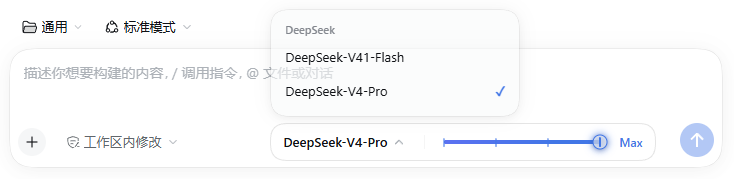
One DSH composer plugin: direct model picker, draggable reasoning-effort rail, and a DeepSeek account hider. DSH 输入框三合一插件:模型选择 + 拖动强度条 + 隐藏 DeepSeek 账号
- Stars
- 0
- Language
- JavaScript
- Created
- Oct 17, 2026
- Updated
- Oct 20, 2026
Introduction
dsh-composer-plus
One plugin, four things: model picker + draggable reasoning-effort rail + DeepSeek account hider + right-click file actions.

中文 | English
What it is
dsh-composer-plus is a pure front-end plugin for the DeepSeek Harness (dsh) web client. It folds the composer's right-hand controls into one pill:
| Feature | What it does |
|---|---|
| Model picker | Click the model name to get a provider-grouped list (no submenu). A pick applies immediately. |
| Effort rail (drag bar) | A notched slider: click, drag, or use ←/→/Home/End. Levels come from each model's own reasoningEfforts; the top level gets a gradient sweep and halo. |
| Hide DeepSeek account | The bundle patch disables the official account entry (sidebar account menu, account settings page, credential onboarding), and the custom model menu filters the deepseek-account channel. |
| File context menu | Right-click a changed-files card, a delivered file card, a file-tree row, or a rendered file-path link: open it in the sidebar or show it in Finder (Explorer / the default file manager on other platforms). |
| Theme-aware | Every color binds to --dsw-alias-* theme variables, so light/dark and third-party skins stay readable. |
| Zero intrusion | A modular bundle: no core changes, nothing written outside the profile, clean removal. |
The file menu reuses shipped capabilities: the target's own click, the shell.overlay / Menu / Toast primitives, and the Session Remote's openWorkspacePath({ action: 'reveal' }) (the Host runs open -R on macOS), so it adds no host route.

Compatibility
- dsh 0.1.5+ (the
ctx.modelDirectories/session/selectModelgeneration) and a web client (dsh web, or the web UI inside the desktop app). - End-to-end tested on dsh 0.2.1-rc.2: model switching, drag + keyboard effort changes, light/dark themes, no account entry in Settings, and the file context menu.
- The rail only appears for models that declare reasoning levels; other models show the picker alone.
- The plugin draws into the composer's
conversation.input.rightseat and tucks the native model trigger away. If a future dsh changes the composer DOM and the native trigger is not hidden, please open an issue. - The file menu recognizes dsh's DOM contracts (
data-changed-files,data-presented-file,data-files-path/entry, and path-link buttons carrying atitle). If a later dsh renames one, the menu stays quiet instead of hijacking unrelated right-clicks.
Install
Web profile (dsh web)
# straight from GitHub — no npm account needed
dsh plugin --profile web add github:WuweiRE/dsh-composer-plus
Or clone and install the local directory:
git clone https://github.com/WuweiRE/dsh-composer-plus.git
dsh plugin --profile web add ./dsh-composer-plus
Restart dsh web (or dsh --profile web) once and refresh the page. Later client-only updates usually need just a refresh.
Desktop app
The desktop profile is managed by the Electron app (dsh plugin --profile desktop is refused). Install this bundle from the app's Plugins page (GitHub repo or a local directory), then restart the app. If your build has no such entry, validate on a web profile first and point the app at that profile.
The plugin participates in profile composition, so install/remove needs one app restart; CSS/client-only changes only need a refresh.
Configuration
All three switches are on by default and live in the bundle's own cordis.patch.yml:
- insert:
    - id: ui-composer-plus
      name: dsh-composer-plus
      config:
        hideAccount: true        # account menu / account settings page / credential onboarding + leftover rows
        hideAccountModels: true  # filter the deepseek-account channel from the custom model menu
        fileActions: true         # right-click file menu (open in sidebar / show in Finder)
To bring the official account UI back, override the row in your profile's cordis.patch.yml and delete these two patches, which are what actually close the account page:
- id: ui-settings-account
  disabled: true
- id: ui-settings-models
  name: '@deepseek-ai/dsh-client-ui-settings-models'
  config:
    credentialOnboarding: false
Uninstall
dsh plugin --profile web remove dsh-composer-plus
Then restart dsh web / the app. The plugin stores no runtime data; the last selected effort stays in dsh's own session state.
Layout
dsh-composer-plus/
├─ package.json          # bundle + web client manifest (immediately / inject)
├─ cordis.patch.yml      # account hider patches + plugin row
├─ lib/index.js          # host half: publishes options as window.__DSH_COMPOSER_PLUS__
├─ lib/client.js         # browser half: pill, model menu, rail, account-row hider, file context menu
├─ locale/{zh,en}.json   # plugin-manager title/description
├─ icon.svg              # plugin icon
├─ test/context-menu.smoke.mjs  # Node smoke test for the file context menu (npm test)
└─ docs/*.png            # README screenshots
There is no build step: lib/client.js is a browser-executed window.__ModuleLoader__.load({...}) factory and React comes from the dsh module table.
Known limits
- Account hiding is patch-layer disable + client-side fallback: another plugin that re-adds account UI can override it; disable that plugin first.
- The account-model filter only affects this plugin's menu; the native
/modelpopup is still dsh's (use it to pick an account model temporarily). - Web client only; headless/TUI profiles never render the composer.
- The file menu only acts on file elements the UI already renders; a plain-text path in a message that is neither a link nor a file card gets no menu.
License
MIT. Third-party credits: THIRD_PARTY_NOTICES.md.