
 @ZhangShurong
dsh-vista
Visual memory and active inspection for DeepSeek Harness: revisit any image, inspect any region, read exact pixels.
- Stars
- 1
- Language
- TypeScript
- Created
- Oct 24, 2026
- Updated
- Oct 24, 2026
Introduction

dsh-vista
Visual memory and active inspection for DeepSeek Harness.




English
Your agent sees an image once. dsh-vista makes it addressable forever.
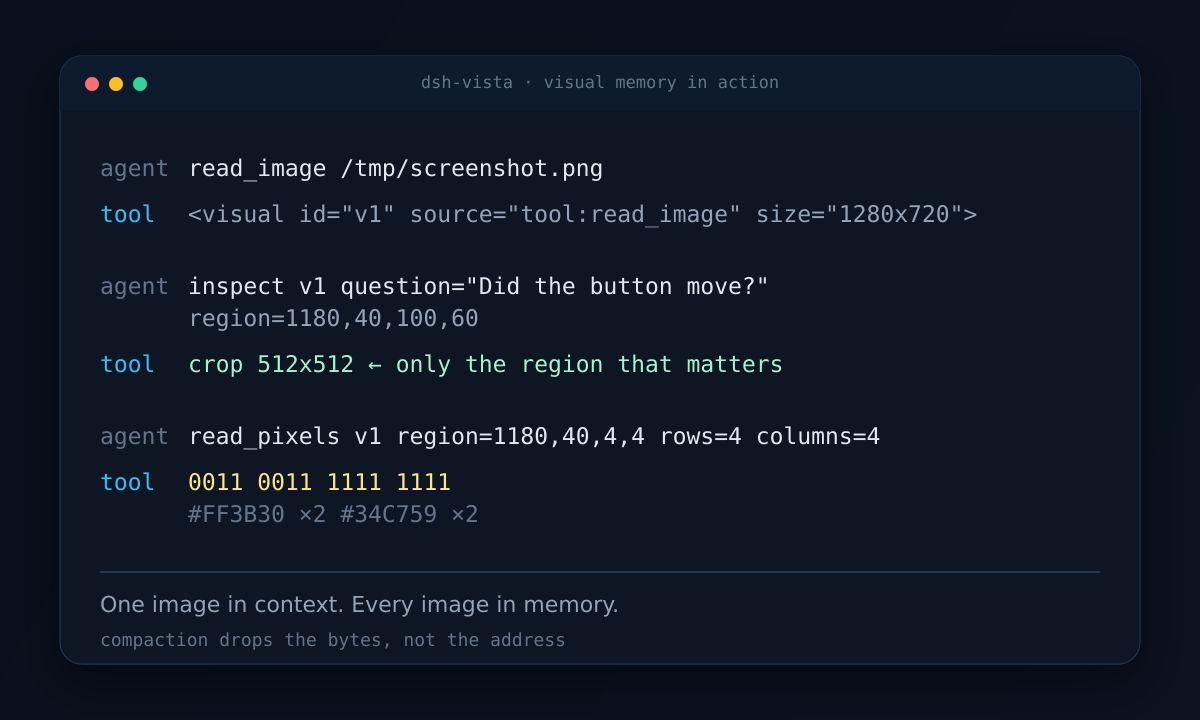
DSH agents work with screenshots, charts, and rendered pages, but the image that matters is often gone after the next tool call or compaction. dsh-vista keeps every image it has seen in an addressable archive and gives the agent three tools to go back to it:
inspect— revisit any past image and crop any region, enlarged without smoothing;read_pixels— sample exact colors from a region as a compact symbol matrix;visuals— list the images the agent has already seen.
Every image that reaches the model is automatically tagged with a stable id:
<visual id="v12" source="tool:read_image" size="1280x720"></visual>
The model can reference v12 later even if the original image has fallen out of
the context window.
Based on VISTA
dsh-vista is an adaptation of VISTA: A Visual Harness for Reasoning in an Interactive World by Qiushi Han, Keya Hu, Linlu Qiu, Cathy Wu, and Kaiming He (MIT):
It brings VISTA's core ideas — lossless visual memory, active visual inspection, and exact pixel reading — into DeepSeek Harness. It is not the official VISTA implementation; it is a DSH-native adaptation.
Why
- Compaction drops bytes, not meaning. dsh-vista keeps the original bytes addressable after the context has moved on.
- Re-screenshotting is expensive and lossy. The screen has changed; the image you need is the one from three steps ago.
- "Look at the whole image again" is not inspection. A good visual agent asks a specific question about a specific region.
- Text-only fallback.
read_pixelsworks even when the model route accepts text only.
Install
dsh plugin --profile web add dsh-vista
Or pin a version:
dsh plugin --profile web add dsh-vista@0.1.3
Then verify:
dsh --profile web --dump-config | grep dsh-vista
dsh --profile web
From a GitHub checkout:
dsh plugin --profile web add github:ZhangShurong/dsh-vista#v0.1.3
Tools
| Tool | What it does | Output |
|---|---|---|
inspect | Select an archived visual and an optional region; crops from the original and enlarges with nearest-neighbour. | Image blocks |
read_pixels | Divide a region into equal rows and columns; sample each centre pixel. | Palette + symbol rows |
visuals | List recent visuals with id, source, size, and timestamp. | JSON |
Example inspect:
{
  "question": "Did the button move after the click?",
  "views": [
    {
      "label": "button before",
      "visual": "v11",
      "region": { "x": 1180, "y": 40, "width": 100, "height": 60 }
    }
  ]
}
Example read_pixels result:
{
  "palette": { "0": "#FF0000", "1": "#0000FF" },
  "views": [
    { "label": "quadrant", "visual": "v1", "rows": 2, "columns": 2, "samples": ["01", "11"] }
  ]
}
read_pixels only measures. It does not align, transform, or interpret pixels.
How it works
tool result / attachment
        │
        ▼
tools/post-execute ──► archive bytes, assign vN, prepend <visual id="vN">
        │
        ▼
     model sees: <visual id="v12" ...></visual>  [image]
        │
        ├── inspect(v12, region)      ──► cropped + enlarged image
        ├── read_pixels(v12, region)  ──► palette + symbol rows
        └── visuals()                 ──► index of previous images
The archive is content-addressed and append-only (index.jsonl plus files under
archiveDir). DSH's attachment service still owns the image that reaches the
model; dsh-vista keeps a second copy so visual ids survive compaction and image
offload.
Configuration
Defaults live in src/config.ts. Override them in the bundle row or the
profile patch:
- id: dsh-vista
  config:
    archiveDir: /home/me/.dsh/dsh-vista/archive
    displaySize: 1024
    maxInspectViews: 8
    maxPixelViews: 16
    maxPixelSamples: 4096
    annotate: true
    retentionDays: 7
| Field | Default | Meaning |
|---|---|---|
archiveDir | $DSH_HOME/dsh-vista/archive | Byte store and index.jsonl. |
displaySize | 1024 | Longest edge of an inspected crop. |
maxInspectViews | 8 | Views per inspect call. |
maxPixelViews | 16 | Views per read_pixels call. |
maxPixelSamples | 4096 | Total samples per read_pixels call. |
annotate | true | Insert <visual id="..."> before every archived image. |
retentionDays | 7 | Delete older archived visuals; 0 keeps forever. |
What this deliberately does not do
- No environment adapters (ARC-AGI-3, GameWorld, browser automation).
- No
play/actaction tools. - No one-action-per-turn policy, budgets, or evaluation harness.
- No Python sidecar.
Those belong in follow-up plugins. This one answers a narrower question: does addressable visual memory plus active inspection improve a DSH agent's visual work?
License
MIT
中文
你的 agent 只见过一张图一次,dsh-vista 让它永久可寻址。
DSH agent 经常要处理截图、图表和渲染后的页面,但真正重要的那张图,往往在下一次工具调用或上下文压缩之后就消失了。dsh-vista 会把 agent 见过的每一张图保存进一个可寻址的归档,并提供三个工具让它随时回去查看:
inspect—— 重新查看任意历史图像并裁剪任意区域,以无平滑插值的方式放大;read_pixels—— 把某个区域采样成紧凑的符号矩阵,读取精确颜色;visuals—— 列出 agent 已经见过的图像。
每一张送到模型面前的图像都会自动带上一个稳定的 id:
<visual id="v12" source="tool:read_image" size="1280x720"></visual>
即使原图已经掉出上下文窗口,模型之后仍然可以引用 v12。
基于 VISTA
dsh-vista 基于何恺明团队(MIT)的 VISTA: A Visual Harness for Reasoning in an Interactive World 实现,作者为 Qiushi Han、Keya Hu、Linlu Qiu、Cathy Wu 和 Kaiming He:
本插件把 VISTA 的核心思想——无损视觉记忆、主动视觉检视、精确像素读取——带进 DeepSeek Harness。它不是 VISTA 官方实现,而是面向 DSH 的原生适配。
为什么需要它
- 上下文压缩丢掉的是字节,不是语义。 上下文过去之后,dsh-vista 仍然让原始字节保持可寻址。
- 重新截图既昂贵又有损。 屏幕已经变了;你需要的往往正是三步之前那张图。
- "再把整张图看一遍"不叫检视。 好的视觉 agent 会针对某个具体区域提出具体问题。
- 纯文本兜底。 即使模型路由只接受文本,
read_pixels依然可用。
安装
dsh plugin --profile web add dsh-vista
或锁定版本:
dsh plugin --profile web add dsh-vista@0.1.3
然后验证:
dsh --profile web --dump-config | grep dsh-vista
dsh --profile web
从 GitHub 源码安装:
dsh plugin --profile web add github:ZhangShurong/dsh-vista#v0.1.3
工具
| 工具 | 作用 | 输出 |
|---|---|---|
inspect | 选择一个已归档的 visual 和可选区域;从原图裁剪,并用最近邻插值放大。 | 图像块 |
read_pixels | 把区域划分成等分的行和列,采样每个格子中心像素。 | 调色板 + 符号行 |
visuals | 列出最近的 visual,包含 id、来源、尺寸和时间戳。 | JSON |
inspect 示例:
{
  "question": "点击之后按钮移动了吗?",
  "views": [
    {
      "label": "点击前的按钮",
      "visual": "v11",
      "region": { "x": 1180, "y": 40, "width": 100, "height": 60 }
    }
  ]
}
read_pixels 返回示例:
{
  "palette": { "0": "#FF0000", "1": "#0000FF" },
  "views": [
    { "label": "四个象限", "visual": "v1", "rows": 2, "columns": 2, "samples": ["01", "11"] }
  ]
}
read_pixels 只做测量,不对像素做对齐、变换或解释。
工作原理
工具结果 / 附件
        │
        ▼
tools/post-execute ──► 归档字节、分配 vN、在前面插入 <visual id="vN">
        │
        ▼
     模型看到:<visual id="v12" ...></visual>  [image]
        │
        ├── inspect(v12, region)      ──► 裁剪并放大的图像
        ├── read_pixels(v12, region)  ──► 调色板 + 符号行
        └── visuals()                 ──► 历史图像索引
归档采用内容寻址、仅追加的方式(index.jsonl 加上 archiveDir 下的文件)。送到模型面前的图像仍然由 DSH 的 attachment 服务管理;dsh-vista 额外保留一份副本,让 visual id 在上下文压缩和图像卸载之后依然存活。
配置
默认值位于 src/config.ts。可以在 bundle 配置行或 profile 补丁中覆盖:
- id: dsh-vista
  config:
    archiveDir: /home/me/.dsh/dsh-vista/archive
    displaySize: 1024
    maxInspectViews: 8
    maxPixelViews: 16
    maxPixelSamples: 4096
    annotate: true
    retentionDays: 7
| 字段 | 默认值 | 含义 |
|---|---|---|
archiveDir | $DSH_HOME/dsh-vista/archive | 字节存储与 index.jsonl 所在目录。 |
displaySize | 1024 | 检视裁剪图的最长边。 |
maxInspectViews | 8 | 单次 inspect 调用允许的视图数。 |
maxPixelViews | 16 | 单次 read_pixels 调用允许的视图数。 |
maxPixelSamples | 4096 | 单次 read_pixels 调用的采样总数。 |
annotate | true | 在每张已归档图像前插入 <visual id="...">。 |
retentionDays | 7 | 删除超过该天数的归档;0 表示永久保留。 |
刻意不做的事
- 不做环境适配器(ARC-AGI-3、GameWorld、浏览器自动化)。
- 不提供
play/act动作工具。 - 不做每回合单动作策略、预算或评测框架。
- 不使用 Python sidecar。
这些都属于后续插件。本插件只回答一个范围更窄的问题:可寻址的视觉记忆加上主动检视,能否提升 DSH agent 的视觉工作表现?
许可证
MIT