
 @bvcvb
dsh-baize-rules
DeepSeek Harness (DSH) plugin — inject durable user-set session/global must-do / must-not requirements into the model at conversation start (Baize).
- Stars
- 3
- Language
- TypeScript
- Created
- Aug 31, 2026
- Updated
- Sep 22, 2026
Introduction
dsh-baize-rules
English | 简体中文 — 中文说明见 README.zh.md。



dsh-baize-rules (Baize) is a dsh plugin that injects user-set, durable "must-do / must-not" requirements — plain-text rules — into the model at conversation start as a sourced user/message.
The name comes from Baize (白泽) — a mythical beast said to "understand the nature of all creatures, know the names of all things, and comprehend the principles of everything." It carries the behavioral baseline that the user sets for the model.
- Rules are plain text with no
must/mustNotmarkers — whether something is "must-do" or "must-not" is expressed by the language of the body itself (e.g.Write comments in Chinese.= must,Do not delete the tests.= must-not). - Injection happens at the start of a conversation: the currently active rules are injected into the model request as a persistent
user/message, wrapped in a<system-reminder>frame, withsource.kind='plugin'andplugin='baize-rules'. - No rules → no injection; if the byte budget shrinks such that all rules are cut, it returns
undefinedand never injects an empty reminder shell.
Features
| Feature | Description |
|---|---|
| Three scopes, all injected | global (all sessions) / session (current session) / project (the session's working directory — this directory only): all three reach the model |
| Persistence | Everything is written to $DSH_HOME (default ~/.dsh); survives across sessions and restarts |
| Specificity wins | Render order project > session > global; when the byte budget is tight, the more specific rules are preserved first |
| A corrupt file never breaks a step | Rule files are read tolerantly: a broken or hand-edited file degrades that scope to empty and surfaces a problems warning, instead of failing the conversation |
| Deduplication | Suppresses duplicate injection by SHA-1 digest of the rendered text; optional injectAtEveryStep forces a refresh on every step |
| Stays present in long threads | The snapshot is republished when the text changes, after a session lifecycle change (startup / resume / clear / compact), and once the last copy is refreshAfterSteps steps old (default 20) — so the rules are never left behind only at the top of a long conversation |
| Escape protection | Literal </system-reminder> in rule bodies is escaped so user text can't close the plugin's frame |
| Command + API share the same source | The /baize-rules command and the front-end panel use the same store/core, so there is always a single source of truth |
| Tags | Rules can carry free-text tags (flow, #frontend) that the panel filters by. Panel-only by default — tags cost no model-context budget (injectTags opts in) |
| Template library | Save frequently used rules as templates (body + tags) and apply them to any scope; export/import the library as JSON to move it across machines and sessions. Applying a template makes a content copy — later template edits do not rewrite the rules you already added |
| Conflict-safe writes | Every write carries the file version it read; if another window changed the file in between, the write is refused with a retry hint instead of silently overwriting |
How this compares to AGENTS.md instructions
dsh ships @deepseek-ai/dsh-agent-instructions, which loads the workspace instruction chain (AGENTS.md / CLAUDE.md). The two are complementary — pick by where the rule has to live:
AGENTS.md (built in) | dsh-baize-rules (this plugin) | |
|---|---|---|
| Where it lives | A file inside the repository | $DSH_HOME/rules/*.json, plus the panel |
| Reach | Everyone working in that repository | Your machine: all sessions, one session, or one directory |
| Version control | Committed, reviewed and shared with the team; travels with the repository | Outside the repository; travels with DSH_HOME |
| How you change it | Edit the file; the change lands on the next file touch or session resume | Edit it in the panel or with /baize-rules; the next step injects it |
| Best for | Project conventions that belong to the project | Personal, cross-project, or per-conversation requirements |
Both inject a sourced user/message framed with <system-reminder>, and both carry the same precedence sentence, so they reinforce rather than fight each other.
Installation
dsh plugins are distributed from npm and installed into a profile via
dsh plugin.
# Install from npm into the web profile (use the actual published version)
dsh plugin --profile web add dsh-baize-rules@0.2.4
pm2 restart dsh          # Reload when dsh is managed by pm2
dsh --profile web
Peer dependencies (@deepseek-ai/*, react, etc.) are provided by the dsh profile; if any are missing, pnpm resolves them against peerDependencies in the profile directory.
Uninstall
# Remove the plugin from the profile
dsh plugin --profile web remove dsh-baize-rules
pm2 restart dsh          # Reload when dsh is managed by pm2
If the entry lingers in the profile's dsh.profile.bundles, delete that line from
$DSH_HOME/profiles/web/package.json and restart dsh again. Your rule files under
$DSH_HOME/rules/ are not touched — delete them by hand if you want a clean slate.
Try it without touching your running setup
Install into a separate profile so your currently running dsh stays unchanged:
dsh plugin --profile smoke add dsh-baize-rules@0.2.4
dsh --profile smoke --dump-config   # read & compose the config only — does not boot dsh
--dump-config only composes and prints the tree; it does not start a server, so it is safe to run
alongside your live dsh. To actually try the plugin in that profile, run dsh --profile smoke.
Note on
pm2 restart dsh: it reloads the profile you are running. Install/remove only changes the profile on disk — nothing takes effect until the next boot (or that restart).
Local development (link)
If you haven't published yet, or want to pick up source changes live, use this directory as a link dependency:
// /home/abc/.dsh/profiles/web/package.json
"dependencies": {
  "dsh-baize-rules": "link:/home/abc/work/plugin/dsh-baize-rules"
}
Then run pnpm install in the profile directory and add dsh-baize-rules to dsh.profile.bundles.
Quick Start
/baize-rules                                   # Same as /baize-rules list: show the currently active rules
/baize-rules add Write comments in Chinese.    # Add to the default scope (usually session)
/baize-rules global add Don't delete or rewrite existing tests.  # Explicitly add to global
/baize-rules list                              # Show project + session + global (abbreviated id / disabled markers)
/baize-rules list project                      # List one scope only
/baize-rules edit <id> Use pnpm to build only. # Edit a rule's text
/baize-rules disable <id>                      # Disable one (keep it, don't delete)
/baize-rules enable <id>                       # Re-enable
/baize-rules scope global                      # Subsequent commands default to global
/baize-rules clear session                     # Clear the current session's rules
/baize-rules global clear                      # Same thing: `clear <scope>` and `<scope> clear` are equivalent
/baize-rules export                            # Export all rules as JSON
# --- tags ---
/baize-rules tag <id> flow release              # Tag a rule (idempotent, deduped)
/baize-rules untag <id> release                 # Drop one tag
# --- templates ---
/baize-rules save <id>                          # Store this rule as a template ("Save as template" in the panel)
/baize-rules tmpl list                          # List the template library (optionally by tag)
/baize-rules from <id|#tag>                     # Add rules from templates (#tag = all with that tag)
/baize-rules tmpl export ./templates.json       # Export the library to a JSON file
/baize-rules tmpl import ./templates.json --yes # Import (dry run by default; --yes writes)
Scope goes before the verb. Write
/baize-rules global add <text>. A scope word at the end is no longer a modifier — in/baize-rules add Deploy after tests globalthe wordglobalis part of the rule text. See Scope syntax.
Commands
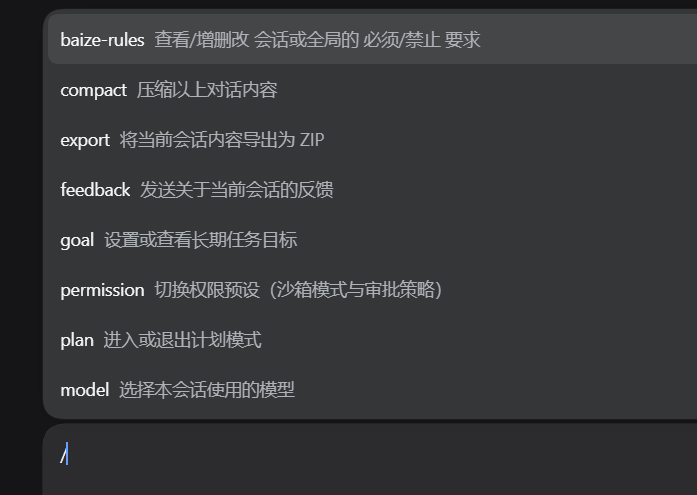
All subcommands live under /baize-rules; no argument is equivalent to list.
/baize-rules [<scope>] <command>                     # scope is global|session|project, written BEFORE the verb
/baize-rules [list [scope]|add <text>|remove <id>|edit <id> <text>|enable|disable <id>|tag|untag <id> <tag…>|save <id> [#tag…]|from <id|#tag>|tmpl <list|add|edit|rm|export|import>|scope <scope>|clear <scope>|export]
| Subcommand | Syntax | Purpose |
|---|---|---|
| list | /baize-rules list [scope] | List the merged active rules (Project/Global/Session sections; shows No active rules. when empty). Pass a scope to list that scope only (/baize-rules list project; <scope> list is equivalent) |
| add | /baize-rules add <text> | Append a rule to the target scope (default scope); the text is the rule |
| remove | /baize-rules remove <id> | Delete a rule (id or unique prefix) |
| edit | /baize-rules edit <id> <text> | Change a rule's text |
| enable | /baize-rules enable <id> | Enable a disabled rule |
| disable | /baize-rules disable <id> | Disable a rule (keep but not active) |
| tag | /baize-rules tag <id> <tag…> | Append tags to a rule (idempotent, deduped, case-insensitive) |
| untag | /baize-rules untag <id> <tag…> | Remove the named tags |
| save | /baize-rules save <id> [#tag…] | Store the rule as a template; merges tags if a same-text template exists |
| from | /baize-rules from <id|#tag> | Add rules from templates; #tag adds every template carrying that tag. The target scope comes from the leading scope keyword (or the default), never from a second argument |
| tmpl | /baize-rules tmpl <subcommand> | Template library management (below) |
| scope | /baize-rules scope <global|session|project> | Switch the default scope for subsequent commands (persistent for the current process). The scope is an argument here, so both /baize-rules scope global and /baize-rules global scope work |
| clear | /baize-rules clear <global|session|project> | Clear all rules in a scope. Both /baize-rules clear global and /baize-rules global clear work |
| export | /baize-rules export | Export { global, session, project } as JSON |
tmpl subcommands
| Subcommand | Syntax | Purpose |
|---|---|---|
| list | /baize-rules tmpl list [tag] | List templates (abbreviated id, tags, use count), optionally filtered by tag |
| add | /baize-rules tmpl add <text> [#tag…] | Create a template |
| edit | /baize-rules tmpl edit <id> [<text>] [#tag…] | Change body and/or tags; omit <text> to retag only |
| rm | /baize-rules tmpl rm <id> | Delete a template |
| export | /baize-rules tmpl export [<file>] | Export the library (prints JSON when no path is given) |
| import | /baize-rules tmpl import <file> [--merge|--replace] [--dry-run] [--yes] | Import a library (dry run by default; only --yes writes) |
Argument details
<text>: the rule body, may contain spaces. Whether it's "must-do" or "must-not" is expressed by the body's language; there is no marker.<id>: a stable rule id (crypto.randomUUID).listshows the first 8 characters as an abbreviated id for readability;remove/edit/enable/disable/tag/untag/saveall accept the full id or a unique prefix. An ambiguous prefix reportsambiguousand lists the candidates — it never guesses. Same fortmpl rm/tmpl edit.<tag…>: free-text tags, space separated,#prefix optional (#flow≡flow). At most 8 tags per item, 24 characters each; dedupe and filtering are case-insensitive, while the stored spelling is what you first typed.fromduplicate guard: a rule whose text already exists in the target scope is skipped (Skipped N duplicate(s)), so re-adding from a template never piles up duplicates. A template that is actually applied gets its use count +1.
Scope syntax
A scope modifier is written before the verb — this is the only form:
/baize-rules global add Write in Chinese./baize-rules project add Run the tests before every commit./baize-rules session remove <id>
BREAKING (0.2.1): the trailing scope form was removed. A scope word at the end of the line is no longer a modifier — it is part of the argument.
/baize-rules add Deploy after tests globalnow stores the bodyDeploy after tests globalin the default scope. Before 0.2.1 the same line dropped the wordglobalfrom the body and wrote the rule intoglobal, silently truncating rule text and mis-targeting the write, so the trailing form was removed outright rather than kept as an alias.The verbs this applies to are
add/remove/edit/enable/disable/from. A scope word anywhere other than the first token is plain text:/baize-rules add Run global checks before release.stores that whole sentence as the body.fromlost its positional scope argument with the trailing form: write/baize-rules project from <id>(or set the default with/baize-rules scope project) instead of/baize-rules from <id> project.Trailing tag metadata is unchanged.
tag/untag/save/tmplstill take a trailing run of#tagtokens as metadata, not rule text. They take the scope in the prefix form only (/baize-rules global tag <id> frontend), so a tag literally namedproject/global/sessioncan never be swallowed as a scope.
Where the scope is an argument, not a modifier, both orders work — /baize-rules clear global ≡
/baize-rules global clear, /baize-rules scope project ≡ /baize-rules project scope, and
/baize-rules list project ≡ /baize-rules project list.
When no scope is given, the default set by /baize-rules scope is used (initially from Config.scope, usually session).
Injection behavior (how the model context changes)
- Conversation-start baseline: at the start of a session,
agent/pre-step(prepend:true) inserts the active rules as auser/messageinto the request, framed as<system-reminder>withsource.kind='plugin',plugin='baize-rules',form='snapshot'. - All three scopes are injected:
project > session > global, specific first.projectrules are read from the session's working directory, so they join the view (and the model context) whenever the session declares acwd; they are rendered under the headerProject requirements (this directory only):. - Specificity wins: when the budget is tight the broader
globalrules are trimmed first. - Deduplication: a SHA-1 digest is computed over the rendered text; unchanged rules aren't re-injected.
injectAtEveryStep:trueforces a refresh on each step. - A fresh copy after a session lifecycle change:
agent/session-start(startup/resume/clear/compact) drops that session's record, so the next step publishes the full rules again — a compacted or cleared session cannot be left without them, which is the one case where "inject once at the start" could lose them for good. - A fresh copy every
refreshAfterStepssteps: once the last published copy is that many steps old it is republished even when the text is byte-identical (default 20,0disables the periodic refresh). A step counter that restarts after compaction counts as stale as well. Because the message is a snapshot, the model still sees a single copy — this only moves it back to where the conversation is now. - Escape: a literal
</system-reminder>in a body is escaped viaescapeReminder. - Tags stay out of the model: tags are not injected by default (
injectTags:false), so tagging or retagging a rule neither changes the text the model sees nor triggers a redundant re-injection. - Empty / fully trimmed: when there are no rules, or the budget cuts all of them, it returns
undefined(i.e. does not inject that message). - A corrupt file never blocks the step: every read degrades instead of throwing — a broken file makes that scope read as empty and adds a
problemsentry. The step always completes; the warning is what tells you a file needs fixing.
What the model actually sees
<system-reminder>
The following user requirements apply to every step of this conversation. Obey them.
More specific instructions take precedence over broader ones. They do not override system, developer, or direct user instructions.

Project requirements (this directory only):
- Run the tests before every commit.

Session requirements (this conversation only):
- Always test the plugin in isolation before deploying.

Global requirements:
- Write comments in Chinese.
- Do not delete or rewrite existing tests.
</system-reminder>
(The Project requirements (this directory only): section appears only when the session has a working directory and that directory has active rules.)
Configuration (Config)
On startup the plugin validates Config with @deepseek-ai/schemastery; an invalid value makes the plugin fail to load.
| Config | Default | Description |
|---|---|---|
scope | — (schema-required) | Default scope, used when /baize-rules doesn't specify one. Any of global/session/project — project included, resolved against the session's working directory |
maxBytes | — (schema-required) | Byte cap visible to the model; trimmed with specificity-wins when exceeded |
globalRulesPath | $DSH_HOME/rules/global.json | Override the global rules file path |
injectAtEveryStep | false | Force re-render on every step (debugging); default only patches on change |
refreshAfterSteps | 20 | Republish the snapshot once the last copy is this many steps old, even when nothing changed, so a long conversation never keeps the rules only at its top. 0 disables the periodic refresh |
injectTags | false | When true, render tags into the model context (- [flow,release] body). Off by default: tags are a human-facing classifier, and injecting them spends budget and adds noise |
apiOriginCheck | false | When true, the panel API accepts same-machine, same-origin requests only; off by default so a reverse-proxied web UI keeps working |
scopeandmaxBytesare required by the schema, not optional with an implicit fallback. Omitting either fails the plugin load with an explicit error naming the missing field — silently defaulting an undefined scope used to hide a broken configuration.
apiOriginCheck(defaultfalse). When switched on, the panel API answers only requests that come from this machine and, when the browser states anOrigin, from the host's own origin (or a localfile://page, which sends anullorigin); anything else is refused with403. It is off by default because the web UI is routinely reached through a reverse proxy, where the request arrives from the proxy's address instead of loopback and the panel would break. Turn it on when the port is reachable by others and no proxy layer authenticates the callers — the check exists because the global rule file reaches every conversation's prompt, so "anything that can reach the port" must not be enough. With the check off, authentication belongs to the transport (dsh's own token) and the proxy.
Mount metadata (cordis.patch.yml)
The published npm package ships dsh.bundle.patch, wired up automatically by dsh when you install dsh-baize-rules@<version>:
cordis.patch.yml inserts a single plugin line with default scope: session and maxBytes: 8192. To adjust the default scope / budget, change it there.
To mount by hand instead of relying on the bundle patch, insert the same row yourself — note the whole
mounted-rows list is inserted into the tree, and config mirrors the Config schema:
# $DSH_HOME/profiles/<profile>/cordis.patch.yml   (e.g. ~/.dsh/profiles/web/cordis.patch.yml)
- insert:
    - id: baize-rules
      name: 'dsh-baize-rules'
      config:
        scope: session
        maxBytes: 8192
After editing the profile's cordis.patch.yml, restart dsh (pm2 restart dsh when it is pm2-managed);
the profile file is read at boot.
Data location
| Scope | Storage | When written | Persistence |
|---|---|---|---|
| global | $DSH_HOME/rules/global.json | On any command / API submission | ✅ across restarts |
| session | $DSH_HOME/rules/sessions/<sessionId>.json | Same | ✅ across restarts |
| project | $DSH_HOME/rules/projects/<slug>.json (slug from the session cwd; no cwd → nothing is written) | Same | ✅ across restarts |
| templates | $DSH_HOME/rules/templates.json (global, not bound to any scope) | On template create/update/delete, import, or an apply that bumps the use count | ✅ across restarts |
$DSH_HOMEis resolved by@deepseek-ai/dsh-home-paths, default~/.dsh.Reads never throw. They go through
ctx.fs(resolve/stat/readText; writes auto-create directories). A missing file is simply an empty scope, and a corrupt or hand-edited file degrades to an empty scope plus aproblemsentry — the failure is reported (command output gains a⚠ …line, the panel shows a warning), never fatal to the step. Writes replace a whole file (there is no partial edit on disk), so a write is either the new complete file or nothing at all.Concurrent writes are guarded. Every write carries the freshness token of the file it read. If the file changed in between (another panel window, another command), the write is refused — the command reports a conflict and asks you to retry, the HTTP API answers
409— instead of silently overwriting the other edit.No empty files. Only the scopes that actually changed are rewritten, and an untouched empty scope is not written at all. (Older versions left a 3-byte
[]file per session under$DSH_HOME/rules/sessions/; those leftovers are harmless and can be deleted by hand — new ones are no longer created.)
projectrules are part of the model context. When the session declares a working directory, its project rules are read and injected underProject requirements (this directory only):, most specific first (project > session > global). The project file name is a slug of the session's cwd: the characters\ / : * ? " < > |become_, leading and trailing_are trimmed, and a cwd made entirely of those characters falls back to the literal_. With no session or nocwdthere is no project key, so nothing is written to disk (the HTTP API refuses such a write with400).
Client panel (optional)
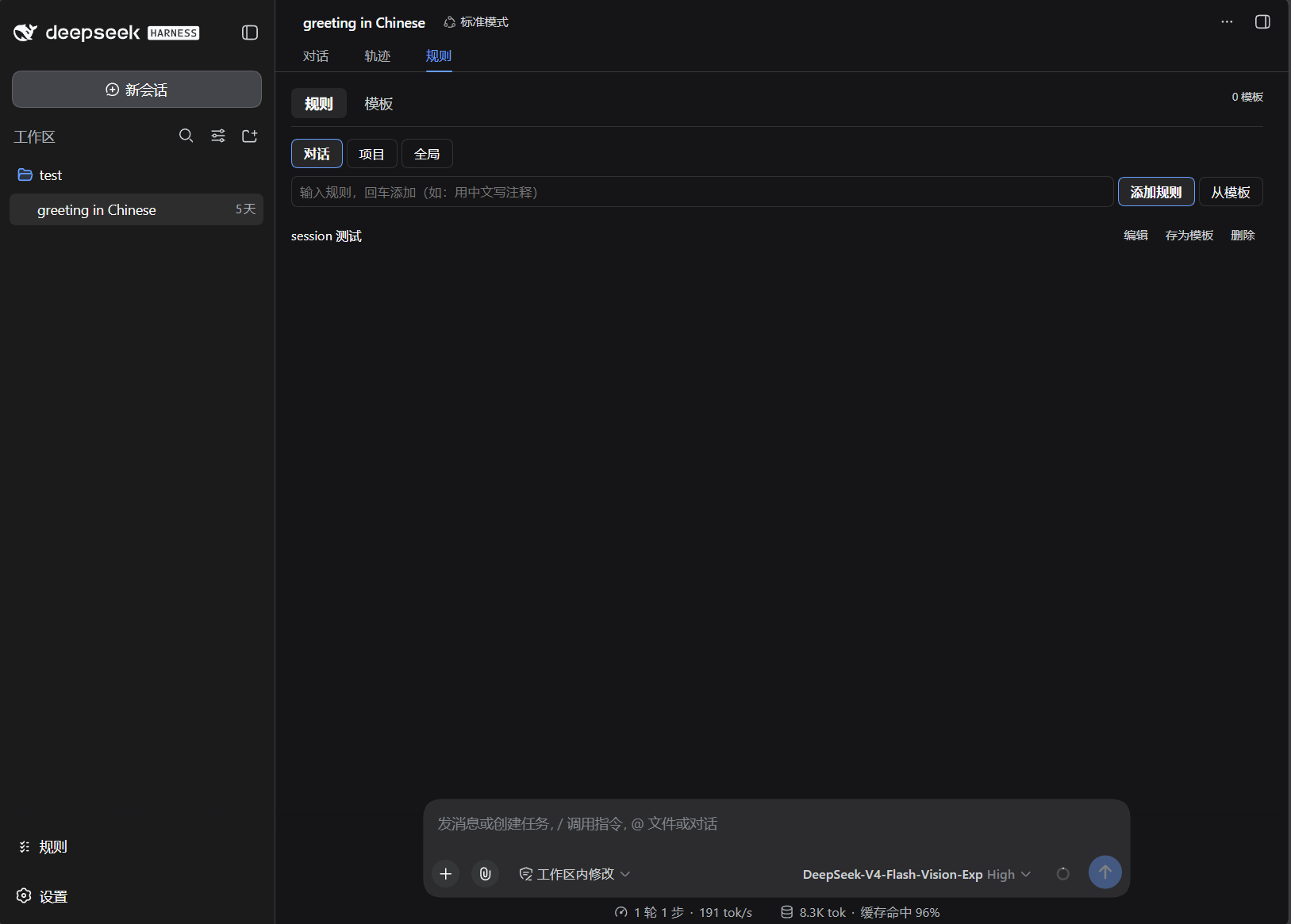
The published package also exposes a dsh web client panel (lib/client.js; see the ./client entry in package.json exports), talking to the same store/core as the command through the host HTTP API /baize-rules.api.
Where the panel lives
The panel registers itself into the dsh client slot ctx.slots.inject('conversation.view') — the panel is a tab in that conversation's view ring, and it shares the store/core with the /baize-rules command:
- In-session 「规则」 tab — when a conversation is open, the panel is a tab in that conversation's view ring; this is the only way in.
- 0.2.4 removed the sidebar footer 「规则」 button: it used to sit directly above Settings and doubled as the entry point of the new-chat full-viewport overlay. The button, the overlay and its sidebar-footer-only layout styles are all gone.
The new-chat page has no entry point (a known trade-off): with no session there is no tab ring, so after 0.2.4 the panel cannot be opened there. Rule injection and the
/baize-rulescommand are unaffected.
The panel has two panes:
- Rules: scope switch (conversation / project / global), tag-chip filtering, and per-row
Edit / Save as template / Remove. Each row shows whether the rule is enabled or disabled and toggles it in one click (no need to fall back to/baize-rules disable). New rules are created through the structuredrule.addop, so the text you typed is never re-parsed as a command line and can never lose a trailing word to a scope keyword; when a submission fails the input is left as typed so nothing has to be retyped. Warnings returned inproblemsare shown in the panel, and the UI is keyboard- and screen-reader-accessible (tabrole/ariastate, modal-dialog semantics with focus management, andaria-pressedon the tag chips). - Templates: create/edit (body + tags)/delete,
Add to rules(pick a scope and apply),Export(download JSON) andImport(choose a file → dry-run preview → confirm).
Templates are content copies. A rule row's Save as template button (「存为模板」 — this is also referred to as 「加入模板」, "add to template"; it is the same button) stores a snapshot of that rule's body
- tags in the template library. Adding a template to a scope creates a new rule with that content: the two are independent afterwards, so later edits to the template do not rewrite the rules you already added, and editing a rule does not change the template it came from.
A round trip through the panel: rule row Save as template → switch to the Templates pane and edit the body and tags there → back on the Rules pane open From template and tick the entries you want → choose the scope and add them.
Scope availability: the panel only offers session/project when it is attached to a conversation — when the host hands it no
sessionIdthose two buttons are disabled with a hint and only global rules can be edited, which avoids the old behaviour where a rule looked added and then vanished.The project directory does not come from the panel: the host resolves the session's cwd itself (
resolveProject), so project rules are available whenever you are in a conversation.
API:
-
GET /baize-rules.api?sessionId=…&project=…→{ global, session, project, templates, problems } -
POST /baize-rules.api, body{ sessionId, project, op, … }→{ ok, text, view, templates, problems, … }op: 'raw'(the default, and what older panels send){ raw, scope }— one command line through the same core as/baize-rules- rules:
rule.add{ scope, text },rule.update,rule.setTags,rule.setEnabled{ scope, ruleId, enabled },rule.saveAsTemplate,rule.addFromTemplates - templates:
template.create,template.update,template.delete,template.export,template.import - every op returns the post-change
view,templatesandproblems, so one call refreshes both panes and surfaces any unreadable store
-
Failure semantics (the response body always carries
textfor a refusal, except500which carries{ error }):Status Meaning 400The request was refused: malformed JSON body, an empty raw, a missingruleId/text, or an edit to a scope this request has no storage key for (no session, no cwd)403Origin refused — only with apiOriginCheck: true: the request is not from this machine (a non-loopback source), or the browser states anOriginthat is neither the host's own nor a local page (cross-site). Off by default, so a reverse-proxied web UI never sees this405Method other than GET/POST409Concurrency conflict — the file changed since it was read, so nothing was written; reload and retry 413Request body larger than 1 MiB 500Unexpected server-side failure, reported as { error }
Module structure
src/rules.ts      Pure logic: Rule/RuleTemplate models + tag normalization + render/<system-reminder>/byte budget(specificity-wins)/digest/escapeReminder
src/core.ts       Pure logic: parseCommand/runCommand/scope resolution/CRUD/template library ops/template import-export (zero deps, unit-testable without dsh)
src/store.ts      Pure logic: global/session/project rule files + templates.json persistence; tolerant reads (empty scope + `problems`) and version-guarded writes (ctx.fs + dshHomePath)
src/command.ts    Thin dsh adapter: feed view/templates/defaultScope → core, persist nextView/nextTemplates; file IO for tmpl export|import; appends `⚠ …` warnings
src/index.ts      apply: agent/pre-step injection + /baize-rules command registration + API mount (inject: agents/commands/fs/webServer/sessions)
src/api.ts        Host HTTP API: GET + POST(op dispatch) /baize-rules.api (origin check, 1 MiB body cap, 409 on a lost write race) for the front-end panel
src/invariant.ts  dsh-invariants contract companion (name/inject/apply)
scripts/dev-render.ts  Loop 0 demo
test/*.spec.ts    rules/core/composition/regression tests
cordis.patch.yml  Mount metadata (inserts the baize-rules plugin line + default config)
Public entry points (see package.json exports): . (index), ./invariant, ./client, ./src/*.
Development & instant feedback
pnpm dev:render            # Print the <system-reminder> text the model will actually see (supports budget args)
pnpm test                  # Run unit + REAL-composition tests, then the client smoke test
pnpm test:watch            # Re-run on save
pnpm test:client           # Just the client-panel smoke test (node test/client.smoke.mjs)
pnpm build                 # tsc -p tsconfig.build.json → lib/
pnpm typecheck             # tsc --noEmit
pnpm check:exports         # Validate every path promised by package.json `exports`
Change the pure functions in src/rules.ts (rendering) or src/core.ts (command decisions), then re-run pnpm dev:render to see the change — the fastest feedback loop (sub-second, without touching dsh).
Publishing
Releases are driven from a v* tag, but the publish itself is a local command. The publish job in .github/workflows/ci.yml requires the NPM_TOKEN secret, which is not configured in this repository — so it fails with npm error code ENEEDAUTH on every tag (verified on v0.1.3, v0.1.4 and v0.1.5). Until that secret is set, npm publish --access public is the step that actually ships a version.
# 1. Bump the version: update `version` in package.json + the install example in both READMEs
# 2. Verify locally
pnpm build && pnpm typecheck && pnpm test
# 3. Commit, tag, and push both (the tag run still gives you the CI build+test gate)
git add -A && git commit -m "release: vX.Y.Z"
git tag -a vX.Y.Z -m "vX.Y.Z" && git push origin main && git push origin vX.Y.Z
# 4. Publish — this is the step that actually ships
npm publish --access public
The publish job runs on v* tags and needs the test job to pass; it will keep reporting failure until NPM_TOKEN is added to the repository secrets.
Credentials.
npm publishauthenticates with your own npm credentials — either the ones already in~/.npmrcor ones supplied through environment variables. The repository-root.npmrcis listed in.gitignoreand must stay there: never commit a token, and never paste one into an issue, a README, or a CI log.
Changelog
See CHANGELOG.md.