
 @codeadeel
dsh-browser
Live shared Chromium and a ranked search gateway for DeepSeek Harness — watch your agent browse and take over anytime
- Stars
- 0
- Language
- TypeScript
- Created
- Oct 25, 2026
- Updated
- Oct 26, 2026
Introduction
dsh-browser



Give your DeepSeek Harness agent a real browser — and watch it work.
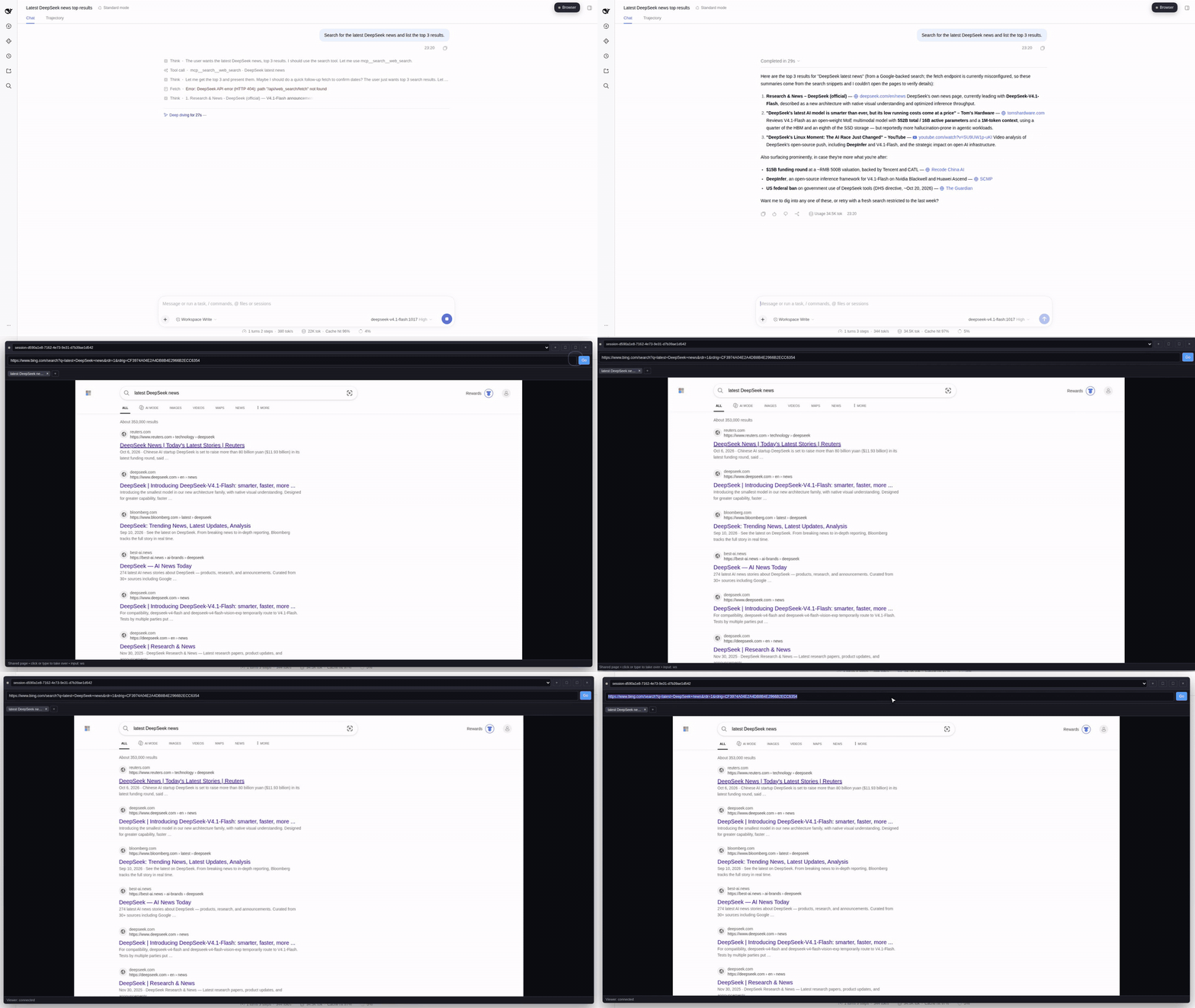
A live Chromium for every DSH session: the agent drives it, you watch it in a panel inside the UI, and you can take over with your own mouse and keyboard at any time. Backed by a ranked search gateway (SearXNG, Google CSE, Gemini, Brave, Vertex, DuckDuckGo) with whole-web Google results.
How it fits together
flowchart LR
  subgraph UI["DSH web UI"]
    Panel["Browser panel<br/>screencast · WS input · tabs"]
    Settings["Search settings<br/>ranking · keys · stack address"]
  end
  Host["Host plugin<br/>/dsh-browser/* proxy · browser_* tools"]
  Browser["Browser service :8790<br/>sessions · tool dispatch"]
  Viewer["Viewer :8791<br/>SSE frames · WS input"]
  Gateway["Search gateway :8787<br/>/mcp /config /test /health"]
  Chrome["Dedicated Chromium<br/>one profile per session"]
  Chain["Providers (ranked)<br/>searxng → cse → gemini → brave → vertex → ddg"]

  Panel --> Host
  Settings --> Host
  Host --> Browser
  Host --> Viewer
  Host --> Gateway
  Browser --> Chrome
  Viewer -->|"same page, live"| Chrome
  Gateway --> Chain
What you get
- Live panel — every page the agent opens, as it happens; take over instantly (your clicks and keys go to the same tab). Resizable card, tabs strip, address bar, maximize mode.
- Ranked search — whole-web Google results via Gemini grounding; Brave, SearXNG, Vertex, DuckDuckGo reorderable; first provider that answers wins, the rest are fallback. Keys live in one settings page, never shown again.
- One session, one browser — the browser session id is the DSH session id, created on first use; isolated profile, cookies and tabs per session; idle sessions close themselves, and deleting a workspace closes the browser sessions attached to it.
17 agent tools: navigate, snapshot, click, type, press, scroll, tabs, screenshot, search, wait_for, find, batch, console, network. CAPTCHA or consent page? The agent pauses and asks — you finish it in the panel, by design, never automated.
Try it
git clone https://github.com/codeadeel/dsh-browser.git && cd dsh-browser
cp .env.example .env              # Gemini/Brave keys (SearXNG needs none)
docker compose up -d --build     # one command, whole backend

dsh --profile web --patch config/dsh-search.patch.yml --no-open --host 0.0.0.0 --port 3000
Install the panel plugin (UI or CLI)
From the DSH UI — open the ?token= URL DSH printed:
- Plugins in the sidebar
- Add plugin
- paste
github:codeadeel/dsh-browser#path:panelinto the package field (leave Registry on the default npm registry — its custom address is for private registries, not plugin specs) - Install → Enable now
From the CLI:
dsh plugin --profile web add "github:codeadeel/dsh-browser#path:panel"
flowchart LR
  P["dsh-browser-panel"] --> A["UI: Plugins → Add plugin<br/>paste the GitHub URL"]
  P --> B["CLI: dsh plugin add<br/>github:codeadeel/dsh-browser#…&path=panel"]
  P --> C["dev: link:/path/panel"]
Click the Browser button, and in Plugins → dsh-browser-panel set your provider order, save, and run Test search.
Then ask the agent: "search for the DeepSeek R2 release date, open the top result, and summarize it" — and watch it happen in the panel.
How a search works
flowchart LR
  A["mcp__search__web_search"] --> G["gateway /mcp"]
  G --> C{"ranked chain"}
  C -->|"first hit wins"| R["results"]
  C -->|"brave 422 / idle?"| F["falls to gemini → … → duckduckgo"]
- Gemini = whole-web Google grounding, AI Studio key, billing required.
- Brave = official Brave MCP service in compose; REST fallback with a key.
- SearXNG = free, self-hosted, no key. Vertex = site-scoped app search.
- One address for everything (
DSH_SEARCH_URL, settable in the plugin page); the stack can live on another machine. Plain HTTP end to end.
How the browser works
flowchart LR
  Agent["agent browser_* tools"] --> Chrome["Chromium<br/>(session = DSH session id)"]
  Human["human in the panel"] -->|"watch · click · type"| Chrome
Why it exists
- Trust through visibility — you see exactly what the agent is doing, no more blind tool calls.
- Human in the loop, not in the way — same browser for both drivers, no VNC, no extension, no screen-recording hacks.
- Search that keeps up — Gemini grounding gives current whole-web results; SearXNG and Brave cover privacy and cost.
- No private registry, zero accounts — first-party services build from source; SearXNG runs from its official image.
Full compose & repo layout
flowchart TB
  subgraph base["docker compose up -d --build"]
    S["searxng"]
    B["brave-mcp"]
    G["search-gateway :8787"]
    BR["browser :8790/:8791"]
  end
  D["dsh (--profile web)"]
  P["playwright-mcp (--profile extra)"]
panel/           what you see in DSH (panel UI, settings, host bridge)
src/search/      the ranked search gateway
src/browser/     Chromium sessions + the live viewer
docs/demo/       the 35s product demo + preview
docker-compose.yml + Dockerfile    the whole backend, one command
Docs: docs/walkthrough.md — the 10-minute tour.
Architecture for contributors: docs/architecture.md.
MIT license.