
 @devilzyl
dsh-enhance-prompt
Composer plugin for DeepSeek Harness that rewrites your chat draft into a clearer, more specific prompt with your own model. One click to enhance, one to revert.
- Stars
- 1
- Language
- JavaScript
- Created
- Oct 23, 2026
- Updated
- Oct 23, 2026
Introduction

dsh-enhance-prompt
Turn a rough draft into a precise prompt — one click, right inside DeepSeek Harness.




One click turns your draft into a clear, specific prompt. Not happy? One more click reverts it.
Features · Installation · Configuration · Privacy
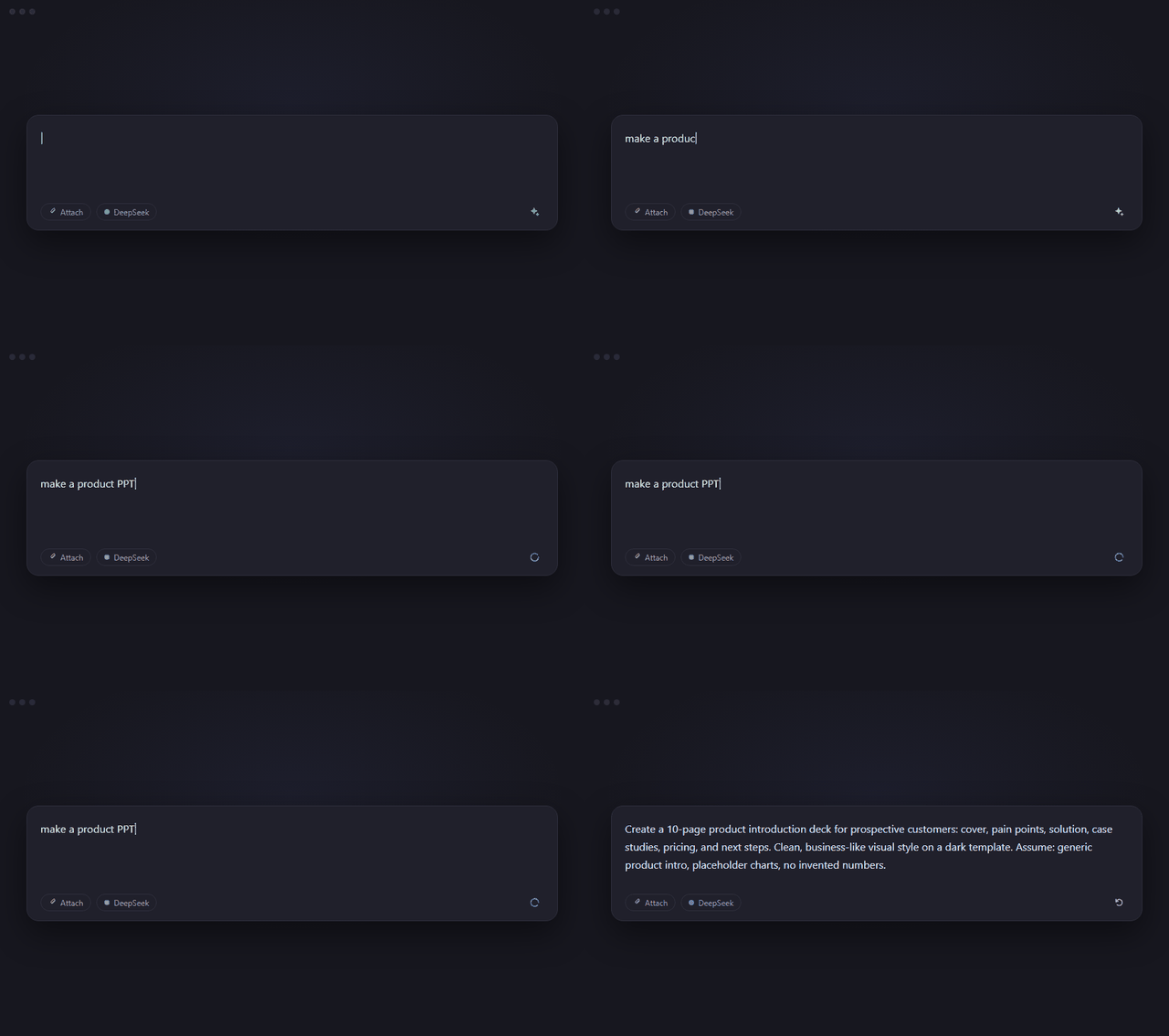
✨ Features
| One-click rewrite | One tap on ✨ turns your draft into a clear prompt. |
| Answers, not questions | Missing details? It fills them in and marks them "Assume: …" — no back-and-forth. |
| Instant revert | Click ↺ to restore. Start typing and the offer disappears. |
| Cancel anytime | Click the spinner to cancel; it stops on its own after 60 seconds. |
| Language preserved | Chinese stays Chinese, English stays English, mixed stays mixed. |
| Protects @ references | Drafts with @ chips are left untouched, so references never break. |
| Bilingual UI | Follows the app language, switches live. |
| Zero footprint | No storage, no caching, no telemetry. |
📦 Installation
Open the plugin installer in DeepSeek Harness and paste one of the following:
| Source | Paste this |
|---|---|
| npm recommended | dsh-enhance-prompt |
| GitHub | https://github.com/devilzyl/dsh-enhance-prompt |
| Local folder | the absolute path to a checkout of this repository |
[!NOTE] If the npm name does not resolve yet, use the GitHub or local-folder source.
After installing or updating the plugin, refresh the page once before use.
Uninstall
Remove the bundle named dsh-enhance-prompt from the plugin manager.
⚙️ Configuration
Works out of the box. To adjust, edit the plugin row's config in the bundle patch:
- id: prompt-enhance
  config:
    maxInputChars: 4000      # draft limit; longer drafts return 413
    maxOutputTokens: 1024    # output ceiling for the rewrite
    temperature: 0.4         # optional; omitted means the parameter is not sent
🔒 Privacy & Data Flow
- What is sent — Only the plain text of your draft. No attachments, no files, nothing from other sessions.
- Where it goes — To your local Harness, then to the model provider you configured. The plugin never goes online by itself and never sees your API keys.
- What is stored — Nothing. No files, no cache, no telemetry.
- Who can call it — Only a logged-in browser session (401 otherwise); cross-site requests are rejected (403); if the auth service is down, everything is refused (503).
📄 License
MIT © dsh-enhance-prompt contributors