
 @ds-hu
dsh-auto-task-center
Task Center for DeepSeek Harness: scheduled and webhook tasks that deliver into a session, plus a 任务管理 agent preset
- Stars
- 1
- Language
- JavaScript
- Created
- Oct 22, 2026
- Updated
- Oct 23, 2026
Introduction
Task Center for DSH
任务中心 / Task Center — scheduled, HTTP- and hand-triggered tasks for DeepSeek Harness. Add a task once, and DSH opens a session or messages an existing one when the task fires.
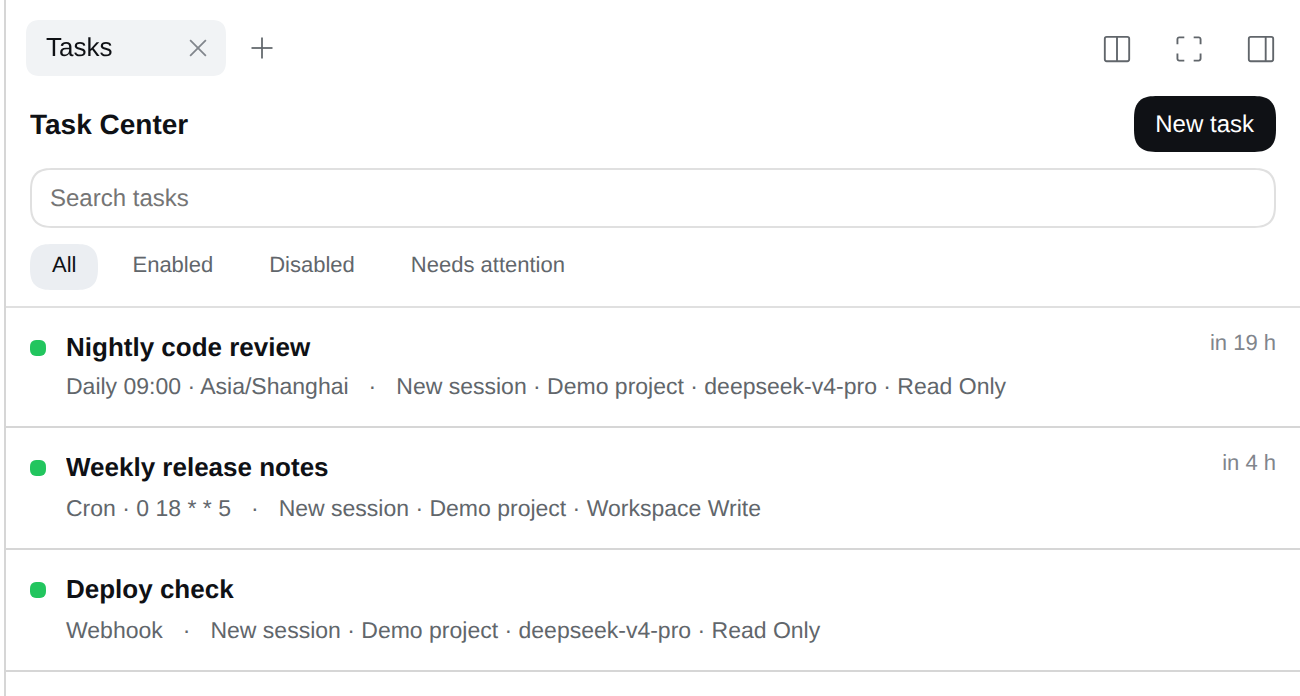


A tab, right where you work
Task Center is a tab in the session's right sidebar: no new window, no separate app. Every row answers three questions at a glance — is it on, when does it fire next, where does it deliver. A disabled task stays in the list with its settings and history intact.
One task, one source
A task is caused by exactly one thing, and every row says which:
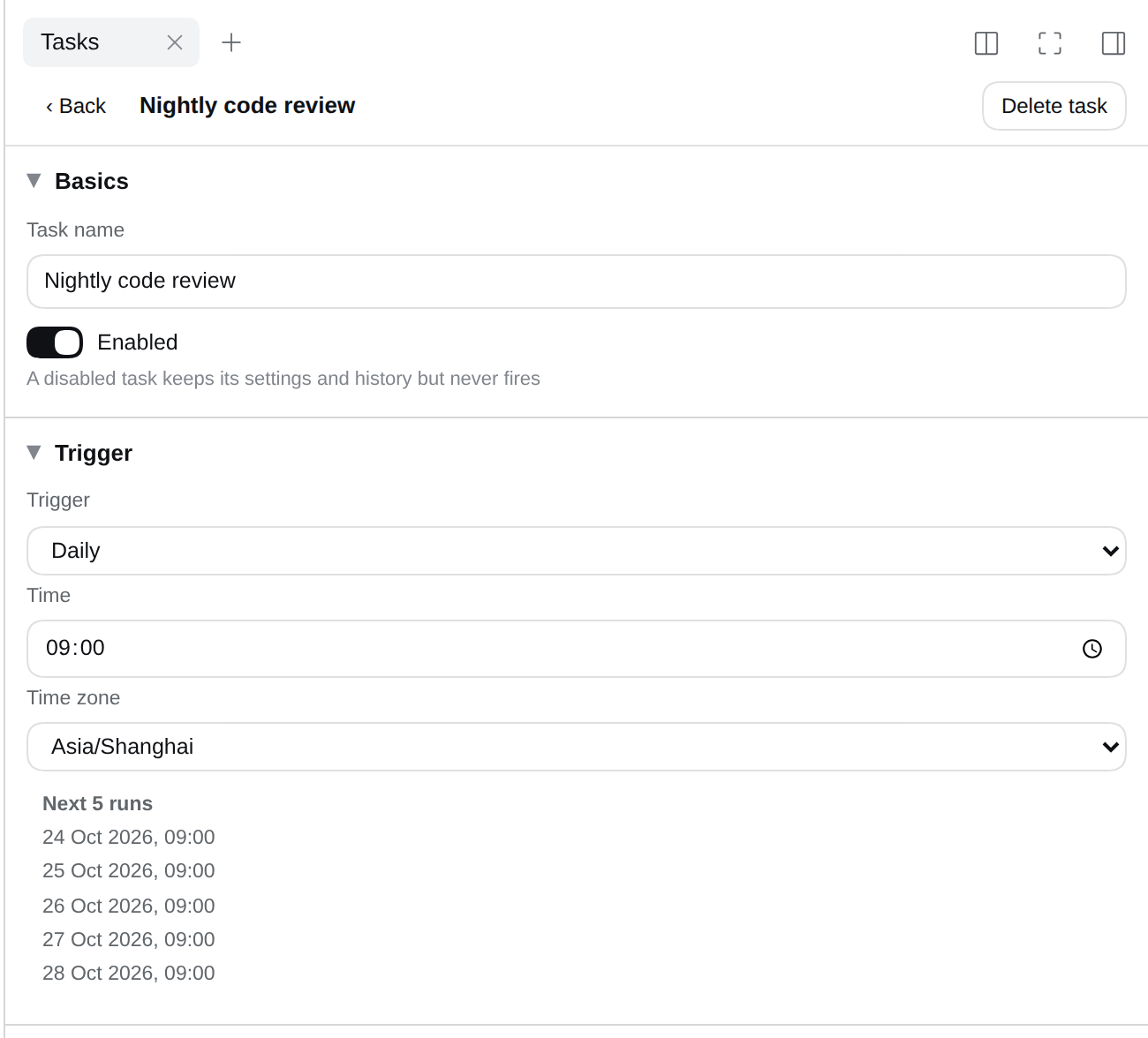
- A schedule — one-off, fixed interval, daily, weekly, or cron. Next 5 runs is computed in the time zone you chose, so a wrong cron expression shows up before you save it.
- An HTTP request — a webhook URL with its own secret, for CI, a GitHub hook, or a shell one-liner.
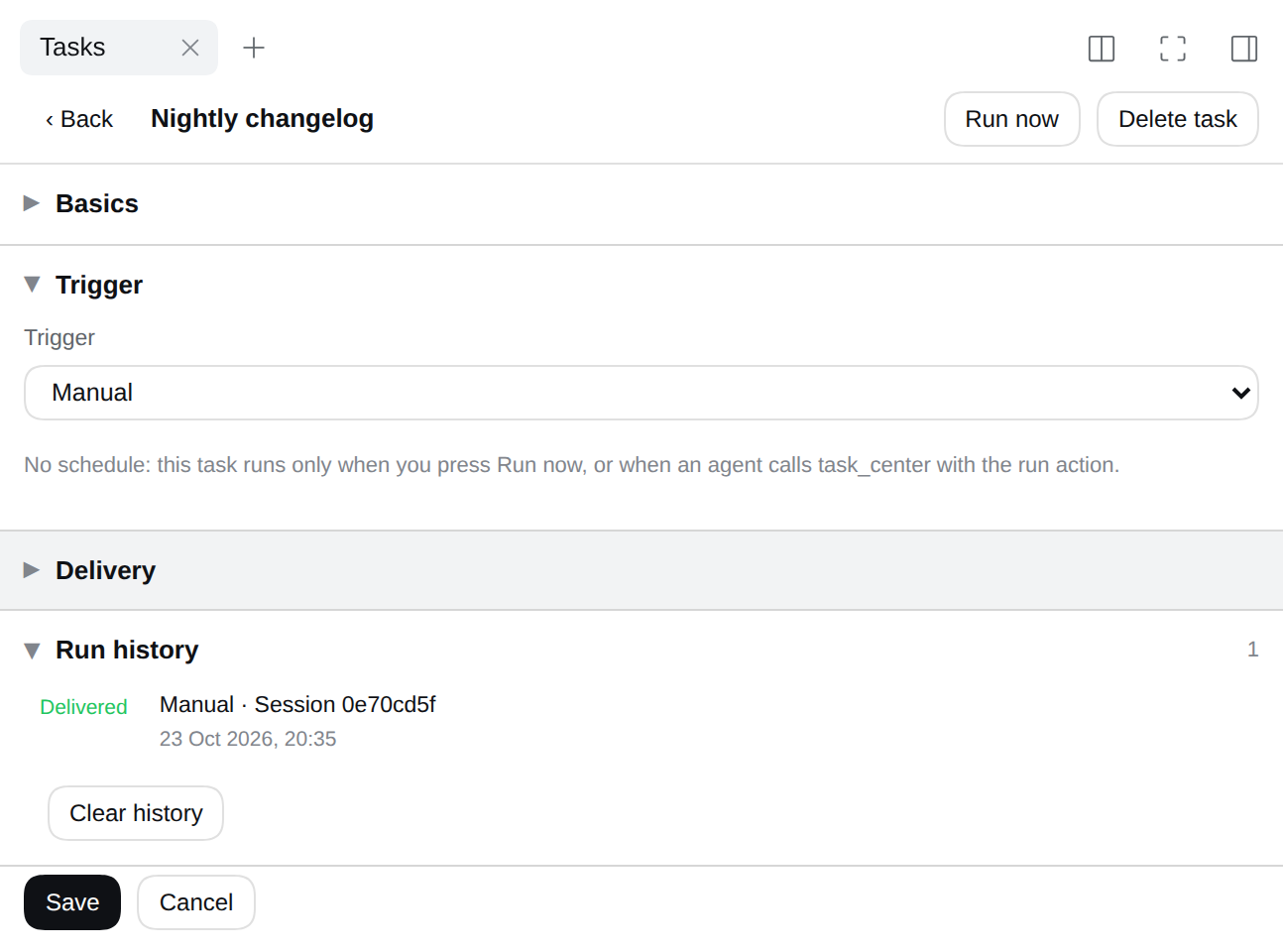
- You — a manual task has no clock and no address. It runs when you press Run now, and at no other time.
Running a scheduled task by hand is still a manual run, and the record says so: Manual · Session 3f2a1c
rather than pretending the schedule fired. The agent can fire one too — task_center has a run action.
Where it runs, on which model, with which permission
Deliver into a brand-new session or into an existing conversation. For a new session the task decides:
- the workspace and the agent preset;
- the model — the cheap one for routine digests, the deep one for real reasoning;
- the reasoning effort — off, low, high, max: whatever that model declares. The cheap model at low effort for a digest, the deep one at max for a refactor that has to think;
- the permission — read only, workspace write, or full access, the same presets DSH itself offers. It is in force before the first turn, so a nightly job is boxed in from its very first action.
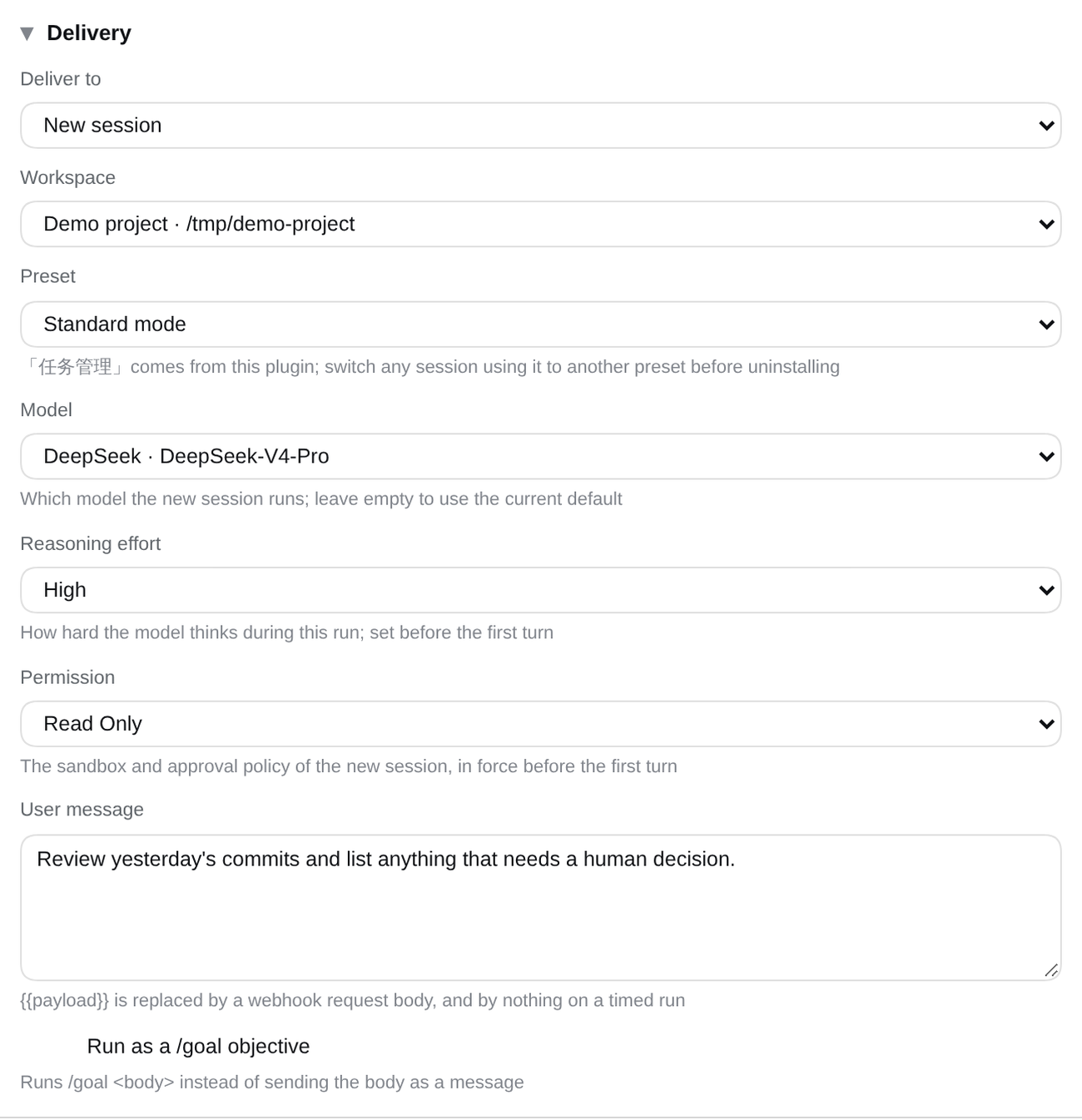
The message is yours to write and arrives as a normal user message, so slash commands still work:
/goal turns the trigger into an autonomous goal run, and any /skill-name loads that skill.
The model, effort and permission pickers appear only when the Host offers them, and leaving any of them empty follows the deployment default. The effort list comes from the chosen model, so it can never name something that model cannot do. If a model or preset later disappears, the task is never silently re-pointed at something else: the run record says what failed instead of delivering into the wrong sandbox.
With dsh-better-workspaces installed, a new session can also
land in a fresh worktree made per run: each run branches off the base you pick, so a nightly job never touches
the checkout you have open.
HTTP triggers and the run record
An HTTP task gets its own URL and secret, on DSH's own port. The request body replaces {{payload}} in your
message, and Rotate secret makes a leaked URL useless in one click.
curl -X POST "http://127.0.0.1:3080/task-center/hook/<task-id>/<secret>" -d '{"branch":"main"}'
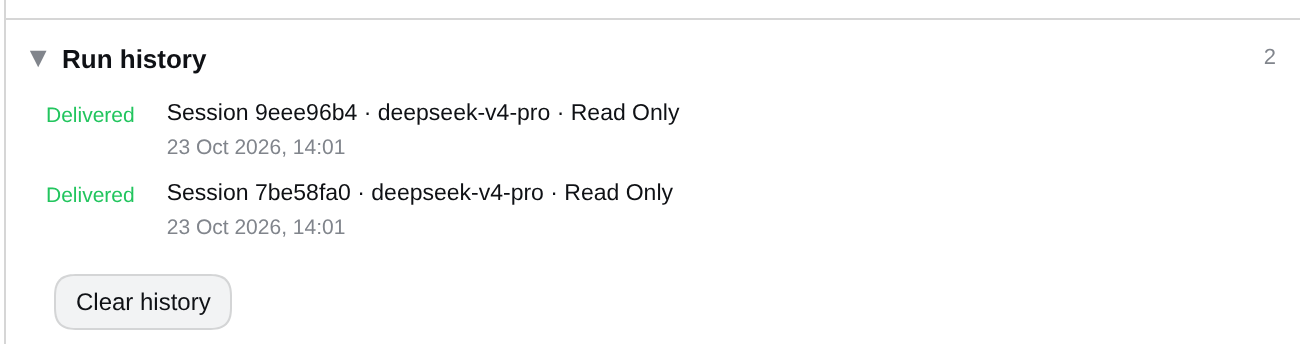
Every run leaves a record naming its source — schedule, HTTP, or manual: delivered, skipped because DSH was closed, or failed because the target was gone. A task that keeps failing is flagged needs attention instead of quietly doing nothing.
A preset that hands scheduling to the agent
Installing the plugin adds an agent preset, 任务管理: Standard mode without the built-in reminder tools, plus a
task_center tool — so you can say "every weekday at 9, summarise the repo" and the agent writes the task
itself. It can list, edit, delete, and fire one on demand.
The panel borrows DSH's theme tokens, so it looks native in light and dark alike.
Install
dsh plugin --profile web add @ds-hu/dsh-auto-task-center
Restart dsh web, open any session, and pick Task Center from the right sidebar's start page.
The 任务管理 preset shows up in the composer's mode menu.
Behind a reverse proxy, a tunnel, or Cloudflare Access, the panel keeps working: a write is checked against the host your browser actually used, not the loopback address DSH bound.
Uninstall
The plugin writes only under $DSH_HOME/task-center/ and registers no install scripts, so removing it leaves no
services, no timers and no patched configuration behind.
dsh plugin --profile web remove @ds-hu/dsh-auto-task-center
dsh-auto-task-center purge --yes   # optional: also delete the stored tasks
Move sessions off the 任务管理 preset first, then click away the one dead tab DSH keeps in your browser. Details in Uninstall.
Documentation
| Document | What is in it |
|---|---|
| docs/TECHNICAL.md | Architecture, data model, HTTP API, scheduling rules, uninstall |
| CONTEXT.md | The vocabulary this plugin is built on |
| docs/adr | Why the design is what it is |
License
MIT. See LICENSE.