
 @dshworks
dsh-watch
Put a watch on a stream: background listeners that wake the DeepSeek Harness agent with new matching lines — and a daemon host so a watcher runs unattended for weeks, with no task and no browser. Not affiliated with DeepSeek.
- Stars
- 2
- Language
- JavaScript
- Created
- Aug 14, 2026
- Updated
- Sep 18, 2026
Introduction
dsh-watchEnglish | 中文 Put a watch on a stream. The agent gets woken by what it says — even while idle. Even with nobody there.The stock jobs subsystem says when work finishes. Then take the human out. Declare the watches in profile config, mount the daemon, and the agent boots, idles at zero cost, and wakes for weeks on whatever its streams say.
|
|




Install
dsh plugin --profile web add @dshworks/dsh-watch
dsh --profile web
dsh plugin forwards to pnpm, so pnpm must be on PATH. Nothing else to
configure — the watch tool is available in the next session.
The tool
watch(source: "command", command: "npm run dev", pattern: "error|warn|Ready", label: "dev")
→ Watch armed (watch-1) on command: npm run dev.

# …the agent keeps working. When the dev server logs "Ready in 130ms",
# a notice wakes it:
[watch dev · watch-1] 1 line:
Ready in 130ms
Tail a file instead:
watch(source: "file", path: "/var/log/app.log", pattern: "ERROR|FATAL")
Every watch is a first-class background job (kind watch), so the
standard surface applies unchanged: job_list shows armed watches,
job_output drains a watch's line backlog, job_kill disarms one,
ownership is session-fenced, and settlement arrives as an ordinary
completion notice. This plugin adds only the watching — no parallel
lifecycle, no second registry.
| Behavior | Detail |
|---|---|
| Sources | command (spawned once through the shell capability, inheriting the session's sandbox policy and env) · file (tailed from its current end; pre-existing content is never delivered; truncation restarts from the top; a not-yet-existing file is watched for) |
| Batching | All lines heard in one poll tick share one notice — a bursty source costs one wake, not one per line |
| Filtering | Optional JavaScript regex; only matching lines are delivered. Cover failure signatures too — silence is not success |
| Wake budget | A token bucket per owner: burst maxConsecutiveWakes, then one credit back per wakeRefillMs. A claimed user message refills it completely |
| Event budget | Each watch disarms itself after max_events notices and settles completed; 0 listens indefinitely |
| Byte bounds | Each complete notice is capped UTF-8-safely, wrapper included; job_output holds the bounded backlog with an explicit trim marker when lines were dropped |
| Truncation honesty | Upstream output loss (lossy reads) is surfaced as a marker line, never swallowed |
| Lifecycle | Process exit flushes the tail, then settles completed (exit 0), failed (nonzero — a dead watch is a finding, not a silence), or killed (signal/disarm). Plugin disposal tears every watch down |
| Caps | Per-owner armed-watch cap fails the arming call loudly |
Running unattended
An agent that watches an ecosystem for a month is not a conversation. Two things have to change, and both are in the box.
It must not go deaf. The wake budget exists so a runaway source cannot
loop an idle agent forever. Counting consecutive wakes and refilling on the
next human message is right for a session someone is sitting in — and a
one-way door for one nobody is: after the last credit, every notice is
injected into an idle agent that nothing will ever wake again. So the
budget is a token bucket instead. Credits return with time
(wakeRefillMs, default 60 s), and a notice that arrived while the bucket
was empty earns a catch-up wake as soon as one comes back. Set
wakeRefillMs: 0 for the strict dsh-tool-jobs rule.
Something has to arm the watches, and something has to keep the process
alive. dsh --profile headless drives one task to quiescence and exits;
dsh --profile web stays up but waits for a browser. So autoArm declares
watches in profile config — armed for the root session at
agent/session-start, routed through the tool registry so they pass the
same guards, approval policy, sandbox, and shell environment a model-issued
call would — and @dshworks/dsh-watch/daemon is a ~90-line host that
creates one agent, seeds a standing brief, holds the process open, and
writes each active period's closing text to stdout as an operator journal.
# ~/.dsh/profiles/watcher/cordis.patch.yml
- id: dsh-watch
  config:
    wakeRefillMs: 300000
    autoArm:
      - source: command
        command: node recipes/ecosystem-watcher/feed.mjs --topic dsh-plugin
        pattern: '"kind":"new-repo"'
        label: ecosystem
        max_events: 0          # a watcher that disarms itself is not a watcher

- insert:
    - id: dsh-watch-daemon
      name: '@dshworks/dsh-watch/daemon'
      config:
        brief: >-
          You are the ecosystem watcher. A standing watch named "ecosystem"
          is armed on a feed of newly published repositories. For each one,
          decide whether there is an idea worth keeping, and append it to
          data/ideas.ndjson.
dsh plugin --profile watcher add @dshworks/dsh-watch
dsh --profile watcher | tee -a watcher.log
recipes/ecosystem-watcher/ has the whole
thing, including a feed that polls GitHub topics by creation date and emits
one NDJSON line per repository it has not seen before.
Proof
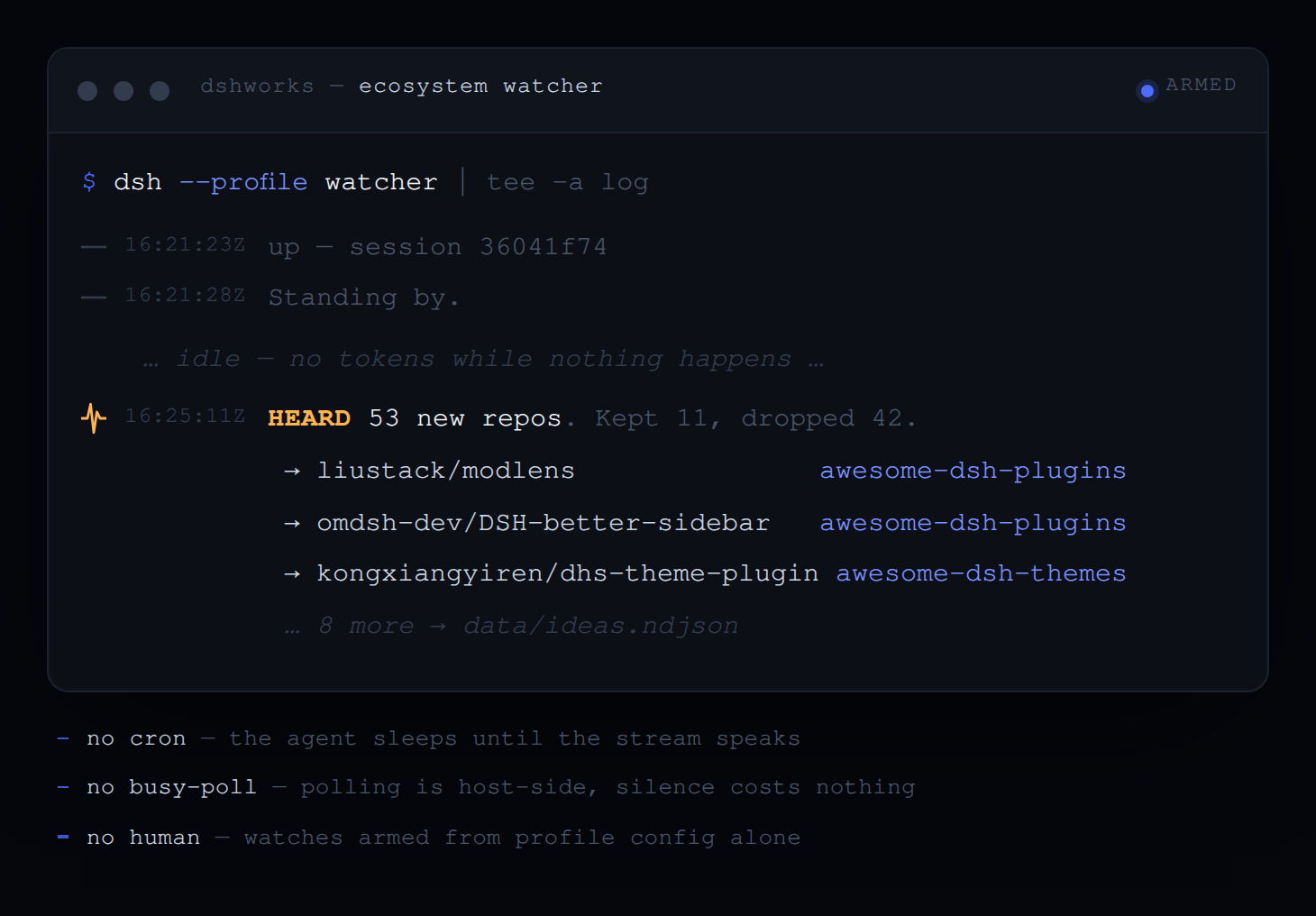
A real run, 2026-08-15, DeepSeek-V4-Pro, no human in the session. The feed found 53 newly published dsh repositories; the watcher was woken, read them, kept 11 and said why it dropped the other 42:
2026-08-15T16:21:23Z up — session 36041f74
2026-08-15T16:25:11Z Batch of 53 repos processed. Appended 11 ideas to data/ideas.ndjson
{"repo":"liustack/modlens","why":"Pasting an image and receiving structured JSON evidence
 (OCR, layout, semantics) gives text-only DSH models vision without a vision model.",
 "for":"awesome-dsh-plugins"}
That run also earned a bug fix: notices injected into a busy owner are
claimed at its next step, so counting them as owed a catch-up wake produced
one wake whose entire content was "you have queued notices" — for notices
already answered. Clearing the count on agent/inbox/claimed fixed it, and
a regression test holds the line.
Configuration
Every bound is a validated Config field, not a constant.
| Field | Default | Meaning |
|---|---|---|
pollIntervalMs | 300 | Poll cadence, and therefore the batch window |
maxNoticeBytes | 4096 | UTF-8 byte cap for one complete notice, header included |
maxConsecutiveWakes | 3 | Wake-credit burst capacity per owner |
wakeRefillMs | 60000 | Milliseconds per restored credit; 0 disables time refill |
defaultMaxEvents | 50 | Notice budget per watch; 0 means unbounded |
maxListenersPerOwner | 8 | Armed-watch cap per agent |
backlogBytes | 65536 | Retained-bytes budget for a watch's job_output |
autoArm | [] | Standing watches armed for the root session at boot |
The daemon's own config is brief (required), flushIntervalMs
(300000), and journal (true).
Model Experience
System prompt
One section (order 107, after the background-jobs guidance):
You can arm a watch on a stream with the watch tool: it listens in the background and wakes you when new matching lines arrive, so never busy-poll a source you already listen to. Listeners are background jobs — job_list shows them, job_output reads a listener's heard-line backlog, job_kill disarms one.
When autoArm is configured, a second section (order 108) names the
standing watches, so the model does not re-arm what it already has.
Tools
One tool, watch (source, command/path, workdir, pattern, max_events,
label). Disarm, list, and read ride the stock job_kill / job_list /
job_output.
Token effects
A silent source costs zero tokens — polling happens host-side. Each notice
costs one bounded message (≤ maxNoticeBytes); an idle wake additionally
costs the model request it opens, which is why wakes are budgeted.
Requirements
- The jobs subsystem:
@deepseek-ai/dsh-jobs,dsh-jobs-local, anddsh-tool-jobs— all present indsh-base, and therefore in the stock web and headless profiles. Arming fails loudly without an attached job controller. - For
source: command: the shell capability (@deepseek-ai/dsh-shell+ a provider). File sources work without it. - The daemon additionally needs
agents,sessions, andagentDefaultModel— alsodsh-base.
Development
pnpm install && pnpm test # 83 tests
Plain ESM JavaScript in lib/ — nothing builds at install time, so a git
install has no allowBuilds surface. (The dev install does: vitest pulls
esbuild, approved in pnpm-workspace.yaml, which is where pnpm ≥ 11 reads
build settings — the pnpm field in package.json is silently ignored.)
Beyond the suite, the full lifecycle is verified against live sessions on
0.1.0-rc.6 with DeepSeek-V4-Pro: arm → silence on non-matching lines →
wake-on-match while idle → disarm via stock job_kill → silence after
disarm (2026-08-14), and boot → standing brief → idle → woken twice by an
unattended feed, ~1.6 s from write to reply (2026-08-15).
Through 0.1.0-rc.8, checked at the source rather than re-run.
@deepseek-ai/dsh-tools — the seam every watch is installed and fired through
— has a byte-identical src/ in rc.7 and rc.8. @deepseek-ai/dsh-llm did
change, additively: an interruptedBlocks() assembler for cancelled streams,
image content, and a retry default raised from 2 to 5. Nothing removed, so
nothing here breaks; the raised retry default is worth knowing if you were
timing a standing watch's failure budget.
One rc.8 rename to know even though nothing here passes it:
SubagentReportDelivery dropped 'wakeup' for 'next-step', which steers the
parent rather than waking it. dsh-watch wakes its owner through the tools
seam, not through the subagent report path, so the rename does not reach it.
Relation to neighbors
- Stock
dsh-tool-jobsnotifies on job completion; dsh-watch notifies on output while running. Same wake mechanism, complementary moments. - yoke233/dsh-tool-monitor subscribes to already-running bash/pwsh jobs by teeing their output. Use it to watch a job you already started; use dsh-watch to arm a dedicated watch (or tail a file) with batching and budgets.
- AbnerAI/dsh-monitor polls a re-run command or an NDJSON inbox and wakes the agent per line. dsh-watch differs in running the command once as a stream, batching per tick, budgeting wakes and events, bounding every notice, living inside the jobs subsystem, and shipping a host for unattended operation.
Known limitations and deferred work
- Polling, not
inotify/kqueue: sub-pollIntervalMslatency is out of scope; the tick is the batch window by design. - One regex per watch; alternation covers the multi-signature case
(
error|Traceback|FAILED). stderrof command sources arrives inside the shell provider's marked sections, not as a separate filterable channel.- No re-arm across restarts: watches live with their session. A restarted
daemon starts a fresh session and re-arms from
autoArm; it does not resume the old one. - The catch-up sweep runs on listener ticks, so an owner whose every watch has been disarmed keeps whatever was queued until something wakes it.
License
MIT. Not affiliated with DeepSeek. Registered in awesome-dsh-plugins.