
 @grloper
dsh-claude-oauth
Claude Pro/Max OAuth model provider for DeepSeek Harness with Google/Gmail login in Settings, auto-token refresh, live model discovery, and real-time quota tracking
- Stars
- 4
- Language
- JavaScript
- Created
- Sep 6, 2026
- Updated
- Oct 10, 2026
Introduction
dsh-claude-oauth




Claude Pro / Max OAuth integration for DeepSeek Harness (DSH) — sign in directly with your Google / Gmail account from the DSH Web Settings page, with automatic token rotation, live model discovery, and real-time 5-hour / 7-day subscription quota tracking.
English · 简体中文 · Technical Article
Verification boundary
The source contains an OAuth PKCE callback flow, credential synchronization, model discovery, and quota probing. These are implementation claims, not evidence of current upstream authorization or DSH compatibility. No live login, token refresh, credential file access, model request, or quota probe was performed in this review. The quota implementation calls /v1/messages with max_tokens: 1; it is an inference request and should not be described as a free read-only probe.
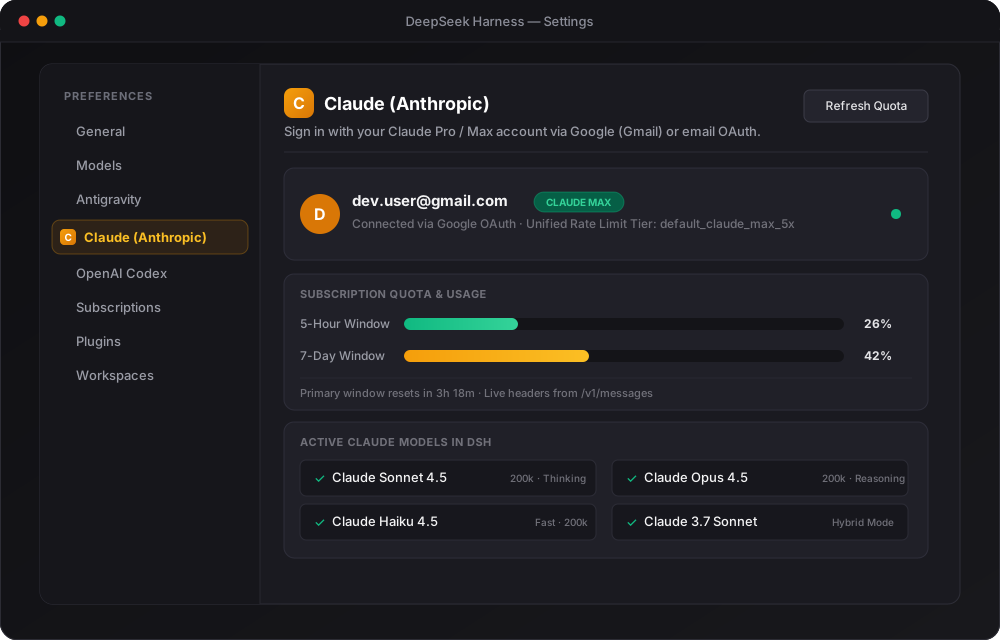
npm run check checks syntax; npm test verifies six metadata/header/PKCE/HTML-escaping cases. Those tests do not exercise the host plugin lifecycle, callback validation, token storage, refresh, or UI. The SVG below is a design asset, not a captured authenticated runtime demo. Existing compatibility badges are unverified. Callback error and profile text now escapes HTML markup before rendering; authentication scopes, token exchange and credential behavior are unchanged.
Preview
Key Features
- 🚀 One-Click Google / Gmail Sign-In in Settings: Dedicated Claude section in DSH Settings (
order: 13, beside Antigravity and Codex). Click "Sign in with Google / Gmail" to authenticate directly in your browser. - ⚡ Zero Terminal Hassle: No manual CLI token dumping, copying strings, or editing YAML config files.
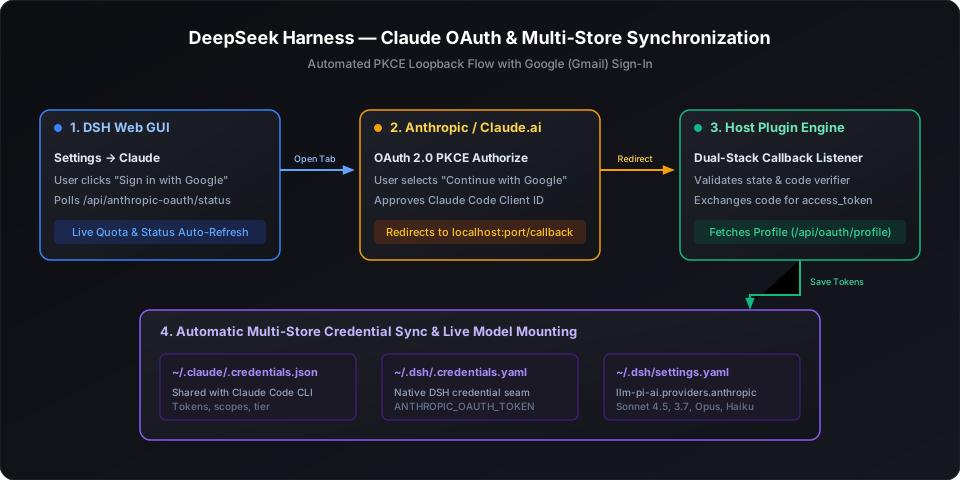
- 🔄 Dual-Stack PKCE OAuth Engine: Ephemeral loopback callback server listening on dual-stack IPv4 (
127.0.0.1) and IPv6 (::1), avoiding Windows localhost resolution traps. - 🛡️ Multi-Store Credential Sync: Exchanged tokens automatically sync to:
~/.claude/.credentials.json(shares authorization with the official Claude Code CLI)~/.dsh/.credentials.yaml(ANTHROPIC_OAUTH_TOKENandCLAUDE_CODE_OAUTH_TOKEN)~/.dsh/settings.yaml(configuresllm-pi-ai.providers.anthropicwith active models)
- 📊 Live Subscription Quota Meters: Displays real-time 5-hour and 7-day quota utilization bars with reset countdowns in both Settings and the ambient chat composer dock.
- 🤖 Live Model Catalog: Queries
GET /v1/modelsdynamically. All latest Claude releases (Claude 3.7 Sonnet, Claude Sonnet 4.5, Claude Opus 4.5, Claude Haiku 4.5) mount automatically.
Architecture Flow
Quick Start
Installation
Install dsh-claude-oauth into your active DSH Web profile:
# From GitHub repository
dsh plugin --profile web add github:grloper/dsh-claude-oauth

# Or from local checkout
dsh plugin --profile web add ./dsh-claude-oauth
Sign In via Web Settings
- Start or open DeepSeek Harness Web GUI:
dsh web - Open Settings (gear icon on the sidebar).
- Select the Claude section from the navigation list.
- Click "Sign in with Google / Gmail".
- In the opened browser window, choose "Continue with Google", pick your Gmail account, and click Authorize.
- The tab will display "Claude Connected". Return to DSH — your account email, tier (
CLAUDE PROorCLAUDE MAX), live quota bars, and models are now active!
Optional: Sign In via CLI
You can also authenticate directly from the command line using the bundled bin script:
claude-oauth-login
# Or via npx
npx dsh-claude-oauth
Setting Claude as Default Agent Model
To make Claude Sonnet 4.5 your default model for all sessions:
In ~/.dsh/settings.yaml:
agent-default-model:
  provider: anthropic
  model: claude-sonnet-4-5
Or pick Claude per-session from the composer model selector.
Verification & Testing
Run the included test suite:
npm run check
npm test