
 @hotpot-labs
dsh-wooden-fish
dsh 木鱼,dsh 干活你敲木鱼,每天增加一点点功德
- Stars
- 0
- Language
- TypeScript
- Created
- Sep 3, 2026
- Updated
- Sep 3, 2026
Introduction
dsh-wooden-fish
English | 中文
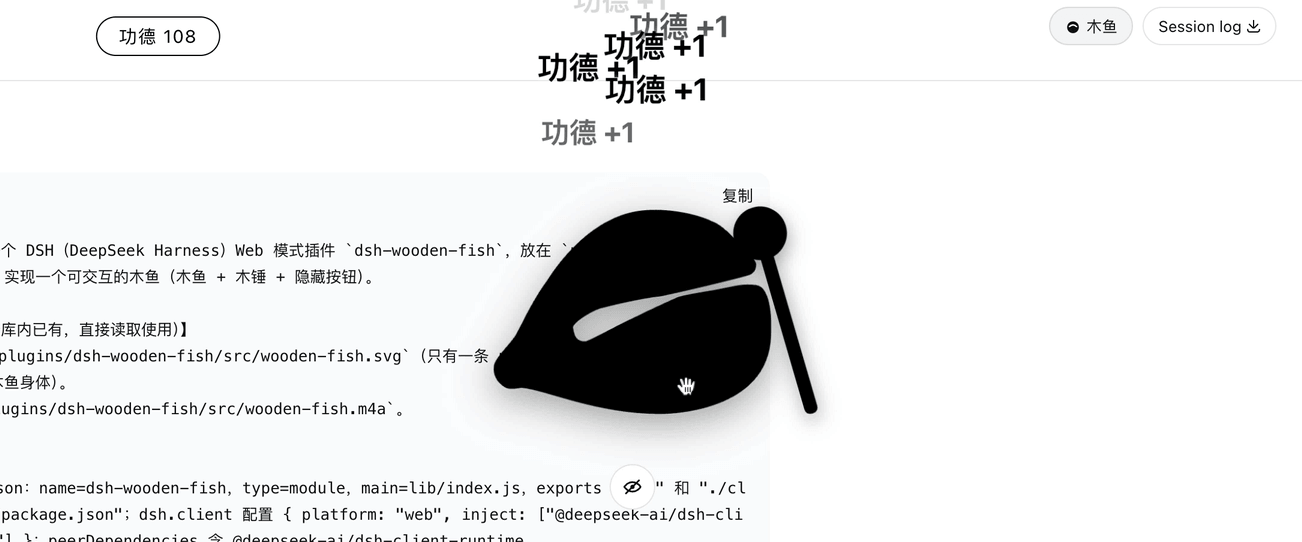
A DSH (DeepSeek Harness) web-mode plugin: shows a centered wooden fish (木鱼) and mallet over a blurred backdrop of the dsh web UI. Click the fish to strike it with the mallet, pop a "功德 +1" at the top, and hear "南无阿弥陀佛".
Installation
Install from npm (recommended)
dsh plugin --profile web add dsh-wooden-fish
Install from GitHub
dsh plugin --profile web add github:your-org/dsh-wooden-fish
pnpm ≥10 blocks build scripts of git dependencies by default. After the first add fails, authorize this package's build in the profile's pnpm-workspace.yaml, then re-run the add command above:
allowBuilds:
  dsh-wooden-fish: true
Install locally
From the directory containing this plugin, install it into the profile as a local bundle:
dsh plugin --profile web add ./dsh-wooden-fish
Usage
After installation, start in web mode:
dsh --profile web web
A wooden fish and mallet appear centered on the page, over a blurred view of the dsh web UI. Click the wooden fish to strike it.
Features
- Renders a centered wooden fish and mallet in dsh web mode via the
shell.overlayslot. - Blurs the background with
backdrop-filterwhile keeping the dsh web UI underneath click-through. - On click, the mallet strikes the fish once, "功德 +1" pops up at the top, and the merit counter increments.
- Plays a knock sound (
wooden-fish.m4a) and speaks "南无阿弥陀佛" (Web Speech API). - The wooden fish, mallet, and merit counter follow the app appearance: black in light mode, white in dark mode.
Development
The plugin is client-only: the host entry (src/index.ts) is an empty bundle stub, and all behavior lives in the browser entry (src/client.tsx). Build with esbuild:
npm install
npm run build
npm run typecheck
FAQ
- No sound / no speech on click? The browser requires a user gesture to unlock audio, and
speechSynthesisdepends on a Chinese voice being installed in the OS/browser. Clicking the fish is the gesture; if speech still does not play, install a Chinese (zh-CN) voice in your system settings. - How do I hide the overlay? Stop or uninstall the plugin, or reinstall to remove it. There is no in-page toggle.