
 @kolawong
dsh-plugin-toolkit
DeepSeek Harness personal toolkit: runtime-toggleable quality-of-life optimizations, each shipped as one card in the Toolkit settings page.
- Stars
- 1
- Language
- JavaScript
- Created
- Sep 3, 2026
- Updated
- Oct 19, 2026
Introduction
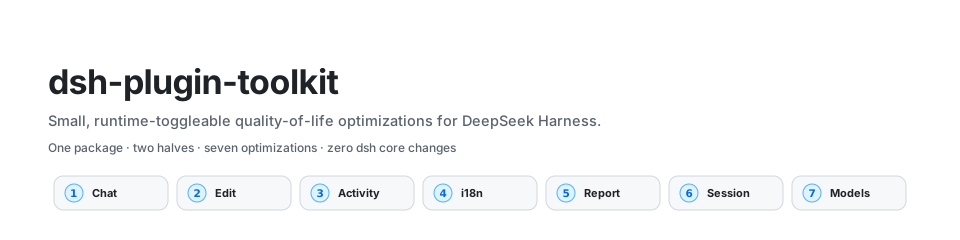
English · 简体中文
Personal quality-of-life toolkit for DeepSeek Harness. Each optimization is too small to deserve its own vertical plugin, so they ship together as one entry in the Toolkit settings card: Web settings → Plugins → DSH-Toolkit expands a half-width sub-card grid (icon, title, short subtitle, on/off badge), and clicking a sub-card opens that optimization's dialog. The plugins page stays a compact launcher as the list grows.
Everything is wired through public extension surfaces — settings namespaces, the client module table, conversation slots, llm/stream, model discovery and webServer routes — so no dsh core package is patched and upstream one-click upgrades stay painless.
Contents
- At a glance
- Install
- Architecture
- The settings card
- Optimizations
- Configuration reference
- Development
- Graduation rules
- Model experience
- License
At a glance
| # | Optimization | What it does | Default | Half |
|---|---|---|---|---|
| 1 | workspacelessChat | Keeps a no-project chat workspace and auto-connects it at cold start | on | client + host |
| 2 | editLastMessage | Edit-and-resend the last user message, rewinding the model context | on | client (host session.rewrite RPC) |
| 3 | viewActivity | Sidebar activity icon: running-first, then Today / Yesterday / Weekday / Earlier | on | client |
| 4 | slashI18n | Chinese descriptions for the / menu's commands and skills | on | client |
| 5 | changeReport | Codex-style per-turn file-change card at the turn tail | on | client |
| 6 | opencodeSession | Stable x-opencode-session header on OpenCode Go/Zen requests | on | host |
| 7 | modelCapability | Keeps one llm-pi-ai route's model list, capacities and image support current | on | host + client |
| 8 | smartReply | Gray ghost-text suggested reply in the composer, Tab to fill; registered routes runtime-transported (any protocol), context-aware, learns your phrasing locally | on | client + host |
Install (web profile)
cd ~/.dsh/profiles/web
pnpm add file:/path/to/dsh-plugin-toolkit   # link:/path/to/dsh-plugin-toolkit while developing
# add "dsh-plugin-toolkit" to the dsh.profile.bundles list in package.json
systemctl restart deepseek-harness.service  # or your profile's restart path
Server-side changes (this package) need a profile restart; the client bundle re-syncs with pnpm install inside the profile followed by a browser hard refresh. Toggles, paths and model lists are settings-namespace values, so day-to-day edits apply live without a restart.
Architecture
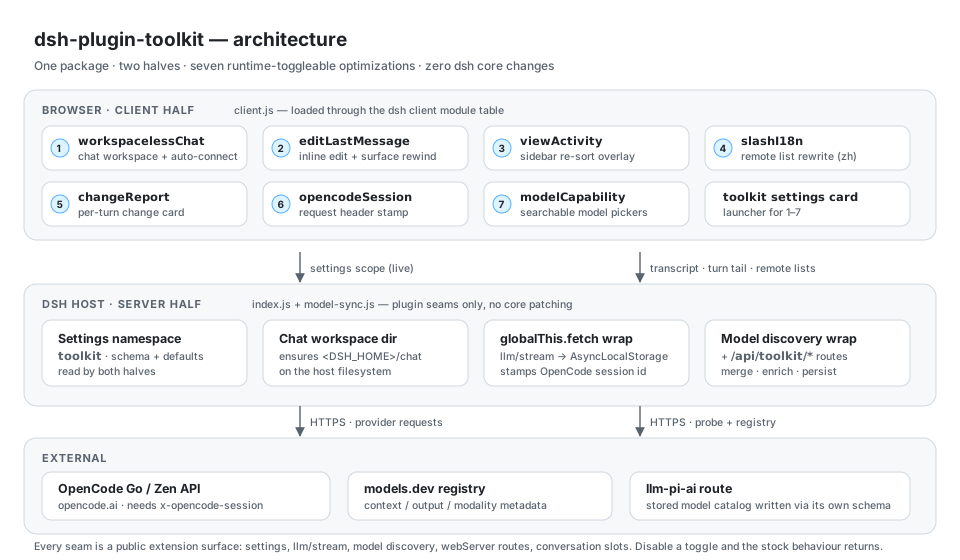
The package is split into a browser half and a host half; both read the same toolkit settings namespace, and neither touches dsh source.
| Half | Files | Responsibility | Seams used |
|---|---|---|---|
| Client | client.js | Settings card, inline edit UI, sidebar re-sort, /-menu rewrite, change-report card, composer ghost-text suggestion, model-id pickers | Client module table, conversation node/turn-tail slots, conversation.input.overlay, inputActions, remote.* namespace wraps, settings scope |
| Host | index.js | Settings schema and defaults, default chat workspace directory, OpenCode session-header stamping | settings, llm/stream, globalThis.fetch |
| Host | model-sync.js + models-core.js | Model discovery wrap, sync/listing routes, capacity and modality enrichment, and the endpoint/credential resolvers suggest-api.js reuses for its unregistered-route fallback | llm model discovery, webServer routes, settings stores |
| Host | suggest-api.js + suggest-core.js | Suggestion route (runtime-first, direct fallback), session-context reads, and the pure prompt/salvage logic behind it | webServer routes, llm streaming, sessions, model-sync resolvers |
| Host | suggest-habits.js + suggest-store.js | Pure local phrasing statistics and their atomic, failure-tolerant persistence under <DSH_HOME>/plugins/dsh-plugin-toolkit/ | local filesystem |
Design rules that hold across the package:
- No core patches. Every hook is a documented extension surface, so an upstream upgrade cannot conflict with the toolkit.
- Dormant, not broken. Missing a seam (older host, no
webServer, nosession.rewrite) disables just that optimization; the rest of the UI is untouched. - Live configuration. Every toggle and field lives in the
toolkitsettings namespace and is re-read at use time. - Independent toggles. Each optimization can be switched off from its sub-card and restores the stock behaviour verbatim.
The settings card
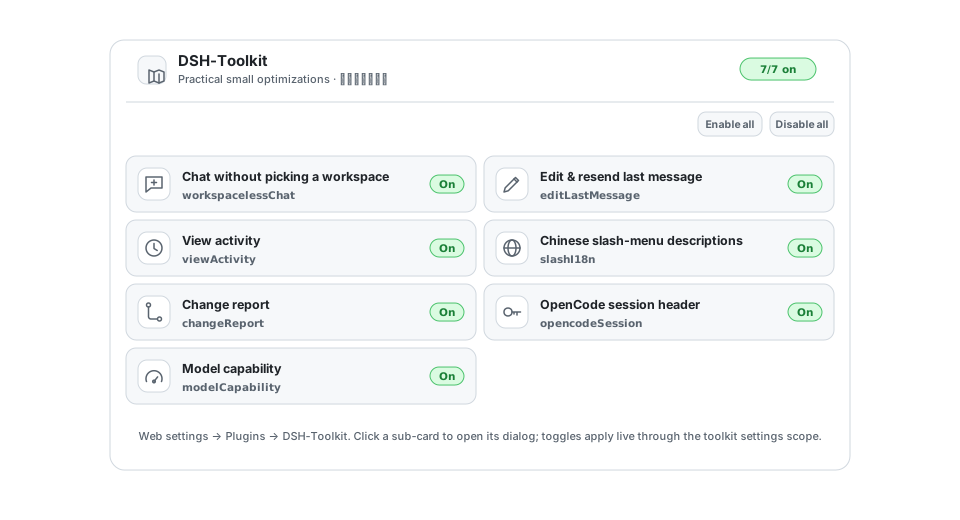
The card renders one sub-card per optimization with a live on/off badge and an Enable all / Disable all pair. Opening a sub-card shows that optimization's own description and fields (for example the chat directory, or the model-capability key and pickers).
Optimizations
workspacelessChat
Chat without picking a workspace first, like other agent harnesses' default-project behaviour. dsh's composer requires a blank session to belong to a workspace, so the optimization keeps a dedicated no-project chat workspace (「通用对话」) around: it is idempotently created with its friendly title whenever the optimization is enabled, so the option always shows in the sidebar and workspace picker — open it to chat without a project.
On top of that, when both baselines are ready, no session is selected, and the runtime's own startup policy has no recent workspace to connect (first run, no workspaces), the client also auto-connects a blank session in that workspace so the composer is live immediately.
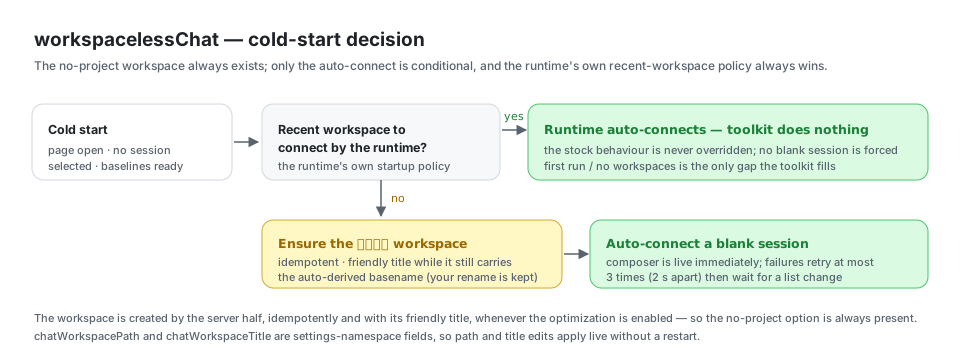
The cold-start auto-connect failures retry at most 3 times (2 s apart) and then stay dormant until a list change re-triggers the check. The runtime's own recent-workspace auto-connect always wins; the auto-connect only fills the nothing-to-connect case, while the workspace itself exists unconditionally. The workspace is renamed to its friendly title only while it still carries the auto-derived basename (a title you set yourself is never overwritten).
| Config | Default | Meaning |
|---|---|---|
optimizations.workspacelessChat | true | Toggle the no-project chat workspace + auto-connect. |
chatWorkspacePath | "" | Host directory for the default chat workspace; empty resolves to <DSH_HOME>/chat. The server creates the directory (live on settings edits, too). |
chatWorkspaceTitle | 通用对话 | Display title of the no-project chat workspace. |
The card writes go through the toolkit settings namespace, so toggles and path edits apply live without a restart.
editLastMessage
Retry a failed answer without copy-pasting and without polluting the model's context: the last user message's hover actions gain an Edit button. Clicking it opens an inline editor prefilled with that message; Save & resend rewrites the session in place — the edited message and everything after it are replaced (the model context truly rewinds, so the next request contains only the edited content), and a new turn answers the edited message.
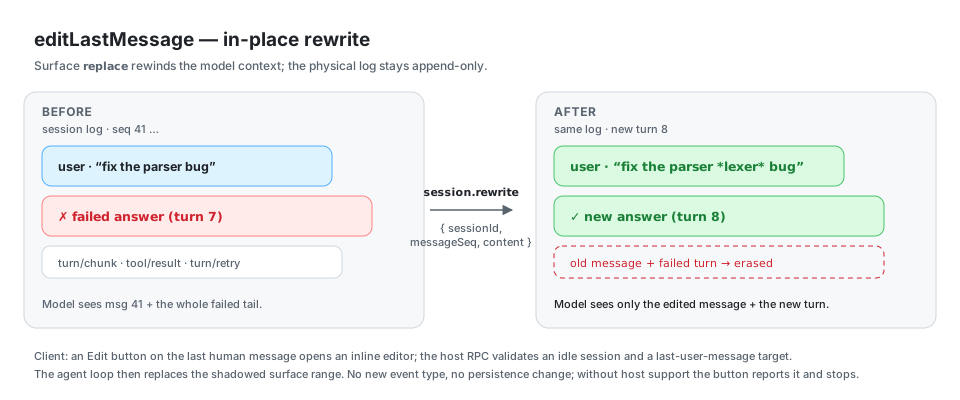
This needs host support for the session.rewrite RPC (a small addition to this repo's dsh checkout). On hosts without it, the button still shows but reports that rewriting is unsupported. The client transcript erases the old message and its failed turn; turn boundaries are kept so the failed turn collapses into an invisible empty turn. Requires an idle session (a running turn rejects with agent-busy); only the last human user message is editable, text-only.
The host extension lives in this repo as host/session-rewrite.patch. A dsh upgrade drops it, so re-apply it after every upgrade: node scripts/apply-host-patch.mjs, then pnpm run build:lib && pnpm run build:web and restart the harness. Verify the live behavior with node scripts/e2e-verify-rewrite.mjs.
| Config | Default | Meaning |
|---|---|---|
optimizations.editLastMessage | true | Edit-and-resend button on the last user message. |
viewActivity
Adds an Activity icon (native clock glyph) to the workspace sidebar, right after the search (magnifier) control. Clicking it re-sorts the sidebar's conversation list in place: running conversations surface in a leading Priority group, then the remaining history grouped by Today / Yesterday / Weekday / Earlier (newest first within each group) — the familiar "recent conversations" pattern. Clicking again restores the previous grouping (workspace sections or the flat list); the icon highlights while the activity sort is on.
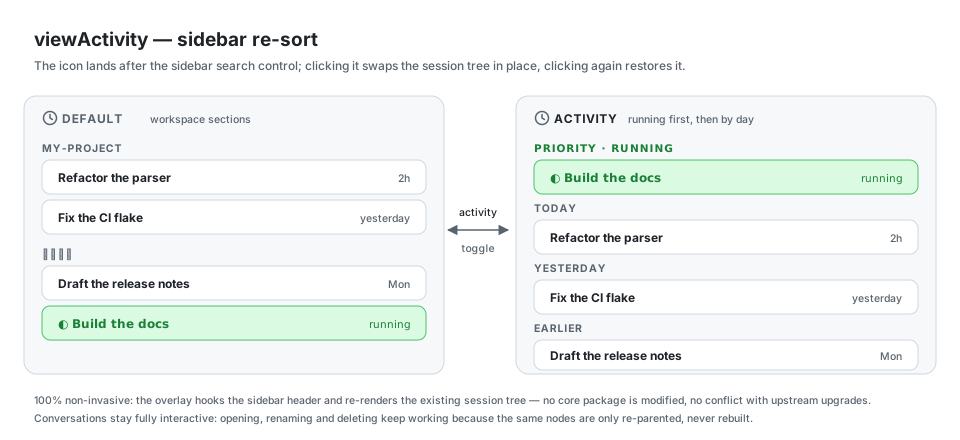
100% non-invasive external implementation: hooks the activity toggle into the sidebar header and dynamically swaps the session tree, with zero modifications to official DSH core packages and zero conflict with upstream one-click upgrades.
| Config | Default | Meaning |
|---|---|---|
optimizations.viewActivity | true | Workspace-header activity icon + in-place running-first / by-day re-sort. |
slashI18n
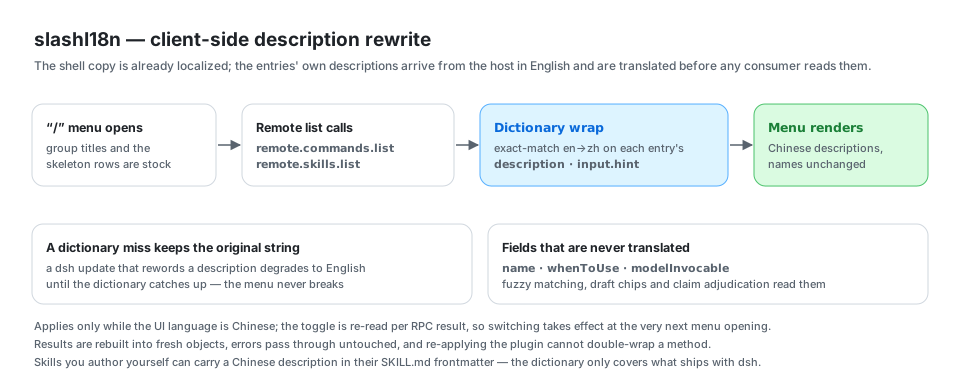
The / menu's shell copy (group titles, the user-only badge, skeleton rows) is already localized, but the entries' descriptions come straight from the host: built-in command descriptions, argument hints, and skill catalog descriptions all render verbatim in English, even under the Chinese UI. This optimization translates them client-side: the toolkit wraps the remote.commands.list and remote.skills.list namespace methods and rewrites each response's description / input.hint through an exact-match en→zh dictionary before any consumer reads it.
Scope and safety rails:
namefields are never translated — fuzzy matching, the draft-chip lexicon, and claim adjudication all read them;whenToUse/modelInvocableride untouched too.- A dictionary miss falls back to the original string, so a dsh update that rewords a description degrades to English until the dictionary catches up (it never breaks the menu).
- Translations apply only while the UI language is Chinese, and the settings toggle is re-read per RPC result, so switching takes effect at the very next menu opening.
- Results are rebuilt into fresh objects, so no caller cache aliases the wire data; rejections and error results pass through untouched; re-applying the plugin cannot double-wrap a method.
- Skills you authored yourself can simply carry a Chinese
descriptionin theirSKILL.mdfrontmatter — no dictionary needed. The dictionary only covers what ships with dsh (6 built-in commands, 2 hints not already keyed by ui-conversation's ownhint.*locale keys, and the 2 built-in skills). - No dsh source changes and no host extension are required; on a host without these namespaces the optimization simply stays dormant.
| Config | Default | Meaning |
|---|---|---|
optimizations.slashI18n | true | Chinese descriptions for the / menu's commands and skills. |
changeReport
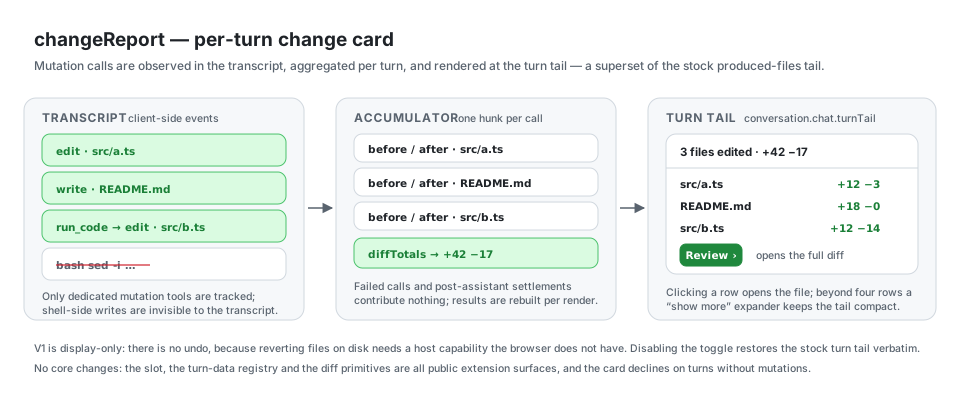
A codex-style change report at the tail of every completed turn. When a turn changed files (edit / write / mutating str_replace_editor calls), the tail renders a compact card: "N files edited · +A -R", one row per file with its own +N -M (click a row to open the file in the viewer), a show more expander beyond four rows, and a Review button opening the turn's full diff. The card is a superset of dsh's built-in produced-files tail: it joins the same conversation.chat.turnTail chain ahead of it (lower priority) and declines on non-mutating turns, so the stock tail renders exactly as before.
How it works, and its bounds:
- Data comes from the transcript, client-side: a conversation turn-data accumulator records one before/after hunk per successful mutation call — direct agent tool calls and
run_code's nested sub-calls (which log astool/code-dispatchevents keyed by their root call). Line counts reuse the primitives'diffTotals, so the header numbers always match what the reviewDiffBlockrenders. bash-side file writes (sed, redirects, …) are invisible to the transcript and therefore not tracked — the report covers the dedicated file-mutation tools, like codex tracks its own.- Failed calls (tool error results) contribute nothing; settlements after the closing assistant seq are excluded; aggregated results are rebuilt per render (no aliasing with the wire data).
- No undo: reverting files on disk would need a host-side capability the browser does not have. Declining is deliberate — V1 is display-only.
- No dsh source changes: the slot, the turn-data definition registry, and the diff primitives are all public extension surfaces. Disabling the toggle restores the stock tail verbatim.
| Config | Default | Meaning |
|---|---|---|
optimizations.changeReport | true | Per-turn change report card at the turn tail. |
opencodeSession
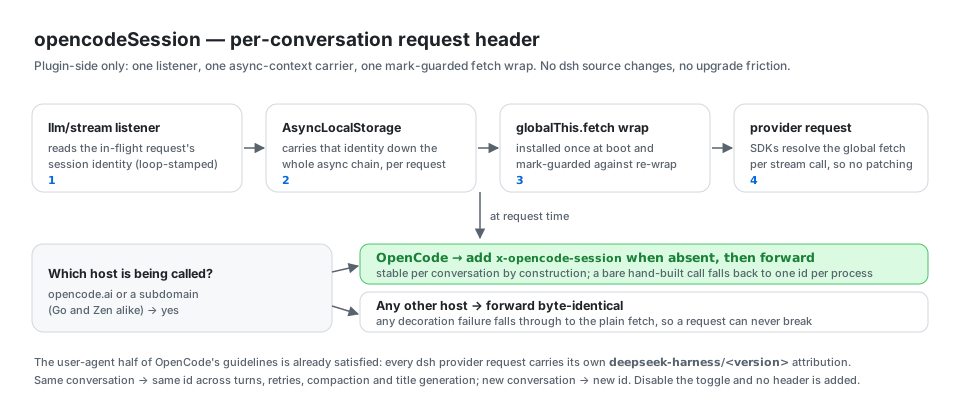
OpenCode Go now 400-rejects requests that lack x-opencode-session ({"type":"MissingSessionID", ...}), and its guidelines ask coding agents to identify themselves with their own user agent and to send one stable session id per conversation so the gateway can route requests and reuse prompt caches. The user-agent part is already satisfied — every dsh provider request carries deepseek-harness/<version> attribution. This optimization fixes the session half, entirely from the plugin side: an llm/stream listener carries the in-flight request's session identity down the async chain via AsyncLocalStorage, and a thin boot-time globalThis.fetch wrap stamps the header onto any request whose target host is opencode.ai or a subdomain (Go and Zen alike).
How it works, and its bounds:
- The id is the loop-stamped session identity dsh already attaches to every request it builds (the agent-loop invariant requires it), so the header is stable per conversation by construction — new conversation, new id; same conversation, same id across turns, retries, compaction, and title generation.
- A call that carries no session identity (rare hand-built one-shots; also model discovery) falls back to one id per process rather than failing with the gateway's
MissingSessionID. - The wrap is installed once (mark-guarded), adds the header only when it is absent, and any decoration failure falls through to the plain fetch — it can never break a request. Non-OpenCode requests pass through byte-identical.
- Provider SDKs resolve the global fetch per request (pi-ai constructs its client per stream call), so the boot-time wrap needs no dsh source changes and survives one-click upstream upgrades untouched.
- 100% non-invasive external implementation, like
viewActivity: zero modifications to dsh core packages.
| Config | Default | Meaning |
|---|---|---|
optimizations.opencodeSession | true | Stable per-conversation x-opencode-session header on OpenCode Go/Zen requests. |
modelCapability
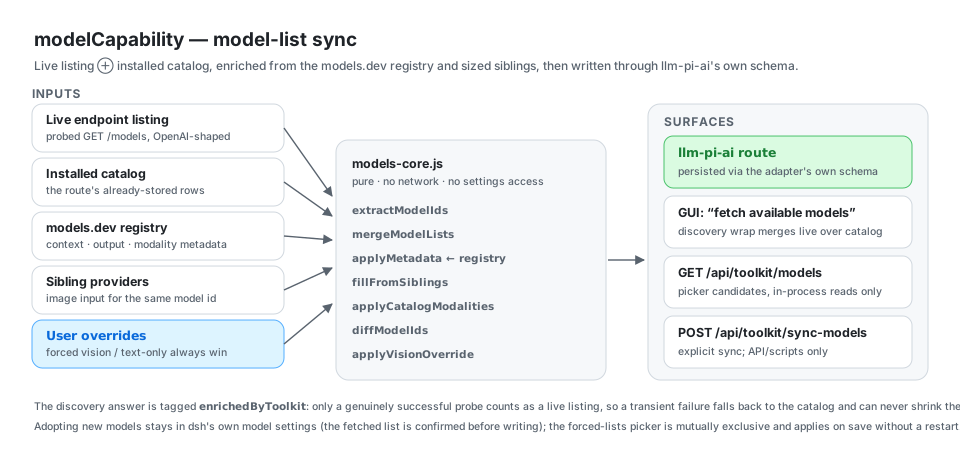
Keeps every llm-pi-ai route's model list current against its endpoint's live listing: newly served models become selectable immediately, with no restart; missing context/output limits are filled from the models.dev registry and from sized siblings; image input is borrowed from any other registered provider that declares the same id multimodal; and a model can be forced vision-capable or text-only. This was the 「模型能力」 section of dsh-plugin-quota-badges and now lives here in full — the other plugin no longer ships it.
How it works, and its bounds:
- Discovery wrap: wraps the runtime's llm-pi-ai model discovery so the GUI's "fetch available models" answers with the live listing merged over the installed catalog instead of the catalog alone. The wrap covers every llm-pi-ai route the request names, not just
modelsRouteKey: the host answers a catalog route from its installed catalog without any network call, so a vendor's newer models would otherwise stay invisible on every other route. Each route resolves its own endpoint (request draft → the route's storedbaseURL→ amodelsRouteBaseURLsoverride; the primary route additionally falls back tomodelsBaseURL), credential (draft key → the route'sapiKeyEnvthrough the credentials service, then the environment; the primary route additionally falls back tomodelsApiKey) and models.dev directory (the primary route usesmodelsRegistryProvider, every other route its own key). A route with no resolvable endpoint, or with neither a credential nor deployment headers, keeps the host's answer — the wrap never guesses a URL or probes into a guaranteed 401. The endpoint must be resolved before the host's own discovery runs: a provider pi-ai ships no catalog for (clinepassand any gateway the adapter does not know) makes the host throwDISCOVERY_FAILEDwhen the request names nobaseURL— and the GUI's request names only the route. Because the wrap used to call the host first, that error escaped before the endpoint could be supplied and the route answered with whatever the editor had saved. The wrap now resolves the endpoint first and, on that refusal, retries the host with the resolved endpoint (the host's reply is the endpoint's own listing, so it is reused and tagged live rather than probed a second time); only when no endpoint resolves at all does the host's error propagate unchanged. Diagnose a route that will not fetch withDSH_TOOLKIT_DEBUG=1: the wrap prints the branch it took (no endpoint / no credential / probe result / host refusal / host listing reused) to stderr, with credential lengths but never credential values. The wrap is taggedenrichedByToolkit: only an answer whose probe really succeeded counts as a live listing for the sync route, so a transient probe failure falls back to the catalog and can never shrink the stored route. There is no "sync model list" button on the card: adopting new models happens in dsh's own model settings (click "fetch available models"; the list is yours to confirm before it is written), so nothing dumps the whole live listing into the route by accident. The server route that does it —POST /api/toolkit/sync-models— stays registered and only runs when explicitly called (API/scripts); it still targetsmodelsRouteKeyalone. - Searchable model pickers: the forced vision / text-only fields are no longer comma-separated id boxes. Each is a type-to-filter picker over the route's known models — click a candidate to add it as a chip, click the chip's × to drop it, press Enter to add an id the list does not know, Backspace to delete the last chip. Candidates come from
GET /api/toolkit/models(modelsRouteKey's stored rows ∪ the runtime'slistModels, deduped and sorted, in-process reads only — no network) and are fetched once per dialog open: it only reads the configured models and changes nothing. The two lists are mutually exclusive: adding to one removes the id from the other. The pickers and both forced lists stay scoped tomodelsRouteKey, unlike the multi-route discovery wrap. - Startup healing: pre-writes the route's wire protocol (
api) so the configuration surface's own save passes serviceability too, and heals image input on already-saved models (that save path sends noinputfield). Edits to the forced vision / text-only lists apply to the stored models at once — no restart, no re-sync. - One-way migration: on first start with an empty
modelsApiKey, the formerquota-badgesnamespace donates its OpenCode key, forced vision / text-only lists, and route shape; the migration marker lands in the same write, so clearing the key afterwards is never re-filled. - Dormant — not broken — on a host without the settings / llm / webServer seams, and everything stays inside this package: no dsh source changes.
| Config | Default | Meaning |
|---|---|---|
optimizations.modelCapability | true | Master switch for the discovery wrap, sync route, and capability healing. |
modelsApiKey | "" | OpenCode API key; empty falls back to the environment variable. |
modelsApiKeyEnvVar | OPENCODE_API_KEY | Environment variable consulted when the key is empty. |
modelsRouteKey | opencode-go | The primary route: what the sync route, the pickers and the forced vision/text-only lists act on; the discovery wrap keeps modelsBaseURL/modelsApiKey as its fallbacks. |
modelsBaseURL | https://opencode.ai/zen/go/v1 | Endpoint probed for the primary route's live listing (every other route uses its own stored baseURL). |
modelsRouteApi | openai-completions | Wire protocol pre-written onto the primary route (other routes use their own api, defaulting to openai-completions). |
modelsSyncPath | /api/toolkit/sync-models | Same-origin explicit-sync route (no card entry point; API/scripts only; changing it needs a restart; syncs the primary route only). |
modelsPath | /api/toolkit/models | Same-origin route listing the picker's candidates. The server registers the path once (a change needs a restart) while the card re-reads it live, so until that restart an edit makes the card target a route the server does not serve yet. |
modelsRouteBaseURLs | {} | Per-route endpoint override, giving a catalog route whose profile names no baseURL (e.g. minimax-cn, kimi-coding) an endpoint to probe: either the endpoint string, or { baseURL, api } when the route's protocol is not stated in its profile (e.g. api: anthropic-messages for an Anthropic-compatible vendor). Lower precedence than the route's stored baseURL. |
modelsRouteExtraModels | {} | Per-route model ids the endpoint serves without ever listing them, e.g. { minimax-cn: [MiniMax-M3.1-Flash-Preview] }. MiniMax answers 200 for that id on the same credential while /anthropic/v1/models lists only the eight non-preview ids, so no probe can surface it. Declared ids are appended to that route's discovery answer (after the endpoint's own listing, never duplicating an id already present) whether or not the live probe ran. |
modelsEnrichFromRegistry | true | Fill missing capacities/modalities from the models.dev registry. |
modelsRegistryProvider | opencode-go | Provider directory inside the models.dev registry. |
modelsVision | [] | Model ids forced to accept image input. |
modelsTextOnly | [] | Model ids forced to drop image input. |
modelsTimeoutSec | 10 | Total per-request deadline in seconds for the live probe (headers and body). The models.dev registry reads use their own fixed 4 s budget. |
Note: this optimization carries a server route and its own config fields, so it already meets the graduation rule below; it deliberately stays in the Toolkit for now as one numbered optimization.
smartReply
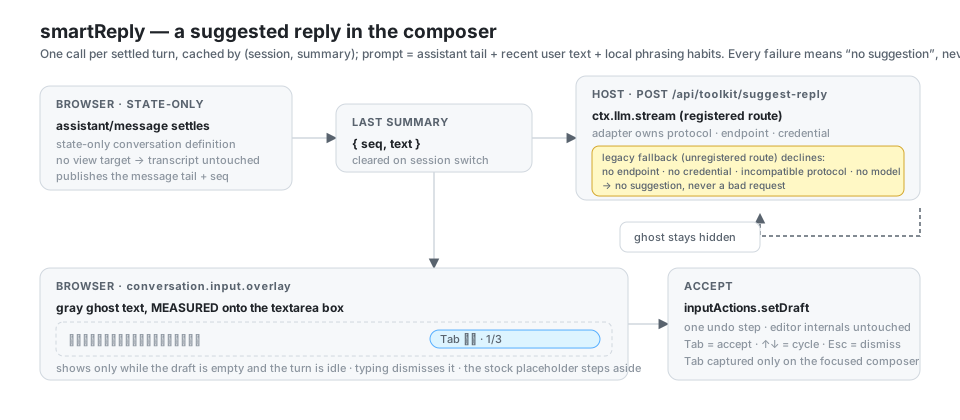
A suggested reply shown as gray ghost text inside the composer, accepted with Tab. When a turn settles, the last assistant message and the previous user message are handed to a small model that drafts a few things you might say next; the first is shown inline, ↑/↓ cycle the rest, Esc dismisses, and Tab fills the active one into the draft. A route registered with the DSH llm runtime is called through it with its own protocol; an unregistered primary route uses the direct fallback. The feature also learns your phrasing locally.
How it works, and its bounds:
- Only when it is actually useful. The ghost renders only while the composer is empty and the turn is idle — never mid-submission, never on top of something you have already typed. Typing a character dismisses it immediately.
- Alignment is measured, not guessed. The composer is a Lexical contenteditable whose padding, font, line-height and letter-spacing are dsh's own CSS. The ghost layer copies the textarea's computed geometry and typography and is positioned over its measured box, so it cannot drift when that CSS changes. While a ghost is showing, the composer's own placeholder steps aside the same way dsh hides it for IME composing — one marker attribute, removed again when the ghost goes.
- The accept path is the public one.
Tabgoes through the conversation service'sinputActions.setDraft(the same action voice-input uses), so it is one undo step and never touches editor internals.Tabis captured only while the composer has focus and a suggestion is showing, so no otherTabon the page changes meaning. - One call per turn, cached by (session, summary). A failed call resolves to "no suggestion" and is cached too, so a dead endpoint costs one request per turn rather than one per keystroke. A session switch or a reconnect clears the cache, so the previous conversation's summary can never be suggested in the next one.
- Registered routes go through the DSH runtime. When the configured route is registered with the llm service, the call uses
ctx.llm.stream, so the adapter owns endpoint, protocol, and credential — a catalog route such asminimax-cnworks with its nativeanthropic-messagesprotocol and needs nomodelsRouteBaseURLsentry. Only an unregistered primary route (a plugin-owned gateway such asopencode-go) falls back to the direct OpenAI-compatible request, keeping the original decline ladder: no resolvable endpoint, no credential, an incompatible protocol, or no model id all yield no suggestion instead of a bad request. - The prompt carries real context. The request includes the current session id, so the host reads the most recent real user messages from the session log (injections are skipped) and pairs them with the assistant reply's tail. Candidates continue the same thread in the same register instead of guessing a generic question.
- Local phrasing learning (opt-out). Each turn aggregates the session's not-yet-learned real user messages plus the suggestions you accepted with Tab into local statistics — average length, opening words, and up to five real examples plus five accepted texts per language — persisted under
<DSH_HOME>/plugins/dsh-plugin-toolkit/suggest-habits.json. The state file stays on this machine, but a short aggregate hint (at most two examples and two accepted texts) is embedded in the suggestion prompt, so it reaches whichever model route you configured for suggestions. The feature can be switched off on the settings card; the prompt marks the hint as data that must not be treated as instructions or copied. - The transcript is untouched. The accumulator is a state-only conversation definition with no view target, so it renders nothing; the stock assistant bubble behaves exactly as before.
- Non-invasive like every other optimization here: public slots and public input actions only, no dsh source changes.
| Config | Default | Meaning |
|---|---|---|
optimizations.smartReply | true | Master switch for the ghost text and the suggestion call. |
suggestRouteKey | "" → modelsRouteKey | llm-pi-ai route the suggestion call uses. Empty reuses the modelCapability primary route. A route registered with the llm runtime is called with its own protocol. |
suggestModel | "" | Model asked to draft the candidates. Empty resolves at call time to the route's own first catalog id. Suggestions run on every turn — name a cheap, fast model. |
suggestPath | /api/toolkit/suggest-reply | Same-origin route the client POSTs to (registered once; changing it needs a restart). |
suggestOptionsPath | /api/toolkit/suggest-options | Same-origin route listing the routes/models the smartReply pickers offer (GET, registered once). |
suggestLanguage | "" | Reply-language pin; empty follows the UI language per request. |
suggestCount | 3 | Candidate replies kept per turn. |
suggestTimeoutSec | 30 | Total per-request deadline in seconds, headers and body. |
suggestLearnHabits | true | Learn phrasing from this machine's sessions (average length, openings, ≤5 short examples) so candidates sound like you. Turning it off stops learning; the existing state file is left alone. |
Configuration reference
All fields live in the toolkit settings namespace. The composition defaults are declared in cordis.patch.yml, the schema in index.js, and the public types in index.d.ts.
| Field | Type | Default | Used by |
|---|---|---|---|
optimizations.workspacelessChat | boolean | true | workspacelessChat |
optimizations.editLastMessage | boolean | true | editLastMessage |
optimizations.viewActivity | boolean | true | viewActivity |
optimizations.slashI18n | boolean | true | slashI18n |
optimizations.changeReport | boolean | true | changeReport |
optimizations.opencodeSession | boolean | true | opencodeSession |
optimizations.modelCapability | boolean | true | modelCapability |
optimizations.smartReply | boolean | true | smartReply |
modelsMigratedFromQuotaBadges | boolean | false | modelCapability — internal one-way marker set when the former quota-badges model settings were adopted; never set it by hand. |
chatWorkspacePath | string | "" → <DSH_HOME>/chat | workspacelessChat |
chatWorkspaceTitle | string | 通用对话 | workspacelessChat |
modelsApiKey | string | "" | modelCapability |
modelsApiKeyEnvVar | string | OPENCODE_API_KEY | modelCapability |
modelsRouteKey | string | opencode-go | modelCapability |
modelsBaseURL | string | https://opencode.ai/zen/go/v1 | modelCapability |
modelsRouteApi | string | openai-completions | modelCapability |
modelsSyncPath | string | /api/toolkit/sync-models | modelCapability |
modelsPath | string | /api/toolkit/models | modelCapability |
modelsRouteBaseURLs | Record<string, string | {baseURL,api?}> | {} | modelCapability |
modelsRouteExtraModels | Record<string, string[]> | {} | modelCapability |
modelsEnrichFromRegistry | boolean | true | modelCapability |
modelsRegistryProvider | string | opencode-go | modelCapability |
modelsVision | string[] | [] | modelCapability |
modelsTextOnly | string[] | [] | modelCapability |
modelsTimeoutSec | number | 10 | modelCapability |
suggestRouteKey | string | "" | smartReply — empty reuses modelsRouteKey |
suggestModel | string | "" | smartReply — empty uses the route's first catalog id |
suggestPath | string | /api/toolkit/suggest-reply | smartReply |
suggestOptionsPath | string | /api/toolkit/suggest-options | smartReply |
suggestLanguage | string | "" | smartReply — "" follows the UI language |
suggestCount | number | 3 | smartReply |
suggestTimeoutSec | number | 30 | smartReply |
suggestLearnHabits | boolean | true | smartReply — local phrasing learning; off stops writes to <DSH_HOME>/plugins/dsh-plugin-toolkit/suggest-habits.json |
Development
npm test              # node --test tests/*.test.js — no host required
npm run smoke         # host-side smoke for index.js + model-sync.js (needs the peers, see below)
npm run smoke:client  # offline smoke for the client bundle (no host required)
npm test and npm run smoke:client are self-contained. (tests/index.test.js
loads the host entry dynamically: where the @deepseek-ai/schemastery peer does
not resolve, its nine host-half cases report as skipped instead of failing the
suite.) npm run smoke imports
index.js, which imports the @deepseek-ai/schemastery peer; that is not a
dependency of this package, so run it from a checkout where it resolves (a dsh
workspace, or a profile with this package installed) rather than from a bare
npm install:
cd /root/deepseek-harness && node /root/dsh-plugin-toolkit/scripts/smoke.mjs
Why
@deepseek-ai/dsh-settingsis no longer imported: that package's export list moves with the host build. Older builds exportedinstallSettingsSection/settingsNamespace; the current checkout exports only{ SettingsConflictError, SettingsForms, redactSecrets }. A named import of a missing export is a link-timeSyntaxError— it takes the whole plugin down beforeapplyruns (no fiber at all), which shows up as the settings card, the sync route and the model-discovery wrap all silently disappearing. The plugin now calls the runtime service (sctx.settings.register(...)) directly and carries its ownsettingsNamespace()validator, so it imports nothing from that package.
| Path | Contents |
|---|---|
index.js / index.d.ts | Host half: settings namespace, chat directory, OpenCode fetch wrap. |
model-sync.js | Host half: discovery wrap, sync/listing routes, enrichment and migration; also exports the endpoint/credential resolvers smartReply reuses. |
models-core.js | Pure merge/enrich/diff helpers (no network, no settings access). |
suggest-api.js / suggest-core.js | Host half: the suggestion route (runtime-first with a direct fallback), session-context reads, and the pure prompt-building / JSON-salvage logic. |
suggest-habits.js / suggest-store.js | Host half: pure local phrasing statistics (no I/O), plus atomic, failure-tolerant reads/writes of <DSH_HOME>/plugins/dsh-plugin-toolkit/suggest-habits.json. |
http-route.js / dsh-home.js | Shared route helpers (sendJson / methodNotAllowed / capped readJsonBody) and the single DSH_HOME resolver, extracted from three near-identical copies. |
client.js | Browser half: the settings card and every client-side optimization. |
cordis.patch.yml | Composition defaults inserted into the dsh bundle patch. |
tests/ | Unit tests: the pure core, the sync route, the settings card, and index.js (the fetch wrap + llm/stream session chain). |
scripts/ | Smoke, host-patch, and verification scripts. smoke.mjs / client-smoke.mjs are offline; apply-host-patch.mjs / e2e-verify-rewrite.mjs (host:apply / host:verify) and verify-smart-reply-history.mjs need a dsh checkout or a live host. |
docs/assets/ | The SVG diagrams used by this README family. docs/initiative-*.md are internal design notes and are deliberately excluded from the npm package. |
Graduation rules
An optimization graduates out of this package into its own dsh-plugin-* when any of these holds:
- it grows its own settings GUI beyond one toggle row, a service route, a background job, or a
client.jsfeature surface; - it needs to be enabled/disabled per composition row (Cordis toggles whole rows, not single tools);
- its definition plus tests exceed roughly 200 lines;
- it is worth publishing or sharing on its own.
Model experience
No tool is registered and no prompt surface changes; this package is pure UI/runtime ergonomics. The one exception is the editLastMessage rewrite, which by design changes what the model sees: after an edit, the erased tail is removed from the derived request history (via the surface replace), so subsequent turns read only the edited content.