
 @liqiGeGe
dsh-plugin-execution-graph
A DeepSeek Harness (DSH) client plugin that adds an "Execution graph" tab to the conversation view. It reconstructs one session turn's activity as a vertical timeline on a React Flow canvas
- Stars
- 22
- Language
- TypeScript
- Created
- Sep 1, 2026
- Updated
- Sep 6, 2026
Introduction
dsh-plugin-execution-graph
English | 中文
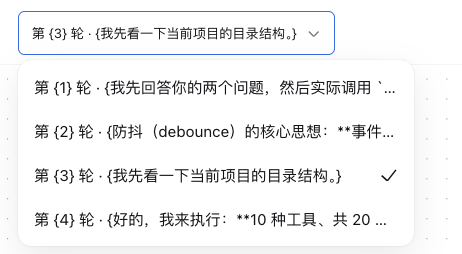
A DeepSeek Harness (DSH) client plugin that adds an "Execution graph" tab to the conversation view. It reconstructs one session turn's activity as a vertical timeline on a React Flow canvas: the turn's request-header, assistant-message, tool-call, and tool-result nodes are ranked into timeline steps stacked top-to-bottom and connected by arrowed edges from each step to the next. turn-group container nodes are not drawn — one turn is shown at a time (defaulting to the session's last), so a container box would be redundant. Tool calls are never merged by name — each call and its result are independent nodes tied by a resolves edge, an assistant message's tool-call blocks connect to their tool-call nodes by a triggers edge, and same-group nodes chain by a sequence edge in event order. Parallel tool calls triggered by one assistant message share a timeline step and spread horizontally; a column is capped at ten steps and then wraps into the next column block to the right, and when a column's last row holds several parallel nodes feeding the next column, their connectors converge through a merge junction before bending into the next column. A running tool call (present in the shared Session window's running-call-id set, with no settled result yet) renders with a distinct dashed, pulsing border instead of a fabricated result. A tool-call card puts its Tool kind label and tool name on one row and a truncated argument preview on the next. Selecting a node fills a persistent detail sidebar to the right — resizable (320–600px, collapsible) — that shows a Payload JSON tree for tool calls and a line-broken command block for shell commands. A turn selector above the canvas lists every turn and defaults to the last; switching turns re-centers the canvas at scale 1. A download button in the canvas's lower-left corner exports the whole graph as a PNG. Each assistant-message card carries a fold toggle on its right edge: collapsing hides the tool calls/results that follow it up to the next assistant message (an in-place view transform — columns and coordinates stay fixed), leaving a fold capsule that bridges the collapsed reply to the next one and can be clicked to expand. The package provides no service and declares no Context merge; it registers target-specific Conversation Event Definitions, a Graph view snapshot builder, and one tab in the conversation's 'conversation.view' slot ring.
Plugin results
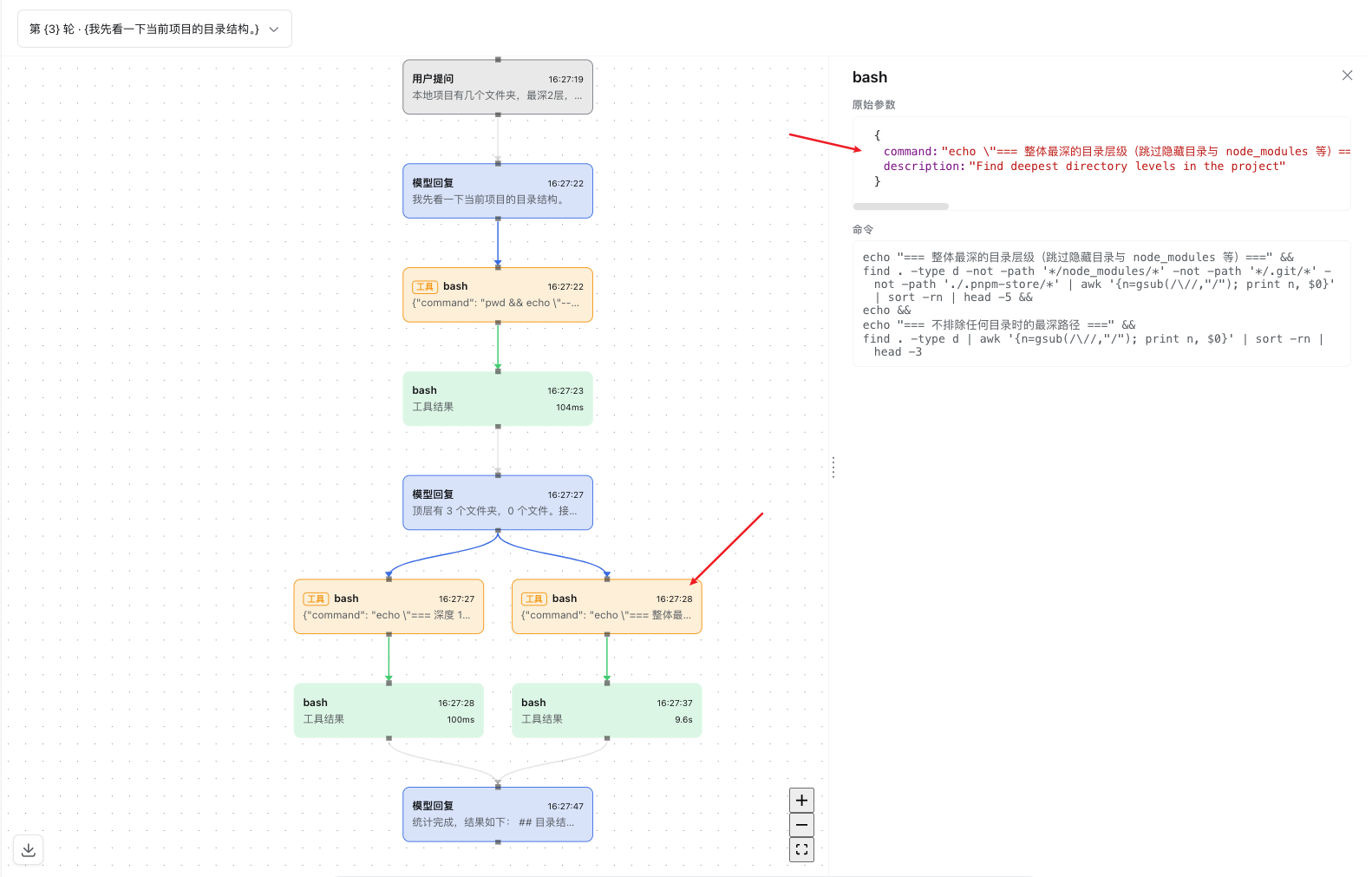
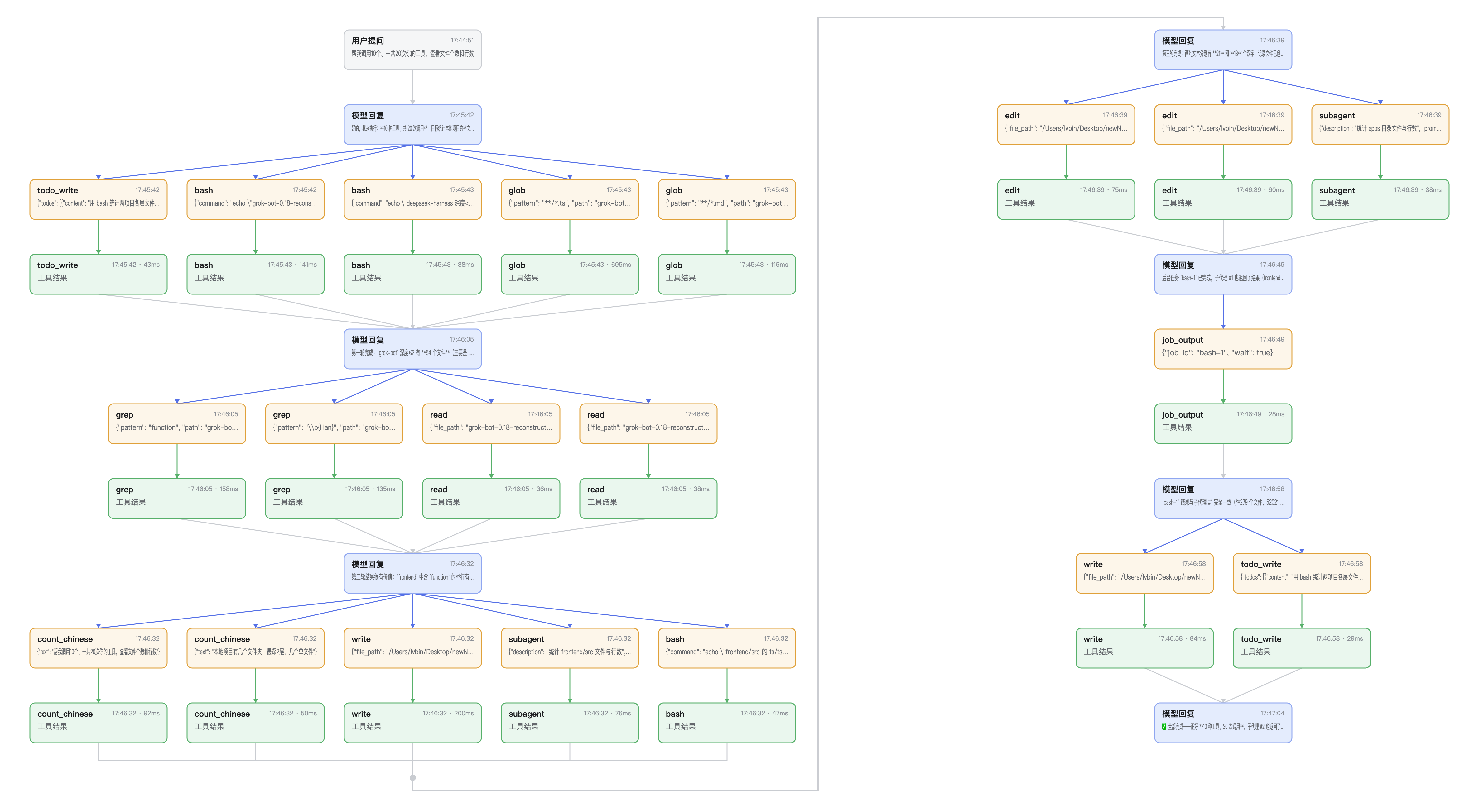
Plugin declaration and lifecycle
This is a pure-consumer Cordis plugin with two entry faces:
- Node half (
src/index.ts) — a no-opapply(); the plugin has no host-side behavior. - Client half (
src/client/index.ts) — the real plugin. It exportsinjectandapply(ctx), following the DSH function-plugin contract (no default export).
apply(ctx) performs exactly these side effects, each registered reversibly through the Cordis effect system so that unloading the plugin reverts them in full:
- Locale dictionary —
ctx.effect(() => ctx.locale.register('graph', { zh, en })); unload de-registers thegraphnamespace. - React Flow stylesheet —
installGraphStyles(ctx)injects a plugin-tagged<style>element for the vendored React Flow base stylesheet; the effect's disposer removes the tag on unload. - Conversation Event Definitions —
registerGraphNodeDefinitions(ctx)foldsrequest/header,assistant/message,user/message, andtool/call→tool/resultevents into graph contributions. - Conversation View Definition —
registerGraphConversationView(ctx)registers thegraphtarget's snapshot builder. - UI slot —
ctx.slots.inject('conversation.view', () => ctx.slots.register({ id: 'graph', … }, GraphView));slots.registerreturns a disposer and rides the slot service's effect wrapper, so unload removes the tab.
Because every contribution goes through ctx.effect / ctx.on and slots.register's returned disposer, unloading the plugin (or disposing its fiber) removes the tab, the locale dictionary, and the stylesheet, restoring the system to its pre-load state. No config rows are written, so there is nothing to clean up on disk. HMR is supported by the framework: a config change that disables the plugin unloads these effects; no manual restart is required beyond the framework's own reload.
Service dependencies and injection
inject = ['slots', 'conversationEvents', 'conversationViews', 'locale'].
These are the services the plugin requires at load time; each is provided by the base DSH client stack (@deepseek-ai/dsh-base and the web surface) and declared via the package's dsh.client.inject manifest. The plugin declares no optional dependencies and performs no ctx.get() of optional services. Because it declares its injections, Cordis disposes the plugin automatically if one of these services is unloaded and re-mounts it when the service returns — the plugin does not need to observe dependency loss itself.
Configuration and scope
The plugin has no user-configurable options and takes no config: block; it is enabled or disabled purely by its presence in the boot roster. It runs in the global client scope — it contributes one conversation-view tab available to every session — and holds no per-session or per-user state; all rendering state is derived from the session's own view snapshot.
Installation
Install into a profile with dsh plugin, which reads the package's dsh.bundle manifest:
dsh plugin --profile <name> add dsh-plugin-execution-graph
The bundle's cordis.patch.yml appends one row to the client roster:
- insert:
    - id: execution-graph
      name: dsh-plugin-execution-graph
Because the plugin has no config options, users do not edit cordis.patch.yml themselves; disabling it is dsh plugin --profile <name> remove dsh-plugin-execution-graph.
Requirements
- A DSH runtime hosting the client web surface (the
dshCLI with a web-enabled profile) on the@nextline — i.e. the DSH core packages (@deepseek-ai/dsh-client-*,@deepseek-ai/dsh-*) at^0.1.1-rc.2with@deepseek-ai/cordisat^4.0.1, exactly as declared in this package'speerDependencies. DSH publishes this line under the npmnextdist-tag (lateststill points to the older0.0.1-rc.1), so a consumer profile must install DSH core from@next. @deepseek-ai/dsh-client-ui-primitivesand@deepseek-ai/dsh-client-ui-slotsare not peer dependencies: they are platform modules the DSH host shares into its frozen module table, so the plugin's client bundle imports them as externals resolved by the host.- Node.js ≥ 22 and pnpm for a from-source checkout.
Extension points and compatibility
The plugin uses only official DSH extension points and never forks or patches core code:
- Conversation Event Definitions (
conversationEvents) and Conversation View Definition (conversationViews) — the same two-tier fold/build pipeline Trajectory uses, to project session events into aGraphSnapshot. - UI slot — injects into the
'conversation.view'slot ring (idgraph, order 20), alongside Chat and Trajectory. - Locale — registers the
graphdictionary namespace.
Contract tests. The package carries a client-bundle test that loads the built lib/client.js through window.__ModuleLoader__.load and asserts the handoff id and the apply/inject exports, and a views test that mounts the plugin on a real SlotRegistry ring and asserts the tab appears. An unload test disposes the fiber and asserts the view tab, the conversation-event registrations, and the view-builder registrations are all removed.
Folding tool segments
A long agent turn interleaves assistant replies with many tool calls/results. Each assistant-message card carries a fold toggle on its right edge; clicking it hides everything between that reply and the next assistant message, so the timeline reads as the conversation's reply spine with the tool busywork tucked away.
Folding is an in-place view transform, not a re-layout:
- The timeline is always laid out from the full, unfolded snapshot, so column assignment, node coordinates, and the current pan/zoom all stay fixed across fold/expand.
- The hidden tool calls/results leave the canvas; a fold capsule appears directly under the collapsed reply, labelled with the number of hidden nodes, and bridges the reply to the next assistant message with a dashed arrow.
- Clicking the capsule (or the reply card's toggle, now pointing to expand) restores the segment.
Only an assistant message that actually has following tool nodes is foldable — a reply with no tool segment shows no toggle. Folding is per-assistant and independent: collapsing one reply never hides another's segment. Segment ownership is derived from timeline order (assistantFoldMembers), and the hidden set plus capsules are computed purely by foldCapsuleView.
Column layout
A turn whose timeline runs longer than the column cap (ten steps) wraps into a second column block to the right. Two buttons next to the turn selector switch this:
- Single column (
layout.singleColumn) — every timeline step renders in one vertical column; row spacing and parallel-sibling spread are unchanged, and the merge junctions that route cross-column edges are dropped because nothing wraps. - Restore default (
layout.default) — back to the wrapped multi-column layout with merge junctions.
Both buttons set a boolean passed to layoutGraphSnapshot({ singleColumn }); toggling re-centers the canvas at scale 1.
Single-column layout is a distinct code path, not a flag threaded through the multi-column one: when singleColumn is set, layoutGraphSnapshot returns straight edges with junctions: [] and never calls the merge-junction builder, so no right-angle (step) connector can exist in that mode by construction. The multi-column layout synthesizes a merge junction only when a column's last row holds two or more parallel nodes that all feed the next column's opening node; those connectors render as right-angle step lines and the junction itself as a small dot. Toggling to single column rebuilds the React Flow store (a key on the provider), guaranteeing the previous mode's edges and junctions are fully discarded.
Model Experience
None, as the graph view renders session data in the browser; nothing here reaches a model request.
KV Cache effect
None; this package neither assembles nor sends a provider request.
Known Limitations and Deferred Work
- Layout recomputes on every snapshot change — the timeline is laid out from scratch on each render rather than incrementally repositioning only new nodes, so very long sessions pay a growing layout cost per update. No pagination or windowing exists yet; the view always renders the whole selected turn.
- Vendored React Flow base stylesheet — the functional layout styles are copied to
src/client/styles/reactflow-base.cssand injected as a plugin-owned<style>tag, because the client bundler resolves.cssimports relative to the importer and cannot take a bare@xyflow/react/dist/base.cssimport. Bump the copy alongside the@xyflow/reactdependency.