
 @little-traincar
dsh-imagegen
Image generation plugin for DeepSeek Harness: Doubao Seedream 5.0 Pro and Aliyun qwen built in, plus any OpenAI-compatible gateway, relay or local deployment. Watermark-free, verbatim in-image text, inline chat display.
- Stars
- 1
- Language
- JavaScript
- Created
- Sep 9, 2026
- Updated
- Oct 13, 2026
Introduction
dsh-imagegen
Image generation plugin for DeepSeek Harness. Registers the generate_image tool so the agent can create images and show them inline in the conversation.
Features
- Inline images — generated images are attached to the conversation and render directly in chat (plus a same-origin
/imagegen/<file>link as a fallback). - User-configurable model — every channel's model id is yours to fill in, in Settings. Aliases and per-call overrides included.
- Open provider table — built-in Doubao Seedream and Aliyun qwen, plus any OpenAI-compatible
/images/generationsendpoint: gateways, relays, or local deployments (Ollama / vLLM / SD-WebUI / ComfyUI). - Watermark-free —
watermark: falseis sent by default; the switch exists for the models that reject the field. - Verbatim in-image text — text you supply is embedded character by character, never reworded.
- Image-to-image — pass a reference image (URL, absolute local path, or data URI) and describe the change.
- Saved to disk — every image is written to
outDirbefore it is returned. - Several candidates in one call — channels that declare
supportsNproduce multiple images from a single request. - Partial failures survive — if some of the requested images fail, the successful ones are kept and the failures are listed.
- Requires DSH 0.2.x (0.2.0-rc.2 / 0.2.1-alpha.1).
Installation
Desktop
Launch Desktop once so it creates its profile, then fully quit the application before running the command.
dsh plugin --profile desktop add @little-traincar/dsh-imagegen
Reopen Desktop to load it.
GitHub
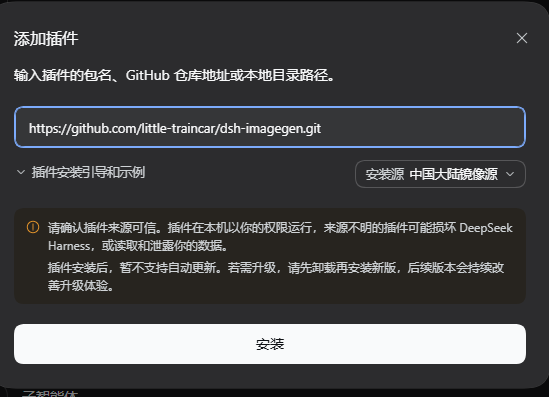
NPM
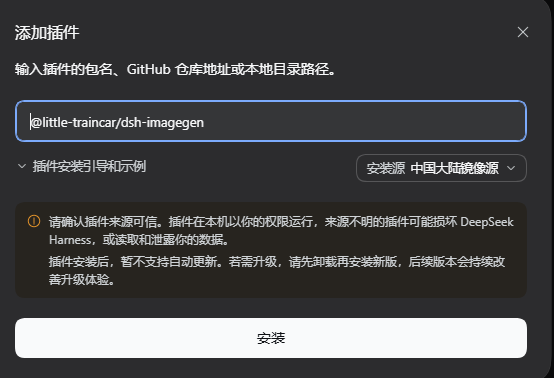
Web
dsh plugin --profile web add @little-traincar/dsh-imagegen
Restart the web profile to load it.
From GitHub (a specific tag)
dsh plugin --profile desktop add github:little-traincar/dsh-imagegen#v0.3.1
From a local checkout or tarball
dsh plugin --profile desktop add ./
dsh plugin --profile desktop add ./little-traincar-dsh-imagegen-0.3.1.tgz
Configuration
Open Settings → imagegen, fill in an API key for the channel you want to use, then save. Settings are written to the profile's cordis.patch.yml and take effect on the next generation call — no restart.
Built-in providers
| Channel | Default model | API key |
|---|---|---|
doubao | doubao-seedream-5-0-pro-260628 | Volcengine Ark console, or env ARK_API_KEY |
qwen | qwen-image-3.0-pro | Alibaba Bailian / DashScope console, or env DASHSCOPE_API_KEY |
| your own | you choose | see Custom providers |
Custom providers
Any OpenAI-style POST <baseUrl>/images/generations works. Declare it in the Custom providers field:
{
  "local": {
    "baseUrl": "http://127.0.0.1:11434/v1",
    "model": "x/flux2-klein",
    "apiKeyOptional": true,
    "sendWatermark": false,
    "sendPromptExtend": false,
    "size": "1024x1024"
  }
}
| Field | Default | Meaning |
|---|---|---|
baseUrl | required | bare host gets /v1/images/generations; a /v1 suffix gets /images/generations |
model | required | fallback model id for this channel |
apiKey / apiKeyEnv | empty | inline key, or read from an environment variable (fallback IMAGE_API_KEY / OPENAI_API_KEY) |
apiKeyOptional | false | keyless endpoints (local deployments) must opt in |
authHeader / authScheme | authorization / Bearer | auth header name and prefix |
size / sizes | 1024x1024 tier | fixed size, or a per-aspect table |
sizeSeparator | x | * for Alibaba-style sizes |
supportsN / maxN | false / 4 | several images in one request |
sendWatermark | true | set false for models that reject watermark |
sendN / sendSeed / sendNegativePrompt | true | turn off parameters a model rejects |
sendPromptExtend | false | true sends prompt_extend:false |
imageField | image | reference-image field; false disables image-to-image |
responseFormat | b64_json | or url |
extraBody | empty | vendor-private fields |
Models
Each channel's model id is editable, in three places:
- Settings → imagegen → Models — one model-id field per channel. Saving it empty clears the override and restores the built-in default. The field writes the canonical
models.<channel>key, which takes effect on the next generation call. - Model details (or
cordis.patch.yml) — the whole map at once, with optional aliases:
{
  "doubao": "doubao-seedream-5-0-pro-260628",
  "qwen": "qwen-image-3.0-pro",
  "relay/gpt-image": { "id": "gpt-image-1", "label": "Gateway GPT-Image" }
}
A key is either <channel> (that channel's default model) or <channel>/<alias>. An alias can be named in a tool call:
generate_image(prompt="…", provider="relay", model="gpt-image")
The default model may also be written as <channel>/default (equivalent to <channel>). <channel>/model and <channel>/label are historical keys written by the 0.3.1 settings card: they are still read, and saving the settings card migrates them to <channel>; built-in channels no longer expose those suffixes as aliases.
Any other model value is passed through verbatim as a model id. The result reports the provider and model actually used.
Usage
Ask for an image in the conversation — for example: “Draw a summer coffee-shop poster: retro magazine collage, cream yellow and coffee brown, portrait; headline ‘Summer Ice Cafe Festival’, subtitle ‘Half price for the second cup’.”
The agent calls generate_image and the images appear inline. Every image is also written to outDir (default: generated-images under the directory dsh was started in).
Uninstallation
Desktop
Fully quit the application first, then:
dsh plugin --profile desktop remove @little-traincar/dsh-imagegen
Web
dsh plugin --profile web remove @little-traincar/dsh-imagegen
The command removes the bundle from the profile and uninstalls the package; restart the profile to finish unloading it. Generated images under outDir and the imagegen section of the profile's cordis.patch.yml are left in place — delete them yourself if you want a clean sweep.
License
MIT