
 @loyalchiiina
dsh-todo-float-ball
Floating todo progress ball for DSH: live done/total + active task, status colours, draggable, Shadow-DOM isolated, dual-channel sync, history archive (cleanup/restore/copy), pinned sessions, layout switch, discipline injection + first-call gate, 128 shared skins, web + desktop. 常驻 todo 进度悬浮球:实时进度/状态色/历史归档/固定会话/布局切换/纪律注入+首调用硬门/128 皮肤统一,双端可用。
- Stars
- 1
- Language
- JavaScript
- Created
- Sep 6, 2026
- Updated
- Oct 21, 2026
Introduction
dsh-todo-float-ball
Your AI agent runs long tasks — but its plan keeps scrolling out of sight. Turn it into a progress ball that never leaves the screen. 让 AI 的任务清单常驻屏幕 —— DeepSeek Harness(DSH)进度悬浮球插件。



English | 简体中文
What it does · 一句话说明
When you give an AI agent a multi-step job in DSH, it records the plan with the built-in todo_write tool. The official UI renders that plan as a thin strip above the input box — but the strip is easy to miss, scrolls away with the conversation, and folds itself while the agent is still working. You end up hunting through the transcript to answer "how far along is it?"
dsh-todo-float-ball moves that checklist onto a persistent floating ball:
| The problem | What this plugin does |
|---|---|
| The plan strip scrolls away; progress is invisible | A ball pinned to a window corner (bottom-right by default; draggable, position remembered across restarts) |
| You must expand a panel to see "how many are done" | The ball face shows done/total directly, with a progress ring |
| You can't tell which item the agent is on right now | The active task's name appears on the ball; capsule mode shows only that line |
| Several sessions running — you keep switching to check each | Pin multiple sessions and the panel shows their progress side by side, so parallel work is visible at a glance |
| Hard to tell finished from unfinished | Status colour at a glance: pulsing orange = working, green = all done, blue = pending only, gray = no list |
| Want to look back at previously planned tasks | History archive: when a new plan replaces the old one, the old tasks fold into a "history" section instead of vanishing |
| The ball blocks your view | Hide it, collapse it to a capsule, or drag it — with per-session memory |
It is a pure, read-only companion: the plugin never modifies the official panel, the conversation, or any other plugin.
Why it matters · 为什么值得装
- Built for long unattended runs — DSH agents continue across many turns; you may not look at the screen for ten minutes. The orange glow and
3/8tell you at a glance that work is still moving, and how far. - Parallel sessions stop being guesswork — pinning side-by-side columns puts two conversations' progress in one panel; no more clicking back and forth.
- Visually consistent with its siblings — shares one 128-skin catalogue with the
dsh-skill-browseranddsh-font-enhancerballs (plus the 6 classic skins kept as a separate "legacy" group), so all three switch together and match. - One codebase, two targets — identical behaviour on Desktop (Electron) and the web UI.
- Zero intrusion, zero config — install and it works; no config files, no changes to the official UI.
Shadow DOM + all:initialkeeps styles isolated, so it cannot clash with your theme or skin plugins. - Reliable data — three-tier sync: the runtime's
sessionsservice (authoritative projection) drives the ball; a debouncedMutationObserveron the official todo panel and a passive transport tap are fallbacks that only speak when the service has produced nothing for that session. Even when the official strip is collapsed — or unrendered — the ball still has the full list.
Screenshots
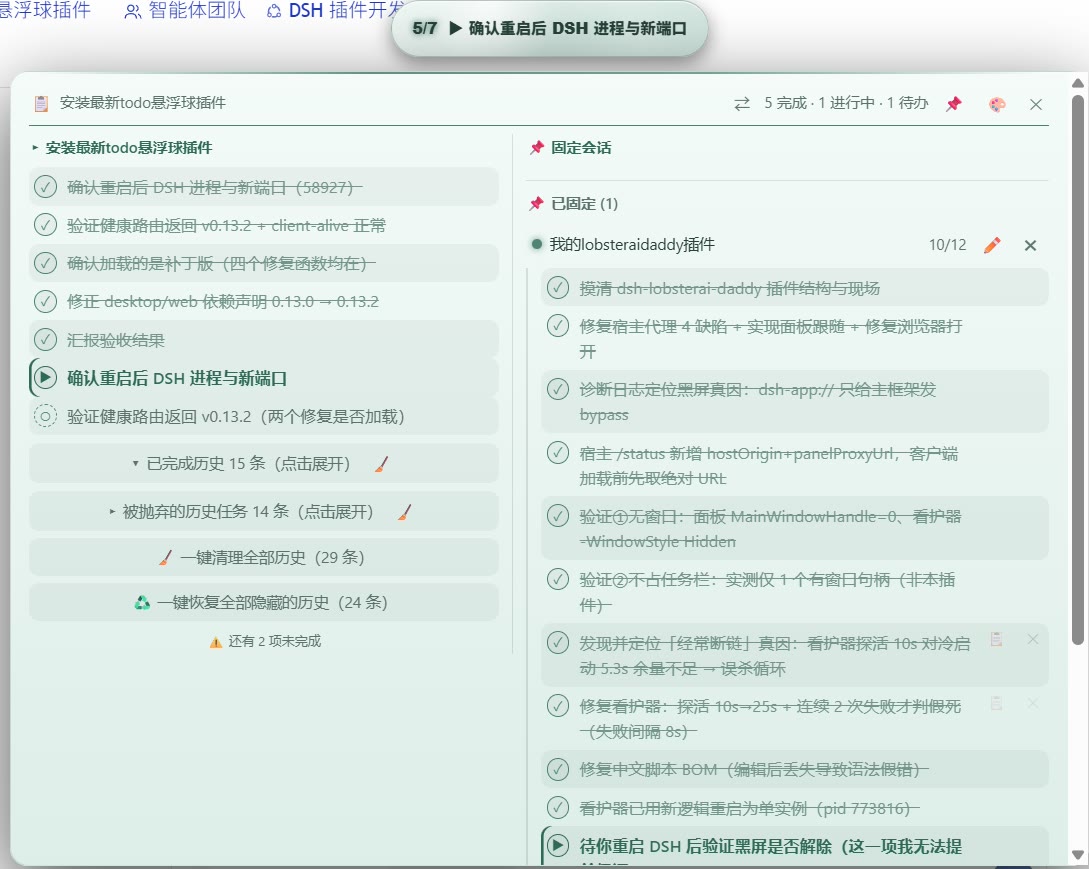
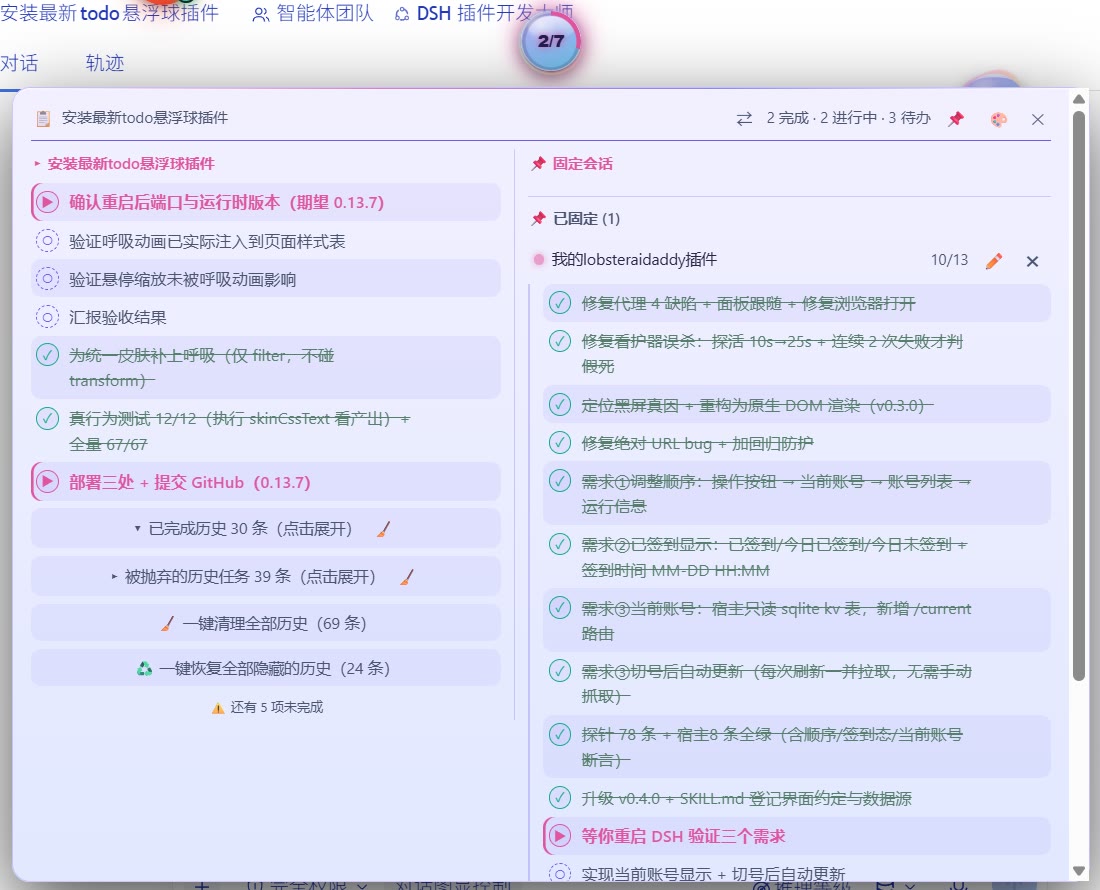
Pinned sessions — side-by-side task progress
Pin two conversations and the panel shows both progress columns at once, so you can watch parallel work without switching sessions.
Capsule mode
Right-click the ball to collapse it into a slim capsule that shows the running task and the done/total count — ideal when screen space is tight.

Skins
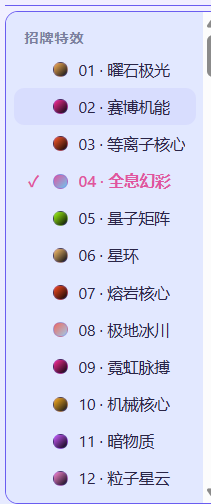
128 built-in skins (plus a separate "legacy" group holding the 6 pre-catalog skins), shared with the sibling skill-browser / font-enhancer balls so all three stay visually consistent. Groups: 招牌特效 28 / 浓郁深底 38 / 尘埃灰调 20 / 柔光深底 15 / 中性点缀 10 / 浅色纸面 17.
Basic usage · 基本用法
- The ball sits in a window corner at all times (default: bottom-right).
- Its face shows live progress:
done/total, with the active task's name underneath. A ring around it mirrors the same percentage. - Click the ball to expand the full task panel; click again (or press
Esc) to fold it back. - Right-click to switch to capsule mode, which shows only the running task and the count.
- Drag it anywhere; the position is remembered per profile. Drag it off-screen and it snaps back.
- Colour tells you the state at a glance: pulsing orange = work in progress, green = all done, blue = pending only, gray = no list yet.
It is a pure, read-only companion: the plugin never modifies the official panel, the conversation, or any other plugin.
功能总览 · At a glance(中英对照 / Bilingual)
Floating ball · 悬浮球
| 中文 | English |
|---|---|
常驻可拖拽悬浮球(默认右下角),位置存 localStorage 并跨重启恢复,越界旧位置自动拉回 | Persistent draggable ball (default bottom-right); position saved to localStorage and restored across restarts, off-screen positions clamped back |
球面实时显示 done/total + 当前进行中任务名(截断),随 todo_write 实时刷新 | Live done/total plus the active task's name on the ball face, updated in real time |
| 状态颜色一眼可读:橙脉动=进行中 / 绿=全部完成 / 蓝=只有待办 / 灰=暂无清单 | Status colours at a glance: orange pulse = working, green = all done, blue = pending only, gray = no list |
| 每项任务带图标与配色:✓ 完成(绿+删除线)、▶ 进行中(橙)、○ 待办(灰虚线) | Per-item icons & colours: ✓ done (green, strikethrough), ▶ in progress (orange), ○ pending (dashed gray) |
Panel & data · 面板与数据
| 中文 | English |
|---|---|
| 点球折叠/展开面板,靠屏幕边缘自动翻侧 | Click to fold/expand; the panel flips sides near the screen edge |
三路数据同步:主 = 运行时 sessions 服务的权威投影帧;兜底 1 = MutationObserver 抓官方 todo 面板;兜底 2 = 被动拦截传输帧。兜底仅在权威通道对该会话尚无数据时才发言,官方面板折叠时也有完整清单 | Three-tier sync: primary = the runtime sessions service (authoritative projection); fallback 1 = DOM observer on the official panel; fallback 2 = passive transport tap. Fallbacks only speak while the authoritative channel has produced nothing for that session — full list even when the strip is collapsed |
Shadow DOM + all:initial 样式隔离,不进不出,主题/皮肤插件互不干扰 | Shadow DOM with all:initial — no style leaks in or out, immune to theme/skin plugins |
| 桌面端(Electron)与网页端同一份代码双端可用 | One codebase for Desktop (Electron) and the web UI |
History & pinned sessions · 历史与固定会话
| 中文 | English |
|---|---|
| 快照合并不再冲掉旧任务——旧任务进入历史归档区 | Snapshots merge instead of replacing — older todos become a history archive |
| 球上的数字只反映当前这一轮(与官方进度条同口径),历史不会把分母撑大 | The number on the ball covers the current round only (same basis as the official strip); history never inflates the denominator |
展开清单分两段:上面是可折叠的历史(已完成历史 / 被抛弃的历史任务),中间一道分界线 ── 当前进度 · 5/10 完成 ──,下面才是当前轮的任务 | The expanded list has two sections: collapsible history on top, a divider ── Current · 5/10 done ── in the middle, the current round's todos below |
| 行级 ✕ 隐藏、两个独立折叠行、🧹 批量清理、♻️ 一键恢复、📋 整行复制 | Per-row ✕ hide, two independent fold rows, 🧹 batch cleanup, ♻️ one-click restore, 📋 full-text copy |
| 📌 固定会话与当前对话共用同一历史渲染器,状态按会话独立 | 📌 Pinned sessions render through the same history renderer, with per-session state |
| ⇄ 布局切换:上下堆叠 ⇄ 左右并排(左当前列表、右固定会话,带列标题) | ⇄ layout switch: stacked ⇄ side-by-side (current + pinned columns with captions) |
Discipline injection · 纪律注入
| 中文 | English |
|---|---|
| 宿主端向每次会话系统提示注入 todo 纪律段(order=190,6 条规则,实测 498 字符)——装上插件即生效,无需加载技能 | Host injects a stable todo-discipline section (order=190, 6 rules, 498 chars measured) into every session — works the moment the plugin is installed |
硬门:每轮首个工具调用若不是 todo_write 会被拒绝并提示补写(可用 enforceFirstTodoWrite: false 关闭) | Hard gate: the first tool call of each turn must be todo_write or it is denied (disable with enforceFirstTodoWrite: false) |
只有显式布尔 false 才关闭;"false"/0/缺 config 均保持开启 | Only an explicit boolean false disables it; "false"/0/missing config keep it ON |
Skins & privacy · 皮肤与隐私
| 中文 | English |
|---|---|
| 三球共享 128 款皮肤目录(含 6 款经典旧皮肤),任一处切换全同步 | Shares the 128-skin catalogue across the three balls (6 classic skins kept), synced everywhere |
| 零遥测、零数据上传,仅一条本机回环健康路由 | Zero telemetry, zero data upload — just a loopback-only health route |
Features
| Feature | Detail |
|---|---|
| Persistent floating ball | Always visible in the viewport, draggable anywhere, position saved to localStorage and restored across restarts (off-screen stale positions are clamped back) |
| Live progress | done/total on the ball face plus the first active task's content (truncated), updated in real time |
| Fold / expand | Click the ball to toggle the task panel; the panel opens next to the ball and flips sides when near the screen edge |
| Status colors | Per-item icons and colors: ✓ completed (green, strikethrough), ▶ in progress (orange), ○ pending (dashed gray); ball itself: orange pulse / green / blue / idle gray |
| Data sync (3 tiers) | Primary: ctx.sessions.list.subscribe — the runtime's authoritative todos projection, plus a 2 s pull as a safety net. Fallback 1: a debounced MutationObserver over [data-testid="todo-panel"]. Fallback 2: a passive tap on window.fetch and WebSocket.onmessage that only reacts to projection-shaped frames. Fallbacks are gated by hasPrimaryData() and stay silent once the service has spoken for a session |
| Shadow DOM isolation | All UI lives inside an open Shadow DOM with all:initial — no style leaks in or out, immune to theme/skin plugins |
| Dual-end support | Works in DSH Desktop (Electron window) and the web UI (browser) with the same code, because both render the same page; the UI mounts on <html> to dodge transform-related position:fixed breakage |
| Privacy-friendly | Zero telemetry, zero data upload. The only host-side surface is a loopback-only health route (/dsh-todo-float-ball/health) |
| Discipline injection (v0.9.0) | The host injects a 6-rule todo discipline (498 chars measured, order=190) into the system prompt of every session — works as soon as the plugin is installed, no skill needs to be loaded; turn it off with injectDiscipline: false |
| History archive & panel tools (v0.10.0) | Merged snapshots no longer wipe older todos — they become a foldable history archive; per-row ✕ hide, two independent fold rows, 🧹 batch cleanup, ♻️ one-click restore, 📋 full-text copy; all counters reflect only the latest snapshot |
| Pinned-panel parity & layout switch (v0.11.0) | 📌 pinned sessions render through the same history renderer as the current view (folds, 🧹, ♻️, per-session state and per-session action scoping); the panel header gained a ⇄ button to flip between a stacked layout and a side-by-side layout (left = current list, right = pinned sessions) with per-column captions |
Pinned sessions & panel layout (v0.11.0)
- One renderer, two lists — the current conversation and every pinned (📌)
conversation are rendered by the same
historySectionHtml()function: latest snapshot flat, then▾ Completed history (N)and▸ Abandoned history tasks (M), each fold with its own 🧹, plus🧹 Clear all historyand♻️ Restore all hidden history. Pinned panels got the last two rows for the first time in this release. - Per-session state — fold open/closed and hidden rows are keyed by session
id, so expanding or cleaning one conversation never moves another one; every
control carries the id of the list it was rendered for (
data-ownsid). - Stable snapshot boundary — the snapshot/history split is taken on the raw list and the hidden-row filter is applied afterwards, so hiding a snapshot row can no longer drag an archived row into the live area or shift a fold count.
- ⇄ layout switch — stacked (current list above, pinned below) or
side-by-side (left current, right pinned). The preference is stored in
localStorage["dsh-todo-float-ball-layout"]and restored on load. - Column captions — in side-by-side mode the left column is captioned with
the current conversation title and the right one with
📌 固定会话; in stacked mode the captions stay hidden and nothing about the old layout changes.
History & panel management (v0.10.0)
A plan is rewritten many times during a long task. From v0.10.0 the panel keeps the latest snapshot as the live list and archives everything older instead of discarding it:
- Merge, not replace — a fresh snapshot updates the leading
snapLenrows of the session bucket; previous items that are not part of the new snapshot are appended after it, so old tasks never disappear. - Statistics mean "the current plan" — the ball face (
done/total), the progress ring, the header summary and the "N items left" notice count only the latest snapshot (snapshotList()); history is a pure archive. - Per-row hide (✕) — hover a history row and click ✕ to hide it. Hidden
rows live in
localStorage(dsh-todo-float-ball-hidden-v1, per session); the data layer is untouched. Pinned (📌) sessions hide rows independently — a hidden row in session A can never hide a row in session B (data-ownsid). - Two fold rows —
▾ Completed history (N)and▸ Abandoned history tasks (M)are independent collapsible rows (collapsed by default); the latest snapshot always renders fully expanded. - Batch cleanup (🧹) — each fold row has a 🧹 button to clear that fold,
plus a
🧹 Clear all history (X)row that hides both folds at once. - One-click restore (♻️) —
♻️ Restore all hidden history (X)appears only while something is hidden and unhides everything in the session. - Row copy (📋) — copies the full task text (not the 80-char display truncation), with a real ✓/⚠ feedback.
Discipline injection (v0.9.0)
DSH skills are loaded on demand: a session that never loads the todo-show-discipline skill carries no todo rules at all. Since v0.9.0 the host half injects a stable "todo discipline" section into every session's system prompt, so installing the plugin is enough — independent of which skill got loaded, which preset is active, and whether you run Desktop or the web UI.
- ON by default (no
configrow means ON). - To turn it off: add
config: { injectDiscipline: false }to this plugin's row incordis.patch.yml(or your profile's patch layer), then restart DSH. - Only an explicit boolean
falsedisables it;"false"/0/ typos / a missingconfigall keep it ON (guards against accidental shutdown). - The injected text is deliberately short (a system-prompt section costs tokens in every session); the full rules stay in the
todo-show-disciplineskill, which is disabled for model invocation by default once this plugin is installed, and can be re-enabled if you uninstall the plugin.
Install
The plugin is a standard DSH npm package (dsh.bundle self-declared). Two ways:
From npm (when published)
npm install dsh-todo-float-ball
Then add "dsh-todo-float-ball" to both dependencies and dsh.profile.bundles in your profile's package.json (e.g. %USERPROFILE%\.dsh\profiles\desktop\package.json), and restart DSH.
Manual
Copy this package folder into your profile's node_modules (a real copy — do not use link: / file: dependencies, they can trigger DSH's install-recovery loop), then register it the same way and restart.
After the restart you should see the ball in the bottom-right corner. Verify the host half with:
http://127.0.0.1:<your DSH port>/dsh-todo-float-ball/health
→ {"ok":true,"plugin":"dsh-todo-float-ball","version":"<the installed package.json version>"}
Use your actual port. DSH Desktop defaults to port: 0 (a fresh random port on every restart), so there is no fixed number to hardcode. Read it from the address bar of the DSH window, or pin it by setting port in %USERPROFILE%\.dsh\desktop-preferences.json. A fixed 43120 only applies if you set it yourself. The route is also loopback-only and refuses any non-renderer request with 403 Browser access is disabled, so curl will not work unless you enable browserAccess.
How it works
The official todo data is a session projection:
@deepseek-ai/dsh-tool-todoregisters thetodo_writetool and atodosprojection unit onsessionProjections; every call appends atodo/writesnapshot to the session log.@deepseek-ai/dsh-client-connectionbroadcasts the current value as a control frame:{type:"projection", sessionId, key:"todos", value:[{content,status}...]}.@deepseek-ai/dsh-client-ui-conversationrenders it as the plan strip above the input box ([data-testid="todo-panel"]).
This plugin reads from all three surfaces without touching any of them, in strict priority order:
- Primary —
sessionsservice: the client half declaresinject: ["sessions"]and subscribes to the runtime's global session registry (ctx.sessions.list.subscribe, with a 2 s pull as a safety net in case a callback stops firing after a shell rebuild). This channel is authoritative: it is the whole list, it carries history, and it wins every disagreement. - Fallback 1 — DOM panel: a debounced (200 ms)
MutationObserverwatches[data-testid="todo-panel"], readsli[data-status]items when the strip is expanded, and parses the localized count label (e.g. "1 完成 · 2 进行中") when it is collapsed. It returns immediately wheneverhasPrimaryData()says the service has already spoken for that session — otherwise the two channels would alternate on every observer tick and the ball would flicker. - Fallback 2 — transport tap: a one-time, defensive wrapper around
window.fetch(cloning responses, text/json only) andWebSocket.prototype.onmessage(text frames) feeds every payload through a strict extractor that only reacts to objects shaped like projection frames,todo/writeevents, or{todos:[...]}snapshots. Malformed payloads are ignored; nothing is ever written back.
All channels funnel into one normalizer: items are filtered to the three known statuses, blank contents are dropped, and unchanged lists are no-ops (cheap signature comparison). The snapshot boundary is taken from the authoritative frame length — todo_write replaces the whole list, so that frame is the live plan and everything merged in behind it is archive. That single rule is what keeps done/total matching the official panel; the pre-0.14.6 code used a monotonic high-water mark that could never shrink and drifted further off with every round.
FAQ
The ball doesn't show up.
Check the health URL above; if it responds, the host half is fine — the client bundle may have been blocked (look for loaded without registering in DSH logs; the bundle id must equal the package name). If it doesn't respond, the plugin isn't in your profile's bundles list.
Can I move the ball? Yes — drag it anywhere. The position persists per browser/renderer profile. If a saved position somehow lands off-screen, the plugin clamps it back into the viewport on startup.
Does it work while the official strip is collapsed? Yes. That is exactly why channel B exists: the official strip renders only a counts label when collapsed, while projection frames always carry the full list.
Does it slow the UI down?
No. The observer is debounced (200 ms), the transport tap only string-scans for "todos" before parsing, and the ball-respawn watchdog gives up after 300 × 2 s = 10 minutes (the visibility/sync poll is deliberately kept alive, because it is also how a skin switched from a sibling plugin reaches this ball).
Compatibility
- DSH Desktop 2.x (desktop profile) and DSH web (web profile)
- No
peerDependencies— the plugin is self-contained and talks to DSH only through public DOM/HTTP surfaces
License
MIT