
 @lvsun080403
Bonsai-27B-72K-DSH-
双击 install.bat,12 GB 笔记本跑 27B(三进制 1.76 bit · 73K 上下文 · 57–66 tok/s)+deepseekUI优化插件
- Stars
- 1
- Language
- PowerShell
- Created
- Oct 22, 2026
- Updated
- Oct 23, 2026
Introduction
Bonsai 27B · 72K · 一键部署
双击 install.bat,十分钟后,你的 12 GB 笔记本上跑着一个 27B 模型。
三重(Ternary)权重 · 8.87 GB 模型 · 73,728 上下文 · 实测 57–66 tok/s · 全程离线





这张图就是全部卖点
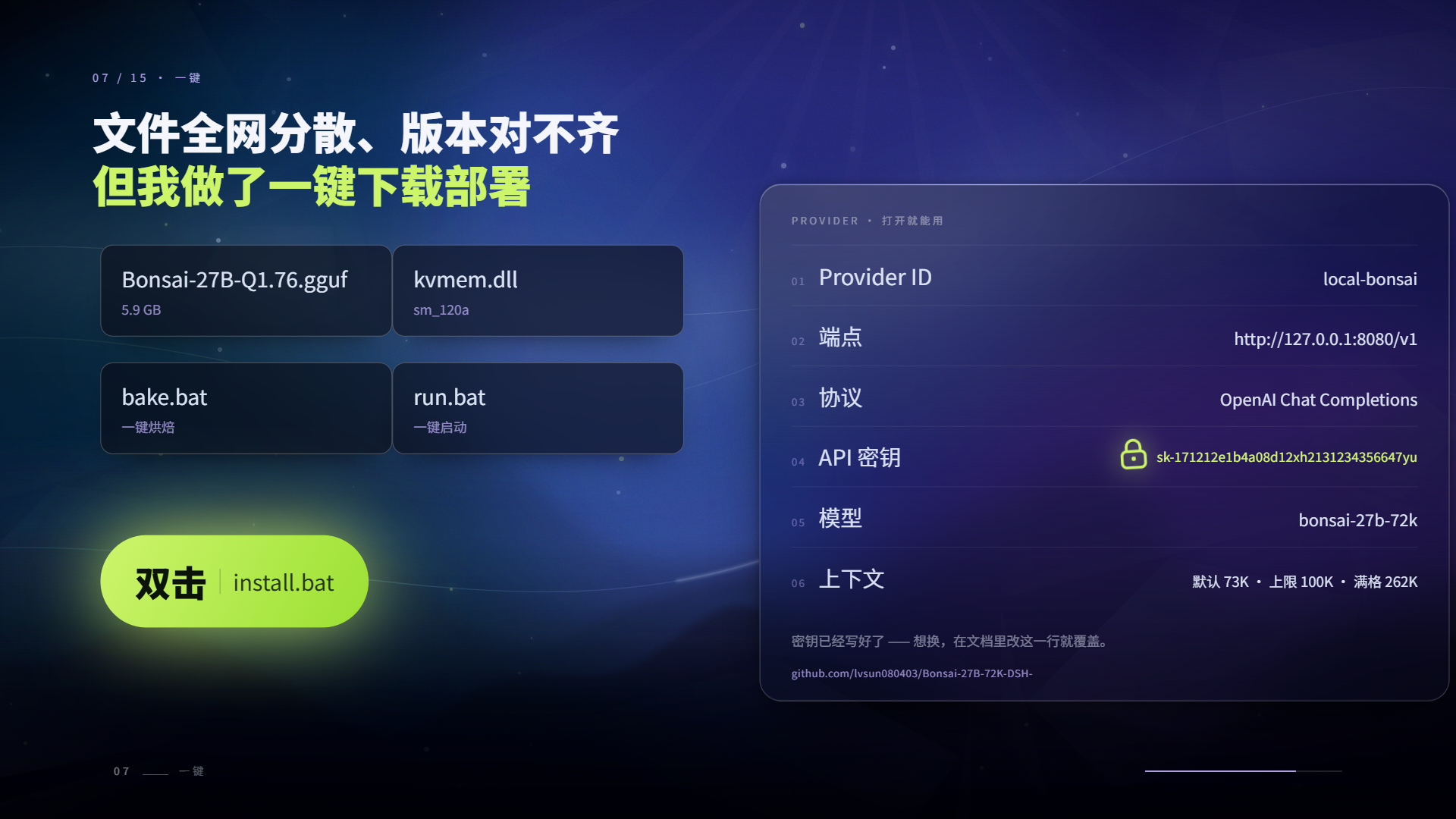
上游把模型、引擎、KV 管理、三进制内核拆在四个仓库、若干网盘和一堆 bat 里,版本互相对不上。 这个仓库把它们拼成一个文件夹:双击
install.bat,等进度条走完,双击start.bat,完事。
这是什么
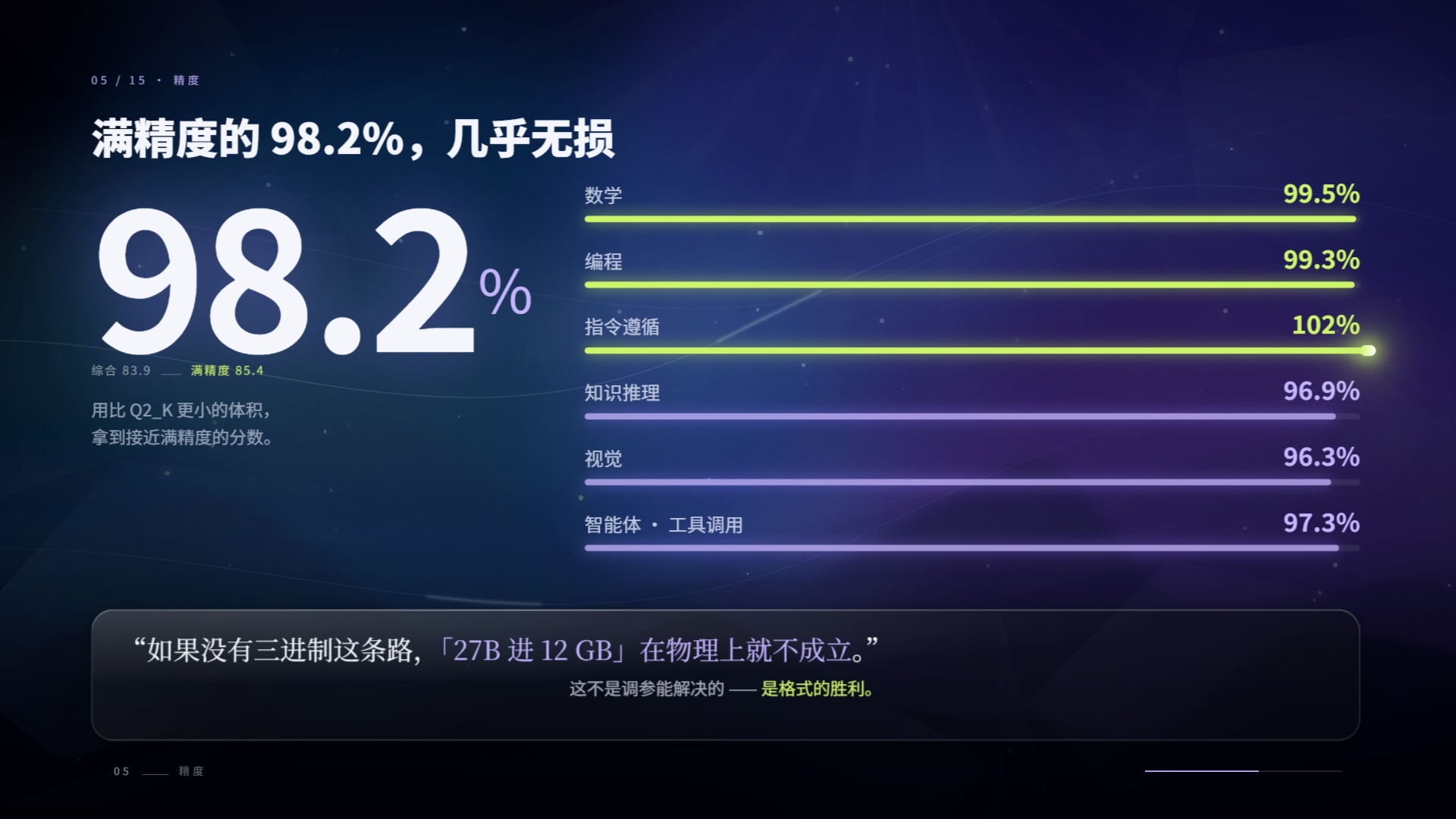
一个能在消费级显卡上跑 27B 的自包含部署包。模型不是量化到半残的 Q4,而是把权重压成三进制(−1 / 0 / +1)再配分组缩放,等效 1.76 bit,却保住了原模型 98.2% 的分数。
| 模型 | Ternary-Bonsai-2-27B-ninfer-v3.ninfer · 9,520,051,456 B(8.87 GiB) |
| 基座 | Qwen3.8-27B(27B 稠密、64 层、hidden 5120、词表 248,320、原生 262,144 上下文) |
| 精度 | 三进制权重 + FP16 分组缩放,官方口径保留 98.2%(综合 83.9 vs 85.4) |
| 引擎 | NInfer(KVMem v0.18.0 · Windows · RTX 50 系 sm_120a 构建) |
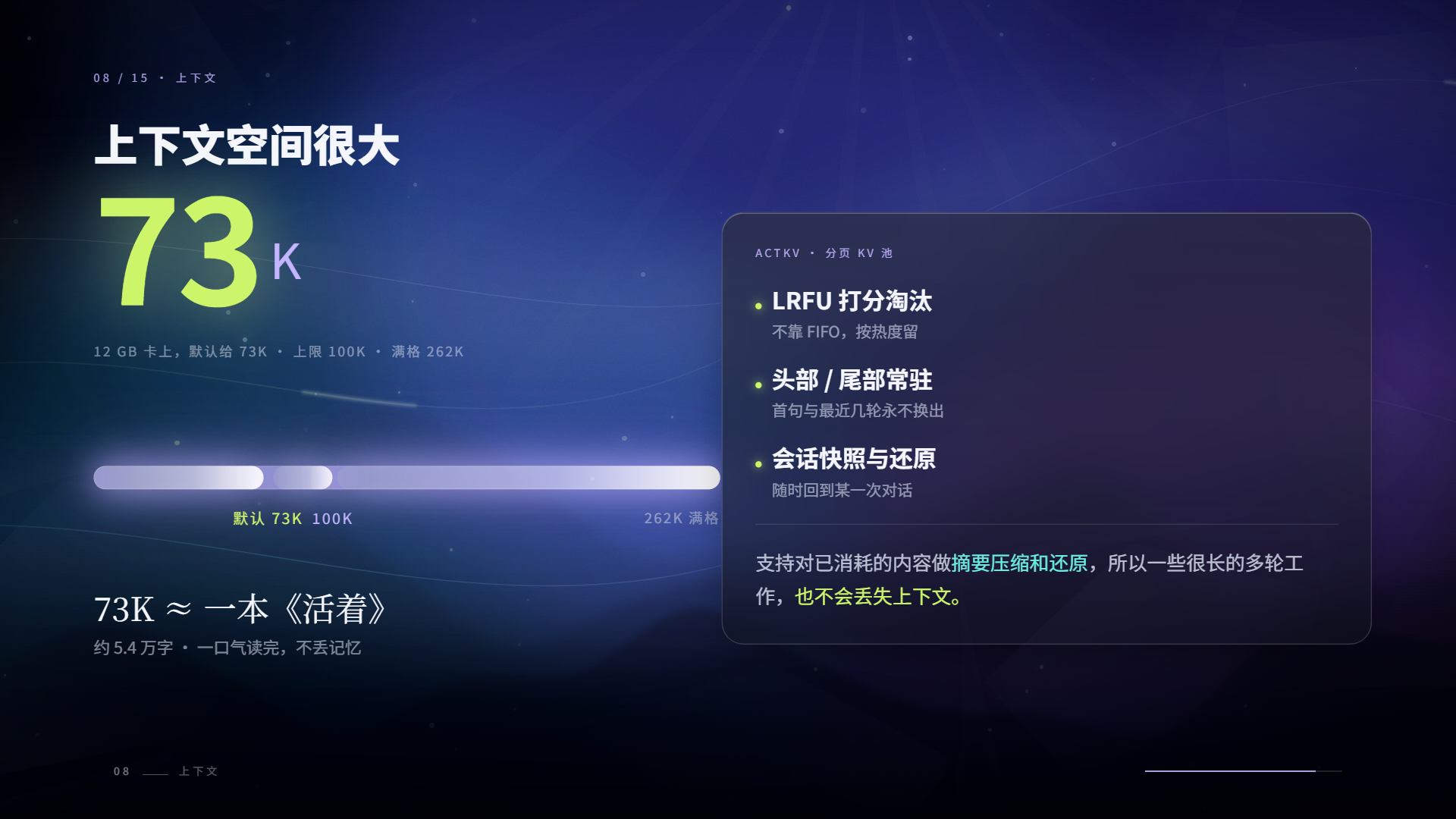
| 默认上下文 | 73,728 token ≈ 11.9 万汉字 ≈ 一整本《活着》 |
| 显存占用 | 约 10.5 GB(12 GB 卡上的实测峰值) |
| 解码速度 | 57–66 tok/s(长答);短答 65–71 tok/s |
| 预填充 | 564–724 tok/s(8K–71K 提示) |
| 依赖 | 不需要 CUDA Toolkit、不需要 Python、不需要 WSL —— 只要驱动够新 |

🚀 一键部署三步
① 双击 install.bat     下载 → 校验 SHA256 → 解压 → 写配置(首次约 10.4 GB)
② 双击 start.bat       加载引擎(约 5 秒),打印 Base URL / 模型名 / API Key
③ 打开 http://127.0.0.1:18200
就这三步。没有 Python 环境、没有 pip、没有编译。
它到底做了什么(点开)
- 环境自检:64 位 / Windows 10+ /
curl/ 显卡compute_cap必须是 12.0(RTX 50 系)/ 磁盘 ≥ 22 GB;缺 VC++ 运行库会自动下载安装。 - 引擎:从镜像下载
kvmem-v0.18.0-ninfer-windows-rtx50-sm120a.zip(900,767,487 B),SHA256 逐字节校验后解压拍平。 - 权重:下载
Ternary-Bonsai-2-27B-ninfer-v3.ninfer(9,520,051,456 B),同样校验 SHA256。 - API Key:首次运行自动写入
api-key.txt(默认sk-171212e1b4a08d12xh2131234356647yu)。 - 启动:
scripts\serve.ps1组装参数,后台拉起引擎,轮询/health直到 200。
重跑是安全的:已经下好的文件会显示“已存在”并跳过。
🔧 我做了什么优化
上游能给的是一个能用但难用的组合。下面每一条都是踩过坑之后改的,括号里是实测数字。
| # | 问题 | 我做的处理 | 效果 |
|---|---|---|---|
| 1 | 官方只有 sm_89 / sm_86 构建,RTX 50 系加载即崩 | 换用 sm_120a 通用构建,并确认二进制里含 t2_g128 三进制内核 | 12 GB 笔记本卡可直接跑 |
| 2 | 默认开 CUDA Graph,启动阶段 cudaErrorGraphExecUpdateFailure | 固定 --no-cuda-graph | 能启动,速度几乎无损失 |
| 3 | 默认 KV 类型吃显存 | 换 rk4v4(4-bit KV) | 上下文 20,480 → 65,536,再调到 73,728 |
| 4 | 预填充慢(长文档等不起) | --fast-prefill-kernel + --prefill-chunk 512 | 71K 提示 564 tok/s |
| 5 | 投机解码草稿宽度不会选 | A/B 测出 --draft-tokens 2 最稳 | 长答 55–60 tok/s(4/6 反而掉到 42–45) |
| 6 | 主机内存只有 16 GB,默认会 pin 9.2 GiB 直接失败 | --kvmem-host-mib 2048 + --kvmem-sessions 2 | 内存占用降到约 2 GB,服务能起来 |
| 7 | 下载源动不动断流 | 多源兜底(镜像优先、直连永远排最后)+ --ssl-no-revoke + 断点续传 + 45 秒卡死看门狗 | 一次装完,不用人盯着 |
| 8 | 进度看不见 | 自绘单行原地刷新进度条([####----] 42.3% 3.76 GB / 8.87 GB 12.4 MB/s ETA 06:52) | 一眼能判断“是否在正常下” |
| 9 | 包内文件散、版本对不上 | 引擎与权重全部 SHA256 校验;同盘用硬链接安装,不重复占空间 | 装完即用,可复现 |
| 10 | 双击 bat 出来的窗口关不掉进程 | stop.bat 只杀本端口的进程,不误杀别的模型 | 多模型共存不串台 |
完整调参记录、断电矩阵、失败尝试都在
使用说明.html。
📊 实测数据
三档上下文,同一台机器(RTX 5070 Ti Laptop 12 GB / i7 / 16 GB RAM / 驱动 591.91):
| 提示长度 | 预填充 | 首字延迟 | 解码 |
|---|---|---|---|
| 20,046 token | 679 tok/s | 29.5 s | 57.1 tok/s |
| 48,083 token | 604 tok/s | 79.7 s | 58.9 tok/s |
| 70,331 token | 564 tok/s | 124.7 s | 66.5 tok/s |
结论:解码速度基本不随上下文变慢(57–66 tok/s),变慢的只有首字延迟,约每 1 万 token +1.7 秒。前缀缓存生效时,同一段 8K 提示的第二次首字从 11.0 s 掉到 0.18 s。
与其他方案的对比(点开)
| 本仓库(Bonsai 27B / 三进制) | Qwen3.5-9B Q4_K_XL | 27B Q4(常规量化) | |
|---|---|---|---|
| 权重体积 | 8.87 GiB | 5.56 GiB | 16.5 GiB |
| 参数 | 27B | 8.95B | 27B |
| 12 GB 显存 | ✅ 10.5 GB | ✅ 9.4 GB | ❌ 装不下 |
| 上下文 | 73,728 | 131,072 | — |
| 预填充 | 564–724 tok/s | 2,813 tok/s | — |
| 解码 | 57–66 tok/s | 55.5 tok/s | — |
| 同题正确率(15 题) | 11/15 | 11/15 | — |
一句话:它不是“更聪明的 9B”,而是“你机器上唯一能跑的 27B”。
🎛 自带 DSH 插件
仓库里的 dsh-local-model-toggle-plugin-0.6.0.zip 是一个 DeepSeek Harness 插件(也是我写的):
- 左侧栏底部一个胶囊开关:左键启停,右键弹菜单
- 自动识别 DSH 配置里所有本地模型(
127.0.0.1/localhost),右键切换,不会串台 - 每个模型独立记录部署夹与上下文长度
- 闲置 N 分钟自动关停,把显存还给游戏
- 找不到部署夹时红点提示,右键选目录
装法:解压 → 双击 install.bat → 完全退出 DSH 再打开。
📁 目录结构
.
├── install.bat             ← 双击这个
├── start.bat / stop.bat / status.bat
├── 重置下载.bat             ← 下载卡死时清缓存重来
├── api-key.txt             ← 首次安装自动生成
├── scripts\
│   ├── install.ps1         安装:自检 / 下载 / 校验 / 解压 / 写 key
│   └── serve.ps1           启动:组参数 / 拉进程 / 等 /health
├── engine\                 引擎(安装后生成)
├── model\                  权重(安装后生成,同盘硬链接)
├── download\ / run\        下载缓存与运行日志
├── 使用说明.html            完整说明书(12 章)
└── dsh-local-model-toggle-plugin-0.6.0.zip
⚠️ 已知坑(必读)
- 别同时开
--prefill-chunk 4096和--prefill-cublas。我这台机器上这个组合会整机断电(Kernel-Power 41,BugcheckCode=0,无蓝屏无过热),单独用任一个都正常。默认配置已经避开。 - 默认上下文 73K,不是 262K。满 262,144 需要 16 GB 卡(官方口径:16 GB 卡上约 7 GB 出头显存)。
- 走的是私有格式(
.ninfer),stock llama.cpp 读不了,必须用包内引擎。 - 三进制内核跑在 CUDA 上,Windows + RTX 50 系是验证过的组合;40 系要换
sm_89构建。 - 首次加载约 5 秒,之后靠系统文件缓存,基本瞬开。
❓FAQ
能跑在 8 GB 显存上吗?
官方口径可以(8 GB 即可运行),但会牺牲上下文;我这边的 12 GB 配置是「73K 上下文 + 满载还剩 1.2 GB」的折中。为什么不用 Ollama / LM Studio?
它们还不支持三进制权重(`t2_g128_fp16` 是 PrismML 的私有张量类型),加载会直接报 `invalid ggml type 143`。它会不会瞎编?
会。同题实测里“虚构条约”一题,它和 9B 都编了,只是编的年份不同。27B 不等于不幻觉。能商用吗?
权重与基座是 Apache-2.0,但请自行核对上游许可;本仓库只做“把它们拼起来 + 调好参数”。🙏 致谢与来源
| 角色 | 来源 |
|---|---|
| 基座模型 | Qwen3.8-27B(Apache-2.0) |
| 三进制压缩 | PrismML |
| ActKV 思路 / KVMem | 中国科学技术大学(arXiv:2609.31395) |
| 引擎构建 | kvmem v0.18.0(NInfer · Windows sm_120a) |
| 三进制构件 | WaveCut(HuggingFace) |
| 部署包 · 调参 · DSH 插件 | 本仓库 |
新仓库地址:https://github.com/lvsun080403/Bonsai-27B-72K-DSH-
如果你也在这套东西上踩过坑,欢迎开 issue 补充;参数是拿真机一档一档试出来的,有更优组合请告诉我。
🇬🇧 English
install.bat. Ten minutes later, a 27B model runs on your 12 GB laptop.
What this is
A self-contained Windows deployment bundle that puts a 27B ternary-quantized model on a consumer GPU. The weights are packed as {−1, 0, +1} with group-wise scaling — effectively 1.76 bit — while keeping 98.2% of the original model's benchmark score.
| Model | Ternary-Bonsai-2-27B-ninfer-v3.ninfer · 8.87 GiB |
| Base | Qwen3.8-27B (27B dense · 64 layers · 262,144 native context) |
| Engine | NInfer / KVMem v0.18.0 · Windows · RTX 50-series sm_120a build |
| Default context | 73,728 tokens (~119k Chinese chars) |
| VRAM | ~10.5 GB (peak, measured on a 12 GB laptop) |
| Decode | 57–66 tok/s long-form · 65–71 tok/s short answers |
| Prefill | 564–724 tok/s |
| Requirements | No CUDA Toolkit, no Python, no WSL — just a recent driver |
🚀 Three steps
1. double-click install.bat    download → verify SHA256 → extract → write config (~10.4 GB)
2. double-click start.bat      load engine (~5 s), prints Base URL / model / API key
3. open http://127.0.0.1:18200
What the installer actually does
- Pre-flight: 64-bit / Windows 10+ /
curl/ GPUcompute_cap == 12.0(RTX 50) / ≥ 22 GB free disk; auto-installs the VC++ runtime if missing. - Downloads the engine zip (900,767,487 B) from a mirror, verifies SHA256, extracts and flattens the layout.
- Downloads the weights (9,520,051,456 B) and verifies SHA256.
- Writes
api-key.txton first run. scripts\serve.ps1assembles the launch flags, starts the engine in the background and polls/health.
Re-running is safe — finished files are detected and skipped.
🔧 What I actually changed (and why)
| # | Problem | Fix |
|---|---|---|
| 1 | Only sm_89/sm_86 builds upstream → instant failure on RTX 50 | Switched to the sm_120a build; verified t2_g128 kernels inside the binary |
| 2 | Default CUDA Graphs crashed at startup (cudaErrorGraphExecUpdateFailure) | Forced --no-cuda-graph |
| 3 | Default KV type ate VRAM | Switched to rk4v4 (4-bit KV): 20,480 → 65,536 → 73,728 tokens |
| 4 | Slow prefill on long docs | --fast-prefill-kernel + --prefill-chunk 512 → 564 tok/s at 71K |
| 5 | Speculative-decoding draft width untuned | A/B measured --draft-tokens 2 as best (55–60 tok/s; 4/6 dropped to 42–45) |
| 6 | Default pins 9.2 GiB host RAM → fails on 16 GB machines | --kvmem-host-mib 2048 + --kvmem-sessions 2 |
| 7 | Downloads stall constantly | Multi-mirror failover (direct connection always last), --ssl-no-revoke, resume, 45 s stall watchdog |
| 8 | No visibility while downloading | Single-line inline progress bar with speed and ETA |
| 9 | Scattered files, mismatched versions | SHA256 for engine + weights; hard-link install on the same volume |
| 10 | Double-clicked bat leaves zombie processes | stop.bat kills only the process on its own port |
📊 Measured
RTX 5070 Ti Laptop (12 GB) · 16 GB RAM · driver 591.91:
| Prompt | Prefill | TTFT | Decode |
|---|---|---|---|
| 20,046 tok | 679 tok/s | 29.5 s | 57.1 tok/s |
| 48,083 tok | 604 tok/s | 79.7 s | 58.9 tok/s |
| 70,331 tok | 564 tok/s | 124.7 s | 66.5 tok/s |
Decode is essentially flat across context length; only TTFT grows (~+1.7 s per 10k tokens). With prefix caching, a repeated 8K prompt drops TTFT from 11.0 s to 0.18 s.
🎛 Bundled DSH plugin
dsh-local-model-toggle-plugin-0.6.0.zip adds a pill switch at the bottom-left of DeepSeek Harness: left-click to start/stop, right-click to pick among all local models discovered from your DSH config (loopback only), each with its own deploy folder and context size. Idle auto-stop frees the GPU for games.
⚠️ Known issues
- Never combine
--prefill-chunk 4096with--prefill-cublas— on this machine that combination hard-resets the whole laptop (Kernel-Power 41, no BSOD, no overheating). Either one alone is fine. The defaults avoid it. - Default context is 73K, not 262K. The full 262,144 window needs a 16 GB card.
- Proprietary container (
.ninfer) — stock llama.cpp cannot read it; use the bundled engine. - Validated on Windows + RTX 50 (
sm_120a); 40-series needs thesm_89build.
🙏 Credits
Base model Qwen3.8-27B (Apache-2.0) · ternary packing by PrismML · ActKV/KVMem research by USTC (arXiv:2609.31395) · engine build kvmem v0.18.0 · ternary artifact by WaveCut. Packaging, tuning and the DSH plugin by this repo.
Repo: https://github.com/lvsun080403/Bonsai-27B-72K-DSH-