
mattismegevand
dsh-dock
A plugin-owned docking system for DeepSeek Harness Web plugins
- Stars
- 0
- Language
- TypeScript
- Created
- Aug 16, 2026
- Updated
- Aug 16, 2026
Introduction
dsh-dock
English | 中文
A plugin-owned docking system for the DeepSeek Harness Web UI. It gives browser plugins a stable keyed panel slot and
ctx.dockservice without modifying the Harness repository.


What it does
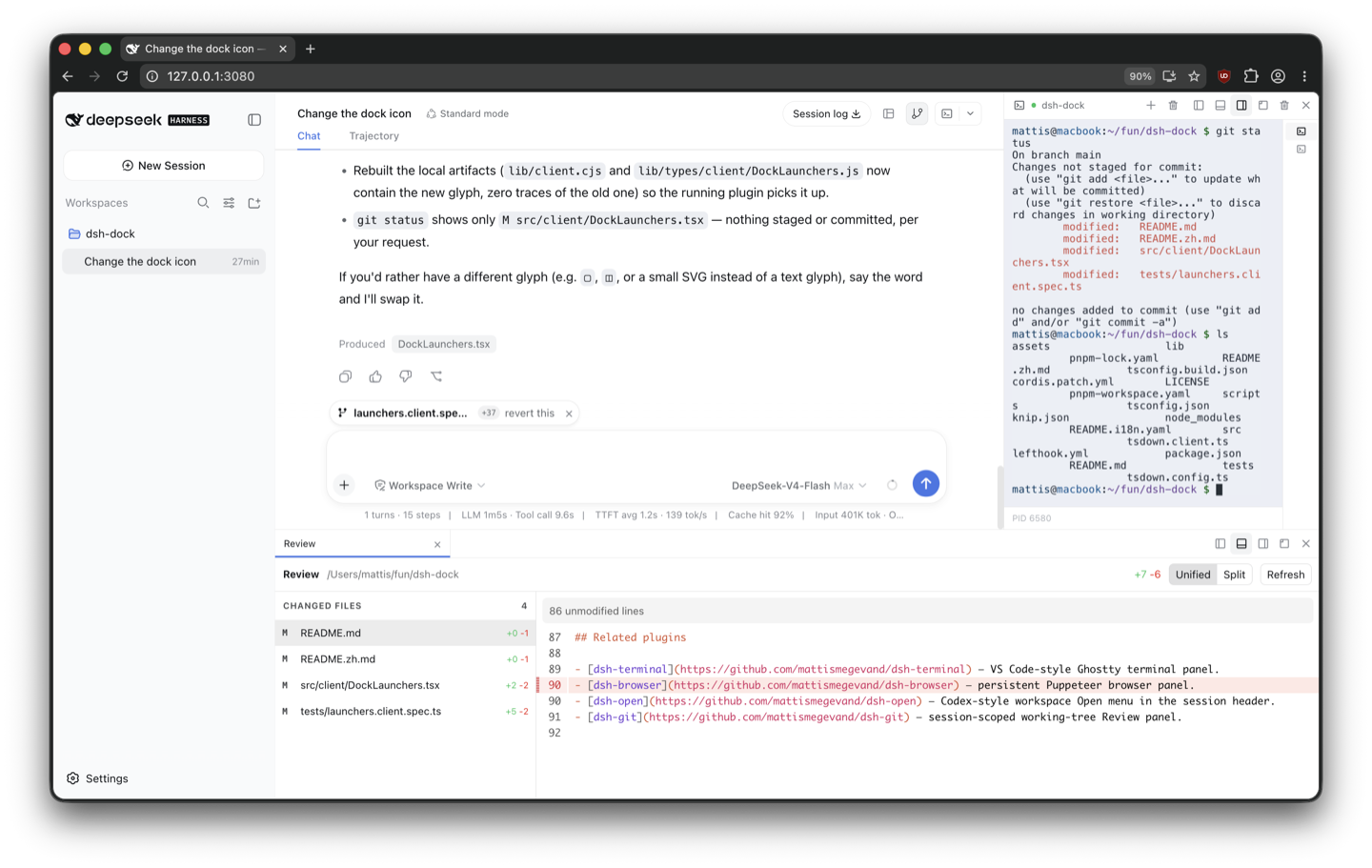
- Left, right, bottom, and floating panel placement with tab groups.
- Pointer and keyboard resizing, header dragging, edge previews, and
Alt+Shift+Arrowdocking. - Lazy child detachment with rollback on cancelled drags.
- Per-session, versioned
localStoragelayouts with bounded scope retention. - Responsive side-panel folding below the configured compact breakpoint.
- Stable mounts while panels move, hide, or switch tabs.
- Session-header launchers and logical launcher groups for multi-pane features.
Panel API
Register metadata with ctx.dock, then contribute content to the keyed dock.panel slot with the same id:
const disposePanel = ctx.dock.registerPanel({
  id: 'terminal',
  title: 'Terminal',
  icon: '>_',
  defaultLocation: 'bottom',
})

ctx.slots.inject('dock.panel', () => ctx.slots.register({
  name: 'dock.panel',
  key: 'terminal',
}, TerminalPanel))
Panel components receive panelId, visible, location, closePanel, activatePanel, setPanelTitle, and beginPanelDrag. Hidden panels remain mounted. A child drag can return a new panelId and rollback; the dock invokes rollback on cancellation or disposal.
Harness compatibility
The plugin uses shell.overlay, conversation.session.header.utilities, and conversation.input.right. Its reversible frame adapter discovers the semantic sidebar, conversation, and details anchors, inserts grid spacers, and restores changed inline styles during disposal.
Install
Requires the dsh CLI (Node.js 22.19+ or 24) and pnpm 10+.
From npm
dsh plugin --profile web add @mattismegevand/dsh-dock
From GitHub
dsh plugin --profile web add github:mattismegevand/dsh-dock
Git installs fetch sources, so pnpm runs the package's prepare build on first add. pnpm ≥10 refuses that until you allow it: copy the exact package key pnpm printed into the profile's pnpm-workspace.yaml allowBuilds entry, then re-run the same add.
Develop locally
git clone https://github.com/mattismegevand/dsh-dock.git
cd dsh-dock
corepack pnpm install
corepack pnpm check:all
dsh plugin --profile web add .
Configuration
All deployment-varying dimensions and thresholds are validated Loader config, including the compact breakpoint, drag threshold, persistence bound, default dock sizes, minimum sizes, and floating bounds.
- id: dock
  name: '@mattismegevand/dsh-dock'
  config:
    compactBreakpoint: 860
    maxPersistedScopes: 64
    defaultBottomSize: 340
Related plugins
- dsh-terminal — VS Code-style Ghostty terminal panel.
- dsh-open — Codex-style workspace Open menu in the session header.
- dsh-git — session-scoped working-tree Review panel.
Model experience
Dock UI contribution
What the model sees
Nothing. The plugin only registers browser layout, chrome, persistence, and a client service; it adds no prompt, tool schema, message, or model-visible result.
Token effect
Zero tokens are added to model requests or responses.
KV Cache effect
None. The plugin does not alter model input, so it cannot invalidate or shift the main request cache prefix.
Known limitations
- The frame adapter requires the current AppFrame semantic anchors and three-column template; it fails visibly when that host contract is unavailable.
- The dock intentionally omits arbitrary nested editor splits and pop-out browser windows.
- Layout persistence is browser-local and does not synchronize across profiles or devices.
License
MIT