
 @mdikarev
dsh-filetree
No description
- Stars
- 0
- Language
- TypeScript
- Created
- Aug 21, 2026
- Updated
- Sep 5, 2026
Introduction
dsh-filetree
Workspace file tree panel for the DeepSeek Harness (DSH) Web GUI — an explorer for the session workspace: live refresh, git status, text/markdown/image previews, and confirmed deletion via a tree context menu.

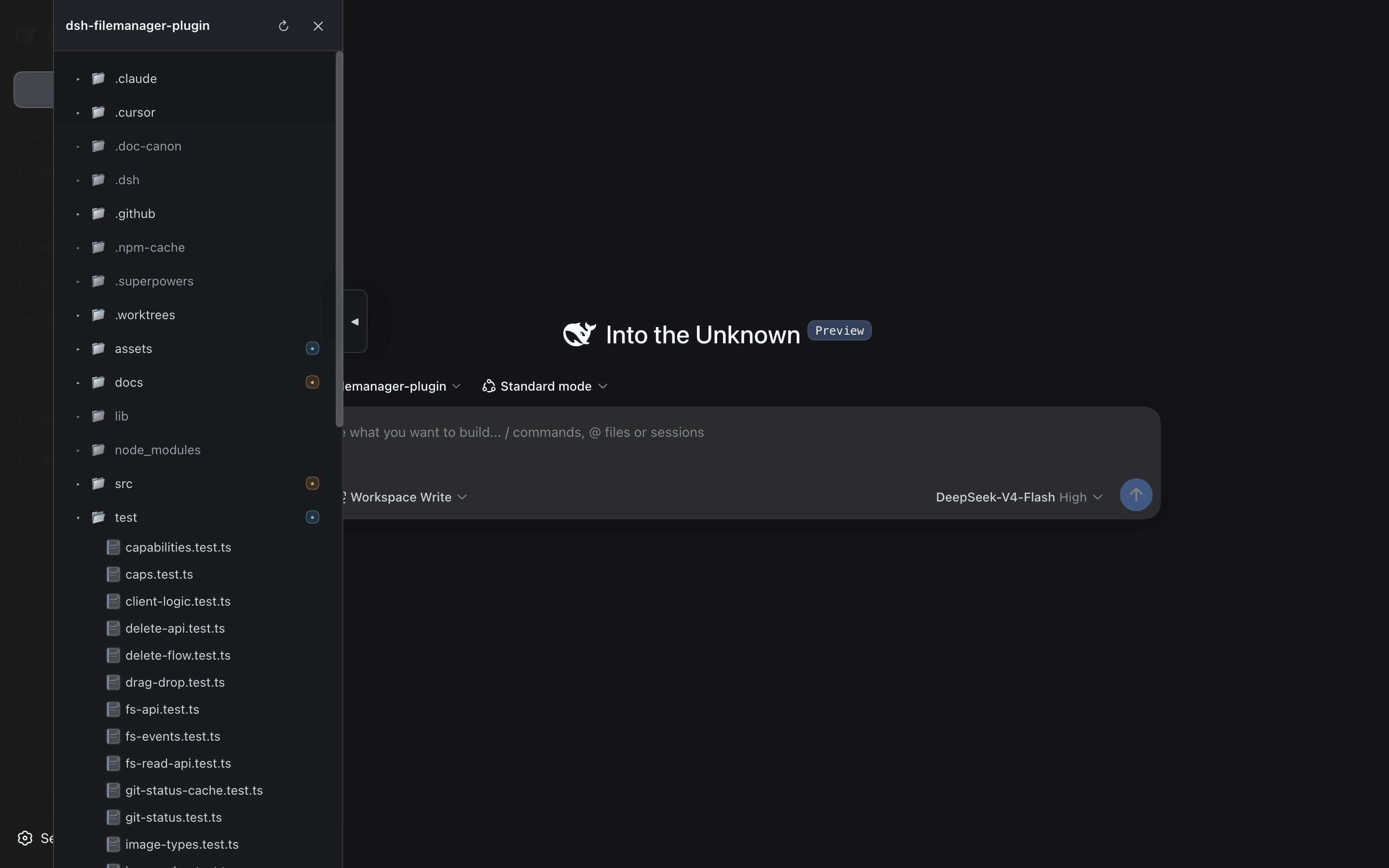
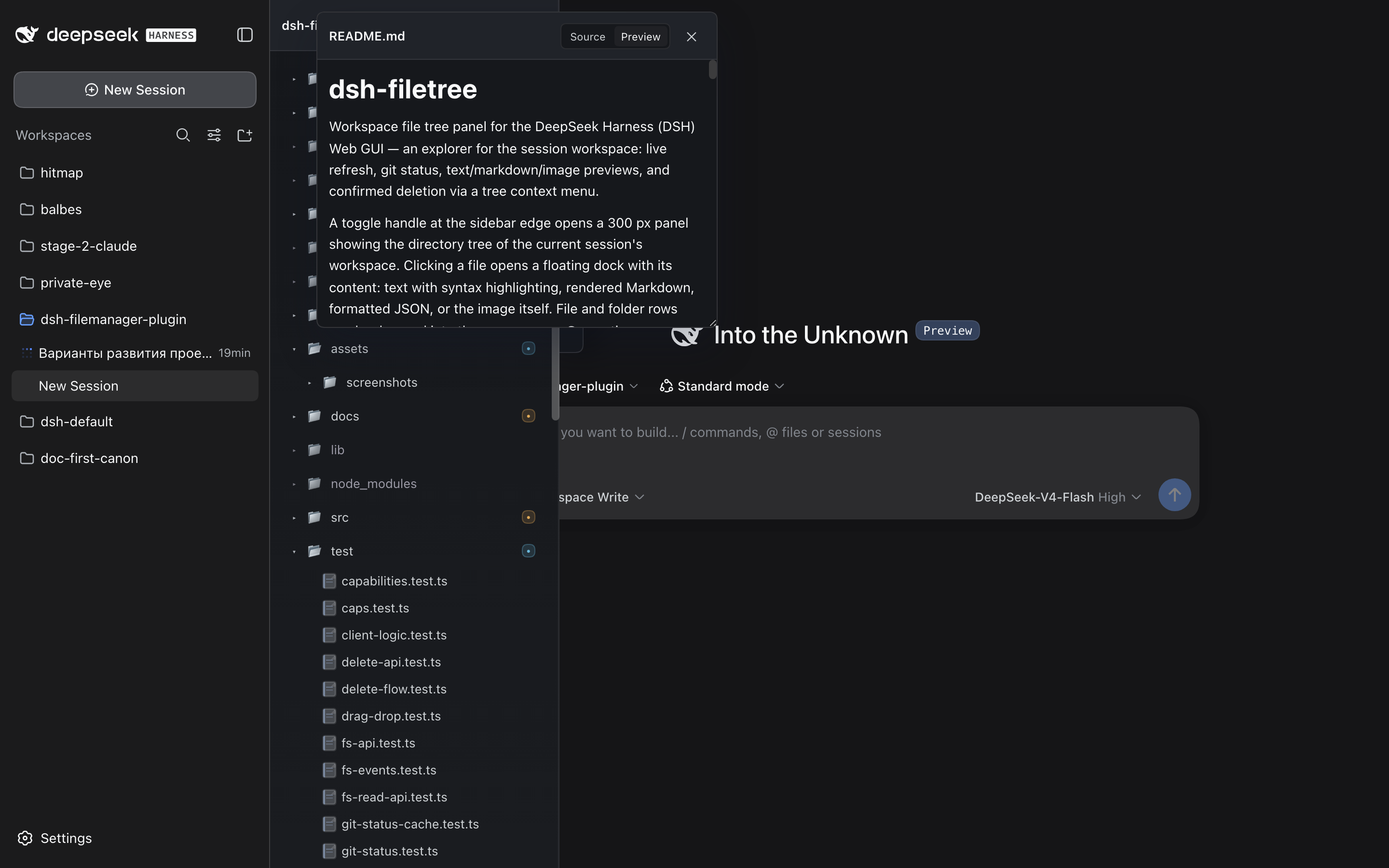
A toggle handle at the sidebar edge opens a 300 px panel showing the directory tree of the current session's workspace. Clicking a file opens a floating dock with its content: text with syntax highlighting, rendered Markdown, formatted JSON, or the image itself. File and folder rows can be dragged into the composer as @-mentions.
Screenshots
Note for maintainers: add PNGs under
assets/screenshots/and they will appear here on GitHub (this README is mirrored there). The npm tarball does not includeassets/, so these images render on the GitHub repo page only.
| Panel + tree | Preview dock (Markdown) |
|---|---|
 |  |
| Image preview | Context menu (Delete) |
|---|---|
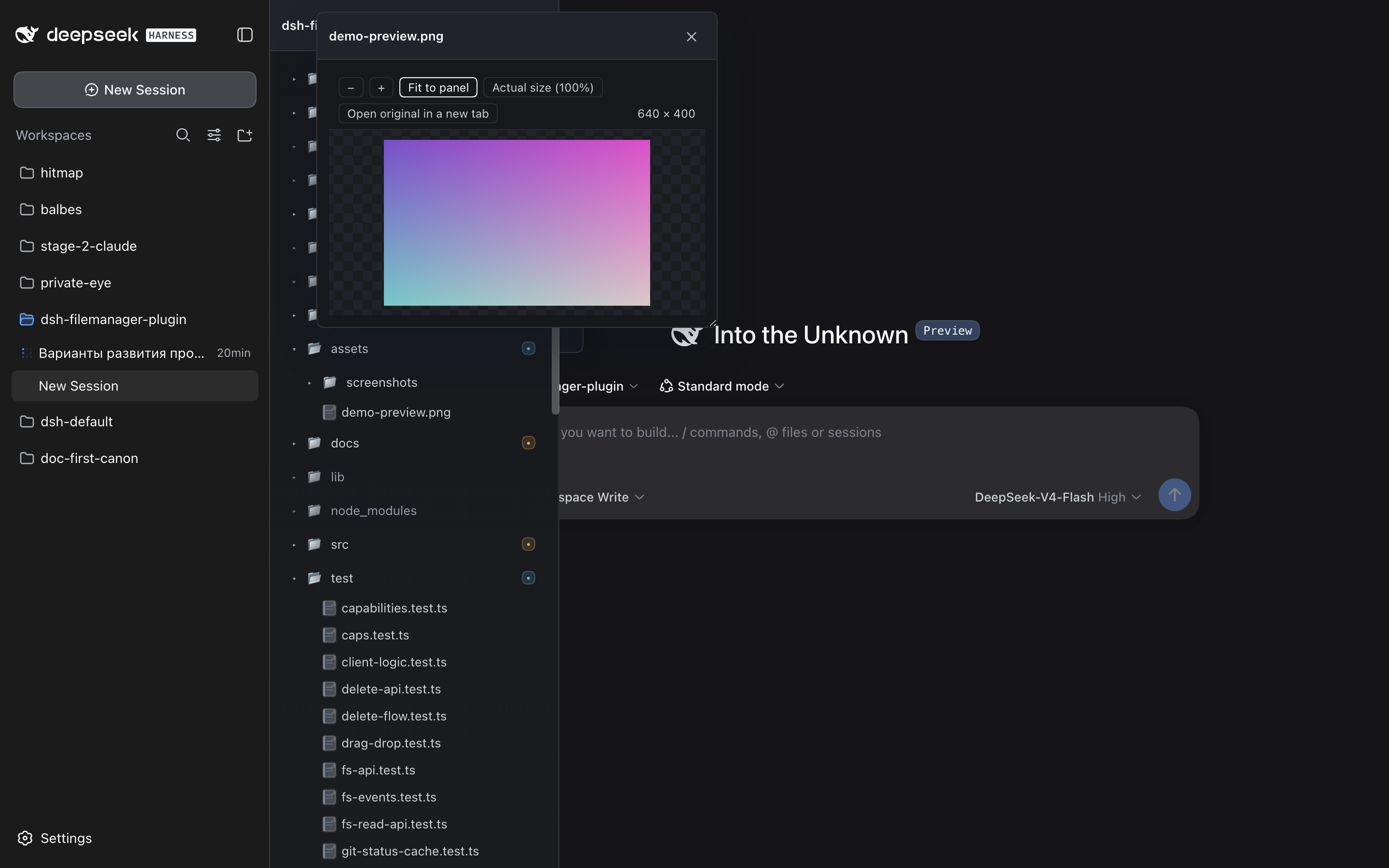 | 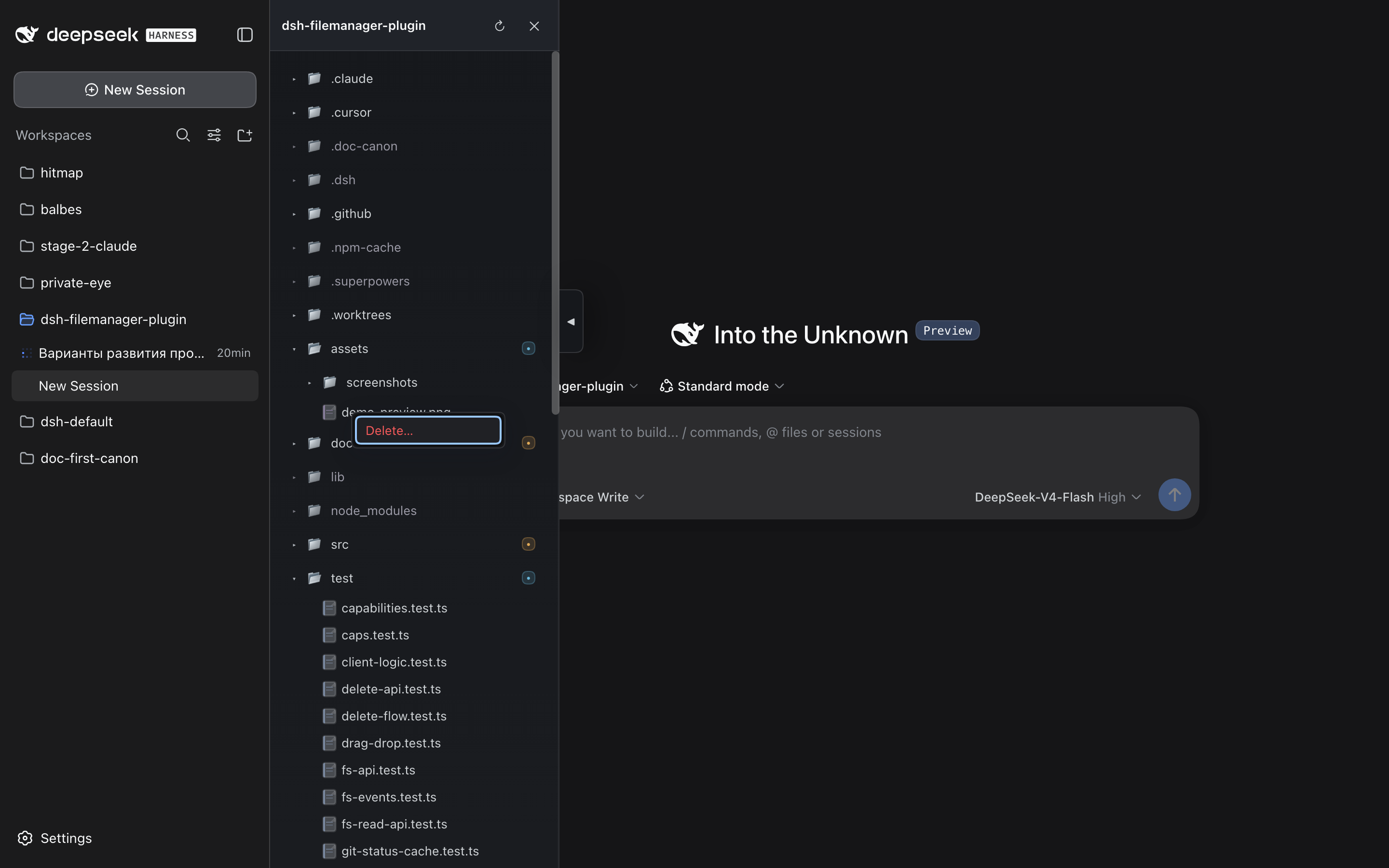 |
Each row above is one suggested capture from the live GUI (dark or light theme — the panel adapts via DSH tokens):
- tree-panel.png — the panel open at the sidebar edge with folders expanded and git badges visible (a workspace with a few modified/untracked files shows the badges best).
- preview-markdown.png — a
.mdfile open in the dock in Preview mode. - preview-image.png — an image file open in the dock (zoom toolbar visible).
- context-menu.png — the row context menu (right-click) with the Delete command highlighted. The confirmation dialog that follows is shown in the plugin docs and covered by tests; capturing it here requires a server build with the delete-info preflight action live.
Features
- Tree panel: lazy directory loading on expand, folders first then case-insensitive alphabet, dotfiles shown (
node_modulesand.gitfiltered), theme-aware styling via DSH tokens (auto dark/light). - Git status: per-file and per-folder badges (modified / added / untracked / ignored) with folder summaries; ignored rows muted.
- Live refresh: the tree updates automatically via a fetch-based SSE stream with a polling fallback. A server heartbeat + client watchdog detect a stalled connection and degrade to polling with a status banner instead of freezing silently.
- Performance: the workspace git-status snapshot is cached server-side (TTL + event invalidation), so refresh bursts share a single
git statusrun. - Preview dock: draggable by its header, resizable, position/size remembered per workspace; text files up to 5 MB (truncation notice); Markdown renders with a Source/Preview toggle — workspace-local relative images render inline, external images stay blocked; syntax highlighting for common languages.
- Image preview: raster (png/jpeg/gif/webp/avif) and svg files open fitted to the panel with zoom controls (toolbar buttons, double-click) and image dimensions in the toolbar; "open original" opens the raw file in a new tab; SVG responses are served with a sandbox CSP.
- JSON view: Raw/Formatted toggle — Formatted is the default for valid JSON under 1 MB; invalid or oversized files fall back to raw with a note.
- Composer integration: drag files/folders from the tree into the composer to insert @-mention references.
- Truncated names: hovering a row whose name is clipped shows a themed tooltip with the full name (only when truncated).
- i18n: UI copy is localized — English by default, Russian auto-selected for ru-locale browsers (override:
fm-localein localStorage). - Accessibility: tree semantics (roles/
aria-expanded/aria-level), full keyboard navigation (arrows, Home/End, Enter/Space, ArrowLeft/Right on folders), the preview is a dialog and closes on Escape, visible focus styles. - Context-menu delete: tree rows get a context menu (right-click or Menu key) with Delete; deletion is confirmed in an inline dialog that warns about uncommitted git changes; files and folders (recursively) can be deleted, symlinks are removed as links; the workspace root and
.gitare protected.
Scope
The panel is read-only, except explicit confirmed deletion of files/folders via the tree's context menu: it browses and previews files and never mutates them otherwise. File operations (create/rename/move) are intentionally out of scope.
Server API
The plugin registers a /filemanager-fs prefix on the DSH host:
GET /filemanager-fs/root?hint=<workspace>— workspace rootGET /filemanager-fs/list?hint=<workspace>&path=<rel>— directory listing with git statusGET /filemanager-fs/read?hint=<workspace>&path=<rel>— text file content (up to 5 MB;truncated: truewhen cut)GET /filemanager-fs/events?hint=<workspace>&paths=<json>— SSE stream of workspace changes (andgit-changedevents), with a heartbeatGET /filemanager-fs/cap?hint=<workspace>— mints an unguessable, expiring per-workspace capability token used to authorize image URLsGET /filemanager-fs/raw?hint=<workspace>&path=<rel>&cap=<token>— serves image bytes to capability URLs (byte caps: 20 MB raster / 2 MB svg;nosniff/no-store)GET /filemanager-fs/delete-info?hint=<workspace>&path=<rel>— read-only preflight for deletion: entry kind, whether it is the workspace root, and whether the file (or any descendant of a folder) carries uncommitted git changes (403 path escape / 404 not found)POST /filemanager-fs/delete?hint=<workspace>&path=<rel>— permanently deletes the file or folder, recursively (header-gated and POST-only); symlinks are removed as links; the workspace root and.gitare rejected (403/404/409)
All endpoints except GET /filemanager-fs/raw require the x-dsh-filemanager: 1 header. /raw is the only endpoint reachable without it — capability URLs must work as plain <img> sources and inside the Markdown preview — and authenticates via the token from /cap. Paths are contained to the workspace (realpath + escape checks, symlink-safe), and git is invoked read-only.
Compatibility
- Node >= 20 (
engines). - React 18 — provided by the DSH web host, not bundled (peer
^18.2.0; verified against 18.3.1). - DSH: built and tested against
@deepseek-ai/dsh@0.1.2-rc.1(web profile). Drag-and-drop into the composer targets the Lexical composer of dsh >= 0.1.2; textarea hosts of earlier dsh versions keep working through the same native text/plain drop. The plugin host and client APIs are pre-1.0 — pin the dsh version you deploy and re-test after dsh upgrades. - Trust model: server endpoints are served by the dsh host on localhost and rely on the
x-dsh-filemanagerheader (image bytes additionally require an unguessable, expiring per-workspace capability token) plus the browser's same-origin/CORS behavior — treat the local dsh process as the trust boundary.
Installation
From npm
dsh plugin --profile web add dsh-filetree
From a local checkout (development)
npm install
npm run build
dsh plugin --profile web add /path/to/dsh-filemanager-plugin
Then register the service in the profile patch (~/.dsh/profiles/web/cordis.patch.yml):
- insert:
    - id: filemanager
      name: 'dsh-filetree'
Restart dsh web and refresh the browser.
Development
npm run build      # esbuild: host (lib/index.js) + client bundle (lib/client.js)
npm test           # node:test + tsx
npm run typecheck  # tsc --noEmit
npm pack           # builds lib/ first (prepack) — inspect the publish tarball
CI (.github/workflows/ci.yml) runs typecheck, tests and the build on every push/PR.
Documentation
- Behavioral source of truth lives in
docs/canon/(doc-canon). - The maturity roadmap and per-phase specs/plans live under
docs/superpowers/. CHANGELOG.mdfollows Keep a Changelog; releases are taggedvX.Y.Z— see RELEASING.md for the release runbook.
License
MIT — see LICENSE.