
 @pioneer666-user
specdev-workbench
DSH(DeepSeek Harness)流程图管理插件:浏览 Archify 业务流程图目录、按 Git 附注标签阅读历史版本、保存版本。A workflow-diagram manager plugin for DSH.
- Stars
- 3
- Language
- JavaScript
- Created
- Sep 19, 2026
- Updated
- Oct 7, 2026
Introduction
SpecDev Workbench 0.2.2
English | 简体中文
Choose a DSH project, read business documents and workflows, or ask a bundled Skill to arrange an independent room for one business.
Version 0.2.2 adds theme-following pages, ceramic/fairy room materials and lighting, Archify 3.0.1 workflow and lifecycle reading, source/document pairing, and single-HTML room export. Changes.
Use Export room, select current business materials, then Export HTML. Room and selected documents/charts are readable offline. Source evidence in the plugin is read from exact local Git commits; exported HTML contains pinned remote source links instead of repository source snippets. Those links need a network connection and private-repository access. Documents may contain code or sensitive text you wrote: confirm the sharing scope. An empty selection exports the room alone. The plugin does not save another HTML copy in your project; keep the file wherever you download it. Closing the export panel releases its temporary download data; the next export generates a new file.
Preview
Real screenshots of fictional sample rooms. Both styles include furniture and a material-matched toolbar.
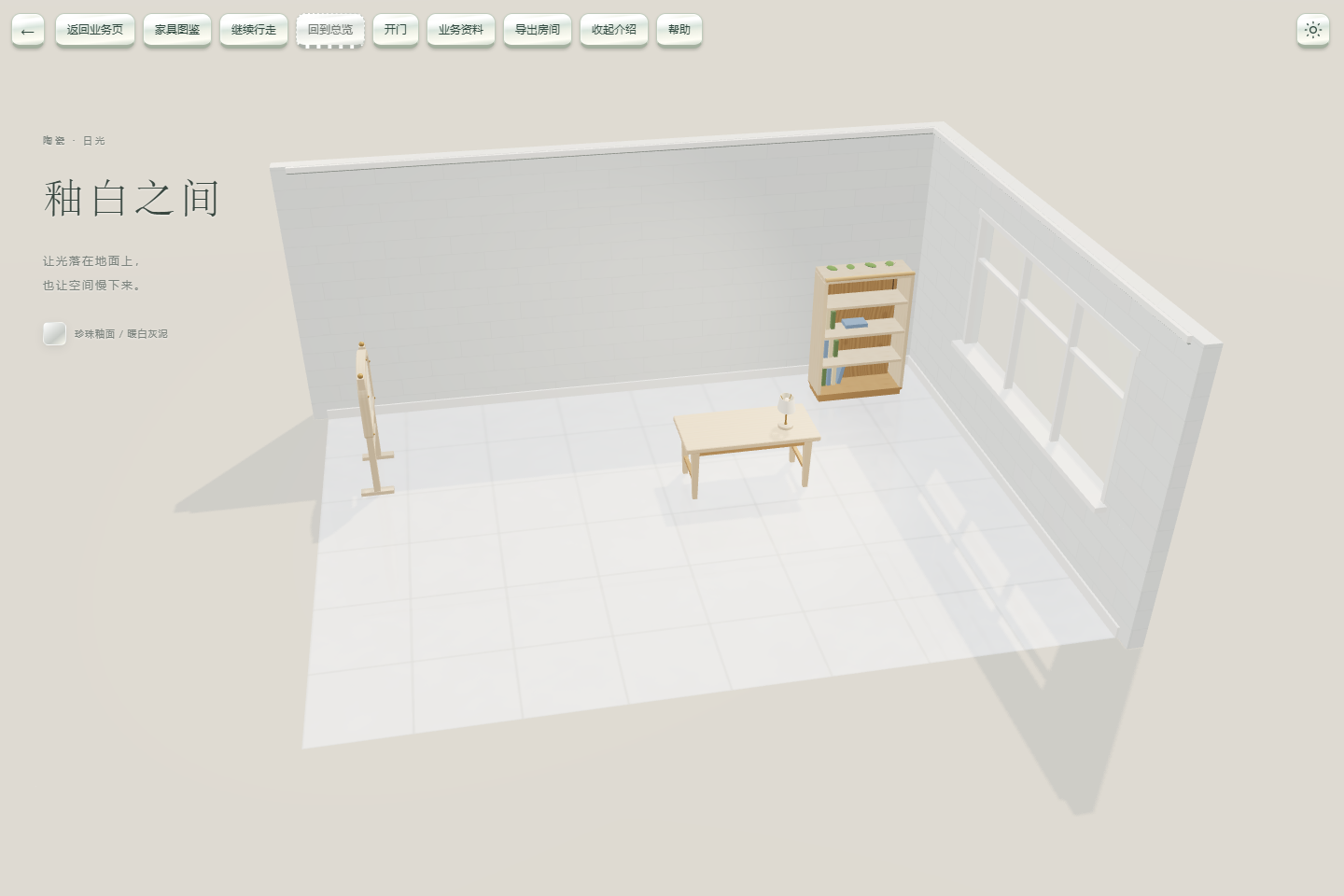
Ceramic: glazed surfaces, translucent windows and adjustable brightness.
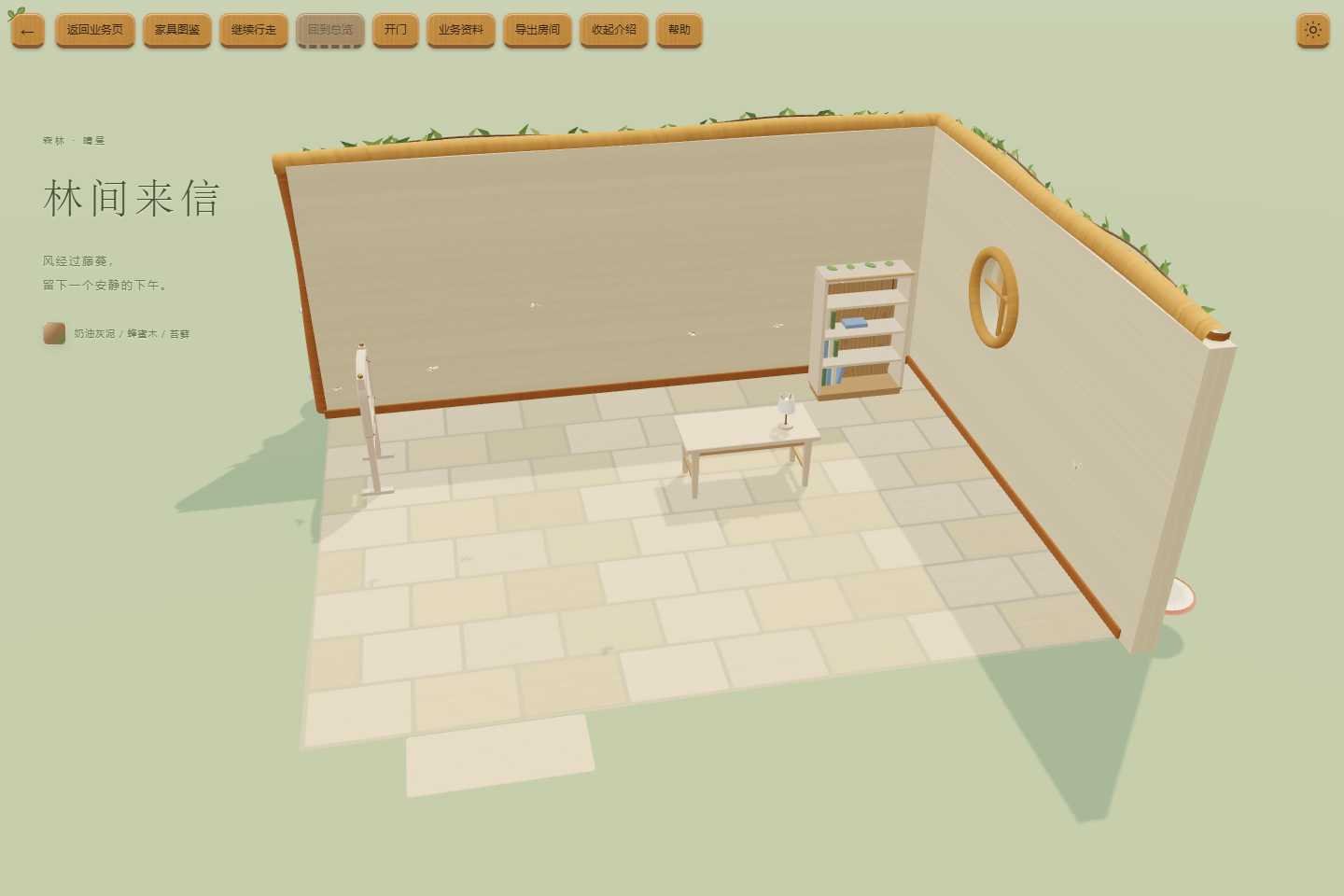
Fairy: warm wood, small leaves and brightness-linked day/night lighting.
Download and install
npm install (recommended; exact version)
npm 0.2.2. GitHub and npm 0.2.2 distribute the same package, @pioneer_zmc/dsh-workbench. Product ID, routes and data roots stay the same.
Windows Desktop
Save work, exit via the menu or tray, and confirm the background instance ended. Use the bundled Desktop CLI and the actual Desktop DSH_HOME; leave it unset if it was unset before. This example demonstrates a custom root only. CLI and Desktop must share the same root; the variable affects this terminal and its children only.
$DesktopDir = 'C:\Apps\DSH' # Replace with the actual installation directory
$env:DSH_HOME = 'C:\DSHData\desktop' # Custom-root example; existing users keep their actual root
& "$DesktopDir\resources\runtime\cli\bin\dsh.cmd" plugin --profile desktop add '@pioneer_zmc/dsh-workbench@0.2.2' '--registry=https://registry.npmjs.org/'
& "$DesktopDir\DeepSeek Harness.exe"
Before upgrading, record the installed package and custom plugin configuration. Existing npm users use the add command above for the same package identity. If the host requires removing a package first, remove only that installed package with the same CLI's plugin --profile desktop remove <installed-package>, then add and verify the original configuration. Do not clear data roots or install two package identities together. GitHub 0.2.1 used @specdev/dsh-workbench; npm 0.2.1 used @pioneer_zmc/dsh-workbench; earlier releases used @specdev/dsh-archify-manage. Old tags/assets retain those identities; migration of every old version has not been tested.
The sidebar opens SpecDev Workbench in the central panel. Choose a project and use Return to chat to restore the conversation.
Web
Stop the corresponding instance and keep its original data root and Web CLI. Apply the same installed-package removal and configuration checks using the web profile.
dsh plugin --profile web add @pioneer_zmc/dsh-workbench@0.2.2 --registry=https://registry.npmjs.org/
Restart that Web instance. The sidebar opens a new tab with project names and full paths, preserving chat. Create a workspace and refresh an empty list; retry read failures. Both states retain manual configuration. Use the CLI and profile for the instance you actually run.
GitHub fallback
Same-version installation package · Release and SHA256. Download to a path without spaces and use the appropriate profile's plugin add <local-tgz-path>. Historical GitHub 0.2.1 remains the old @specdev/dsh-workbench package; it differs from npm 0.2.1.
Features
- One independent room per business: realistic or fairy base, overview and walking modes, indoor/outdoor passage.
- Twelve furniture assets and rendered thumbnails: bookshelf, desk, table lamp, notice board, display stand, vase, plant, book stack, bed, reading chair, low cabinet and floor lamp. Select items in the catalog and copy the list to your chat.
- Furniture with document capabilities can bind that business's registered documents, workflows and lifecycle charts. Reading pauses walking; closing resumes in place. Decorative assets do not promise sitting, sleeping, light switches or free drag placement.
- Project/business navigation, interactive workflows, node explanations, pinned source evidence and historical reading. Saving a version only adds an annotated Git tag to committed content.
- Whole-building overview and walking remain available. Three bundled skills: specdev-business, specdev-building, specdev-room.
First use
- Select a DSH workspace at a Git repository root. Existing
docs/specdevprojects can be browsed directly. Otherwise agree business requirements with the AI and use specdev-business to register documents and workflows first. - In that project's chat, say:
Use specdev-room to create a room for this business.
The Skill guides business, style and arrangement choices, reads the current catalog, writes only docs/specdev/<businessId>/room.json and invokes the read-only validator. It does not generate models, business documents, new workflows or choose a default project.
- Open the sidebar entry, choose the project/business, enter the room, inspect the overview and read bound material while walking. Refresh after configuration changes.
The management UI only writes snapshot tags, without changing business files, branches or commits. Skills write project files only within your authorization.
Breaking changes from 0.1.x
Current npm package: @pioneer_zmc/dsh-workbench. Plugin/sidebar ID: specdev-workbench. Client module: @pioneer_zmc/dsh-workbench/client. Pages/APIs use /specdev-workbench; data uses docs/specdev, six formal specdev/*/1 schemas, SpecDev building formats and specdev/ snapshot tags. Old archify-maker/archify-house skills become specdev-business/specdev-building, with specdev-room added.
Only the new root, formats and tags are read. There is no automatic migration or old URL/skill alias; old bookmarks are not guaranteed. Old files and tags remain intact. Agree migration separately for each old project; do not bulk rename. Registered material can retain its original repository path.
Limits and verification
Windows / DSH Desktop and Web 0.2.0-rc.2 fixed environments cover the current room/reading/export experience. Other platforms, system theme mode, future hosts and every old-version migration are not covered. Separate DSH_HOME roots isolate plugin/business data; Electron preferences, caches and single-instance behavior may still be shared within one Windows account. Release-specific build/download/install results belong to the release record.
Workflow and lifecycle are the supported authoring/registration types. Sequence and other upstream diagram types are not exposed as business materials. Legacy workflow reading and historical snapshots remain compatible; old graphs are not automatically upgraded. Source links in shared HTML are not an official remote-source validation result; their reachability is not checked automatically.
Export includes the current room and selected registered Markdown documents/workflow/lifecycle charts, not the whole project or history. External document images are not bundled; the reader displays placeholders. Export limits are 64 documents, 16 charts, 32 MiB input and 64 MiB HTML output. Export errors/cancellation leave a retryable panel; a download starting does not prove the file was saved. Use Download file if needed.
No in-page furniture editing, arbitrary scaling, wall mounting, nested furniture, cross-room linking or sitting animations. Floor placement and one-level desktop support are available. Room validation checks placement and registered-material readability; use the separate chart validator for graph compilation.
Build and sample
Node.js ≥22. From this repository root, run sequentially:
npm install
node node_modules/typescript/bin/tsc --noEmit
node scripts/build.mjs
npm pack --ignore-scripts --pack-destination .
Produces pioneer_zmc-dsh-workbench-0.2.2.tgz. The renderer and read-only validators are bundled; no private research repository is needed.
node sample/generate.mjs ./local-artifacts/demo-project
The target must not exist. See sample/README.md, then open the generated directory as a DSH workspace. Optional checks node scripts/smoke.mjs and node scripts/check-save.mjs run serially in generated samples without using your business project.
License and acknowledgments
Plugin code, twelve self-created furniture models, generated textures and rendered thumbnails use MIT. See furniture sources. Bundled Archify 3.0.1 license, Marked license and legacy Archify license, third-party notices and Three.js provenance retain upstream attribution. Thanks to DSH and the upstream projects.