
 @qomob
dsh-madrank
AI usage dashboard + optional global ranking for DeepSeek Harness (DSH).
- Stars
- 0
- Language
- TypeScript
- Created
- Sep 3, 2026
- Updated
- Oct 17, 2026
Introduction
MADRank for DSH
Track your AI usage. See how you rank.



English | 简体中文
MADRank is an AI Usage & Ranking plugin for DeepSeek Harness (DSH). It turns your DSH activity into a private local dashboard — Today / 7-Day history / Top models / Streak — and, if you explicitly opt in, an anonymous global 7-Day Token Race based on real usage.
The core principle is simple: local tracking runs by default, global ranking is an explicit opt-in, uploads only happen for finished UTC days, and only aggregated usage is ever sent.
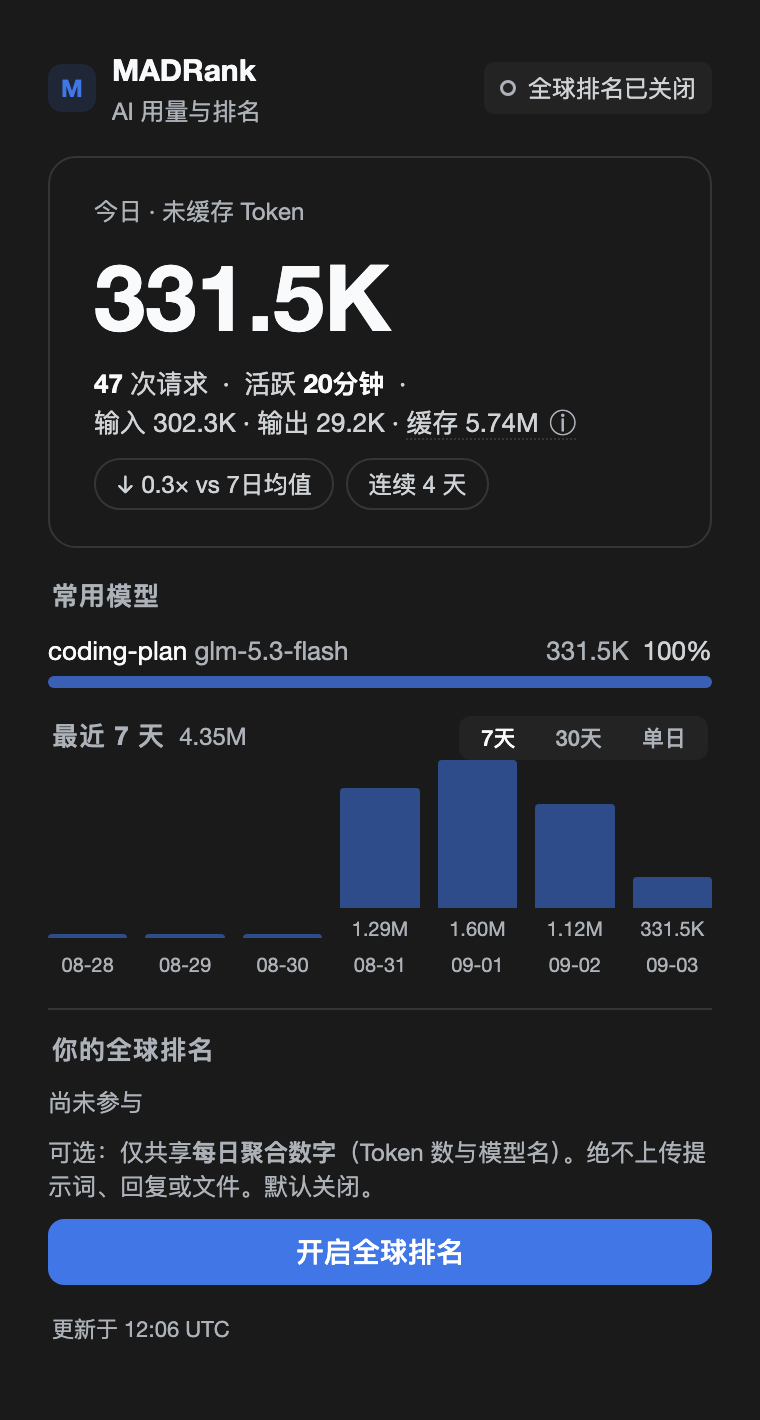
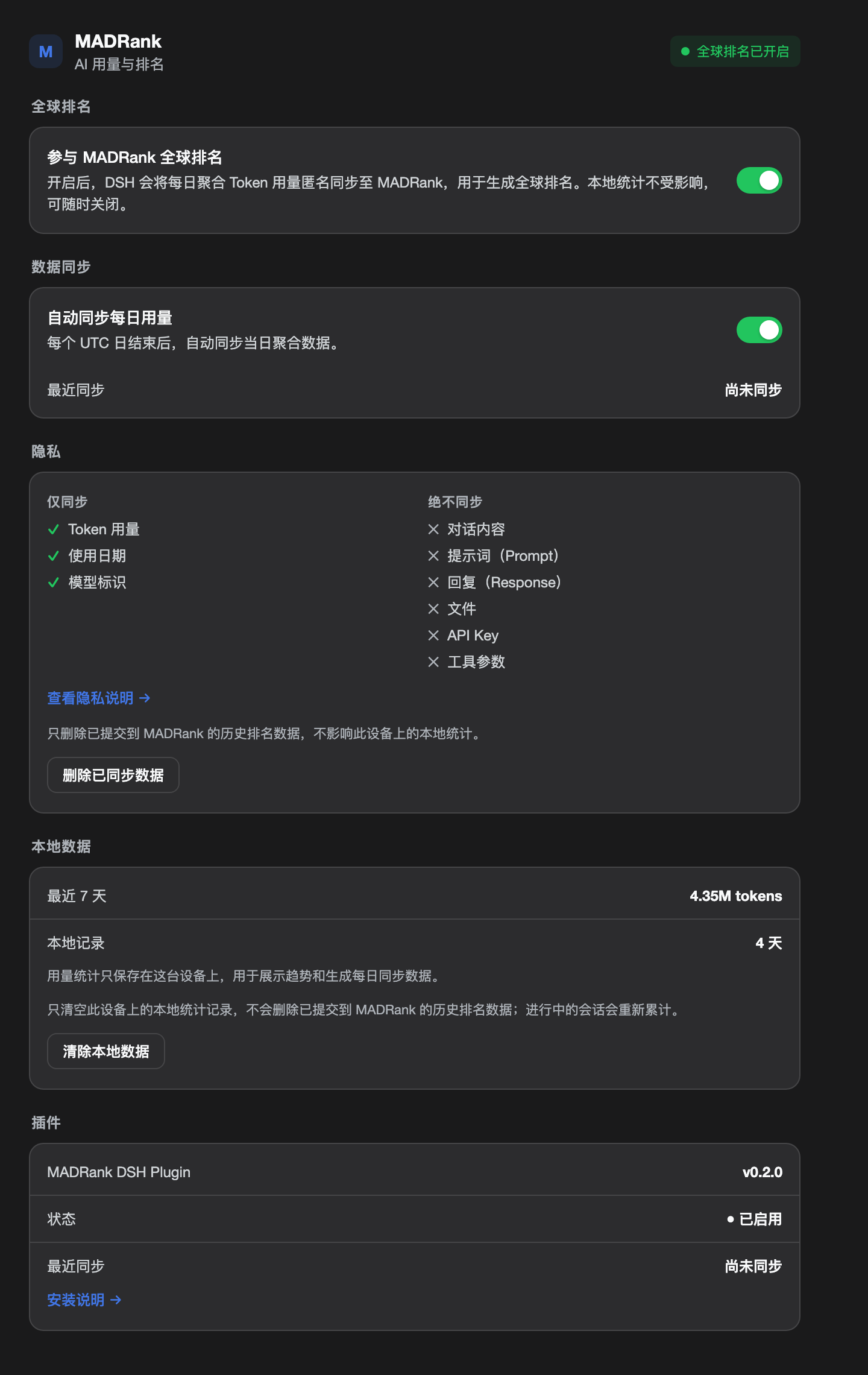
Left: sidebar Quick View (real local data) · Right: Settings → MADRank panel
Features
1. Local AI Usage Dashboard (works fully offline, no ranking required)
- Today — today's usage
- 7-Day / 30-Day History — recent 7-day / 30-day trends
- Top Models — your most-used models
- Streak — consecutive active days
- vs 7-Day Average — compare against your own 7-day baseline
- RANK — global rank status
- Cached Tokens — tracked separately from the ranking metric
Data comes from the DSH session projection feed — the plugin never reads DSH's internal database directly.
2. 7-Day Token Race (the core competitive metric)
7-Day Total — your primary tokens over the last 7 UTC days.
Primary Tokens = uncached input tokens + output tokens
Cached Tokens  = cache read + cache write
A note on honesty: the race figure is the full input+output as uploaded (uncached input + cache write + output); cache reads are reported separately and never counted toward the race. "Uncached" on the local dashboard refers to your local primary (uncached input + output) — the two numbers answer different questions, and the card labels both: local figures are marked LOCAL · LIVE, race figures carry the server sync time. This keeps read-cache differences from distorting comparisons while staying truthful about what is counted.
3. Opt-in Global Ranking
Nothing is uploaded by default. Sync only starts after you explicitly enable join the global ranking:
- Off by default, explicit opt-in
- No real-time requests, no same-day data ever
- Only finished UTC days are uploaded, as per-day per-model aggregates
- Sync failure never affects local statistics
4. One-click Share Card
The share button on the Quick View card turns your rank into a postable card:
- Dedicated share link —
https://madrank.ai/share/<shareToken>, viewable from any device by anyone - Auto-generated social card image — rendered server-side (7-day token total, global rank, brand mark, QR code to madrank.ai); social platforms pick it up automatically as the card preview
- Copy-ready bilingual share text — with rank and model info
- Server-authoritative numbers — refreshed from the server (
/api/usage/me) right before sharing, so stale local caches never leak stale numbers into your posts
Sharing uploads no new private data: the share token only addresses your anonymous node on a public leaderboard, and the leaderboard itself is public.
Privacy by Design
Local tracking and global sync are separated at the architecture level.
Default (offline-capable):
DSH → Local Projection → Local Usage Store → Local Dashboard

After joining the race:
Local Usage Store → Finished UTC Day → Aggregated Usage → MADRank Ingest
Never uploaded: prompts, responses, tool arguments, individual request payloads, same-day usage. Uploaded: daily, per-model aggregated usage only.
Deletion is intentionally split: Clear Local Data removes this machine's statistics; Delete Remote Data requests removal of the remote rows tied to your anonymous installation identity.
Usage Accuracy
MADRank does not invent a second token-accounting logic. It uses DSH's session projection as the data source and reconciles aggregation against an independent reference token-meter. A real-session reconciliation run:
input        745,120  =  745,120
output       186,324  =  186,324
cache read 26,352,384 = 26,352,384

MATCH ✓
The suite covers streaming replacement, waterfall tool traffic, cross-midnight bucketing and (turn, step) replacement semantics. Goal: stay consistent with DSH's own token meter.
Installation
A DSH plugin is mounted from a profile. Two things must both be true, or the plugin silently does nothing:
- the package is declared/installed in the profile (
package.json+node_modules, viadsh plugin … add);- the profile mounts it — a
cordis.patch.ymlinsert entry.The published package ships the Host half compiled to JavaScript (
dist/host/) and the browser half prebuilt (dist/client.js) — consumers need no build step. (Node refuses to type-strip TypeScript insidenode_modules, which is why installed packages must not pointmainat a.tsfile.)
Option 1: Desktop app's built-in plugin manager (recommended for the app)
Open the sidebar Plugins page (the plugin manager; Settings → Plugins is a read-only list) and install from one of:
- GitHub — repository
qomob/dsh-madrank - npm — package
@qomob/dsh-madrank
Then fully quit and reopen the app (the profile composition is loaded at startup; reloading the page is not enough). If the manager leaves the plugin un-mounted, add the mount entry below, then restart.
Option 2: CLI (any profile: desktop, web, …)
# GitHub (always the latest `main`)
dsh plugin --profile desktop add github:qomob/dsh-madrank

# …or the published npm package
dsh plugin --profile desktop add @qomob/dsh-madrank
dsh plugin forwards to pnpm inside ~/.dsh/profiles/<profile>/, which declares the dependency properly (an undeclared package gets pruned on the next pnpm install).
Then add the mount entry to ~/.dsh/profiles/<profile>/cordis.patch.yml:
- insert:
    - id: madrank
      name: '@qomob/dsh-madrank'
And restart DSH.
Option 3: local development (live edits)
git clone https://github.com/qomob/dsh-madrank.git
cd dsh-madrank && npm install && npm run build
dsh plugin --profile desktop add 'link:/absolute/path/to/dsh-madrank'
Use link: not file: (file: copies the package and breaks source sync). With link: the profile loads the built dist/ — run npm run build after source edits, then restart. Add the mount entry and restart as above.
Verify
- the sidebar shows the MADRank entry;
- the log shows
madrankUsage projection registeredandsettings ns registered: madrank-usage.
Troubleshooting — installed but nothing appears
| Symptom | Check |
|---|---|
| No MADRank entry, no log lines | Mount entry missing from cordis.patch.yml |
| Plugin gone after an unrelated install | Dependency not declared in the profile package.json (re-run dsh plugin … add) |
| "settings ns registered" missing | Profile never restarted, or the app was only reloaded |
| Older UI/copy than this README | npm install of an older version — use the GitHub spec, or upgrade (dsh plugin --profile desktop add @qomob/dsh-madrank@latest) |
| Installed, enabled, but runtime says not running (v0.3.6 or earlier) | That release pointed main at src/index.ts; Node cannot type-strip TS under node_modules. Upgrade to v0.4.0+, which ships compiled dist/host/ JS |
UI Model
Sidebar → Quick View = VIEW
Settings → MADRank   = CONFIGURE
Quick View shows your usage, 7-day trend, model mix and rank; the share button on the card generates your personal share card. Settings controls the join switch, auto-sync, privacy, local/remote deletion and plugin status.
💬 Join the Community
Scan the QR code to join the DSH plugin community — discuss DSH usage, plugin development and best practices:

The WeChat group QR code expires periodically. If it stops working, leave a message in Issues and we will refresh it.
Architecture
┌──────────────────────┐
│   DSH Session Logs   │
│    Source of Truth   │
└──────────┬───────────┘
           ▼
┌──────────────────────┐
│  sessionProjections  │
│     madrankUsage     │
└──────────┬───────────┘
           ▼
┌──────────────────────┐
│      UsageStore      │
│  local usage cache   │
└──────────┬───────────┘
      ┌────┴─────┐
      ▼          ▼
   Local UI    Daily Sync
                   │
                   ▼
            MADRank Ingest
                   │
                   ▼
           7-Day Token Race
DSH session logs are the source of truth; the plugin reads sessionProjections (never SQLite directly), keeps a rebuildable local cache, and keeps daily sync fully isolated from local statistics. All DSH coupling lives in src/compat.ts — verifiable via npm run verify:dsh.
Integration follows the current official recommendations from the DeepSeek Harness repository (cookbook docs/cookbook/adding-a-settings-card.md and the dsh-session-projection / dsh-settings package references): the projection definition is the official { key, stateSchema, init, apply, wire, stateVersion } shape (zod ZodType), the settings namespace registers a schemastery schema through the official register contract (src/settings-schema.ts), the sync tick and flush debounce use the official timer service when present, and the browser card registers under settings.plugin.item keyed by its namespace so the Plugins section pairs it with the served namespace automatically.
Non-negotiables: never fork DSH · never read internal SQLite directly · never duplicate token-meter semantics · never create an independent session event pipeline · never upload same-day usage · never upload prompts/responses/tool arguments · never let global sync block local statistics.
Storage
Default directory ~/.madrank/usage/ (override with MADRANK_USAGE_DIR): installation-id, usage-store.json, card-snapshot.json, global-rank.json, deleted-epoch, cleared-epoch. The anonymous identity is a locally generated installation UUID; a new machine means a new identity by default.
Development
npm install
npm test
npm run typecheck
npm run build:client
npm run reconcile -- <events.jsonl>
npm run reconcile:fixture
npm run verify:dsh
npm run preview
TypeScript · React · Zod · Vitest.
Project Status
Local usage projection, 7/30-day history, top models, streak, Quick View, Settings and the daily aggregated sync protocol are implemented; golden-case and real-traffic reconciliation and DSH compatibility verification pass.
v0.5.3 targets DSH 0.2.x (the new plugin model: Config + configForms + slot-prop session data). On older DSH builds the browser half waits for activation — upgrade DSH first. The Host syncs daily aggregates to MADRank and publishes the accepted race record through a dedicated client-visible projection (madrankRank), so the live rank card and share card work on the new model without a custom Remote API.
Related Projects
The MADRank ecosystem goes beyond the DSH plugin:
- madrank-node — official CLI collector: reads real usage from local Claude Code / Codex / OpenCode / Gemini CLI / DSH logs, aggregates, and optionally uploads, sharing the same anonymous identity with this plugin
- madrank-sync — skill marketplace distribution: AI agents (Claude Code / DSH, etc.) collect and upload via a skill, with built-in integrity self-check and anti-fabrication guardrails
Disclaimer
This project is a community-driven, unofficial project and is not affiliated with DeepSeek AI. "DeepSeek", "dsh", "DeepSeek Harness" and related names and trademarks belong to their respective owners.
License
MIT © 2026 qomob / MADRank