
 @shyuan-hub
dsh-compact-button
one-click Compact context button for the DSH Web context meter panel.
- Stars
- 4
- Language
- TypeScript
- Created
- Aug 23, 2026
- Updated
- Sep 30, 2026
Introduction
dsh-compact-button







在 DSH Web 的上下文计量面板里放两个按钮:「压缩上下文」点击即向当前会话提交
/compact,把较早的对话历史压缩成摘要;「新建会话」点击即在同一 workspace 中开启一个新会话。
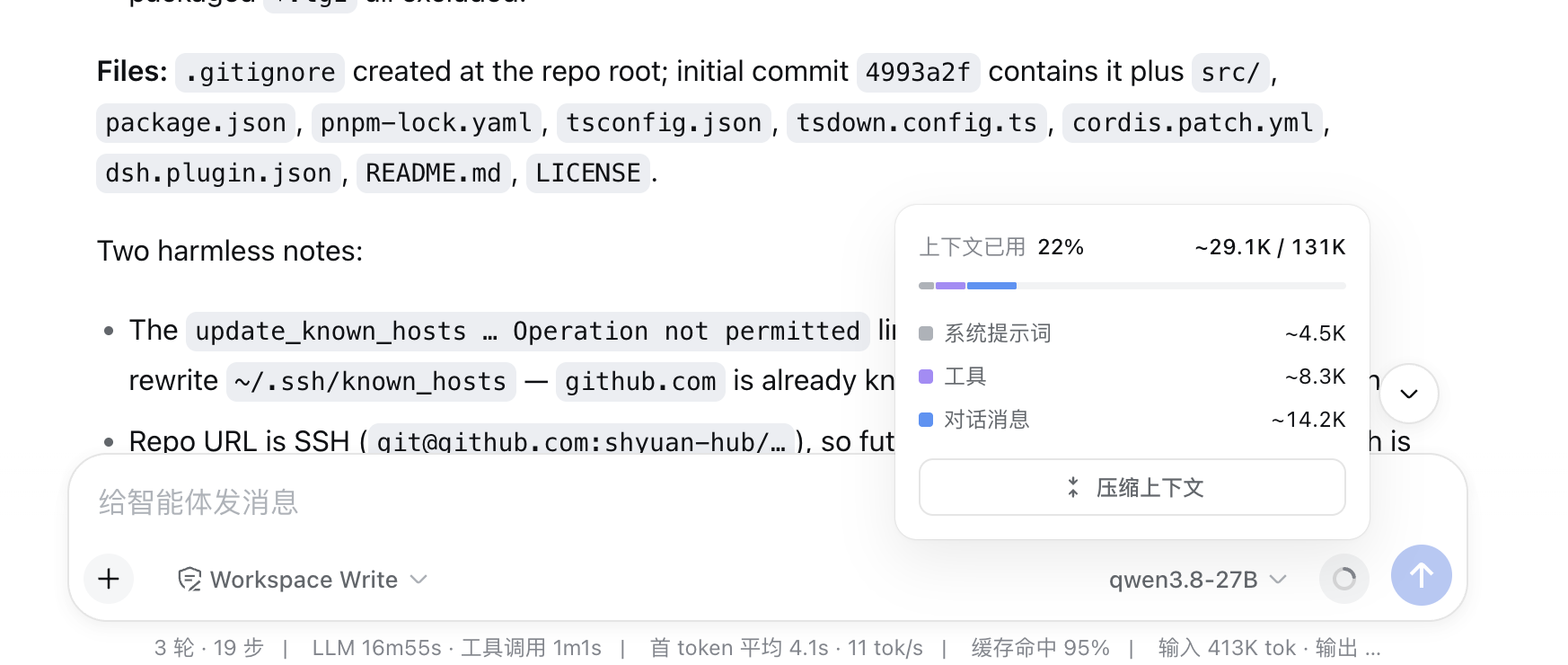
输入框(composer)旁的上下文圆环展开后就是「上下文计量面板」,按钮就在里面
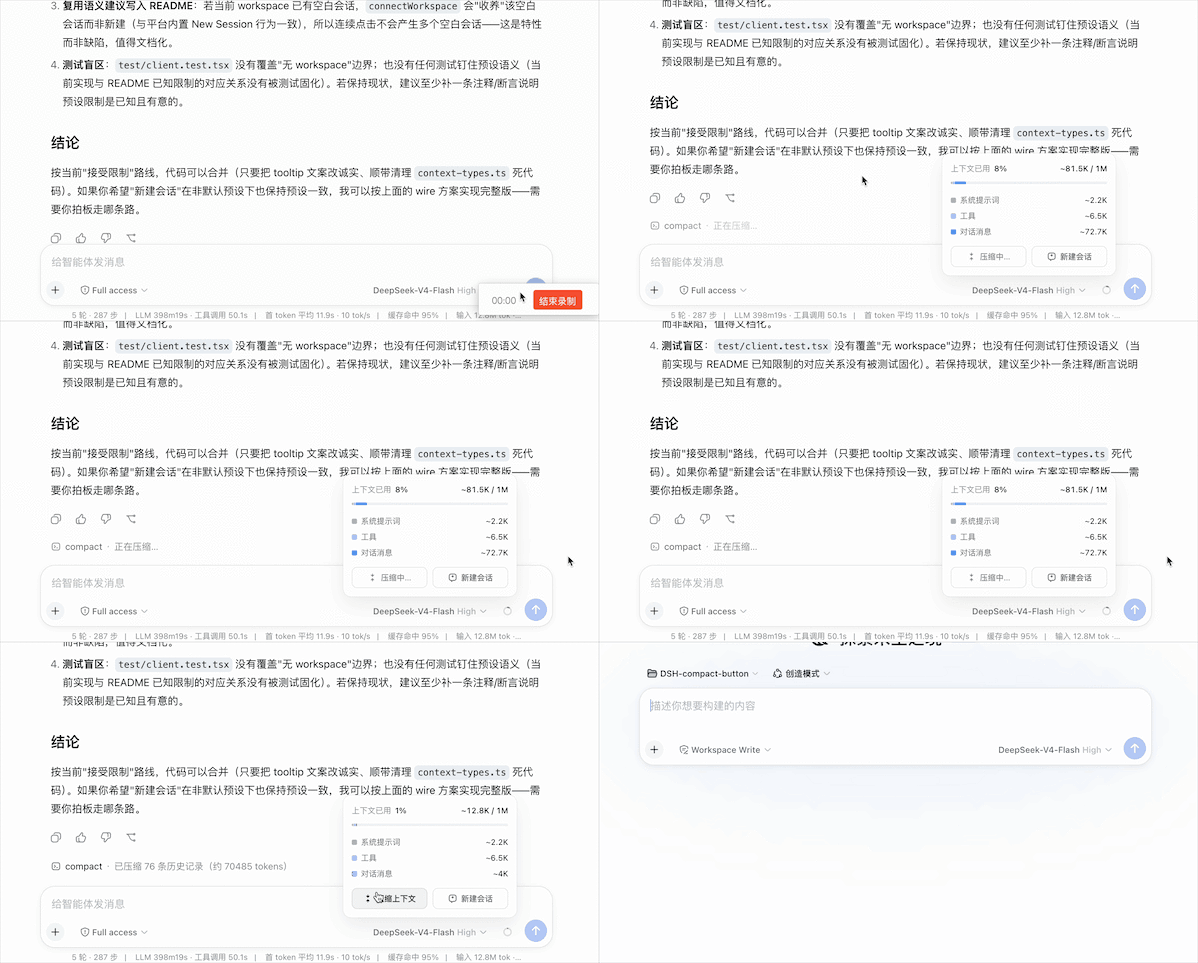
动态演示:点击「压缩上下文」提交 /compact,点击「新建会话」在同一 workspace 开启新会话
📑 目录
✨ 功能一览
- 🔘 一键压缩:长对话不断吃掉上下文窗口,以前得手动敲
/compact——现在按钮就放在你随时能看到的上下文面板上,一眼看到快满了,点一下即可 - 🔁 同一条命令通道:和手敲
/compact走的是完全相同的通道(session.command('/compact')),压缩结果照常以命令行形式出现在对话流里,无特殊行为 - 📊 状态实时反馈:按钮文案随提交状态流转(待命 → 提交中 → 已提交 / 未匹配 / 失败),4 秒后自动回到待命,面板保持清爽
- 🌏 多语言:跟随 DSH 的语言设置,中文 / 英文实时切换
- 🆕 新建会话:在压缩按钮右侧再放一个「新建会话」按钮——点击即在同一 workspace 中开启一个新会话并跳转过去;agent 预设与权限设置沿用部署默认(与当前会话一致的前提见「已知限制」)
- 🪶 零侵入:纯 client 半边插件(host 半为空 apply);槽位不存在时按钮安静地不渲染,不影响平台其余部分
🚀 安装
前置:已装好 DSH(dsh web 能正常运行),Node.js ≥ 20、pnpm ≥ 10。
方式一:从 npm 安装(推荐)
dsh plugin --profile web add dsh-compact-button@latest
方式二:从源码安装(调试本地改动时使用)
# 1. 构建并打包
git clone https://github.com/shyuan-hub/dsh-compact-button.git && cd dsh-compact-button
pnpm install && pnpm build
pnpm pack                                # 生成 dsh-compact-button-<版本号>.tgz

# 2. 通过 dsh plugin 一键安装(file: 通道)
dsh plugin --profile web add "file:<你的本地目录>/dsh-compact-button-<版本号>.tgz"
装完重启 dsh web,再硬刷新浏览器(Cmd/Ctrl+Shift+R)即可生效。
✅ 无需手动编辑 profile 的
package.json:本包声明了dsh.bundle.patch,dsh plugin add安装后会自动把它追加进dsh.profile.bundles。🔧 调试本地改动时,可改用 link 通道:
dsh plugin --profile web add "link:<克隆目录绝对路径>",之后每次pnpm build+ 重启dsh web即可生效。🔄 更新:
dsh plugin --profile web add dsh-compact-button@latest,然后重启dsh web并硬刷新。
📦 插件自带 bundle patch(
cordis.patch.yml):装入 profile 后,启动时会由它自动插入本插件的挂载条目,无需手动编辑 profile 的cordis.patch.yml;若聚合包已挂载本插件,该条目会自动退让,避免重复挂载。
常见问题
| 现象 | 原因与解决 |
|---|---|
| 面板里看不到按钮 | 按钮依赖 conversation.context.actions 子槽位,官方 DSH 并未声明它,由本插件自动应用的平台补丁注入(每次 dsh web 启动时由 host 半边自愈)。看 dsh 启动日志:[dsh-compact-button] platform patch applied: ... @<版本> 表示已注入;platform patch skipped ... "<锚点>" matched N time(s) 表示上游 ContextMeter 结构变化过大,补丁安全中止(不改动平台文件),此时按钮不渲染,插件其余部分不受影响。 |
| 点击后显示「命令未匹配」 | 当前 composer 没有可提交命令的会话。切换到有活跃会话的页面再试。 |
| 安装 / 改动后没生效 | 本插件需要重启 dsh web 才能生效(仅硬刷新浏览器不够),重启后再硬刷新页面。 |
🔩 平台补丁(自动应用):官方
@deepseek-ai/dsh-client-ui-conversation并未声明conversation.context.actions槽位。本插件自带补丁脚本(patch-context-meter.cjs),在每次dsh web启动时(host 半边)自动定位已安装的平台 bundle 并就地注入该槽位的声明与渲染。补丁幂等、逐条断言命中;命中异常则安全中止(不改动平台文件),此时按钮不渲染,插件其余部分不受影响。本包不含任何安装脚本(不依赖 postinstall,任何包管理器安装都不会报错或被拦截);如需在启动前提前打好补丁,可手动执行node node_modules/dsh-compact-button/patch-run.cjs。🏠 harness home 迁移:定位平台 bundle 时按平台的优先级解析 home——显式配置的主目录(
--dsh-home <path>,对应平台的config.dshHome)>$DSH_HOME> 默认~/.dsh,并支持~/~\展开。把 harness 搬到别处(如DSH_HOME=D:\AppData\DSH)时补丁会跟着走,不再漏掉profiles树。显式主目录只是加一层、不会缩小探测范围:$DSH_HOME下的安装照样会被自愈。
🔗 不跟 DSH 发版走:本包不声明任何 DSH peer 依赖,补丁锚点也是格式无关的正则语义锚(缩进、引号、
var/let/const、css module 哈希、jsx helper 改名都不影响命中)。所以 DSH 出新版本时不需要改本插件的版本号或依赖范围——只要 ContextMeter 结构不变就自动适配;结构真变了也只是「按钮不渲染 + 一条明确日志」,不会污染平台文件。启动日志会打印检测到的平台版本,未测过的版本会额外标注(not in the tested set)。已验证:0.1.2-rc.1、0.1.5-rc.1、0.1.5-rc.2、0.1.5-rc.3、0.1.7-alpha.2、0.1.7-rc.1、0.1.7-rc.2。
🖱️ 按钮怎么用
面板里有两个按钮,并排在同一行:左侧「压缩上下文」、右侧「新建会话」(composer 旁的上下文圆环,点击展开)。
压缩上下文(左侧)
文案会随点击状态变化:
| 状态 | 中文 | English | 含义 |
|---|---|---|---|
| 待命 | 压缩上下文 | Compact context | 可点击,点击即提交 /compact |
| 提交中 | 压缩中… | Compacting… | 正在向会话提交命令 |
| 已提交 | 已提交压缩 | Compaction submitted | 命令已被接纳,压缩结果见对话流 |
| 未匹配 | 命令未匹配 | Command not matched | 当前 composer 没有可提交命令的会话 |
| 失败 | 提交失败 | Submission failed | 提交命令时出错 |
状态会在 4 秒后自动回到「待命」。
新建会话(右侧)
点击即在当前会话所在的 workspace 中开启一个新会话并跳转过去(uiWorkspace.startSession())。点击后会短暂锁定约 1.5 秒,防止误连点。新会话沿用部署默认的 agent 预设与权限设置——若当前会话用的是非默认预设,新会话不会自动沿用(见「已知限制」)。
🔧 工作原理
- 平台扩展点:
@deepseek-ai/dsh-client-ui-conversation的 ContextMeter 面板声明子槽位conversation.context.actions(conversation.composer.bar的 children,kind: list)。 - client 半边:通过
slots.inject等待平台声明后,把一个并排容器(ContextActionRow)注册进该槽位,容器内左为CompactButton、右为NewSessionButton:CompactButton点击调用session.command('/compact')——与手敲/compact完全同一条通道(接纳语义由 Host 的 command-compact 插件拥有,压缩结果以命令行形式出现在对话流中)。NewSessionButton点击调用uiWorkspace.startSession()——在当前会话所在 workspace 中开启新会话并跳转;点击后约 1.5 秒内锁定防止误连点。
- Host 半边:启动时自愈应用平台补丁(向已安装的
dsh-client-ui-conversationbundle 注入conversation.context.actions槽位声明);补丁幂等、漂移即中止,绝不阻塞 dsh 启动。 - i18n:字典注册在
compactButton命名空间(zh/en),跟随 DSH 语言设置实时切换。
构建产物 / Artifacts
| 文件 | 通道 |
|---|---|
lib/index.js | Host 半边(启动时自愈应用平台补丁,注入 conversation.context.actions 槽位) |
lib/client.js | 官方 profile 通道(bundle id = 包名 dsh-compact-button) |
lib/client-registry.js | 插件注册表通道(bundle id = manifest id dsh-external/dsh-compact-button) |
patch-context-meter.cjs / patch-run.cjs | 平台补丁模块与手动 CLI 入口(安装后补丁由每次 dsh web 启动的 host 半边自动应用,无需安装脚本) |
🛠️ 开发与构建
pnpm install
pnpm typecheck    # tsc --noEmit
pnpm build        # rm -rf lib && tsdown → lib/index.js + lib/client.js + lib/client-registry.js
pnpm watch        # tsdown --watch
架构:单 npm 包、host/client 双半结构——host(src/index.ts)为空 apply;client(src/client/index.tsx)注册 CompactButton 到槽位并处理状态流转与 i18n。插件按 DSH 官方规范组织(无 default 导出、双 client bundle),运行期不依赖 npm / checkout(@deepseek-ai/* 由 web profile 提供)。
版本兼容策略(为何不需要跟着 DSH 发版改代码)
- 不声明 DSH peer 依赖。插件运行期不
import任何平台包(client bundle 只require("react"),host 半边只用node:*),服务全靠 cordis 注入。因此package.json里没有@deepseek-ai/dsh-*的 peer/dev 版本锁——包管理器也不会为了满足一个范围而拉出第二份 renderer(slot registry 双实例会直接破坏槽位注册)。 - 补丁锚点是语义正则,不是源码字面量。
patch-context-meter.cjs的每条锚点容忍缩进、引号、var/let/const、css module 哈希(前缀从bar条目现场捕获,从不写死)与 jsx helper 改名;单测里用DRIFT_TRANSFORMS逐项回归。 - 断言 + 降级代替版本号卡关。每条锚点仍要求“命中恰好 1 次”,否则整体不写入。兼容性由结构决定,而不是由 semver 范围决定。
TESTED_PLATFORMS只是文档。它只驱动启动日志里的(not in the tested set)提示,从不卡补丁。DSH 出新版本时什么都不用改,启动一次看日志即可;确认适配后把新版本号追加到TESTED_PLATFORMS(可选)。
验证一个新 DSH 版本(无需改代码):
node -e "const p=require('./patch-context-meter.cjs'),fs=require('fs');console.log(p.patchSource(fs.readFileSync('<path>/lib/client.js','utf8')).status)"
# 期望 patched;drift 时会告知哪条锚点、命中几次
⚠️ 已知限制
- 依赖
conversation.context.actions子槽位:官方平台未声明,由本插件自动应用的平台补丁注入;补丁锚点为格式无关的正则语义锚,仅在上游 ContextMeter 结构发生实质变化时失效(安全中止、不改动平台文件、按钮不渲染) - 补丁只作用于
@deepseek-ai/dsh-client-ui-conversation的lib/client.js:若上游把该 bundle 拆分/改名,findTargetFiles会找不到目标,需要跟进调整 - 压缩按钮只负责提交
/compact,压缩的接纳与执行语义由 Host 侧 command-compact 插件拥有 - 状态提示 4 秒后自动复位,不提供压缩进度展示
- 新建会话按钮在同一 workspace 中开启新会话,但沿用部署默认的 agent 预设与权限设置;若当前会话用的是非默认预设,新会话不会自动沿用(client 侧
uiWorkspace.startSession不暴露预设/权限选择)