
 @xccpddym
dsh-bubble-nav
Bubble navigation for DSH (DeepSeek Harness): a draggable accelerator ball listing all of your questions (numbered + timed), plus a full conversation outline panel with category filters. Click to jump anywhere in the conversation.
- Stars
- 0
- Language
- JavaScript
- Created
- Aug 16, 2026
- Updated
- Aug 17, 2026
Introduction
dsh-bubble-nav



气泡导航插件 —— 为 DSH(DeepSeek Harness) 的 Web 界面提供对话气泡导航:一颗可拖拽的悬浮加速球列出你问过的所有问题(带序号与时间),另有全量「对话大纲」面板,点击即可在对话中精确定位。
✨ 特性
- 加速球:蓝色渐变悬浮球,球心显示问题数;点击开/关问题列表,拖拽移动,拖到右缘自动吸附半隐藏
- 问题列表:只显示你说过的话/提出的问题,带 序号 + 时间(当天
HH:MM,跨天M/D HH:MM),纯文字、简洁 - 全对话框:完整大纲(问题/回答/工具/命令),支持分类筛选(全部/问题/回答/工具)、标题栏拖拽、右下角缩放
- 完整历史:Host 直接读取会话日志(
sessionQuery.readSession),一次性展示整个会话,无需手动「展开更多」 - 智能定位:点击条目自动加载更早历史并只滚动对话区定位(不带动整页跳动)
- 两界面互斥分离,不互相干扰
📸 截图
| 加速球 + 问题列表 | 全量对话大纲 |
|---|---|
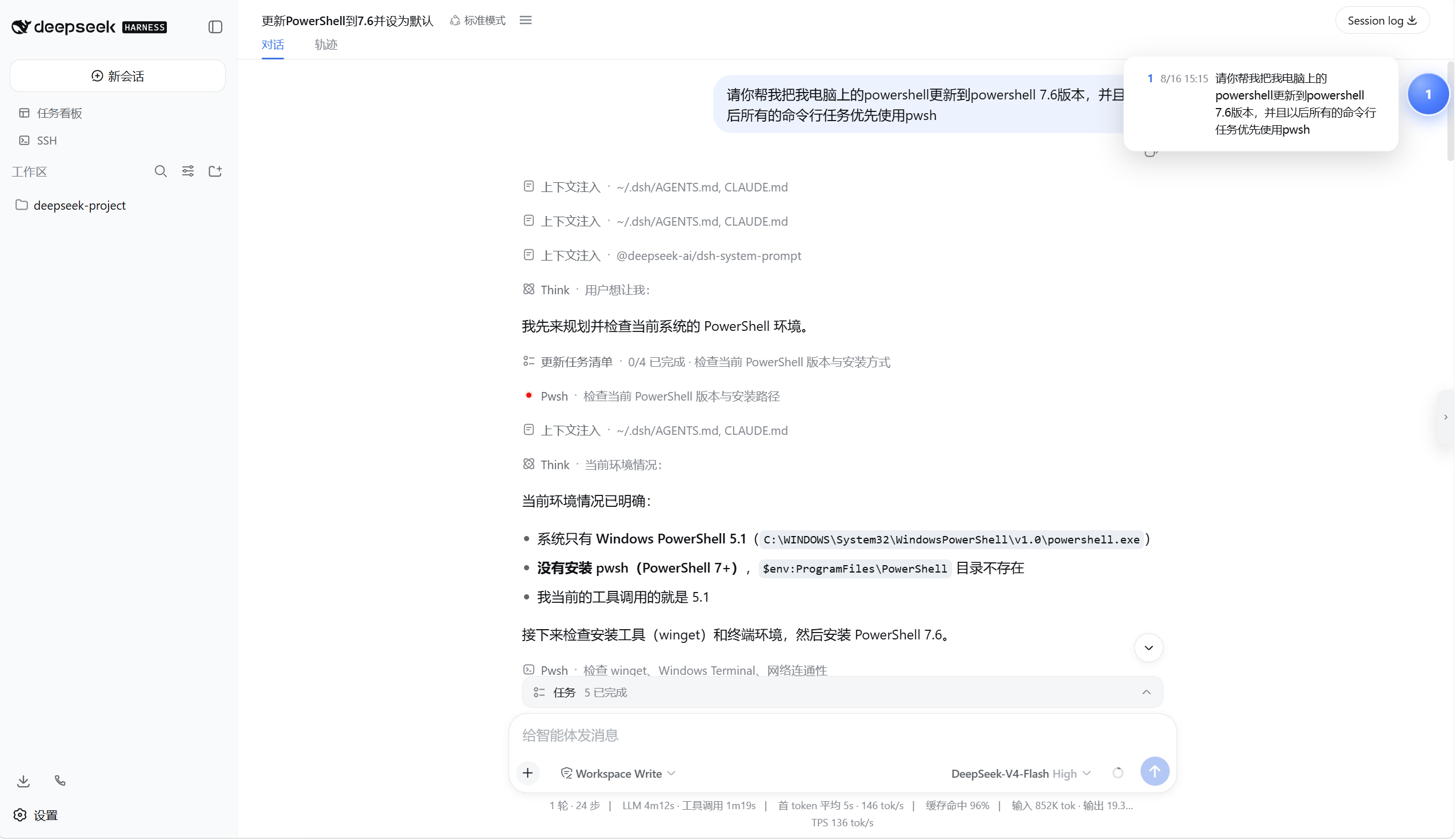 | 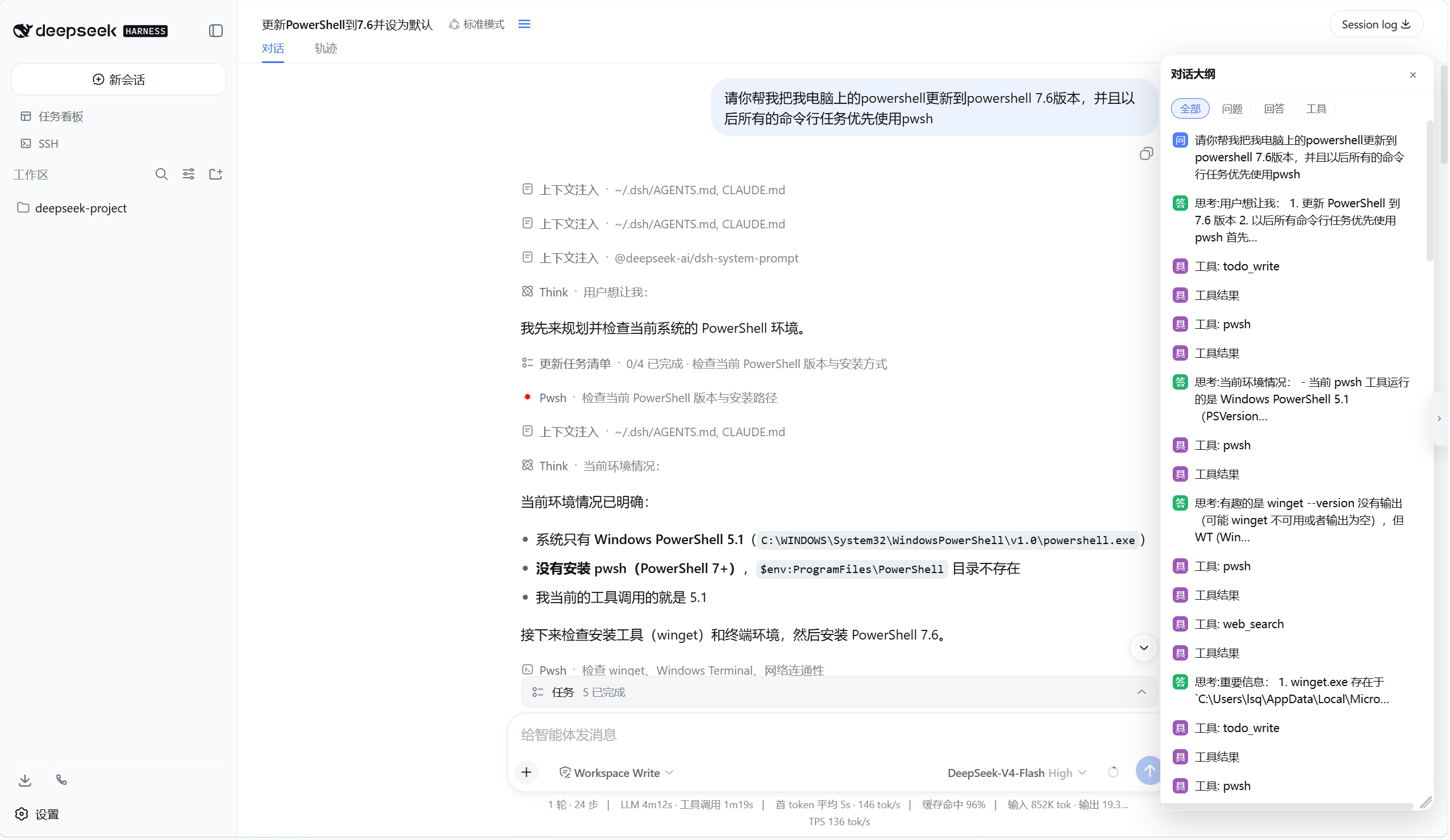 |
📦 安装
要求:Windows + DSH(npm 全局安装
@deepseek-ai/dsh)+ PowerShell 7+。
一键安装(推荐)
npx dsh-bubble-nav
npx 自动下载安装器并完成全部步骤:
- 从 npm 把插件装进 web profile 依赖树(
dsh plugin --profile web add) - 在
~/.dsh/cordis.patch.yml追加启用条目(幂等,重复执行安全) dump-config验证配置能正常合成
最后重启 DSH 即可生效。
其他用法:
npx dsh-bubble-nav --profile tui      # 安装到其他 profile
npx dsh-bubble-nav --uninstall        # 卸载(移除依赖 + 启用条目)
npx dsh-bubble-nav --check            # 只检测环境,不修改任何文件
源码安装(离线 / 开发者)
# 先进入插件仓库目录(clone 或下载解压后、包含 install.ps1 的位置)
cd <你的仓库目录>
.\install.ps1
手动安装
# 先进入插件仓库目录,再执行(file: 需要绝对路径,这里动态取当前目录)
cd <你的仓库目录>
dsh plugin --profile web add "dsh-bubble-nav@file:$((Get-Location).Path)"

# 2) 在 ~/.dsh/cordis.patch.yml 末尾追加
# - insert:
#     - id: bubble-nav
#       name: 'dsh-bubble-nav'

# 3) 验证 + 重启
dsh --profile web --dump-config
🎮 使用
| 操作 | 效果 |
|---|---|
| 点击加速球 | 展开/收起问题列表 |
| 拖拽加速球 | 移动位置;拖到右缘松手 → 吸附半隐藏 |
| 点击问题条目 | 对话区自动加载并滚动定位到该问题 |
| 点击会话头部大纲按钮 | 打开/关闭全对话框(分类筛选 + 拖拽 + 缩放) |
🛠 工作原理
- Host 端(
lib/index.js):声明inject: ["webServer", "sessionQuery"]依赖,等服务就绪后通过webServer注册/dsh-bubble-nav路由;请求到达时用sessionQuery.readSession读取完整会话日志,实时整理出大纲与问题列表,一次性返回给浏览器。 - Client 端(
lib/client.js):通过slots向conversation.session.header.actions注入大纲开关按钮、向shell.overlay注入加速球/问题列表/全对话框三个组件;点击条目时按anchorSeq定位并滚动对话区。 - 数据全部来自 Host 侧真实会话日志,因此不依赖页面已加载的窗口,历史再多也能完整展示。
❓ 常见问题
Q1:npx dsh-bubble-nav 报 404 / 找不到包?
国内 npm 镜像(如 npmmirror)同步官方源有延迟。加官方源重试即可:
npx --registry=https://registry.npmjs.org dsh-bubble-nav
Q2:dsh 启动报 Cannot find package 'dsh-bubble-nav' 并崩溃?
说明插件被启用了但没装进 profile 依赖树。dsh 的插件解析锚点是 profile 目录——不要直接把包复制到全局 node_modules(例如 npm root -g 的输出目录),那只会在启动时因解析不到而 fail-loud 崩溃。正确做法:dsh plugin --profile web add "dsh-bubble-nav@..."(npx 安装器会自动做)。
Q3:安装成功但界面上没出现气泡/按钮? DSH 需要完全退出后重新启动(不是刷新页面),插件才会被加载。重启后再刷新浏览器。
Q4:升级 DSH 后插件不见了?
DSH 升级会重建 profile 依赖树,此时重新运行一次 npx dsh-bubble-nav(或 install.ps1)即可。
Q5:问题列表/大纲是空的?
确认当前会话是在 web profile(dsh web)下打开的,且会话里确实有用户消息;大纲面板需要点击会话头部的大纲按钮打开。
🗑 卸载
npx dsh-bubble-nav --uninstall
或手动:移除 ~/.dsh/cordis.patch.yml 中的 bubble-nav 条目,再 dsh plugin --profile web remove dsh-bubble-nav,重启 DSH。