
 @xuxucodepractice-code
dsh-claim-guard
A deterministic pre-write claim guard for supported DeepSeek Harness file tools.
- Stars
- 0
- Language
- JavaScript
- Created
- Sep 3, 2026
- Updated
- Sep 3, 2026
Introduction
dsh-claim-guard
dsh-claim-guard is a deterministic pre-write claim guard for supported
DeepSeek Harness file tools. It is a non-official community project,
independently developed and maintained by xuxucodepractice-code; it is not
published, certified, maintained, or endorsed by DeepSeek.
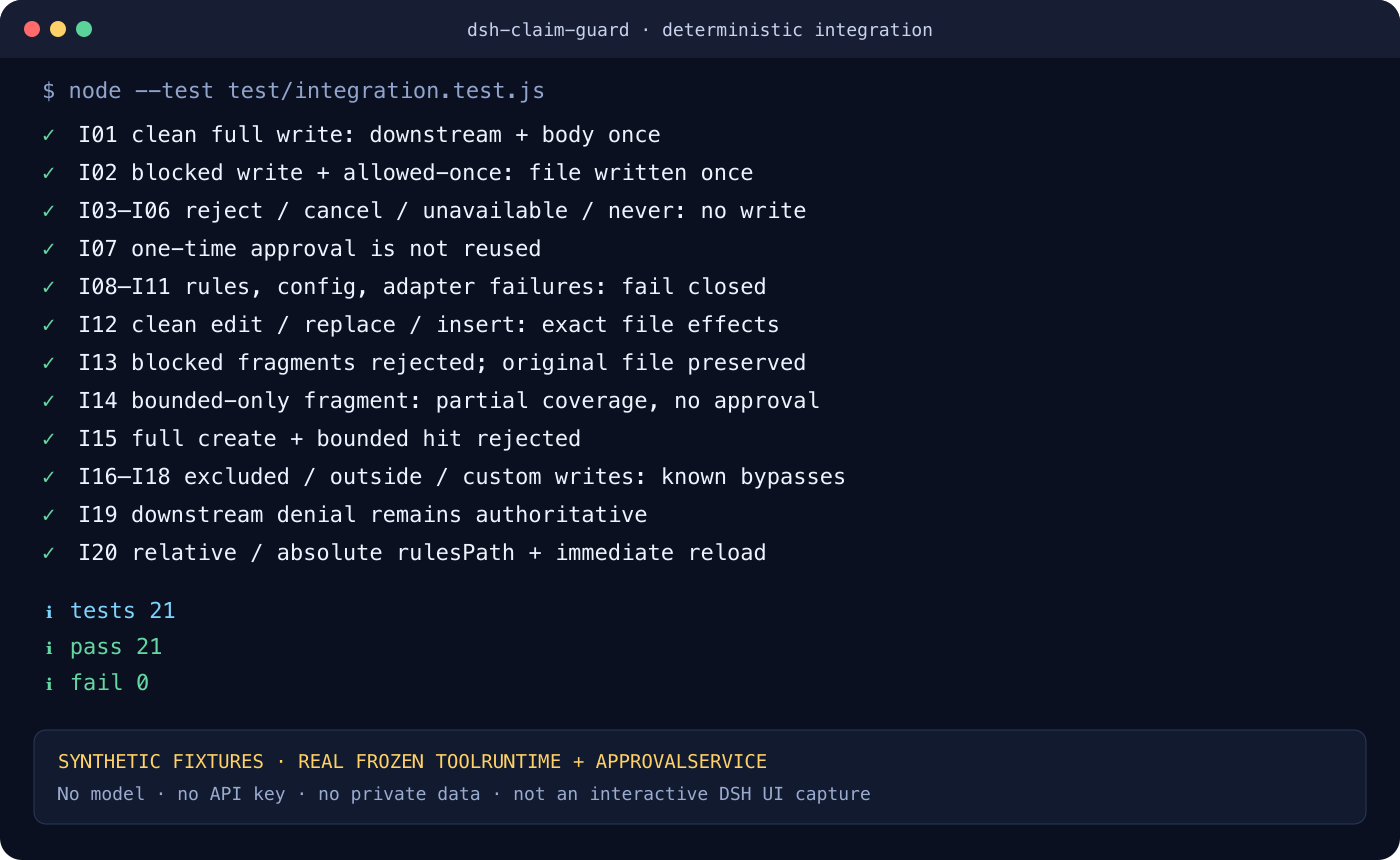
English
What it does
Before a verified DSH file tool writes text, the plugin reads a user-maintained
JSON rule file and inspects the new text. A blocked phrase or an unbounded
bounded phrase returns DSH's native ask decision. DSH's existing approval
service decides whether that one execution proceeds.
The checked-in source does not claim a future release or CI run has passed. Project status words are evidence-bound: see Status and compatibility and the commit-scoped CI/Release evidence once published.
Status and compatibility
| Component | Exact candidate | Evidence rule |
|---|---|---|
| DeepSeek Harness | 0.1.1-rc.2, tag dsh-v0.1.1-rc.2, commit b150a551b8d465e31e418e1b2eaf5e79bbb7d28e | verified only after this exact release commit passes required CI and artifact gates |
| Node | 22.19.0, 24.15.0 | each version must pass the same required CI matrix |
| pnpm | 11.7.0 | exact install/profile command baseline |
| npm | 11.12.1 | exact release-pack baseline |
| Platforms | macOS, Linux CI | other platforms are untested |
implemented, integrated, release-candidate, released-github, and
shared-dsh-community describe different evidence levels; one never implies
the next. The immutable API and dependency evidence is in RECON.md.
Install from a GitHub Release tarball
The first distribution plan is GitHub-only. There is no npm install claim.
After v0.1.0 is published, download both
dsh-claim-guard-0.1.0.tgz and its .sha256 file from the
GitHub Release,
then verify before installing:
shasum -a 256 -c dsh-claim-guard-0.1.0.tgz.sha256
mkdir -p claim-guard-workspace
cp claims.example.json claim-guard-workspace/claims.json
dsh plugin --profile claim-guard-smoke add ./dsh-claim-guard-0.1.0.tgz
cd claim-guard-workspace
dsh --profile claim-guard-smoke --dump-config
dsh --profile claim-guard-smoke
Use a dedicated profile first. The required order is: prepare a valid rules file, install/enable the plugin, then run synthetic blocked and clean writes. If the rules file is missing or invalid, covered writes fail closed. The one self-repair exception is writing the resolved rules file itself, which the plugin always excludes.
Configuration
The bundle inserts this default row:
- insert:
    - id: dsh-claim-guard
      name: dsh-claim-guard
      config:
        rulesPath: claims.json
        include: ["**/*.md", "**/*.mdx", "**/*.txt"]
        exclude: []
rulesPath may be relative to exec.agent.session.header.cwd, or an explicitly
configured absolute path outside the workspace. Target paths are still
classified relative to the session workspace. exclude wins over include;
include: [] includes every workspace target. Unknown config fields, explicit
null, blank values, and wrong types are rejected.
Rules are strict UTF-8 JSON, not YAML and not JSON-with-comments:
{
  "version": 1,
  "options": { "window": 60, "caseSensitive": false },
  "blocked": [
    {
      "id": "manuscript-status",
      "match": "submitted",
      "message": "The synthetic demo manuscript is only in preparation."
    }
  ],
  "bounded": [
    {
      "id": "demo-composite-score",
      "match": "42.5%",
      "mustAccompany": ["synthetic benchmark", "合成示例"],
      "message": "This invented demo value must be labelled as synthetic."
    }
  ]
}
The rule file is limited to 262,144 bytes and 1–256 total rules. Input text is
limited to 1,000,000 JavaScript UTF-16 code units. Matching is literal
substring matching; case-insensitive mode uses ECMAScript toLowerCase() and
does not add normalization, tokenization, fuzzy matching, or synonyms.
Covered tools and approval behavior
| Tool | Operation | Coverage |
|---|---|---|
write | all writes | full new text; blocked and bounded |
edit | replacement/deletion | new fragment only; blocked only |
str_replace_editor | create | full new text; blocked and bounded |
str_replace_editor | str_replace, insert | new fragment only; blocked only |
str_replace_editor | view | not applicable; delegated unchanged |
A clean full write and a fragment with no blocked hit delegate to the next
policy. A match requests approval; only DSH's allowed-once outcome executes
the tool body. Rejected, cancelled, unavailable/no-responder, missing approval,
and never policy outcomes do not execute it. Each hit asks again; an earlier
one-time grant is not cached. Downstream policy can still deny a clean write.
Rules/config/workspace/known-adapter failures return a bounded deny reason;
they cannot be approved as ordinary content. Reports show at most 20 complete
hits and 6,000 UTF-16 code units, with short escaped excerpts rather than the
whole document.
Data flow and permissions
- The plugin reads the configured rules file, normally inside the session
workspace; an explicit absolute
rulesPathmay point outside it. - The pre-execute hook sees new text arguments for the supported file tools.
- A matching excerpt and reason can enter the DSH approval UI and session audit.
- The plugin itself makes no network requests, provides no telemetry, and does not directly write the target file.
- DSH may still access models, networks, files, and logs according to its own configuration.
- A community plugin runs in the same process as DSH. Local execution alone is not a security guarantee. Review the source and pin the release/checksum.
- Never put secret rules or text in public issues, screenshots, or CI. Avoid making a large secret value itself a rule match because excerpts may persist.
What it does not do
This is not a fact checker, content rewriter, DLP system, malware detector, sandbox, or malicious-host boundary. It cannot infer truth or semantic equivalence. Bash, PowerShell, Python, Node scripts, MCP tools, third-party or unknown write tools, host-internal writes, binary content, and paths outside the session workspace can bypass it. Incremental edits are not reconstructed, so a deletion can create a whole-file violation that v1 does not detect.
Why reuse DSH approval
The plugin returns the documented native ask decision instead of creating a
second prompt, policy, or audit mechanism. This keeps one authoritative approval
outcome and preserves DSH's cancellation, no-responder, and session-audit
behavior. It does not make the plugin an official DSH component.
Upgrade, disable, uninstall, and troubleshoot
Install an upgraded checksummed tarball into a disposable profile and repeat the synthetic smoke before changing an important profile. A profile-local patch can disable the same row without changing its identity:
- id: dsh-claim-guard
  disabled: true
Remove the package and bundle layer with:
dsh plugin --profile claim-guard-smoke remove dsh-claim-guard
Common failures:
RULE_FILE_UNREADABLEor invalid rules: restore a validclaims.json; the rules file itself remains writable for recovery.- A write was not checked: confirm the exact DSH/tool version, tool name, workspace boundary, include/exclude patterns, and that the plugin row is enabled. Unknown tools and outside-workspace paths are deliberately uncovered.
- A fragment passed without a bounded phrase: bounded checks require full text and intentionally do not run for incremental edits in v1.
- No approval UI: DSH fails the ask closed when no responder is available.
See SECURITY.md for private reporting and CONTRIBUTING.md for synthetic reproductions. Report ordinary bugs through the issue tracker after removing private data.
Roadmap
- Research exact full-file reconstruction for incremental edits.
- Add compatibility baselines only after source and integration re-verification.
- Consider an optional read-only
claim_checkconvenience tool after the automatic hook remains fully gated. - Evaluate npm distribution separately; GitHub Release remains the v0.1.0 plan.
License
MIT. See LICENSE.
中文
作用与身份
dsh-claim-guard 是一个面向已验证 DeepSeek Harness 文件工具的确定性写前
声明检查插件。它是由 xuxucodepractice-code 独立开发维护的非官方社区项目,
并非 DeepSeek 发布、认证、维护或背书的官方组件。
在受支持工具写入之前,插件读取用户维护的 JSON 规则,检查即将写入的新文本。
命中 blocked,或完整文本中的 bounded 表述缺少邻近限定词时,插件返回 DSH
原生 ask,由宿主已有审批流决定这一次是否执行。源码不提前声称未来 Release
或 CI 已成功;兼容性只有在同一 commit 的两档 CI 与制品门禁完成后才是
verified。
安装与启用顺序
首发采用 github-only,不宣称 npm 已发布。v0.1.0 发布后,从
GitHub Release
下载 .tgz 与 .sha256,先校验,再安装到专用 profile:
shasum -a 256 -c dsh-claim-guard-0.1.0.tgz.sha256
mkdir -p claim-guard-workspace
cp claims.example.json claim-guard-workspace/claims.json
dsh plugin --profile claim-guard-smoke add ./dsh-claim-guard-0.1.0.tgz
cd claim-guard-workspace
dsh --profile claim-guard-smoke --dump-config
dsh --profile claim-guard-smoke
固定顺序是:准备并校验规则 → 安装/启用 → 用合成内容 smoke test。 缺失、不可读、损坏或 schema 非法的规则会让纳入范围的写入失败关闭。唯一恢复 例外是规则文件自身始终排除,所以可以先创建或修复它。
配置与规则
默认 rulesPath 是相对 session workspace 的 claims.json,也可显式配置仓库外
绝对路径;目标文件仍按 session workspace 分类。exclude 优先于 include,
include: [] 表示 workspace 内所有目标。配置不接受未知字段、null、空白值
或错误类型。
规则必须是 UTF-8 严格 JSON,只包含 version、options、blocked、
bounded 规定字段。规则文件不超过 262,144 bytes,总规则 1–256 条,单次文本
不超过 1,000,000 个 UTF-16 code units。匹配是确定性的字面子串,不是事实判断、
正则、分词、模糊匹配或语义推理。完整合成示例见
claims.example.json。
覆盖、审批与失败关闭
write:检查完整新文本的blocked与bounded。edit:只检查new_string片段内的blocked。str_replace_editor/create:检查完整新文本的两类规则。str_replace_editor/str_replace与insert:只检查新片段内的blocked。view、排除路径调用后续策略;未知工具和 workspace 外路径同样继续,但属于 未覆盖,不能称为pass。
命中后每次都重新请求审批;只有 allowed-once 执行。拒绝、取消、无 responder、
approval 不可用或 never policy 都不会执行。干净调用仍保留下游策略的决定。
规则、配置、可信 workspace 或已知 adapter 出错时直接 deny,不会“警告后放行”。
数据流、权限与边界
插件读取规则文件,并能看到受支持工具的新文本参数。命中 excerpt/reason 可能进入 DSH 审批 UI 与 session audit。插件自身不联网、无遥测、不直接写目标文件;但 DSH 仍可按自身配置访问模型、网络、文件和日志。第三方插件与 DSH 同进程运行, “本地运行”不等于安全保证,应审阅源码并固定 Release 与 checksum。
它不是事实核查器、自动改写器、DLP、安全沙箱或恶意宿主隔离层。Shell/Python/ Node、MCP、第三方/未知工具、宿主内部写入、workspace 外路径和二进制内容都可 绕过。增量编辑不重建全文,因此删除旧限定词造成的新全文违规可能无法发现。
升级、禁用、卸载与故障排查
升级前先在一次性 profile 中安装新的 checksummed tarball 并重复合成 smoke。
用同一 row id 加 disabled: true 可禁用;卸载命令是:
dsh plugin --profile claim-guard-smoke remove dsh-claim-guard
若规则错误,先修复 claims.json;若写入未被检查,核对冻结 DSH 版本、工具名、
workspace、include/exclude 与 row enabled 状态;若片段中仅有 bounded 风险却未审批,
这是 v1 的明确边界;若没有 approval responder,DSH 会失败关闭。
安全问题请按 SECURITY.md 私下报告;普通 bug 使用脱敏、完全合成的
复现。Roadmap 包括精确重建增量编辑全文、经证据扩展兼容版本、可选只读
claim_check,以及未来单独评估 npm 分发。
许可证:MIT。